Slow (10 min) start-up BEFORE login screen

My Computer My Computer

At a glance

Windows 10 Pro. 64/ version 1709 Windows 7 Pr...Intel i7-6800K @ 4.3Corsair Platinum 16 gig @2400EVGA GTX 1070 OC
Computer type
PC/Desktop
Computer Manufacturer/Model Number
Home made Desktop
OS
Windows 10 Pro. 64/ version 1709 Windows 7 Pro/64
CPU
Intel i7-6800K @ 4.3
Motherboard
ASUS X-99 Deluxe II
Memory
Corsair Platinum 16 gig @2400
Graphics Card(s)
EVGA GTX 1070 OC
Monitor(s) Displays
Asus 27" LED LCD/VE278Q
Screen Resolution
1920-1080 or 1280-720 HDMI
Hard Drives
INTEL SSD 730-240 Gb Sata 3.0/
PSU
EVGA Platium 1200W
Case
Phanteks Luxe Tempered Glass 8 fans/ one radiator
Cooling
XSPC/ Water Cooled CPU
Keyboard
Das 4 Professional
Mouse
Logitech M705/MX Anywhere 2-S
Internet Speed
100 mbits
Antivirus
Microsoft Security Essentials/ Malwarebytes Premium 3.0/ SAS
Browser
I.E. 11 default/Firefox/ ISP Time Warner Cable/Spectrum
Other Info
LG BluRay Burner/
Sound system-KLipsch-THX/
Icy Dock ssd Hot Swap bays.
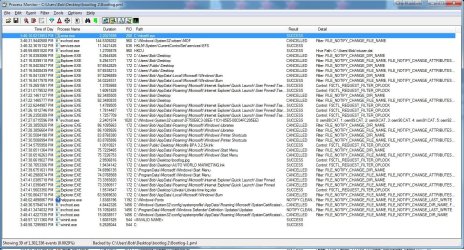
johnhoh: thanks for this information. Much appreicated. I did what you suggested on the startup that took so long ... and the one that was quick. Two screen shots attached. I could not find a text export option.

Is hiberfil.sys supposed to be over 6Mb in size? Mine is.

I wonder why the reports are so different after a Safe Mode start, then restart to normal mode?

Thanks!
 

Attachments

  • bootlog slow.jpg
    bootlog slow.jpg
    406.9 KB · Views: 1
  • bootlog fast.jpg
    bootlog fast.jpg
    267.8 KB · Views: 2

My Computer My Computer

At a glance

Microsoft Windows 7 Home Premium 64-bit 7601 ...AMD Athlon(tm) II X4 645 Processor8.00 GB(1) NVIDIA GeForce 9500 GT (2) LogMeIn Mirror...
Computer type
PC/Desktop
Computer Manufacturer/Model Number
Lenovo H405
OS
Microsoft Windows 7 Home Premium 64-bit 7601 Multiprocessor Free Service Pack 1
CPU
AMD Athlon(tm) II X4 645 Processor
Motherboard
LENOVO Tilapia CRB
Memory
8.00 GB
Graphics Card(s)
(1) NVIDIA GeForce 9500 GT (2) LogMeIn Mirror Driver
Sound Card
(1) Realtek High Definition Audio (2) NVIDIA Virtual Audio
Screen Resolution
(1) 1920 x 1080 x 32 bits (4294967296 colors) @ 60 Hz (2)
Hard Drives
(1) Hitachi HDS721010CLA332 ATA Device (2) SAMSUNG HD103SI USB Device
Antivirus
Kaspersky 17.*
Browser
FF, Chrome
since you are on a desktop you might as well disable hibernation. That's what hiberfil is. you can delete that file and disable hibernation here...

Hibernate - Enable or Disable - Windows 7 Help Forums

btw it would not hurt to clean up your hard drive, with this command

start > run > %SystemRoot%\System32\Cmd.exe /c Cleanmgr /sageset:65535 & Cleanmgr /sagerun:65535 > check all > enter

based on the high number of very high duration procmon line items, I'm not sure this process monitor method is gonna bear fruit. Lets set it aside for now and maybe come back to it. Instead of just one or two real slow items, its as though everything is being slowed down. Based on safe mode being so much quicker, the first thing that comes to mind is you have a bad driver, since safe mode only uses basic drivers. Is your device manager clean? (sorry if you posted about it earlier). The video card is a common driver problem, so you might try updating your video driver to the basic windows vga driver, then reboot. If that does nothing, definitely try what Jack posted in #21 if you have not already
 

My Computer My Computer

At a glance

Win7 pro x64stock i7 7700kCorsair Vengeance LPX 16GB (2x8GB) DDR4 @ 320...integrated Intel HD 630
Computer type
PC/Desktop
Computer Manufacturer/Model Number
diy
OS
Win7 pro x64
CPU
stock i7 7700k
Motherboard
Gigabyte Z270N-WIFI mini-ITX
Memory
Corsair Vengeance LPX 16GB (2x8GB) DDR4 @ 3200MHz
Graphics Card(s)
integrated Intel HD 630
Sound Card
onboard Realtek ALC1220
Monitor(s) Displays
two vertically mounted samsung 55" 4k un55mu8000
Screen Resolution
1920x1280
Hard Drives
256GB Samsung EVO 960 M.2 pci-e NVMe SSD
PSU
SilverStone Nightjar ST45NF 450Watt Fanless
Case
No case. Motherboard is mounted directly onto power supply
Cooling
Evercool low profile 815EP with Panaflow 12L fan at 7v
Keyboard
Ortek MCK-86 mini
Mouse
Belkin 5-button USB
Internet Speed
spectrum 400mbps
... Instead of just one or two real slow items, its as though everything is being slowed down. Based on safe mode being so much quicker, the first thing that comes to mind is you have a bad driver, since safe mode only uses basic drivers. Is your device manager clean? (sorry if you posted about it earlier). The video card is a common driver problem, so you might try updating your video driver to the basic windows vga driver, then reboot. If that does nothing, definitely try what Jack posted in #21 if you have not already

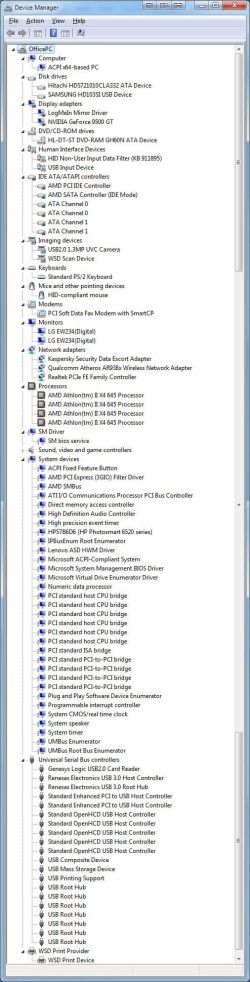
Johnhoh: thanks for that. I did all you stated. There appear to be no drivers out-of-date. Note the attached. NVIDIA graphics card seems to be update. I am on a dual-monitor system and use Display Fusion to manage both desktops.

You are right though about everything being slowed down. But let me clarify.

- Start in Safe Mode: time to login screen = 45 sec
- Restart in normal mode: time to login screen = 49 sec
- Restart again in normal mode: time to login screen = 18 min (last reboot)

Question: Is it normal to take a couple of minutes to shut down with a restart command?

So, it's not just that Safe Mode loads with minimal drivers, it seems that something is triggered (loaded?) after normal restart happens the second time.

Oddly, I found a crash dump during the time yesterday I was having trouble. I attached it as a TXT file if anyone cares to review it for a clue.

Layback Bear: thanks. I will do that soon, but I cannot afford the time this morning if the restart takes 18 minutes as it did yesterday.

I'm perplexed, and if this keeps up much longer I will just have to buy a new machine (groan).
 

Attachments

My Computer My Computer

At a glance

Microsoft Windows 7 Home Premium 64-bit 7601 ...AMD Athlon(tm) II X4 645 Processor8.00 GB(1) NVIDIA GeForce 9500 GT (2) LogMeIn Mirror...
Computer type
PC/Desktop
Computer Manufacturer/Model Number
Lenovo H405
OS
Microsoft Windows 7 Home Premium 64-bit 7601 Multiprocessor Free Service Pack 1
CPU
AMD Athlon(tm) II X4 645 Processor
Motherboard
LENOVO Tilapia CRB
Memory
8.00 GB
Graphics Card(s)
(1) NVIDIA GeForce 9500 GT (2) LogMeIn Mirror Driver
Sound Card
(1) Realtek High Definition Audio (2) NVIDIA Virtual Audio
Screen Resolution
(1) 1920 x 1080 x 32 bits (4294967296 colors) @ 60 Hz (2)
Hard Drives
(1) Hitachi HDS721010CLA332 ATA Device (2) SAMSUNG HD103SI USB Device
Antivirus
Kaspersky 17.*
Browser
FF, Chrome
When restarting from safe mode, your system boots with a need to find and install specific (non-safe-mode) drivers. When you restart in normal mode, it already knows what drivers it needs. I'll have to think about what that means, why would windows be better at detecting and installing a driver than reloading an old driver, but a failing hard drive might do that, or a problem loading its IDE controller driver. What you might try is just like you loaded the basic VGA driver and rebooted (to no effect), try doing that with the IDE controller driver - replace your IDE driver in normal mode with the same driver that windows uses for safe mode. Then again the issue could be unrelated to this line of thinking. Recommend you follow Jack's idea, and also use msconfig to enable boot logging then check your event viewer after that.

Just realized your specs are incomplete. Would like to see motherboard and hard drive specs in detail.

System Info - See Your System Specs - Windows 7 Help Forums

fyi I can't read your screenshot. Probably best to save your screenshots in png mode and/or with much higher resolution
 

My Computer My Computer

At a glance

Win7 pro x64stock i7 7700kCorsair Vengeance LPX 16GB (2x8GB) DDR4 @ 320...integrated Intel HD 630
Computer type
PC/Desktop
Computer Manufacturer/Model Number
diy
OS
Win7 pro x64
CPU
stock i7 7700k
Motherboard
Gigabyte Z270N-WIFI mini-ITX
Memory
Corsair Vengeance LPX 16GB (2x8GB) DDR4 @ 3200MHz
Graphics Card(s)
integrated Intel HD 630
Sound Card
onboard Realtek ALC1220
Monitor(s) Displays
two vertically mounted samsung 55" 4k un55mu8000
Screen Resolution
1920x1280
Hard Drives
256GB Samsung EVO 960 M.2 pci-e NVMe SSD
PSU
SilverStone Nightjar ST45NF 450Watt Fanless
Case
No case. Motherboard is mounted directly onto power supply
Cooling
Evercool low profile 815EP with Panaflow 12L fan at 7v
Keyboard
Ortek MCK-86 mini
Mouse
Belkin 5-button USB
Internet Speed
spectrum 400mbps
———————
colander: FYI, at this point, I also checked Event Viewer and there are no changes to the data I posted earlier, which seems odd, i.e., no new entries.
———————

Yes that does seem odd. Check that event log service is started and running.

http://www.thewindowsclub.com/windows-event-log-service-not-starting

Also it's possible to clear event logs completely then see if they start to populate after a reboot.

Event Viewer One Click Clear - Windows 7 Help Forums

Personally I use this but it's not signed so you might get a prompt from security software:

Event Viewer One Click Clear - Page 8 - Windows 7 Help Forums

Some users reported that it doesn't work but it needs admin rights to run. I launch it from an elevated shortcut.

RE: ProcessMonitor boot logs. I've looked at those on my own machine and they do tend to be huge. Other members can give you an idea of what to look for.
 

My Computer My Computer

At a glance

Microsoft Windows 7 Home Premium 64-bit 7601 ...AMD C-60 APU with Radeon(tm) HD Graphics4.00 GBAMD Radeon HD 6290 Graphics
Computer type
Laptop
Computer Manufacturer/Model Number
ASUS
OS
Microsoft Windows 7 Home Premium 64-bit 7601 Multiprocessor Free Service Pack 1
CPU
AMD C-60 APU with Radeon(tm) HD Graphics
Motherboard
ASUSTeK COMPUTER INC. X501U
Memory
4.00 GB
Graphics Card(s)
AMD Radeon HD 6290 Graphics
Sound Card
(1) AMD High Definition Audio Device (2) Realtek High Defi
Screen Resolution
1366 x 768 x 32 bits (4294967296 colors) @ 60 Hz
Hard Drives
Hitachi HTS545050A7E380 SATA Disk Device
Antivirus
Comodo CIS & FW, SecureAplus App Whitelisting, Threatfire
Browser
Cyberfox 64bit, Opera 64bit, Airfox
Other Info
Spy-The-Spy, HitmanPro.Alert, Norton Connect Safe, MJRegWatcher, BitDefender TrafficLight, Voodoo Shield, Zemana AntiMalware
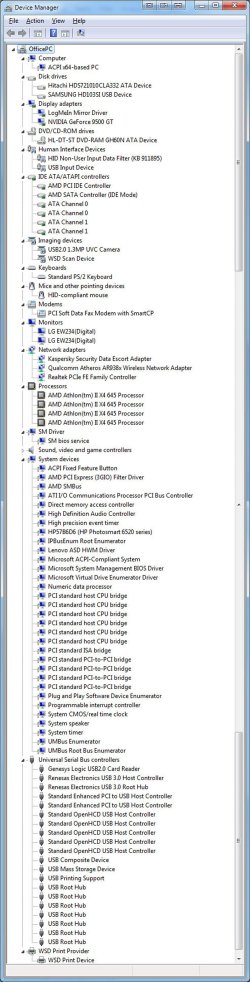
johnho: Thanks. I updated my specs as instructed, also increased the device driver JPG to 1000px wide (was 500px) and also attached a screen shot JPG of the HD's health report via Defragger.

I will get to the other advice soon. : )
 

Attachments

  • device-manager.jpg
    device-manager.jpg
    429.3 KB · Views: 3
  • Defrag-disc-data.jpg
    Defrag-disc-data.jpg
    237.5 KB · Views: 0
Last edited:

My Computer My Computer

At a glance

Microsoft Windows 7 Home Premium 64-bit 7601 ...AMD Athlon(tm) II X4 645 Processor8.00 GB(1) NVIDIA GeForce 9500 GT (2) LogMeIn Mirror...
Computer type
PC/Desktop
Computer Manufacturer/Model Number
Lenovo H405
OS
Microsoft Windows 7 Home Premium 64-bit 7601 Multiprocessor Free Service Pack 1
CPU
AMD Athlon(tm) II X4 645 Processor
Motherboard
LENOVO Tilapia CRB
Memory
8.00 GB
Graphics Card(s)
(1) NVIDIA GeForce 9500 GT (2) LogMeIn Mirror Driver
Sound Card
(1) Realtek High Definition Audio (2) NVIDIA Virtual Audio
Screen Resolution
(1) 1920 x 1080 x 32 bits (4294967296 colors) @ 60 Hz (2)
Hard Drives
(1) Hitachi HDS721010CLA332 ATA Device (2) SAMSUNG HD103SI USB Device
Antivirus
Kaspersky 17.*
Browser
FF, Chrome
I would try booting with the USB disk drive unplugged. Then if that does not help, then boot into safe mode and look at the device manager IDE ATA controller section and compare it to the above jpeg. You'll see that it looks different, that it will not show any AMD line items when in safe mode. Make note of what drivers it does show, then boot normally so it goes back to showing your AMD line items within the IDE section, and right click your way into replacing those AMD drivers with same the generic ones you saw in safe mode, then reboot. If the reboot goes well you have determined that your hard drive is the problem.
 

My Computer My Computer

At a glance

Win7 pro x64stock i7 7700kCorsair Vengeance LPX 16GB (2x8GB) DDR4 @ 320...integrated Intel HD 630
Computer type
PC/Desktop
Computer Manufacturer/Model Number
diy
OS
Win7 pro x64
CPU
stock i7 7700k
Motherboard
Gigabyte Z270N-WIFI mini-ITX
Memory
Corsair Vengeance LPX 16GB (2x8GB) DDR4 @ 3200MHz
Graphics Card(s)
integrated Intel HD 630
Sound Card
onboard Realtek ALC1220
Monitor(s) Displays
two vertically mounted samsung 55" 4k un55mu8000
Screen Resolution
1920x1280
Hard Drives
256GB Samsung EVO 960 M.2 pci-e NVMe SSD
PSU
SilverStone Nightjar ST45NF 450Watt Fanless
Case
No case. Motherboard is mounted directly onto power supply
Cooling
Evercool low profile 815EP with Panaflow 12L fan at 7v
Keyboard
Ortek MCK-86 mini
Mouse
Belkin 5-button USB
Internet Speed
spectrum 400mbps
Last edited:

My Computer My Computer

At a glance

Microsoft Windows 7 Home Premium 64-bit 7601 ...AMD C-60 APU with Radeon(tm) HD Graphics4.00 GBAMD Radeon HD 6290 Graphics
Computer type
Laptop
Computer Manufacturer/Model Number
ASUS
OS
Microsoft Windows 7 Home Premium 64-bit 7601 Multiprocessor Free Service Pack 1
CPU
AMD C-60 APU with Radeon(tm) HD Graphics
Motherboard
ASUSTeK COMPUTER INC. X501U
Memory
4.00 GB
Graphics Card(s)
AMD Radeon HD 6290 Graphics
Sound Card
(1) AMD High Definition Audio Device (2) Realtek High Defi
Screen Resolution
1366 x 768 x 32 bits (4294967296 colors) @ 60 Hz
Hard Drives
Hitachi HTS545050A7E380 SATA Disk Device
Antivirus
Comodo CIS & FW, SecureAplus App Whitelisting, Threatfire
Browser
Cyberfox 64bit, Opera 64bit, Airfox
Other Info
Spy-The-Spy, HitmanPro.Alert, Norton Connect Safe, MJRegWatcher, BitDefender TrafficLight, Voodoo Shield, Zemana AntiMalware
EDIT 2: Also from your process monitor screenshot the only third party service shown is carbonite backup. Services or drivers are possible causes so maybe try excluding carbonite from starup?

Callender: thanks as usual for the input, but I'm confused (not the first time) -- Carbonite isn't involved in the restart-to-login-screen is it? Wouldn't that be after the login, which is not the issue?
 

My Computer My Computer

At a glance

Microsoft Windows 7 Home Premium 64-bit 7601 ...AMD Athlon(tm) II X4 645 Processor8.00 GB(1) NVIDIA GeForce 9500 GT (2) LogMeIn Mirror...
Computer type
PC/Desktop
Computer Manufacturer/Model Number
Lenovo H405
OS
Microsoft Windows 7 Home Premium 64-bit 7601 Multiprocessor Free Service Pack 1
CPU
AMD Athlon(tm) II X4 645 Processor
Motherboard
LENOVO Tilapia CRB
Memory
8.00 GB
Graphics Card(s)
(1) NVIDIA GeForce 9500 GT (2) LogMeIn Mirror Driver
Sound Card
(1) Realtek High Definition Audio (2) NVIDIA Virtual Audio
Screen Resolution
(1) 1920 x 1080 x 32 bits (4294967296 colors) @ 60 Hz (2)
Hard Drives
(1) Hitachi HDS721010CLA332 ATA Device (2) SAMSUNG HD103SI USB Device
Antivirus
Kaspersky 17.*
Browser
FF, Chrome
... and right click your way into replacing those AMD drivers with same the generic ones you saw in safe mode, then reboot. If the reboot goes well you have determined that your hard drive is the problem.

Hi. Thanks. I got most of that and did some basic looking around, i.e., I checked that all the IDE ATA/ATPI controller device dirvers in normal mode appear to be updated to the latest, but risking me effing-up a HD driver swap is a little above my pay grade. LOL

And I wish I could do this emperical testing, which would be fine if the machine booted within a couple of minutes, but if thigns go as they did yesterday, three reboots would cost me a little over an hour.
 

My Computer My Computer

At a glance

Microsoft Windows 7 Home Premium 64-bit 7601 ...AMD Athlon(tm) II X4 645 Processor8.00 GB(1) NVIDIA GeForce 9500 GT (2) LogMeIn Mirror...
Computer type
PC/Desktop
Computer Manufacturer/Model Number
Lenovo H405
OS
Microsoft Windows 7 Home Premium 64-bit 7601 Multiprocessor Free Service Pack 1
CPU
AMD Athlon(tm) II X4 645 Processor
Motherboard
LENOVO Tilapia CRB
Memory
8.00 GB
Graphics Card(s)
(1) NVIDIA GeForce 9500 GT (2) LogMeIn Mirror Driver
Sound Card
(1) Realtek High Definition Audio (2) NVIDIA Virtual Audio
Screen Resolution
(1) 1920 x 1080 x 32 bits (4294967296 colors) @ 60 Hz (2)
Hard Drives
(1) Hitachi HDS721010CLA332 ATA Device (2) SAMSUNG HD103SI USB Device
Antivirus
Kaspersky 17.*
Browser
FF, Chrome
I'm not exactly expert on boot sequence but as I understand it kernel mode loads services before login screen. I could be wrong!

There's a good article here:

Windows 7 Startup | Gizmo's Freeware

Seems to me that it's only reboot that is the problem so I reckon something must be hanging.

Try these tweaks. They won't fix any problem but see if it results in a faster reboot.

Fast shutdown tweaks including the three mentioned in Option 2 Step 5

Shut Down -Speed Up - Windows 7 Help Forums

RE: Carbonite: It shows in your ProcessMonitor boot log so as services can cause slow shutdown/ boot it was a guess on my part. It might be worth a shot but it's not guaranteed to be the problem.

Also when you have time consider running a disk check. It will need a reboot and might take quite a long time to complete:

Command is chkdsk /r /f including spaces. That checks all drives/ partitions.
 
Last edited:

My Computer My Computer

At a glance

Microsoft Windows 7 Home Premium 64-bit 7601 ...AMD C-60 APU with Radeon(tm) HD Graphics4.00 GBAMD Radeon HD 6290 Graphics
Computer type
Laptop
Computer Manufacturer/Model Number
ASUS
OS
Microsoft Windows 7 Home Premium 64-bit 7601 Multiprocessor Free Service Pack 1
CPU
AMD C-60 APU with Radeon(tm) HD Graphics
Motherboard
ASUSTeK COMPUTER INC. X501U
Memory
4.00 GB
Graphics Card(s)
AMD Radeon HD 6290 Graphics
Sound Card
(1) AMD High Definition Audio Device (2) Realtek High Defi
Screen Resolution
1366 x 768 x 32 bits (4294967296 colors) @ 60 Hz
Hard Drives
Hitachi HTS545050A7E380 SATA Disk Device
Antivirus
Comodo CIS & FW, SecureAplus App Whitelisting, Threatfire
Browser
Cyberfox 64bit, Opera 64bit, Airfox
Other Info
Spy-The-Spy, HitmanPro.Alert, Norton Connect Safe, MJRegWatcher, BitDefender TrafficLight, Voodoo Shield, Zemana AntiMalware
I reckon you are correct on Carbonite. It shouldn't run before logon screen.
 

My Computer My Computer

At a glance

Microsoft Windows 7 Home Premium 64-bit 7601 ...AMD C-60 APU with Radeon(tm) HD Graphics4.00 GBAMD Radeon HD 6290 Graphics
Computer type
Laptop
Computer Manufacturer/Model Number
ASUS
OS
Microsoft Windows 7 Home Premium 64-bit 7601 Multiprocessor Free Service Pack 1
CPU
AMD C-60 APU with Radeon(tm) HD Graphics
Motherboard
ASUSTeK COMPUTER INC. X501U
Memory
4.00 GB
Graphics Card(s)
AMD Radeon HD 6290 Graphics
Sound Card
(1) AMD High Definition Audio Device (2) Realtek High Defi
Screen Resolution
1366 x 768 x 32 bits (4294967296 colors) @ 60 Hz
Hard Drives
Hitachi HTS545050A7E380 SATA Disk Device
Antivirus
Comodo CIS & FW, SecureAplus App Whitelisting, Threatfire
Browser
Cyberfox 64bit, Opera 64bit, Airfox
Other Info
Spy-The-Spy, HitmanPro.Alert, Norton Connect Safe, MJRegWatcher, BitDefender TrafficLight, Voodoo Shield, Zemana AntiMalware
Just a quick not to say I tried the Clean Startup and turned some things off, and it seems to be behaving itself this afternoon, i.e., two restarts to normal mode in a row were under 2 minutes each. I did not have the time to track down every item in the startup and system, but perhaps I turned off the culprit. That, or it'll come back tomorrow. LOL

I will check-back if that happens.

Thanks! : )
 

My Computer My Computer

At a glance

Microsoft Windows 7 Home Premium 64-bit 7601 ...AMD Athlon(tm) II X4 645 Processor8.00 GB(1) NVIDIA GeForce 9500 GT (2) LogMeIn Mirror...
Computer type
PC/Desktop
Computer Manufacturer/Model Number
Lenovo H405
OS
Microsoft Windows 7 Home Premium 64-bit 7601 Multiprocessor Free Service Pack 1
CPU
AMD Athlon(tm) II X4 645 Processor
Motherboard
LENOVO Tilapia CRB
Memory
8.00 GB
Graphics Card(s)
(1) NVIDIA GeForce 9500 GT (2) LogMeIn Mirror Driver
Sound Card
(1) Realtek High Definition Audio (2) NVIDIA Virtual Audio
Screen Resolution
(1) 1920 x 1080 x 32 bits (4294967296 colors) @ 60 Hz (2)
Hard Drives
(1) Hitachi HDS721010CLA332 ATA Device (2) SAMSUNG HD103SI USB Device
Antivirus
Kaspersky 17.*
Browser
FF, Chrome
PS: I neglected to add that along with the other things I tried in the last post, earlier in the day I had started to receive a series of pop-up errors indicating that a USB controller had problems. First message said it was reinstalling something USB related. That happened twice. Then, a bit later I got a message saying it has an error and is closing.

So ... I went to Device Manager, founded the problematic driver and simply removed it. I restarted the computer a bit later (twice actually), and both times the machine rebooted in short order. Fingers crossed.

No idea if a USB driver could cause issues, but maybe?

Thanks!
 

My Computer My Computer

At a glance

Microsoft Windows 7 Home Premium 64-bit 7601 ...AMD Athlon(tm) II X4 645 Processor8.00 GB(1) NVIDIA GeForce 9500 GT (2) LogMeIn Mirror...
Computer type
PC/Desktop
Computer Manufacturer/Model Number
Lenovo H405
OS
Microsoft Windows 7 Home Premium 64-bit 7601 Multiprocessor Free Service Pack 1
CPU
AMD Athlon(tm) II X4 645 Processor
Motherboard
LENOVO Tilapia CRB
Memory
8.00 GB
Graphics Card(s)
(1) NVIDIA GeForce 9500 GT (2) LogMeIn Mirror Driver
Sound Card
(1) Realtek High Definition Audio (2) NVIDIA Virtual Audio
Screen Resolution
(1) 1920 x 1080 x 32 bits (4294967296 colors) @ 60 Hz (2)
Hard Drives
(1) Hitachi HDS721010CLA332 ATA Device (2) SAMSUNG HD103SI USB Device
Antivirus
Kaspersky 17.*
Browser
FF, Chrome
usb driver errors and usb device detection problems are pretty common, due to imperfect physical connections. See my post #28. VGA, DVI, RJ45, ps/2 - all those physical connector designs tend to produce perfect electrical paths forever. But a USB connection, especially since USB devices get unplugged and re-plugged back in so much, tend to deteriorate. Trying switching your usb device to a different usb port and the problem will likely disappear.
 

My Computer My Computer

At a glance

Win7 pro x64stock i7 7700kCorsair Vengeance LPX 16GB (2x8GB) DDR4 @ 320...integrated Intel HD 630
Computer type
PC/Desktop
Computer Manufacturer/Model Number
diy
OS
Win7 pro x64
CPU
stock i7 7700k
Motherboard
Gigabyte Z270N-WIFI mini-ITX
Memory
Corsair Vengeance LPX 16GB (2x8GB) DDR4 @ 3200MHz
Graphics Card(s)
integrated Intel HD 630
Sound Card
onboard Realtek ALC1220
Monitor(s) Displays
two vertically mounted samsung 55" 4k un55mu8000
Screen Resolution
1920x1280
Hard Drives
256GB Samsung EVO 960 M.2 pci-e NVMe SSD
PSU
SilverStone Nightjar ST45NF 450Watt Fanless
Case
No case. Motherboard is mounted directly onto power supply
Cooling
Evercool low profile 815EP with Panaflow 12L fan at 7v
Keyboard
Ortek MCK-86 mini
Mouse
Belkin 5-button USB
Internet Speed
spectrum 400mbps
johnhoh: thank you as always.

Problem is though, this PC has six USB ports and I have no idea which one crapped out before restart.

The keyboard, mouse, peripherial drive all seem fine (back of PC), as does my plugged-in smart phone (front of PC).

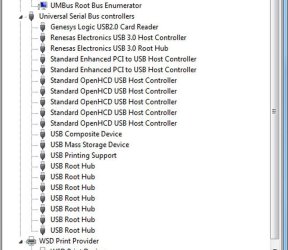
Note the USB area of the Device Manager -- does that look normal to anyone?

Thanks : )
 

Attachments

  • device-manager-USB.jpg
    device-manager-USB.jpg
    88.7 KB · Views: 0

My Computer My Computer

At a glance

Microsoft Windows 7 Home Premium 64-bit 7601 ...AMD Athlon(tm) II X4 645 Processor8.00 GB(1) NVIDIA GeForce 9500 GT (2) LogMeIn Mirror...
Computer type
PC/Desktop
Computer Manufacturer/Model Number
Lenovo H405
OS
Microsoft Windows 7 Home Premium 64-bit 7601 Multiprocessor Free Service Pack 1
CPU
AMD Athlon(tm) II X4 645 Processor
Motherboard
LENOVO Tilapia CRB
Memory
8.00 GB
Graphics Card(s)
(1) NVIDIA GeForce 9500 GT (2) LogMeIn Mirror Driver
Sound Card
(1) Realtek High Definition Audio (2) NVIDIA Virtual Audio
Screen Resolution
(1) 1920 x 1080 x 32 bits (4294967296 colors) @ 60 Hz (2)
Hard Drives
(1) Hitachi HDS721010CLA332 ATA Device (2) SAMSUNG HD103SI USB Device
Antivirus
Kaspersky 17.*
Browser
FF, Chrome
the drivers look fine, the problem is that sometimes it takes them 10 minutes to get to that state, lol. I'm operating under the premise that an imperfect port connection is your problem, and am guessing that the culprit is your usb drive, which is why I made the suggestion in post #28.

usbdeview is pretty cool for showing your usb devices, and will allow you to make a note of which port is currently connected to each device. It has 35 columns of detail for each usb device so the next time you get a usb driver error, that error will most likely reference one of those columns, and you'll know which device is crapping out. Nir Sofer is a guy who has written dozens of super useful non-invasive windows tools.

View any installed/connected USB device on your system
 

My Computer My Computer

At a glance

Win7 pro x64stock i7 7700kCorsair Vengeance LPX 16GB (2x8GB) DDR4 @ 320...integrated Intel HD 630
Computer type
PC/Desktop
Computer Manufacturer/Model Number
diy
OS
Win7 pro x64
CPU
stock i7 7700k
Motherboard
Gigabyte Z270N-WIFI mini-ITX
Memory
Corsair Vengeance LPX 16GB (2x8GB) DDR4 @ 3200MHz
Graphics Card(s)
integrated Intel HD 630
Sound Card
onboard Realtek ALC1220
Monitor(s) Displays
two vertically mounted samsung 55" 4k un55mu8000
Screen Resolution
1920x1280
Hard Drives
256GB Samsung EVO 960 M.2 pci-e NVMe SSD
PSU
SilverStone Nightjar ST45NF 450Watt Fanless
Case
No case. Motherboard is mounted directly onto power supply
Cooling
Evercool low profile 815EP with Panaflow 12L fan at 7v
Keyboard
Ortek MCK-86 mini
Mouse
Belkin 5-button USB
Internet Speed
spectrum 400mbps
A process of eliminate things one at a time.
Keep your mouse and keyboard hooked up and unhook every other external gadget.
If things work as they should; plug on gadget in at a time and see how things go. (ect. ect. ect.)
I would suggest keeping your phone away from your computer until the problem is found. Hooking another device which has it's own operating system to your computer could cause your problem.

Jack
 

My Computer My Computer

At a glance

Windows 10 Pro. 64/ version 1709 Windows 7 Pr...Intel i7-6800K @ 4.3Corsair Platinum 16 gig @2400EVGA GTX 1070 OC
Computer type
PC/Desktop
Computer Manufacturer/Model Number
Home made Desktop
OS
Windows 10 Pro. 64/ version 1709 Windows 7 Pro/64
CPU
Intel i7-6800K @ 4.3
Motherboard
ASUS X-99 Deluxe II
Memory
Corsair Platinum 16 gig @2400
Graphics Card(s)
EVGA GTX 1070 OC
Monitor(s) Displays
Asus 27" LED LCD/VE278Q
Screen Resolution
1920-1080 or 1280-720 HDMI
Hard Drives
INTEL SSD 730-240 Gb Sata 3.0/
PSU
EVGA Platium 1200W
Case
Phanteks Luxe Tempered Glass 8 fans/ one radiator
Cooling
XSPC/ Water Cooled CPU
Keyboard
Das 4 Professional
Mouse
Logitech M705/MX Anywhere 2-S
Internet Speed
100 mbits
Antivirus
Microsoft Security Essentials/ Malwarebytes Premium 3.0/ SAS
Browser
I.E. 11 default/Firefox/ ISP Time Warner Cable/Spectrum
Other Info
LG BluRay Burner/
Sound system-KLipsch-THX/
Icy Dock ssd Hot Swap bays.
Jack wrote: "I would suggest keeping your phone away from your computer until the problem is found. Hooking another device which has it's own operating system to your computer could cause your problem."

Wow ... had not thought of that. Very interesting!
 

My Computer My Computer

At a glance

Microsoft Windows 7 Home Premium 64-bit 7601 ...AMD Athlon(tm) II X4 645 Processor8.00 GB(1) NVIDIA GeForce 9500 GT (2) LogMeIn Mirror...
Computer type
PC/Desktop
Computer Manufacturer/Model Number
Lenovo H405
OS
Microsoft Windows 7 Home Premium 64-bit 7601 Multiprocessor Free Service Pack 1
CPU
AMD Athlon(tm) II X4 645 Processor
Motherboard
LENOVO Tilapia CRB
Memory
8.00 GB
Graphics Card(s)
(1) NVIDIA GeForce 9500 GT (2) LogMeIn Mirror Driver
Sound Card
(1) Realtek High Definition Audio (2) NVIDIA Virtual Audio
Screen Resolution
(1) 1920 x 1080 x 32 bits (4294967296 colors) @ 60 Hz (2)
Hard Drives
(1) Hitachi HDS721010CLA332 ATA Device (2) SAMSUNG HD103SI USB Device
Antivirus
Kaspersky 17.*
Browser
FF, Chrome
Back
Top