Slow Boot up on SSD

EroDoto

New member
Local time
7:49 AM
Messages
19
I have an older desktop (see my profile for specs) that feels slower than I remember
It takes up to 90 seconds from post code to desktop (OS drive is 1tb Sandisk Ultra)
Disconnecting the storage hard disk (6tb WD Gold) reduces it to 60-70 seconds
As I have a few other os on this same computer (on different drives see
MB014SP-B_flexiDOCK Series_REMOVABLE 2.5" SSD / HDD ENCLOSURES_ICY DOCK manufacturer Removable enclosure, Screwless hard drive enclosure, SAS SATA Mobile Rack, DVR Surveillance Recording, Video Audio Editing, SATA portable hard drive enclosure) I've also timed the boot of W10 (installed on a 480gb Sandisk Extreme Pro) finding it more reasonable ....up to 30 secs ,15 or less with the w.d disconnected
Few more details Windows 7 Professional (64bit) was installed about 2 years ago using NTLite to include most updates available at that time.
The few updates that have come since then have been installed ; I also disabled the print spooler for protection .
I do not remember any bsod/freeze in a long time.
I took the smart test that is on the western digital dashboard for both the ssd and hd finding nothing to worry.
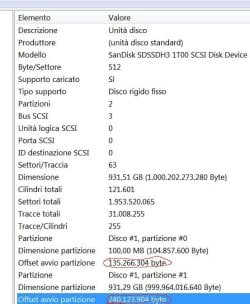
I'm not sure that my w7 drive is properly aligned
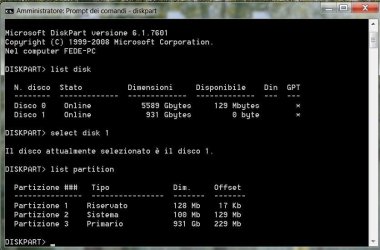
ssd w7 partitions.jpg wd partitions.jpg

Any help is welcome


- - - Updated - - -

Did some research

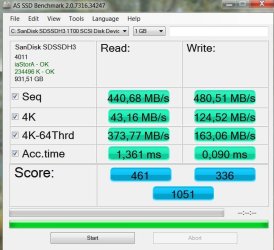
Both drives are properly aligned as these pictures show
wd hard disk.jpgas ssd.jpgsandisk w7.jpg

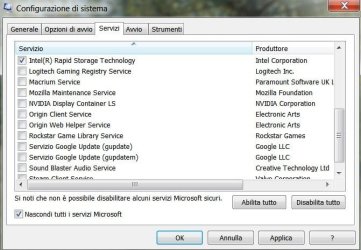
I tried disabling every 3d party services (see below) from the start with the exception of Intel using msconfig and I got about 40-42 seconds boot time
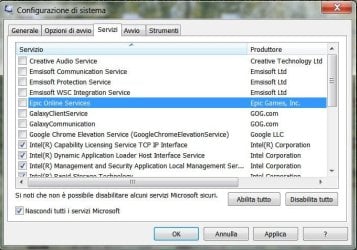
1.jpg2.jpg3.jpg

The I started enabling back services (usually one at time) to see how they would impact "boot performance". I found that Google,Macrium (a 3rd party backup utility) and Emsisoft (3rd party antivirus) ,the worst offenders, had an overall negative impact of 10-12 seconds
 
Last edited:

My Computer

Computer type
PC/Desktop
Computer Manufacturer/Model Number
Custom build
OS
Windows 7 Pro 64bit;Windows 10,Ubuntu
CPU
i5 4670k
Motherboard
MSI Z87-G55
Memory
16GB G.SKILL 1866 DDR3
Graphics Card(s)
Evga GTX 980 Ti
Sound Card
Sounblaster Z
Monitor(s) Displays
Acer Xb270hu
Screen Resolution
2560x1440
Hard Drives
SanDisk Ultra 1TB (W7)
WD Gold 6TB
PSU
XFX Pro Series B.E. 750W 80 Plus Gold
Case
CM 690 III
Cooling
Phanteks PH-TC14PE
Keyboard
CM STORM QUICKFIRE TK
Mouse
Logitech G502 Proteus Core
Internet Speed
Vodafone 100 Mbit/s more or less
Antivirus
EMSISOFT Anti Malware Home
Browser
Firefox 93.0 ,Chrome 94
Buonasera

Lets do the basic.

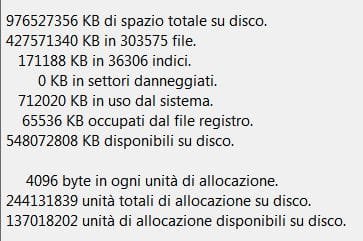
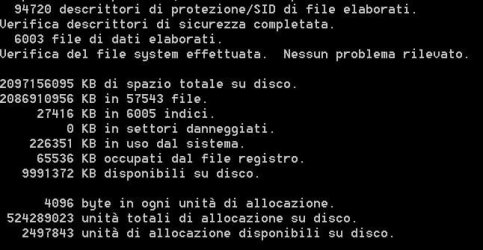
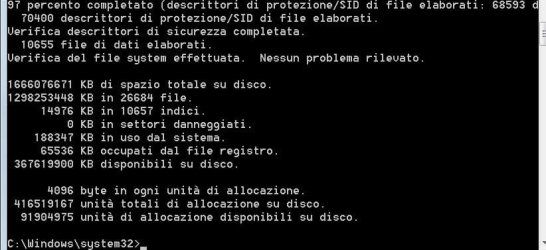
Open a CMD window as administrator and type:
chkdsk c: /f
It will say your disk is in use and ask if you want to schedule to next start = yes

Also do a chkdsk x:/f on the three HDD partitions (replace x by the HDD partitions letters)
Restart

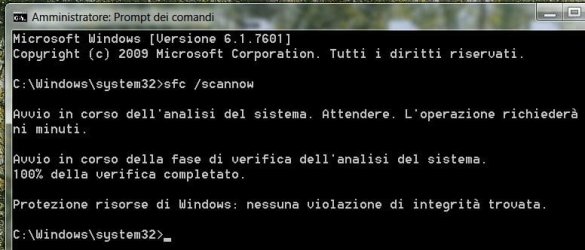
Back to Windows, open a CMD window as administrator and type:
sfc /scannow
If it finds any issue, restart and run again

Report
 

My Computers

System One System Two

  • Computer type
    PC/Desktop
    Computer Manufacturer/Model Number
    custom build
    OS
    Windows 7 HP 64
    CPU
    i5 6600K - 800MHz to 4200MHz
    Motherboard
    GA-Z170-HD3P
    Memory
    4+4G GSkill DDR4 3000
    Graphics Card(s)
    IG - Intel 530
    Monitor(s) Displays
    Samsung 226BW
    Screen Resolution
    1680x1050
    Hard Drives
    (1) -1 SM951 – 128GB M.2 AHCI PCIe SSD drive for Windows 7 and Lubuntu
    (2) -1 WD SATA 3 - 1T for Data
    (3) -1 WD SATA 3 - 1T for backup
    PSU
    Thermaltake 450W TR2 gold
    Keyboard
    Old and good Chicony mechanical keyboard
    Mouse
    Logitech mX performance - 9 buttons (had to disable some)
    Internet Speed
    500Mb/s
    Browser
    Firefox 64
    Other Info
    TinyWall firewall
  • Computer type
    Laptop
    System Manufacturer/Model Number
    Asus Q550LF
    OS
    Windows 7 Pro
    CPU
    i7-4500U 800MHz to 3.0GHz
    Motherboard
    Asus Q550LF
    Memory
    (4+4)G DDR3 1600
    Graphics Card(s)
    IG intel 4400 + NVIDIA GeForce GT 745M
    Sound Card
    Realtek
    Monitor(s) Displays
    LG Display LP156WF4-SPH1
    Screen Resolution
    1920 x 1080
    Hard Drives
    BX500 120G SSD for Windows and programs +
    1T HDD for data
    Internet Speed
    500 Mb/s
    Browser
    Firefox
    Other Info
    TinyWall firewall
Thanks I'll check and let you know if anything is wrong

- - - Updated - - -

c.jpge.jpgf.jpgg.jpgsfc.jpg

Luckily nothing wrong
 

My Computer

Computer type
PC/Desktop
Computer Manufacturer/Model Number
Custom build
OS
Windows 7 Pro 64bit;Windows 10,Ubuntu
CPU
i5 4670k
Motherboard
MSI Z87-G55
Memory
16GB G.SKILL 1866 DDR3
Graphics Card(s)
Evga GTX 980 Ti
Sound Card
Sounblaster Z
Monitor(s) Displays
Acer Xb270hu
Screen Resolution
2560x1440
Hard Drives
SanDisk Ultra 1TB (W7)
WD Gold 6TB
PSU
XFX Pro Series B.E. 750W 80 Plus Gold
Case
CM 690 III
Cooling
Phanteks PH-TC14PE
Keyboard
CM STORM QUICKFIRE TK
Mouse
Logitech G502 Proteus Core
Internet Speed
Vodafone 100 Mbit/s more or less
Antivirus
EMSISOFT Anti Malware Home
Browser
Firefox 93.0 ,Chrome 94

My Computers

System One System Two

  • Computer type
    PC/Desktop
    Computer Manufacturer/Model Number
    custom build
    OS
    Windows 7 HP 64
    CPU
    i5 6600K - 800MHz to 4200MHz
    Motherboard
    GA-Z170-HD3P
    Memory
    4+4G GSkill DDR4 3000
    Graphics Card(s)
    IG - Intel 530
    Monitor(s) Displays
    Samsung 226BW
    Screen Resolution
    1680x1050
    Hard Drives
    (1) -1 SM951 – 128GB M.2 AHCI PCIe SSD drive for Windows 7 and Lubuntu
    (2) -1 WD SATA 3 - 1T for Data
    (3) -1 WD SATA 3 - 1T for backup
    PSU
    Thermaltake 450W TR2 gold
    Keyboard
    Old and good Chicony mechanical keyboard
    Mouse
    Logitech mX performance - 9 buttons (had to disable some)
    Internet Speed
    500Mb/s
    Browser
    Firefox 64
    Other Info
    TinyWall firewall
  • Computer type
    Laptop
    System Manufacturer/Model Number
    Asus Q550LF
    OS
    Windows 7 Pro
    CPU
    i7-4500U 800MHz to 3.0GHz
    Motherboard
    Asus Q550LF
    Memory
    (4+4)G DDR3 1600
    Graphics Card(s)
    IG intel 4400 + NVIDIA GeForce GT 745M
    Sound Card
    Realtek
    Monitor(s) Displays
    LG Display LP156WF4-SPH1
    Screen Resolution
    1920 x 1080
    Hard Drives
    BX500 120G SSD for Windows and programs +
    1T HDD for data
    Internet Speed
    500 Mb/s
    Browser
    Firefox
    Other Info
    TinyWall firewall
Sorry for the delay I've got home late .
Did as you suggested at worst there are 20 to 25 seconds between a normal start (all 3rd party services enabled) and a clean startup (did the test a couple times)
As you guess cold boot is slower than restarting as you have to wait for device detection
 

My Computer

Computer type
PC/Desktop
Computer Manufacturer/Model Number
Custom build
OS
Windows 7 Pro 64bit;Windows 10,Ubuntu
CPU
i5 4670k
Motherboard
MSI Z87-G55
Memory
16GB G.SKILL 1866 DDR3
Graphics Card(s)
Evga GTX 980 Ti
Sound Card
Sounblaster Z
Monitor(s) Displays
Acer Xb270hu
Screen Resolution
2560x1440
Hard Drives
SanDisk Ultra 1TB (W7)
WD Gold 6TB
PSU
XFX Pro Series B.E. 750W 80 Plus Gold
Case
CM 690 III
Cooling
Phanteks PH-TC14PE
Keyboard
CM STORM QUICKFIRE TK
Mouse
Logitech G502 Proteus Core
Internet Speed
Vodafone 100 Mbit/s more or less
Antivirus
EMSISOFT Anti Malware Home
Browser
Firefox 93.0 ,Chrome 94
A SSD should boot in less than 30 sec.
I found out that on my system, the antivirus is the one that delays it most.
Try to uninstall the antivirus and chrome and do a clean boot.
 

My Computers

System One System Two

  • Computer type
    PC/Desktop
    Computer Manufacturer/Model Number
    custom build
    OS
    Windows 7 HP 64
    CPU
    i5 6600K - 800MHz to 4200MHz
    Motherboard
    GA-Z170-HD3P
    Memory
    4+4G GSkill DDR4 3000
    Graphics Card(s)
    IG - Intel 530
    Monitor(s) Displays
    Samsung 226BW
    Screen Resolution
    1680x1050
    Hard Drives
    (1) -1 SM951 – 128GB M.2 AHCI PCIe SSD drive for Windows 7 and Lubuntu
    (2) -1 WD SATA 3 - 1T for Data
    (3) -1 WD SATA 3 - 1T for backup
    PSU
    Thermaltake 450W TR2 gold
    Keyboard
    Old and good Chicony mechanical keyboard
    Mouse
    Logitech mX performance - 9 buttons (had to disable some)
    Internet Speed
    500Mb/s
    Browser
    Firefox 64
    Other Info
    TinyWall firewall
  • Computer type
    Laptop
    System Manufacturer/Model Number
    Asus Q550LF
    OS
    Windows 7 Pro
    CPU
    i7-4500U 800MHz to 3.0GHz
    Motherboard
    Asus Q550LF
    Memory
    (4+4)G DDR3 1600
    Graphics Card(s)
    IG intel 4400 + NVIDIA GeForce GT 745M
    Sound Card
    Realtek
    Monitor(s) Displays
    LG Display LP156WF4-SPH1
    Screen Resolution
    1920 x 1080
    Hard Drives
    BX500 120G SSD for Windows and programs +
    1T HDD for data
    Internet Speed
    500 Mb/s
    Browser
    Firefox
    Other Info
    TinyWall firewall
I appreciate your advice but I cannot do right now
 

My Computer

Computer type
PC/Desktop
Computer Manufacturer/Model Number
Custom build
OS
Windows 7 Pro 64bit;Windows 10,Ubuntu
CPU
i5 4670k
Motherboard
MSI Z87-G55
Memory
16GB G.SKILL 1866 DDR3
Graphics Card(s)
Evga GTX 980 Ti
Sound Card
Sounblaster Z
Monitor(s) Displays
Acer Xb270hu
Screen Resolution
2560x1440
Hard Drives
SanDisk Ultra 1TB (W7)
WD Gold 6TB
PSU
XFX Pro Series B.E. 750W 80 Plus Gold
Case
CM 690 III
Cooling
Phanteks PH-TC14PE
Keyboard
CM STORM QUICKFIRE TK
Mouse
Logitech G502 Proteus Core
Internet Speed
Vodafone 100 Mbit/s more or less
Antivirus
EMSISOFT Anti Malware Home
Browser
Firefox 93.0 ,Chrome 94
Sorry for the delay but it has been a very busy week
As you suggested I uninstalled the antivirus and trimmed the ssd as I never did before (at least on this drive)
Cold boot to desktop took me 50-52 seconds (including 22-24 for device detection)
Reinstalling Emsisoft I got 60 seconds
After some updates and tinkering with av settings i'm back to 80+ seconds
 

My Computer

Computer type
PC/Desktop
Computer Manufacturer/Model Number
Custom build
OS
Windows 7 Pro 64bit;Windows 10,Ubuntu
CPU
i5 4670k
Motherboard
MSI Z87-G55
Memory
16GB G.SKILL 1866 DDR3
Graphics Card(s)
Evga GTX 980 Ti
Sound Card
Sounblaster Z
Monitor(s) Displays
Acer Xb270hu
Screen Resolution
2560x1440
Hard Drives
SanDisk Ultra 1TB (W7)
WD Gold 6TB
PSU
XFX Pro Series B.E. 750W 80 Plus Gold
Case
CM 690 III
Cooling
Phanteks PH-TC14PE
Keyboard
CM STORM QUICKFIRE TK
Mouse
Logitech G502 Proteus Core
Internet Speed
Vodafone 100 Mbit/s more or less
Antivirus
EMSISOFT Anti Malware Home
Browser
Firefox 93.0 ,Chrome 94
Hi
from your 1st screenshot i must admit i've only seen 1024 offsets, yours is 17, and i was under the impression whatever the size it had to be divisable by 4

Now whether or not thats causing slow boot is another matter

my question is tho whats the value in Startup and recovery, default is 30 mines 0

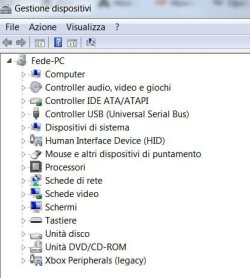
I would also check your device drivers are they all good
 

My Computer

Computer type
PC/Desktop
Computer Manufacturer/Model Number
medionl/Aspire 6930G/acer x55a
OS
W7 home premium 32bit/W7HP 64bit/w10 tp insider ring
CPU
E5300 dual core
Motherboard
medion MS7366
Memory
3gb
Graphics Card(s)
Nvidia Geforce 7100 Nforce 630i
Monitor(s) Displays
avixc
Internet Speed
n (isp resticted to 72)
Antivirus
mse/pands
Browser
palemoon
Other Info
Belkin Fd7050 n USB using Railink RT2870 drivers, more upto date
Hi
from your 1st screenshot i must admit i've only seen 1024 offsets, yours is 17, and i was under the impression whatever the size it had to be divisable by 4

Now whether or not thats causing slow boot is another matter

my question is tho whats the value in Startup and recovery, default is 30 mines 0

I would also check your device drivers are they all good
According to AOMEI Partition Assistant Professional these partition are fine.Where's "Startup and recovery"?

gestione dispositivi.jpg

- - - Updated - - -

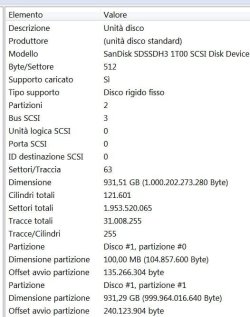
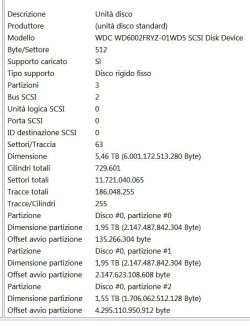
To check for partition alignment
Start menu, type “msinfo32”, and press Enter to launch the System Information tool.
Head to Components > Storage > Disks. Scroll down in the left panel, locate your SSD, and find the “Partition Starting Offset” value below it.
There will be a different partition starting offset value for each partition on the drive.
Check if this number is evenly divisible by 4096.
If it is, the partition is correctly aligned.
If it isn’t, the partition isn’t correctly aligned.

Each one of my partitions is perfectly divisible by 4096

- - - Updated - - -

I'm busy watching CL right now so don't get mad if I don't reply quickly

- - - Updated - - -

sysinfo 1.jpg
ssd

sysinfo 2.jpg
hard disk
 

My Computer

Computer type
PC/Desktop
Computer Manufacturer/Model Number
Custom build
OS
Windows 7 Pro 64bit;Windows 10,Ubuntu
CPU
i5 4670k
Motherboard
MSI Z87-G55
Memory
16GB G.SKILL 1866 DDR3
Graphics Card(s)
Evga GTX 980 Ti
Sound Card
Sounblaster Z
Monitor(s) Displays
Acer Xb270hu
Screen Resolution
2560x1440
Hard Drives
SanDisk Ultra 1TB (W7)
WD Gold 6TB
PSU
XFX Pro Series B.E. 750W 80 Plus Gold
Case
CM 690 III
Cooling
Phanteks PH-TC14PE
Keyboard
CM STORM QUICKFIRE TK
Mouse
Logitech G502 Proteus Core
Internet Speed
Vodafone 100 Mbit/s more or less
Antivirus
EMSISOFT Anti Malware Home
Browser
Firefox 93.0 ,Chrome 94
HeHe so am i, want Man U to lose
ControlPanel>> System >> Advanced System settings(top left) ....Advanced.. bottom entry

Its not the partition entries its where they START, if you followed the standard set up for W7 it would have AUTOMATICALLY set it to 1024, YOU must have changed it

- - - Updated - - -

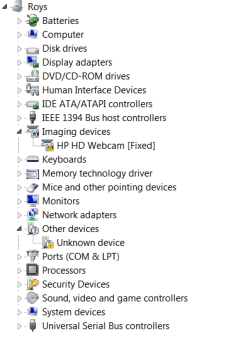
your driver file also seems a little light on entries, her's mine (laptop)
 

Attachments

  • drivers.PNG
    drivers.PNG
    34.5 KB · Views: 4

My Computer

Computer type
PC/Desktop
Computer Manufacturer/Model Number
medionl/Aspire 6930G/acer x55a
OS
W7 home premium 32bit/W7HP 64bit/w10 tp insider ring
CPU
E5300 dual core
Motherboard
medion MS7366
Memory
3gb
Graphics Card(s)
Nvidia Geforce 7100 Nforce 630i
Monitor(s) Displays
avixc
Internet Speed
n (isp resticted to 72)
Antivirus
mse/pands
Browser
palemoon
Other Info
Belkin Fd7050 n USB using Railink RT2870 drivers, more upto date
They're a joke :D

avvio e ripristino.jpg

- - - Updated - - -

No words :mad:

I switched to default setting for the av then I made a couple changes to fit my needs and guess now it boots slightly faster (70 seconds)
 

My Computer

Computer type
PC/Desktop
Computer Manufacturer/Model Number
Custom build
OS
Windows 7 Pro 64bit;Windows 10,Ubuntu
CPU
i5 4670k
Motherboard
MSI Z87-G55
Memory
16GB G.SKILL 1866 DDR3
Graphics Card(s)
Evga GTX 980 Ti
Sound Card
Sounblaster Z
Monitor(s) Displays
Acer Xb270hu
Screen Resolution
2560x1440
Hard Drives
SanDisk Ultra 1TB (W7)
WD Gold 6TB
PSU
XFX Pro Series B.E. 750W 80 Plus Gold
Case
CM 690 III
Cooling
Phanteks PH-TC14PE
Keyboard
CM STORM QUICKFIRE TK
Mouse
Logitech G502 Proteus Core
Internet Speed
Vodafone 100 Mbit/s more or less
Antivirus
EMSISOFT Anti Malware Home
Browser
Firefox 93.0 ,Chrome 94
Back
Top