Slow boot when network cable is plugged

Sniki

New member
Hi dear friends,

Am running Windows 7 32bit since Nov. and everything was working fine until last week. my old Alcatel ADSL modem stopped working so my ISP gave me a new one, since then every boot takes like 5 min.
When I boot the system with the network cable UNPLUGGED, it boots up as usual, but when I have the cable plugged in, it gets stuck on the "Please wait..." screen for about 2.5-3 minutes before the windows login pops up, and then after choosing the user name it took another few min. till the desktop with all the tasks is loaded.

1. Tried to replace the modem with other brand (now am using ADSL D-Link 2500U), same behavior.
2. Scanned for viruses with NOD32 and malwarebyte' everything is clean.
3. Defrag the HD.
3. msconfig, is fine. none useless tasks.
4. Updated my MBO drivers including the Network adapter, useless..

* I didn't installed any new software before that may cause the problem.
* Bios is set for HD first boot.

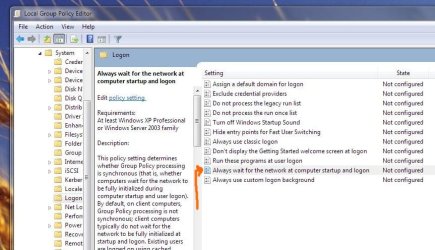
** take a look at the attachment, maybe playing with the marked line is the answer!?

thnx in advance! :)
 

Attachments

  • Untitled.jpg
    Untitled.jpg
    167 KB · Views: 86

My Computer

OS
Windows 7 Ultimate 32bit
CPU
Intel Core i5 760
Motherboard
Gigabyte P55-USB3
Memory
4GB Kingston DDR3 1333
Graphics Card(s)
ATI Sapphire 5670 HD
Sound Card
Sound Blaster Audigy Platinum
Monitor(s) Displays
Dell 22" 2209WA
Hard Drives
WD 1.2TB Black Edition
PSU
SeaSonic 620 S12II
Case
Thermaltake Armor A90
Keyboard
Microsoft Natural Egronomic 4000
Mouse
Logitech MX 518
Run the cmd window as an administrator. Then from the cmd window type the following one at a time hitting Enter after each one.

ipconfig /flushdns
ipconfig /release
ipconfig /renew
exit

Then reboot and see what happens.
 

My Computer

Computer type
PC/Desktop
Computer Manufacturer/Model Number
Custom Build
OS
Windows 7 Home Premium 64 bit SP1
CPU
Intel i7 4790k
Motherboard
MSI Z97-G55 SLI
Memory
16 GB Corsair 2400 MHz DDR3
Graphics Card(s)
Visiontek Radeon R9 285
Sound Card
None
Monitor(s) Displays
Gateway FHX2402L
Screen Resolution
1920 X 1080
Hard Drives
Samsung 840 EVO 500GB
PSU
Corsair 750 TX
Case
Fractal Design
Cooling
Stock fans
Keyboard
Logitech K800
Mouse
Logitech M510
Internet Speed
60.88 Mbps download 10.47 Mbps upload (Speedtest.net)
Antivirus
Norton
Browser
Opera
Other Info
First Computer used: A Commodore Pet of course
Love using Manjaro KDE Linux 64 bit and Windows 7/10 64 bit
Hey, thanks for the advice.
I did exactly what you wrote, but it is still not solved my problem.

any other ideas please? :(
 

My Computer

OS
Windows 7 Ultimate 32bit
CPU
Intel Core i5 760
Motherboard
Gigabyte P55-USB3
Memory
4GB Kingston DDR3 1333
Graphics Card(s)
ATI Sapphire 5670 HD
Sound Card
Sound Blaster Audigy Platinum
Monitor(s) Displays
Dell 22" 2209WA
Hard Drives
WD 1.2TB Black Edition
PSU
SeaSonic 620 S12II
Case
Thermaltake Armor A90
Keyboard
Microsoft Natural Egronomic 4000
Mouse
Logitech MX 518
Have you tried setting up a new network connection and using it? Window 7 setup the connection you are using with the old equipment.

Start, control panel, Network and Internet, Network and sharing center, setup a new connection or network
 

My Computer

Computer type
PC/Desktop
Computer Manufacturer/Model Number
Custom Build
OS
Windows 7 Home Premium 64 bit SP1
CPU
Intel i7 4790k
Motherboard
MSI Z97-G55 SLI
Memory
16 GB Corsair 2400 MHz DDR3
Graphics Card(s)
Visiontek Radeon R9 285
Sound Card
None
Monitor(s) Displays
Gateway FHX2402L
Screen Resolution
1920 X 1080
Hard Drives
Samsung 840 EVO 500GB
PSU
Corsair 750 TX
Case
Fractal Design
Cooling
Stock fans
Keyboard
Logitech K800
Mouse
Logitech M510
Internet Speed
60.88 Mbps download 10.47 Mbps upload (Speedtest.net)
Antivirus
Norton
Browser
Opera
Other Info
First Computer used: A Commodore Pet of course
Love using Manjaro KDE Linux 64 bit and Windows 7/10 64 bit
Nope! but will give it a shot.
do I need to delete the old one or I can keep it for backup?
 

My Computer

OS
Windows 7 Ultimate 32bit
CPU
Intel Core i5 760
Motherboard
Gigabyte P55-USB3
Memory
4GB Kingston DDR3 1333
Graphics Card(s)
ATI Sapphire 5670 HD
Sound Card
Sound Blaster Audigy Platinum
Monitor(s) Displays
Dell 22" 2209WA
Hard Drives
WD 1.2TB Black Edition
PSU
SeaSonic 620 S12II
Case
Thermaltake Armor A90
Keyboard
Microsoft Natural Egronomic 4000
Mouse
Logitech MX 518
Keep it for now and see what happens first.
 

My Computer

Computer type
PC/Desktop
Computer Manufacturer/Model Number
Custom Build
OS
Windows 7 Home Premium 64 bit SP1
CPU
Intel i7 4790k
Motherboard
MSI Z97-G55 SLI
Memory
16 GB Corsair 2400 MHz DDR3
Graphics Card(s)
Visiontek Radeon R9 285
Sound Card
None
Monitor(s) Displays
Gateway FHX2402L
Screen Resolution
1920 X 1080
Hard Drives
Samsung 840 EVO 500GB
PSU
Corsair 750 TX
Case
Fractal Design
Cooling
Stock fans
Keyboard
Logitech K800
Mouse
Logitech M510
Internet Speed
60.88 Mbps download 10.47 Mbps upload (Speedtest.net)
Antivirus
Norton
Browser
Opera
Other Info
First Computer used: A Commodore Pet of course
Love using Manjaro KDE Linux 64 bit and Windows 7/10 64 bit
Have you tried setting up a new network connection and using it? Window 7 setup the connection you are using with the old equipment.

Start, control panel, Network and Internet, Network and sharing center, setup a new connection or network

Sorry :( same results...

:cry:
 

My Computer

OS
Windows 7 Ultimate 32bit
CPU
Intel Core i5 760
Motherboard
Gigabyte P55-USB3
Memory
4GB Kingston DDR3 1333
Graphics Card(s)
ATI Sapphire 5670 HD
Sound Card
Sound Blaster Audigy Platinum
Monitor(s) Displays
Dell 22" 2209WA
Hard Drives
WD 1.2TB Black Edition
PSU
SeaSonic 620 S12II
Case
Thermaltake Armor A90
Keyboard
Microsoft Natural Egronomic 4000
Mouse
Logitech MX 518
no solution!? :(
 

My Computer

OS
Windows 7 Ultimate 32bit
CPU
Intel Core i5 760
Motherboard
Gigabyte P55-USB3
Memory
4GB Kingston DDR3 1333
Graphics Card(s)
ATI Sapphire 5670 HD
Sound Card
Sound Blaster Audigy Platinum
Monitor(s) Displays
Dell 22" 2209WA
Hard Drives
WD 1.2TB Black Edition
PSU
SeaSonic 620 S12II
Case
Thermaltake Armor A90
Keyboard
Microsoft Natural Egronomic 4000
Mouse
Logitech MX 518
Just set the "Always wait for the network at computer startup and logon" to "Disabled" and see what happens.
 

My Computer

OS
Windows 7 Enterprise x64 SP1
sorry... no luck again :(((

the last thing I need now is to reinstall the whole system... damnit!

anymore ideas please?
 

My Computer

OS
Windows 7 Ultimate 32bit
CPU
Intel Core i5 760
Motherboard
Gigabyte P55-USB3
Memory
4GB Kingston DDR3 1333
Graphics Card(s)
ATI Sapphire 5670 HD
Sound Card
Sound Blaster Audigy Platinum
Monitor(s) Displays
Dell 22" 2209WA
Hard Drives
WD 1.2TB Black Edition
PSU
SeaSonic 620 S12II
Case
Thermaltake Armor A90
Keyboard
Microsoft Natural Egronomic 4000
Mouse
Logitech MX 518
What modem did your ISP give to you?
 

My Computer

Computer Manufacturer/Model Number
Dell XPS 15 L502x
OS
Windows 7 Ultimate x64 SP1
CPU
Core i7-2670QM
Memory
8GB DDR3 PC3-10600
Graphics Card(s)
Intel HD Graphics 3000 + GeForce GT 540M
Screen Resolution
1920x1080
Hard Drives
1TB 5400RPM Seagate
What modem did your ISP give to you?

First it was Boateq or something like that, then I replaced it with D-Link 2500U. same results with both of them.
 

My Computer

OS
Windows 7 Ultimate 32bit
CPU
Intel Core i5 760
Motherboard
Gigabyte P55-USB3
Memory
4GB Kingston DDR3 1333
Graphics Card(s)
ATI Sapphire 5670 HD
Sound Card
Sound Blaster Audigy Platinum
Monitor(s) Displays
Dell 22" 2209WA
Hard Drives
WD 1.2TB Black Edition
PSU
SeaSonic 620 S12II
Case
Thermaltake Armor A90
Keyboard
Microsoft Natural Egronomic 4000
Mouse
Logitech MX 518
Back
Top