Slow boot

AllanP

New member
Power User
Local time
3:19 PM
Messages
79
Location
Nanoose Bay, B.C., Canada
Solved: It was my A/V: My Dell Laptop boots into Windows 7 in an acceptable time; a minute or so. I see my antivirus load and my Dexpot desktop switcher, but then it's another five minutes before I can do anything as something is still trying to load I presume and then it's just fine; no slow ups. I see NDProxy.sys is a common complaint; which doesn't load here also srv.sys doesn't load. Is there a way to disable these as they aren't loading anyways and everything works OK once I am finally booted up. Here is my ntblog.txt
Also what are the ??'s Loading driver ie \??\C:\Program Files (x86)\LogMeIn\x64\RaInfo.sys

Code:
Microsoft (R) Windows (R) Version 6.1 (Build 7600)
9 16 2010 12:49:59.595
Loaded driver \SystemRoot\system32\ntoskrnl.exe
Loaded driver \SystemRoot\system32\hal.dll
Loaded driver \SystemRoot\system32\kdcom.dll
Loaded driver \SystemRoot\system32\mcupdate_GenuineIntel.dll
Loaded driver \SystemRoot\system32\PSHED.dll
Loaded driver \SystemRoot\system32\CLFS.SYS
Loaded driver \SystemRoot\system32\CI.dll
Loaded driver \SystemRoot\system32\drivers\Wdf01000.sys
Loaded driver \SystemRoot\system32\drivers\WDFLDR.SYS
Loaded driver \SystemRoot\system32\DRIVERS\ACPI.sys
Loaded driver \SystemRoot\system32\DRIVERS\WMILIB.SYS
Loaded driver \SystemRoot\system32\DRIVERS\msisadrv.sys
Loaded driver \SystemRoot\system32\DRIVERS\pci.sys
Loaded driver \SystemRoot\system32\DRIVERS\vdrvroot.sys
Loaded driver \SystemRoot\System32\drivers\partmgr.sys
Loaded driver \SystemRoot\system32\DRIVERS\compbatt.sys
Loaded driver \SystemRoot\system32\DRIVERS\BATTC.SYS
Loaded driver \SystemRoot\system32\DRIVERS\volmgr.sys
Loaded driver \SystemRoot\System32\drivers\volmgrx.sys
Loaded driver \SystemRoot\System32\drivers\mountmgr.sys
Loaded driver \SystemRoot\system32\DRIVERS\atapi.sys
Loaded driver \SystemRoot\system32\DRIVERS\ataport.SYS
Loaded driver \SystemRoot\system32\DRIVERS\msahci.sys
Loaded driver \SystemRoot\system32\DRIVERS\PCIIDEX.SYS
Loaded driver \SystemRoot\system32\DRIVERS\amdxata.sys
Loaded driver \SystemRoot\system32\drivers\fltmgr.sys
Loaded driver \SystemRoot\system32\drivers\fileinfo.sys
Loaded driver \SystemRoot\System32\Drivers\PxHlpa64.sys
Loaded driver \SystemRoot\System32\Drivers\Ntfs.sys
Loaded driver \SystemRoot\System32\Drivers\msrpc.sys
Loaded driver \SystemRoot\System32\Drivers\ksecdd.sys
Loaded driver \SystemRoot\System32\Drivers\cng.sys
Loaded driver \SystemRoot\System32\drivers\pcw.sys
Loaded driver \SystemRoot\System32\Drivers\Fs_Rec.sys
Loaded driver \SystemRoot\system32\drivers\ndis.sys
Loaded driver \SystemRoot\system32\drivers\NETIO.SYS
Loaded driver \SystemRoot\System32\Drivers\ksecpkg.sys
Loaded driver \SystemRoot\System32\drivers\tcpip.sys
Loaded driver \SystemRoot\System32\drivers\fwpkclnt.sys
Loaded driver \SystemRoot\system32\DRIVERS\timntr.sys
Loaded driver \SystemRoot\system32\DRIVERS\volsnap.sys
Loaded driver \SystemRoot\system32\DRIVERS\stdflt.sys
Loaded driver \SystemRoot\system32\DRIVERS\tdrpm273.sys
Loaded driver \SystemRoot\System32\Drivers\spldr.sys
Loaded driver \SystemRoot\system32\DRIVERS\snapman.sys
Loaded driver \SystemRoot\System32\drivers\rdyboost.sys
Loaded driver \SystemRoot\System32\Drivers\mup.sys
Loaded driver \SystemRoot\System32\drivers\hwpolicy.sys
Loaded driver \SystemRoot\System32\DRIVERS\fvevol.sys
Loaded driver \SystemRoot\system32\DRIVERS\disk.sys
Loaded driver \SystemRoot\system32\DRIVERS\CLASSPNP.SYS
Loaded driver \SystemRoot\system32\DRIVERS\cdrom.sys
Loaded driver \SystemRoot\System32\Drivers\Null.SYS
Loaded driver \SystemRoot\System32\Drivers\Beep.SYS
Loaded driver \SystemRoot\System32\drivers\vga.sys
Loaded driver \SystemRoot\System32\DRIVERS\RDPCDD.sys
Loaded driver \SystemRoot\system32\drivers\rdpencdd.sys
Loaded driver \SystemRoot\system32\drivers\rdprefmp.sys
Loaded driver \SystemRoot\System32\Drivers\Msfs.SYS
Loaded driver \SystemRoot\System32\Drivers\Npfs.SYS
Loaded driver \SystemRoot\system32\DRIVERS\tdx.sys
Loaded driver \SystemRoot\system32\drivers\afd.sys
Loaded driver \SystemRoot\System32\DRIVERS\netbt.sys
Loaded driver \SystemRoot\system32\DRIVERS\wfplwf.sys
Loaded driver \SystemRoot\system32\DRIVERS\pacer.sys
Loaded driver \SystemRoot\system32\DRIVERS\vwififlt.sys
Loaded driver \SystemRoot\system32\DRIVERS\netbios.sys
Loaded driver \SystemRoot\system32\DRIVERS\wanarp.sys
Loaded driver \SystemRoot\system32\DRIVERS\termdd.sys
Loaded driver \SystemRoot\system32\DRIVERS\rdbss.sys
Loaded driver \SystemRoot\system32\drivers\nsiproxy.sys
Loaded driver \SystemRoot\system32\DRIVERS\mssmbios.sys
Loaded driver \??\C:\Program Files (x86)\Shaw Secure\Anti-Virus\minifilter\fsvista.sys
Loaded driver \SystemRoot\System32\drivers\fsdfw.sys
Loaded driver \SystemRoot\System32\drivers\fses.sys
Loaded driver \??\C:\Program Files (x86)\Shaw Secure\HIPS\drivers\fshs.sys
Loaded driver \SystemRoot\System32\drivers\discache.sys
Loaded driver \SystemRoot\System32\Drivers\dfsc.sys
Loaded driver \SystemRoot\system32\DRIVERS\blbdrive.sys
Loaded driver \SystemRoot\system32\DRIVERS\tunnel.sys
Loaded driver \SystemRoot\system32\DRIVERS\wmiacpi.sys
Loaded driver \SystemRoot\System32\drivers\dxgkrnl.sys
Loaded driver \SystemRoot\system32\DRIVERS\atikmdag.sys
Loaded driver \SystemRoot\system32\DRIVERS\HDAudBus.sys
Loaded driver \SystemRoot\system32\DRIVERS\usbehci.sys
Loaded driver \SystemRoot\system32\DRIVERS\bcmwl664.sys
Loaded driver \SystemRoot\system32\DRIVERS\vwifibus.sys
Loaded driver \SystemRoot\system32\DRIVERS\1394ohci.sys
Loaded driver \SystemRoot\system32\DRIVERS\sdbus.sys
Loaded driver \SystemRoot\system32\DRIVERS\o2mdgx64.sys
Loaded driver \SystemRoot\system32\DRIVERS\Rt64win7.sys
Loaded driver \SystemRoot\system32\DRIVERS\CmBatt.sys
Loaded driver \SystemRoot\system32\DRIVERS\i8042prt.sys
Loaded driver \SystemRoot\system32\DRIVERS\kbdclass.sys
Loaded driver \SystemRoot\system32\DRIVERS\SynTP.sys
Loaded driver \SystemRoot\system32\DRIVERS\mouclass.sys
Loaded driver \SystemRoot\system32\DRIVERS\Acceler.sys
Loaded driver \SystemRoot\system32\DRIVERS\intelppm.sys
Loaded driver \SystemRoot\system32\DRIVERS\CompositeBus.sys
Loaded driver \SystemRoot\system32\DRIVERS\lmimirr.sys
Loaded driver \SystemRoot\system32\DRIVERS\AgileVpn.sys
Loaded driver \SystemRoot\system32\DRIVERS\rasl2tp.sys
Loaded driver \SystemRoot\system32\DRIVERS\ndistapi.sys
Loaded driver \SystemRoot\system32\DRIVERS\ndiswan.sys
Loaded driver \SystemRoot\system32\DRIVERS\raspppoe.sys
Loaded driver \SystemRoot\system32\DRIVERS\raspptp.sys
Loaded driver \SystemRoot\system32\DRIVERS\rassstp.sys
Loaded driver \SystemRoot\system32\DRIVERS\swenum.sys
Loaded driver \SystemRoot\system32\DRIVERS\umbus.sys
Did not load driver \SystemRoot\System32\drivers\vga.sys
Loaded driver \SystemRoot\system32\DRIVERS\usbhub.sys
Loaded driver \SystemRoot\System32\Drivers\NDProxy.SYS
Did not load driver \SystemRoot\System32\Drivers\NDProxy.SYS
Loaded driver \SystemRoot\system32\drivers\AtiHdmi.sys
Loaded driver \SystemRoot\system32\drivers\ksthunk.sys
Loaded driver \SystemRoot\system32\DRIVERS\stwrt64.sys
Loaded driver \SystemRoot\system32\DRIVERS\monitor.sys
Loaded driver \SystemRoot\system32\DRIVERS\usbccgp.sys
Loaded driver \SystemRoot\System32\Drivers\usbvideo.sys
Loaded driver \SystemRoot\system32\DRIVERS\CtClsFlt.sys
Loaded driver \SystemRoot\system32\drivers\luafv.sys
Loaded driver \SystemRoot\system32\drivers\WudfPf.sys
Loaded driver \SystemRoot\system32\DRIVERS\lltdio.sys
Loaded driver \SystemRoot\system32\DRIVERS\nwifi.sys
Loaded driver \SystemRoot\system32\DRIVERS\ndisuio.sys
Loaded driver \SystemRoot\system32\DRIVERS\rspndr.sys
Loaded driver \SystemRoot\system32\DRIVERS\TurboB.sys
Loaded driver \SystemRoot\system32\DRIVERS\vwifimp.sys
Loaded driver \SystemRoot\system32\drivers\HTTP.sys
Loaded driver \SystemRoot\system32\DRIVERS\bowser.sys
Loaded driver \SystemRoot\System32\drivers\mpsdrv.sys
Loaded driver \SystemRoot\system32\DRIVERS\mrxsmb.sys
Loaded driver \SystemRoot\system32\DRIVERS\mrxsmb10.sys
Loaded driver \SystemRoot\system32\DRIVERS\mrxsmb20.sys
Loaded driver \??\C:\Program Files (x86)\LogMeIn\x64\RaInfo.sys
Loaded driver \??\C:\Windows\system32\drivers\LMIRfsDriver.sys
Loaded driver \SystemRoot\system32\drivers\peauth.sys
Loaded driver \SystemRoot\System32\Drivers\secdrv.SYS
Loaded driver \SystemRoot\System32\DRIVERS\srvnet.sys
Loaded driver \SystemRoot\System32\drivers\tcpipreg.sys
Loaded driver \??\C:\Program Files (x86)\CyberLink\PowerDVD DX\000.fcl
Loaded driver \SystemRoot\System32\DRIVERS\srv2.sys
Loaded driver \SystemRoot\system32\DRIVERS\afcdp.sys
Loaded driver \SystemRoot\System32\DRIVERS\srv.sys
Did not load driver \SystemRoot\System32\DRIVERS\srv.sys
Loaded driver \SystemRoot\system32\drivers\BCM42RLY.sys
Loaded driver \??\C:\Program Files (x86)\Shaw Secure\Anti-Virus\minifilter\fsgk.sys
Loaded driver \SystemRoot\system32\DRIVERS\psi_mf.sys
 
Last edited:

My Computer

Computer Manufacturer/Model Number
Dell Studio Laptop 1747
OS
Windows 7
CPU
1.6GHz Intel Core i7 720
Motherboard
Dell 0J509P
Memory
6GB
Graphics Card(s)
ATI Radeon HD 4640
Sound Card
ATI High Def
Monitor(s) Displays
Generic PNP 17
Screen Resolution
1600 x 900
Hard Drives
500GB
Case
Laptop
Mouse
Synaptics Touchpad
Internet Speed
Hi Speed Cable
go into msconfig and disable everything in the startup tab and reboot. You will still be able to use all of your programs and your AV will still work, but you'll have to start other programs manually. That should speed your boot time up significantly. If you have problems you can always enable specific items, but almost all startup items in msconfig are not necessary to run your computer
 
Scan your HD with Malwarebytes and MS Security Essentials. Uninstall any AV to leave MSE as real time protection. You may need to leave it checked in msconfig, tho.

Remove the virtual desktop manager and LogMeIn programs using Revo in Advanced mode to see if boot returns to normal.

Google repeat errors in Performance Log on Advanced Tools page accessed by clicking WEI score at Computer>Properties.
 

My Computer

Computer Manufacturer/Model Number
Dell and Custom
OS
Systems 1 and 2: Windows 7 Enterprise x64, Win 8 Developer
CPU
System 1: i7 [email protected], System 2: AMD FX-4100 Zambezi 3.6G
Motherboard
System 1:Dell 06NWYK System 2: ASUS M5A97 AM3+
Memory
System 1: 8GB System 2: 8GB
Graphics Card(s)
System 1: ATI FirePro V4800 System 2: Radeon HD 6850
Sound Card
System 1: onboard System 2: onboard
Monitor(s) Displays
System1: Viewsonic HDMI 24"
Screen Resolution
System 1: 1920x1080 System 2: 1920x1080
Hard Drives
System 1: Mirrored .5B drives System 2: Seagate Barracuda ST1000DM003 1TB 7200 RPM 64MB Cache SATA 6.0Gb/s
Case
System 1: Dell System 2: Cooler Master
Internet Speed
10 MBPS
IF you really want a fast boot, try linux.. takes 9 seconds from POST to internet connectivity in my Dell D800
 
Install a SSD.
 

My Computer

Computer Manufacturer/Model Number
Dell and Custom
OS
Systems 1 and 2: Windows 7 Enterprise x64, Win 8 Developer
CPU
System 1: i7 [email protected], System 2: AMD FX-4100 Zambezi 3.6G
Motherboard
System 1:Dell 06NWYK System 2: ASUS M5A97 AM3+
Memory
System 1: 8GB System 2: 8GB
Graphics Card(s)
System 1: ATI FirePro V4800 System 2: Radeon HD 6850
Sound Card
System 1: onboard System 2: onboard
Monitor(s) Displays
System1: Viewsonic HDMI 24"
Screen Resolution
System 1: 1920x1080 System 2: 1920x1080
Hard Drives
System 1: Mirrored .5B drives System 2: Seagate Barracuda ST1000DM003 1TB 7200 RPM 64MB Cache SATA 6.0Gb/s
Case
System 1: Dell System 2: Cooler Master
Internet Speed
10 MBPS
IF you really want a fast boot, try linux.. takes 9 seconds from POST to internet connectivity in my Dell D800
I've been using Linux for years; three flavours on my PC, but tired of fighting to get things to work that Windows 7 does pretty much without a hitch, so my Ubuntu, Fedora and Suse are gathering dust.
 

My Computer

Computer Manufacturer/Model Number
Dell Studio Laptop 1747
OS
Windows 7
CPU
1.6GHz Intel Core i7 720
Motherboard
Dell 0J509P
Memory
6GB
Graphics Card(s)
ATI Radeon HD 4640
Sound Card
ATI High Def
Monitor(s) Displays
Generic PNP 17
Screen Resolution
1600 x 900
Hard Drives
500GB
Case
Laptop
Mouse
Synaptics Touchpad
Internet Speed
Hi Speed Cable
This is one of the best boot analysis tools I have used:
Soluto

You should be up in 30-40 secs max without excess startup apps.
 

My Computer

Computer type
PC/Desktop
Computer Manufacturer/Model Number
Several custom builds
OS
Windows 7 Ultimate x64, Win 8.1, Win 10 preview, ubuntu14
CPU
AMD 710 X3, E8400, E5500, Athlon 64 2800, Q6600
Graphics Card(s)
IGP
Monitor(s) Displays
3 x S2309 23" 1920x1080
This is one of the best boot analysis tools I have used:
Soluto

You should be up in 30-40 secs max without excess startup apps.
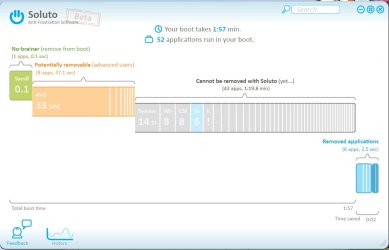
Thanks, Mexman, I had never heard of Soluto. It is quite an impressive utility and, in my estimation, a piece of beautifully written software.

I was unable to achieve anything close to the 30-40 seconds you mentioned.
Screenshot_6.jpg

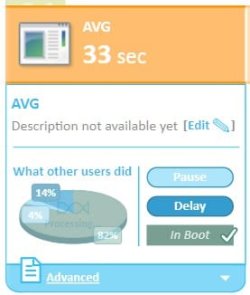
In fact, Soluto indicates my AVG Internet Security alone takes 33 seconds of boot time.
Screenshot_7.jpg

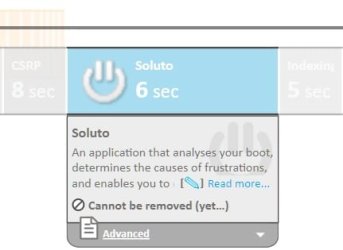
As Soluto goes about attempting to assist in the reduction of boot time resources, it carries its own small penalty at boot time and in system resources.
Screenshot_5.jpg Screenshot_4.jpg

As of this posting, I believe those penalties to be worth it and, to be fair, the software is self-proclaimed to be beta. Even with all that said, I love this utility. It is smartly presented; the User Interface is innovative and very easy to use.

Mexman, great find and, again, thanks for presenting it.
 
Last edited:

My Computer

Computer Manufacturer/Model Number
Toshiba L355D
OS
Windows 7 Ultimate x64 SP1
CPU
Core2 Duo
Motherboard
Intel
Memory
4 GB
Graphics Card(s)
GM965 on-board
Sound Card
RealTek on-board
Monitor(s) Displays
19"+17"(laptop)
Screen Resolution
1440x900 (x 2)
Hard Drives
500GB Ext. 200GB Internal
PSU
N/A
Case
N/A
Cooling
N/A
welcome, My boot time refers to when the Starting Windows splash screen starts to a USABLE desktop. You may want to try Avast and delay it. I get about 30 secs on an old athlon 2800 and 12 secs on my AMD 710 with a Kingston 64GB SSD. Highly recommend that SSD! lol

Looking at your SS's tho, you have a problem in your unremoveable apps. Check that your floppy is disabled in Bios and that u dont have a SOLID color desktop (that cost me 30secs!), Procmon from sysinternals is helpful too, Options/enable boot logging, REBOOT, then Tools, process activity summary. I think u may need to uncheck File/Capture events before startiing as well.
 

My Computer

Computer type
PC/Desktop
Computer Manufacturer/Model Number
Several custom builds
OS
Windows 7 Ultimate x64, Win 8.1, Win 10 preview, ubuntu14
CPU
AMD 710 X3, E8400, E5500, Athlon 64 2800, Q6600
Graphics Card(s)
IGP
Monitor(s) Displays
3 x S2309 23" 1920x1080
to the OP: I would ask Dell for a windows install disk that doesn't have any of the factory apps. If you zeroed your HDD and reinstalled windows minus the factory bloat you should get a boot time of about 25-30 seconds with your current hardware, provided you uncheck the run at startup option on everything else you install.. and that's from power-on to a usable desktop.
 
IF you really want a fast boot, try linux.. takes 9 seconds from POST to internet connectivity in my Dell D800
I've been using Linux for years; three flavours on my PC, but tired of fighting to get things to work that Windows 7 does pretty much without a hitch, so my Ubuntu, Fedora and Suse are gathering dust.

You could install a virtual pc on Ubuntu (I did) to run both OSes.
 

My Computer

Computer Manufacturer/Model Number
Dell and Custom
OS
Systems 1 and 2: Windows 7 Enterprise x64, Win 8 Developer
CPU
System 1: i7 [email protected], System 2: AMD FX-4100 Zambezi 3.6G
Motherboard
System 1:Dell 06NWYK System 2: ASUS M5A97 AM3+
Memory
System 1: 8GB System 2: 8GB
Graphics Card(s)
System 1: ATI FirePro V4800 System 2: Radeon HD 6850
Sound Card
System 1: onboard System 2: onboard
Monitor(s) Displays
System1: Viewsonic HDMI 24"
Screen Resolution
System 1: 1920x1080 System 2: 1920x1080
Hard Drives
System 1: Mirrored .5B drives System 2: Seagate Barracuda ST1000DM003 1TB 7200 RPM 64MB Cache SATA 6.0Gb/s
Case
System 1: Dell System 2: Cooler Master
Internet Speed
10 MBPS
IF you really want a fast boot, try linux.. takes 9 seconds from POST to internet connectivity in my Dell D800
I've been using Linux for years; three flavours on my PC, but tired of fighting to get things to work that Windows 7 does pretty much without a hitch, so my Ubuntu, Fedora and Suse are gathering dust.

You could install a virtual pc on Ubuntu (I did) to run both OSes.
I know this is off topic, but there are a quite a few things in linux that I wish Microsoft would adapt.. such as requiring a password to install applications or make global changes in system settings even when logged in as an administrator, and the built-in multiple desktop feature comes in handy when running multiple apps and VMs. The laptop I use for fixing customers' computers on site is a linux machine with 32 and 64 bit VMs of xp, vista and 7, and I can run them all simultaneously if I need to .. it's a very useful tool. Also, there a quite a few applications in linux that have no windows equivalent. I can think of a few instances, like file transfers and media conversion, where linux just gets things done faster.. bottom line.. gotta use the right tool for the job
 
Scan your HD with Malwarebytes and MS Security Essentials. Uninstall any AV to leave MSE as real time protection. You may need to leave it checked in msconfig, tho.

Remove the virtual desktop manager and LogMeIn programs using Revo in Advanced mode to see if boot returns to normal.

Google repeat errors in Performance Log on Advanced Tools page accessed by clicking WEI score at Computer>Properties.
Yes I've done Malwarebytes. All is OK once up and running and actually I rarely shut down; just sleep. Here is a copy of my WEI. How does it look compared to others?
 

Attachments

  • WEI.JPG
    WEI.JPG
    23.9 KB · Views: 8

My Computer

Computer Manufacturer/Model Number
Dell Studio Laptop 1747
OS
Windows 7
CPU
1.6GHz Intel Core i7 720
Motherboard
Dell 0J509P
Memory
6GB
Graphics Card(s)
ATI Radeon HD 4640
Sound Card
ATI High Def
Monitor(s) Displays
Generic PNP 17
Screen Resolution
1600 x 900
Hard Drives
500GB
Case
Laptop
Mouse
Synaptics Touchpad
Internet Speed
Hi Speed Cable
This is one of the best boot analysis tools I have used:
Soluto

You should be up in 30-40 secs max without excess startup apps.
Soluto sure looks interesting; will give that a shot; thanks.
 
Last edited:

My Computer

Computer Manufacturer/Model Number
Dell Studio Laptop 1747
OS
Windows 7
CPU
1.6GHz Intel Core i7 720
Motherboard
Dell 0J509P
Memory
6GB
Graphics Card(s)
ATI Radeon HD 4640
Sound Card
ATI High Def
Monitor(s) Displays
Generic PNP 17
Screen Resolution
1600 x 900
Hard Drives
500GB
Case
Laptop
Mouse
Synaptics Touchpad
Internet Speed
Hi Speed Cable
to the OP: I would ask Dell for a windows install disk that doesn't have any of the factory apps. If you zeroed your HDD and reinstalled windows minus the factory bloat you should get a boot time of about 25-30 seconds with your current hardware, provided you uncheck the run at startup option on everything else you install.. and that's from power-on to a usable desktop.
Surprisingly My Dell Studio 1747 came with a Win7 install DVD so I formatted and loaded without bloatware.
By accident I think I discovered why it was taking five minutes after the boot appeared complete before I could do anything. I thought I'd give MS A/V a try. Previously I was using F-Prot by my cable provider. I uninstalled it and installed MSE and my desktop was usable right after boot; 1:45 according to Soluto. I'm sure you wizards could shave my boot time down, but I'm happy with 1:45.
 

My Computer

Computer Manufacturer/Model Number
Dell Studio Laptop 1747
OS
Windows 7
CPU
1.6GHz Intel Core i7 720
Motherboard
Dell 0J509P
Memory
6GB
Graphics Card(s)
ATI Radeon HD 4640
Sound Card
ATI High Def
Monitor(s) Displays
Generic PNP 17
Screen Resolution
1600 x 900
Hard Drives
500GB
Case
Laptop
Mouse
Synaptics Touchpad
Internet Speed
Hi Speed Cable
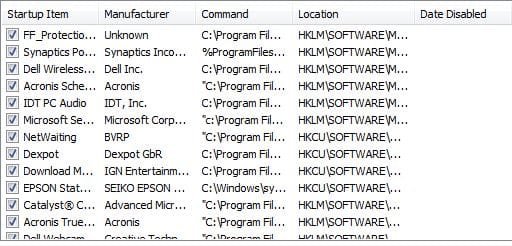
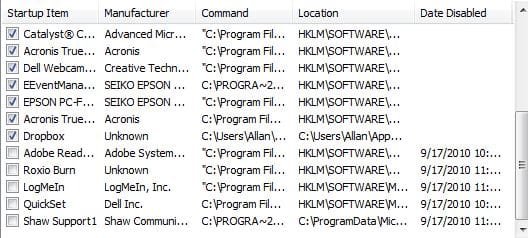
As madtownidiot said earlier, type msconfig. Click on "startup", widen the "startup item" column, and provide a screen capture for us.
 

My Computer

Computer Manufacturer/Model Number
Dell and Custom
OS
Systems 1 and 2: Windows 7 Enterprise x64, Win 8 Developer
CPU
System 1: i7 [email protected], System 2: AMD FX-4100 Zambezi 3.6G
Motherboard
System 1:Dell 06NWYK System 2: ASUS M5A97 AM3+
Memory
System 1: 8GB System 2: 8GB
Graphics Card(s)
System 1: ATI FirePro V4800 System 2: Radeon HD 6850
Sound Card
System 1: onboard System 2: onboard
Monitor(s) Displays
System1: Viewsonic HDMI 24"
Screen Resolution
System 1: 1920x1080 System 2: 1920x1080
Hard Drives
System 1: Mirrored .5B drives System 2: Seagate Barracuda ST1000DM003 1TB 7200 RPM 64MB Cache SATA 6.0Gb/s
Case
System 1: Dell System 2: Cooler Master
Internet Speed
10 MBPS
Or just uncheck everything in msconfig>Startup except AV and gadgets/stickynotes. The others are freeloaders on your startup/RAM/CPU and can spy on you.

Check the Performance log on Advanced Tools accessed by clicking WEI score at Computer>Properties. It will reveal which programs/drivers are slowing startup. Google to resolve the issues.

Your startup shouldn't be much more than 30 seconds with correct drivers and less cluster-start.
 
As madtownidiot said earlier, type msconfig. Click on "startup", widen the "startup item" column, and provide a screen capture for us.
Had to do two snips as Msconfig window wouldn't expand.
 

Attachments

  • msc.JPG
    msc.JPG
    38.7 KB · Views: 10
  • msc1.JPG
    msc1.JPG
    39.5 KB · Views: 7

My Computer

Computer Manufacturer/Model Number
Dell Studio Laptop 1747
OS
Windows 7
CPU
1.6GHz Intel Core i7 720
Motherboard
Dell 0J509P
Memory
6GB
Graphics Card(s)
ATI Radeon HD 4640
Sound Card
ATI High Def
Monitor(s) Displays
Generic PNP 17
Screen Resolution
1600 x 900
Hard Drives
500GB
Case
Laptop
Mouse
Synaptics Touchpad
Internet Speed
Hi Speed Cable
uncheck everything and reboot.. trust me.. it will still boot and everything will still work.. you'll just have to start it manually
 
Back
Top