
Solved Slow download speeds, Fast upload speeds. Other devices are fine.

nick11341134

New member
Local time
1:02 AM
Messages
6
My computer has extremely slow download speeds, upload speeds are fine. Ping is always at ~10-20ms. (to Google) The problem has nothing to do with, my ISP, my router, my type of connection. I know this for a fact.
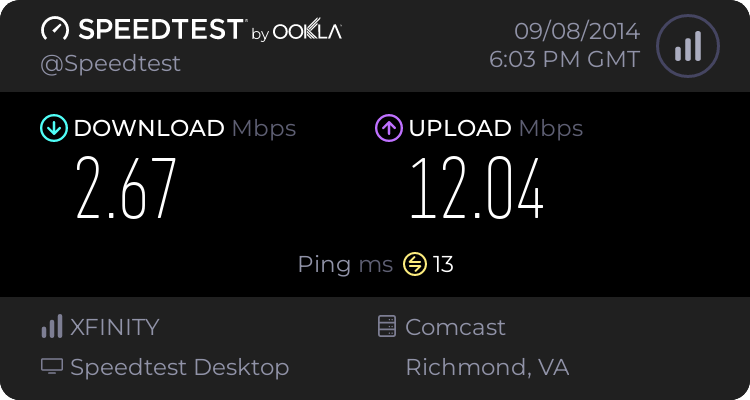

I've tried multiple network adapters. USB WiFi, integrated WiFi, connecting through another PC via ethernet, they all give the same result.

I'm guessing this is a problem with some software on the PC itself, as it seems to not be a hardware problem.

All other devices on the network have perfectly fine speeds, including Ethernet and WiFi connected devices.
I also cannot connect this PC to Ethernet, would take hours.

Any ideas on how to fix this?

Any and all help is greatly appreciated, thank you.
 

My Computer My Computer

At a glance

Windows 7 32bit
Computer type
Laptop
Computer Manufacturer/Model Number
Dell
OS
Windows 7 32bit
In device manager check the status of devices under Network Adapters
 

My Computer My Computer

At a glance

Windows 10 Tech PreviewIntel i5 (3rd Gen)4GBIntel HD Graphics 4000
Computer type
Laptop
Computer Manufacturer/Model Number
Dell Vostro 2520
OS
Windows 10 Tech Preview
CPU
Intel i5 (3rd Gen)
Motherboard
Intel® Mobile HM75 Express chipset
Memory
4GB
Graphics Card(s)
Intel HD Graphics 4000
Hard Drives
500GB
Keyboard
onboard keypad, USB keyboard
Mouse
touchpad, USB mouse, wireless muse
Internet Speed
4 Mbps
Antivirus
No
Browser
IE, chrome, firefox
There's nothing wrong with any devices
 

My Computer My Computer

At a glance

Windows 7 32bit
Computer type
Laptop
Computer Manufacturer/Model Number
Dell
OS
Windows 7 32bit
click on VIEW in menu bar and check 'Show Hidden Devices'
 

My Computer My Computer

At a glance

Windows 10 Tech PreviewIntel i5 (3rd Gen)4GBIntel HD Graphics 4000
Computer type
Laptop
Computer Manufacturer/Model Number
Dell Vostro 2520
OS
Windows 10 Tech Preview
CPU
Intel i5 (3rd Gen)
Motherboard
Intel® Mobile HM75 Express chipset
Memory
4GB
Graphics Card(s)
Intel HD Graphics 4000
Hard Drives
500GB
Keyboard
onboard keypad, USB keyboard
Mouse
touchpad, USB mouse, wireless muse
Internet Speed
4 Mbps
Antivirus
No
Browser
IE, chrome, firefox
Still nothing wrong with any devices.
 

My Computer My Computer

At a glance

Windows 7 32bit
Computer type
Laptop
Computer Manufacturer/Model Number
Dell
OS
Windows 7 32bit
check "Non Plug And Play Devices" in device manager(show hidden devices enabled)
 

My Computer My Computer

At a glance

Windows 10 Tech PreviewIntel i5 (3rd Gen)4GBIntel HD Graphics 4000
Computer type
Laptop
Computer Manufacturer/Model Number
Dell Vostro 2520
OS
Windows 10 Tech Preview
CPU
Intel i5 (3rd Gen)
Motherboard
Intel® Mobile HM75 Express chipset
Memory
4GB
Graphics Card(s)
Intel HD Graphics 4000
Hard Drives
500GB
Keyboard
onboard keypad, USB keyboard
Mouse
touchpad, USB mouse, wireless muse
Internet Speed
4 Mbps
Antivirus
No
Browser
IE, chrome, firefox
also check internet options:- select Connection's tab and check if it shows any Dial-Up/Brodband connection, also click on LAN Settings button
Reboot the system in Safe Mode With Network and test speed then
Create a new user account(Admin) and test speed
 

My Computer My Computer

At a glance

Windows 10 Tech PreviewIntel i5 (3rd Gen)4GBIntel HD Graphics 4000
Computer type
Laptop
Computer Manufacturer/Model Number
Dell Vostro 2520
OS
Windows 10 Tech Preview
CPU
Intel i5 (3rd Gen)
Motherboard
Intel® Mobile HM75 Express chipset
Memory
4GB
Graphics Card(s)
Intel HD Graphics 4000
Hard Drives
500GB
Keyboard
onboard keypad, USB keyboard
Mouse
touchpad, USB mouse, wireless muse
Internet Speed
4 Mbps
Antivirus
No
Browser
IE, chrome, firefox
Okay, will do that now. Be right back.
 

My Computer My Computer

At a glance

Windows 7 32bit
Computer type
Laptop
Computer Manufacturer/Model Number
Dell
OS
Windows 7 32bit
also check internet options:- select Connection's tab and check if it shows any Dial-Up/Brodband connection, also click on LAN Settings button
Reboot the system in Safe Mode With Network and test speed then
Create a new user account(Admin) and test speed

This fixed the problem, and i'm not sure why. Any ideas?
 

My Computer My Computer

At a glance

Windows 7 32bit
Computer type
Laptop
Computer Manufacturer/Model Number
Dell
OS
Windows 7 32bit
Back
Top