
Hi all
I am getting a very slow internet connection. Sometimes in the morning I get 6Mb/s, but more typicaly it's 0.1 Mb/s even when other machines on LAN connect at 4Mb/s
I have tried to be methodical about identifying root cause, but am now stumped
ISP
My other machines still connect at acceptable speeds.
Virus
My anti-virus software (Avast) is upto date and I have scanned the PC - All clean
Software
Have booted into safe mode, the problem still occurs.
Router
I have a Zyxel P600 with wireless. All of the other machines on my home LAN all run at 4+Mbs.
The router isn't Windows 7 certified. Does this make a difference? It always worked fine with Vista.
NIC
I have a intel(r) 82566dm-2 gigabit on-board connection, which I have updated to the latest driver from Intel.
There is some sort of problem here, because it keeps disconneting every 3 minutes or so, despite passing self tests. This may be the issue, however even if it doesn't drop for 5 minutes the slowness persists.
Windows Network
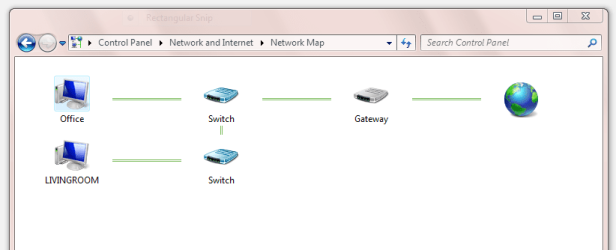
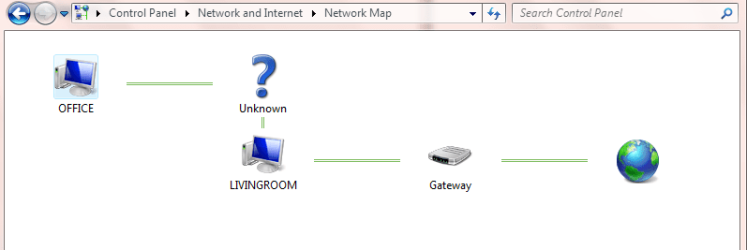
I get strange network map. Sometimes, it's Network1.png, which looks fine more usualy it's Network2.png, which looks like I connect using my Vista PC, which I don't. I've put this down to Microsoft oddness.
Any help very welcome
I am getting a very slow internet connection. Sometimes in the morning I get 6Mb/s, but more typicaly it's 0.1 Mb/s even when other machines on LAN connect at 4Mb/s
I have tried to be methodical about identifying root cause, but am now stumped
ISP
My other machines still connect at acceptable speeds.
Virus
My anti-virus software (Avast) is upto date and I have scanned the PC - All clean
Software
Have booted into safe mode, the problem still occurs.
Router
I have a Zyxel P600 with wireless. All of the other machines on my home LAN all run at 4+Mbs.
The router isn't Windows 7 certified. Does this make a difference? It always worked fine with Vista.
NIC
I have a intel(r) 82566dm-2 gigabit on-board connection, which I have updated to the latest driver from Intel.
There is some sort of problem here, because it keeps disconneting every 3 minutes or so, despite passing self tests. This may be the issue, however even if it doesn't drop for 5 minutes the slowness persists.
Windows Network
I get strange network map. Sometimes, it's Network1.png, which looks fine more usualy it's Network2.png, which looks like I connect using my Vista PC, which I don't. I've put this down to Microsoft oddness.
Any help very welcome
Attachments
My Computer
- OS
- windows 7
