Slow Internet....not same as other posts i think

upheaval

New member
Local time
3:54 PM
Messages
1
Hi-

First post so please bare with me. I am having a problem with a very slow internet connection and I can't figure it out. I browsed many of the threads here and other forums before deciding to post as I wanted to see if anyone else had the same problem but it appears that I am having the opposite problem as everyone else.

My XP, Vista and Win 7 laptops all run very fast on my home wireless network (G...i have to use G because my XP laptop card is only b/g compatible...connected via comcast cable modem and netgear wgr614 router)

Now, when I am at work, we are not allowed to use wireless. We use Comcast as well and there is a linksys router (version unknown) somewhere in the building, with lines routed everywhere. In two different offices, connected to 2 different ports of the router, my Vista laptop works very well with no problems loading ANY website and my download speed is very fast.

When I plug in the Win 7 laptop, I can't load most websites and what took 15 min to download on Vista, now counts up to 3days. When I go to speedtest.net, I get a download speed of 23.47mb/s and upload of 4.38mb/s. If those speeds are accurate, then it has to be a settings issue, right?

I am not sure what info you need but here is some on the Win 7 machine

win7 ultimate 64bit
dell studio 17
intel i7 720 w/ 8gb ram
dell dw1501 wireless-n wlan half mini card
realtek pcie gbe family controller
running google chrome browser

is there some oddball setting in win 7 that I am missing or that I should check for. when my wireless at home works well and my wired connection works under an older OS...it leads me to believe that it must be a setting in Win 7 for wired connections. The laptop is brand new (received it last week) so I hope it isn't the actual network card.

thanks in advance
 

My Computer

Computer Manufacturer/Model Number
dell
OS
win 7
CPU
i7
Memory
8g
Graphics Card(s)
ati
Sound Card
sb
Monitor(s) Displays
17" laptop
Hard Drives
primary 0.5tb
backups: redundant 1tb western digital
Hi-

First post so please bare with me. I am having a problem with a very slow internet connection and I can't figure it out. I browsed many of the threads here and other forums before deciding to post as I wanted to see if anyone else had the same problem but it appears that I am having the opposite problem as everyone else.

My XP, Vista and Win 7 laptops all run very fast on my home wireless network (G...i have to use G because my XP laptop card is only b/g compatible...connected via comcast cable modem and netgear wgr614 router)

Now, when I am at work, we are not allowed to use wireless. We use Comcast as well and there is a linksys router (version unknown) somewhere in the building, with lines routed everywhere. In two different offices, connected to 2 different ports of the router, my Vista laptop works very well with no problems loading ANY website and my download speed is very fast.

When I plug in the Win 7 laptop, I can't load most websites and what took 15 min to download on Vista, now counts up to 3days. When I go to speedtest.net, I get a download speed of 23.47mb/s and upload of 4.38mb/s. If those speeds are accurate, then it has to be a settings issue, right?

I am not sure what info you need but here is some on the Win 7 machine

win7 ultimate 64bit
dell studio 17
intel i7 720 w/ 8gb ram
dell dw1501 wireless-n wlan half mini card
realtek pcie gbe family controller
running google chrome browser

is there some oddball setting in win 7 that I am missing or that I should check for. when my wireless at home works well and my wired connection works under an older OS...it leads me to believe that it must be a setting in Win 7 for wired connections. The laptop is brand new (received it last week) so I hope it isn't the actual network card.

thanks in advance


Could easily be because your computer uses IPv6 and the router (especially if older) uses IPv4. Type cmd in search>ipconfig /all and upload a screenshot of the output.

Ken
 

My Computer

Computer Manufacturer/Model Number
HP Pavillion dv-7 1005 Tx
OS
Win 8 Release candidate 8400
CPU
[email protected]
Memory
4 gigs
Graphics Card(s)
Nvidia 9600M
Sound Card
HD built-in
Monitor(s) Displays
17" Wxga
Screen Resolution
1440x900
Cooling
none
Internet Speed
45Mb down 5Mb up
Hi-

First post so please bare with me. I am having a problem with a very slow internet connection and I can't figure it out. I browsed many of the threads here and other forums before deciding to post as I wanted to see if anyone else had the same problem but it appears that I am having the opposite problem as everyone else.

My XP, Vista and Win 7 laptops all run very fast on my home wireless network (G...i have to use G because my XP laptop card is only b/g compatible...connected via comcast cable modem and netgear wgr614 router)

Now, when I am at work, we are not allowed to use wireless. We use Comcast as well and there is a linksys router (version unknown) somewhere in the building, with lines routed everywhere. In two different offices, connected to 2 different ports of the router, my Vista laptop works very well with no problems loading ANY website and my download speed is very fast.

When I plug in the Win 7 laptop, I can't load most websites and what took 15 min to download on Vista, now counts up to 3days. When I go to speedtest.net, I get a download speed of 23.47mb/s and upload of 4.38mb/s. If those speeds are accurate, then it has to be a settings issue, right?

I am not sure what info you need but here is some on the Win 7 machine

win7 ultimate 64bit
dell studio 17
intel i7 720 w/ 8gb ram
dell dw1501 wireless-n wlan half mini card
realtek pcie gbe family controller
running google chrome browser

is there some oddball setting in win 7 that I am missing or that I should check for. when my wireless at home works well and my wired connection works under an older OS...it leads me to believe that it must be a setting in Win 7 for wired connections. The laptop is brand new (received it last week) so I hope it isn't the actual network card.

thanks in advance

There is a good chance this problem is caused by out of date firmware on your office router. Updating the firmware on the older router could easily fix this type of problem.
 

My Computer

Computer type
PC/Desktop
Computer Manufacturer/Model Number
Home built
OS
Windows 7 Ult, Windows 8.1 Pro,
CPU
Q9650-4.275GHz, E8600 4.5GHz, E6750-3.8GHz
Motherboard
Evga 780i FTW
Memory
G.Skill PC2 9600 1200Mhz 5 5 5 15 2T
Graphics Card(s)
GTX480
Sound Card
Asus Xonar D2
Monitor(s) Displays
HannsG
Screen Resolution
1680X1050
Hard Drives
GSkill Phoenix Pro 120GB SSD
PSU
ThermalTake Toughpower 1000Watt modular
Case
ThermalTake XaserV
Cooling
Xigmatek S1283
Keyboard
Logitech G15
Mouse
Logitech G9
Internet Speed
T1
same here

I believe that this has more to do with the DW1501 Wireless-N WLAN Half-Mini Card
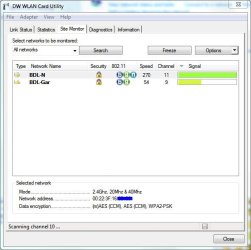
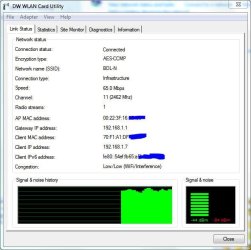
than anything else. I say this because I am having the same problems with speeds not going past 65 Mbps on the Win7Pro machine using this card. All of the other Win7Pro machines in my home with different wireless N cards are reaching around 230 Mbps while contacting the same router. I would be interested in hearing more about this.
Router is a Netgear WNDR3300.
Interesting note: When looking at the DW WLAN utility, you can see that the link is set for 270 mbps but can only achieve 65. See captures:
 

Attachments

  • Capture.JPG
    Capture.JPG
    58 KB · Views: 80
  • Capture2.JPG
    Capture2.JPG
    64.6 KB · Views: 84

My Computer

OS
Windows 7 Pro (64)
Have you actually looked into what Zigzag suggested?
 

My Computer

Computer type
Laptop
Computer Manufacturer/Model Number
Toshiba P775-S7100
OS
Windows 7 Professional SP1 64-bit
CPU
Intel Core i5-2450M @2.5 GHz
Memory
6 GB DDR3 1333MHz
Graphics Card(s)
Intel HD 3000
Monitor(s) Displays
Built-in 17.3" LED; 22" Insignia NS-L22Q-10A
Screen Resolution
1600x900; 1360x768
Hard Drives
750 GB Hitachi
1TB Seagate FreeAgent External
Internet Speed
Verizon DSL Speed(Down/Up): 3360 Kbps / 800 Kbps
Antivirus
MSE and MBAM Pro
Browser
IE10
Windows IP Configuration

Host Name . . . . . . . . . . . . : Prosig_i7-PC
Primary Dns Suffix . . . . . . . :
Node Type . . . . . . . . . . . . : Hybrid
IP Routing Enabled. . . . . . . . : No
WINS Proxy Enabled. . . . . . . . : No

Wireless LAN adapter Wireless Network Connection 2:

Media State . . . . . . . . . . . : Media disconnected
Connection-specific DNS Suffix . :
Description . . . . . . . . . . . : Microsoft Virtual WiFi Miniport Adapter
Physical Address. . . . . . . . . : 70-F1-A1-DF-4A-F3
DHCP Enabled. . . . . . . . . . . : Yes
Autoconfiguration Enabled . . . . : Yes

Ethernet adapter Local Area Connection 2:

Media State . . . . . . . . . . . : Media disconnected
Connection-specific DNS Suffix . :
Description . . . . . . . . . . . : Broadcom Virtual Wireless Adapter
Physical Address. . . . . . . . . : 70-F1-A1-DF-4A-F3
DHCP Enabled. . . . . . . . . . . : Yes
Autoconfiguration Enabled . . . . : Yes

Wireless LAN adapter Wireless Network Connection:

Connection-specific DNS Suffix . :
Description . . . . . . . . . . . : DW1501 Wireless-N WLAN Half-Mini Card
Physical Address. . . . . . . . . : 70-F1-A1-DF-4A-F3
DHCP Enabled. . . . . . . . . . . : Yes
Autoconfiguration Enabled . . . . : Yes
Link-local IPv6 Address . . . . . : fe80::cd8e:e1e5:8b81:a614%15(Preferred)
IPv4 Address. . . . . . . . . . . : 192.168.1.4(Preferred)
Subnet Mask . . . . . . . . . . . : 255.255.255.0
Lease Obtained. . . . . . . . . . : Monday, August 16, 2010 9:19:36 PM
Lease Expires . . . . . . . . . . : Tuesday, August 17, 2010 9:19:36 PM
Default Gateway . . . . . . . . . : 192.168.1.1
DHCP Server . . . . . . . . . . . : 192.168.1.1
DHCPv6 IAID . . . . . . . . . . . : 376500641
DHCPv6 Client DUID. . . . . . . . : 00-01-00-01-13-D6-68-9B-00-26-B9-E7-FC-FB

DNS Servers . . . . . . . . . . . : 192.168.1.1
NetBIOS over Tcpip. . . . . . . . : Enabled

Ethernet adapter Bluetooth Network Connection:

Media State . . . . . . . . . . . : Media disconnected
Connection-specific DNS Suffix . :
Description . . . . . . . . . . . : Bluetooth Device (Personal Area Network)
Physical Address. . . . . . . . . : C4-46-19-FC-77-4A
DHCP Enabled. . . . . . . . . . . : Yes
Autoconfiguration Enabled . . . . : Yes

Ethernet adapter Local Area Connection:

Media State . . . . . . . . . . . : Media disconnected
Connection-specific DNS Suffix . :
Description . . . . . . . . . . . : Realtek PCIe GBE Family Controller
Physical Address. . . . . . . . . : 00-26-B9-E7-FC-FB
DHCP Enabled. . . . . . . . . . . : Yes
Autoconfiguration Enabled . . . . : Yes

Tunnel adapter isatap.{F7D80F3F-1418-44DF-9457-82667372400D}:

Media State . . . . . . . . . . . : Media disconnected
Connection-specific DNS Suffix . :
Description . . . . . . . . . . . : Microsoft ISATAP Adapter
Physical Address. . . . . . . . . : 00-00-00-00-00-00-00-E0
DHCP Enabled. . . . . . . . . . . : No
Autoconfiguration Enabled . . . . : Yes

Tunnel adapter Teredo Tunneling Pseudo-Interface:

Connection-specific DNS Suffix . :
Description . . . . . . . . . . . : Teredo Tunneling Pseudo-Interface
Physical Address. . . . . . . . . : 00-00-00-00-00-00-00-E0
DHCP Enabled. . . . . . . . . . . : No
Autoconfiguration Enabled . . . . : Yes
IPv6 Address. . . . . . . . . . . : 2001:0:4137:9e76:2476:2464:baf1:e992(Pref
erred)
Link-local IPv6 Address . . . . . : fe80::2476:2464:baf1:e992%14(Preferred)
Default Gateway . . . . . . . . . : ::
NetBIOS over Tcpip. . . . . . . . : Disabled

Tunnel adapter isatap.{1850D222-0156-4FC4-BC10-D7C8DA6B8349}:

Media State . . . . . . . . . . . : Media disconnected
Connection-specific DNS Suffix . :
Description . . . . . . . . . . . : Microsoft ISATAP Adapter #3
Physical Address. . . . . . . . . : 00-00-00-00-00-00-00-E0
DHCP Enabled. . . . . . . . . . . : No
Autoconfiguration Enabled . . . . : Yes

Tunnel adapter isatap.{BB2EEE5C-119A-4683-97B1-F13FC5328F99}:

Media State . . . . . . . . . . . : Media disconnected
Connection-specific DNS Suffix . :
Description . . . . . . . . . . . : Microsoft ISATAP Adapter #4
Physical Address. . . . . . . . . : 00-00-00-00-00-00-00-E0
DHCP Enabled. . . . . . . . . . . : No
Autoconfiguration Enabled . . . . : Yes

Tunnel adapter isatap.{450706DD-B3EB-4C15-B7BC-971323F65756}:

Media State . . . . . . . . . . . : Media disconnected
Connection-specific DNS Suffix . :
Description . . . . . . . . . . . : Microsoft ISATAP Adapter #2
Physical Address. . . . . . . . . : 00-00-00-00-00-00-00-E0
DHCP Enabled. . . . . . . . . . . : No
Autoconfiguration Enabled . . . . : Yes

Tunnel adapter isatap.{E3DA53AD-BF8D-4A6B-94DC-0234852D5692}:

Media State . . . . . . . . . . . : Media disconnected
Connection-specific DNS Suffix . :
Description . . . . . . . . . . . : Microsoft ISATAP Adapter #5
Physical Address. . . . . . . . . : 00-00-00-00-00-00-00-E0
DHCP Enabled. . . . . . . . . . . : No
Autoconfiguration Enabled . . . . : Yes
 

My Computer

OS
Windows 7 Pro (64)
I believe that this has more to do with the DW1501 Wireless-N WLAN Half-Mini Card
than anything else. I say this because I am having the same problems with speeds not going past 65 Mbps on the Win7Pro machine using this card. All of the other Win7Pro machines in my home with different wireless N cards are reaching around 230 Mbps while contacting the same router. I would be interested in hearing more about this.
Router is a Netgear WNDR3300.
Interesting note: When looking at the DW WLAN utility, you can see that the link is set for 270 mbps but can only achieve 65. See captures:

Your router is fine for this and most every router these days can easily handle the IPv6 protocol.

The only reason I mentioned that it could be a router problem is because usually with a newer board the problem isnt usually caused by the hardware or the driver.

If the problem is this mini card then wouldn't that be a problem with the board itself? Maybe a different driver would help in that case.

You could always try a different wireless adaptor to see if that is the problem or not.
 

My Computer

Computer type
PC/Desktop
Computer Manufacturer/Model Number
Home built
OS
Windows 7 Ult, Windows 8.1 Pro,
CPU
Q9650-4.275GHz, E8600 4.5GHz, E6750-3.8GHz
Motherboard
Evga 780i FTW
Memory
G.Skill PC2 9600 1200Mhz 5 5 5 15 2T
Graphics Card(s)
GTX480
Sound Card
Asus Xonar D2
Monitor(s) Displays
HannsG
Screen Resolution
1680X1050
Hard Drives
GSkill Phoenix Pro 120GB SSD
PSU
ThermalTake Toughpower 1000Watt modular
Case
ThermalTake XaserV
Cooling
Xigmatek S1283
Keyboard
Logitech G15
Mouse
Logitech G9
Internet Speed
T1
I believe that this has more to do with the DW1501 Wireless-N WLAN Half-Mini Card
than anything else. I say this because I am having the same problems with speeds not going past 65 Mbps on the Win7Pro machine using this card. All of the other Win7Pro machines in my home with different wireless N cards are reaching around 230 Mbps while contacting the same router. I would be interested in hearing more about this.
Router is a Netgear WNDR3300.
Interesting note: When looking at the DW WLAN utility, you can see that the link is set for 270 mbps but can only achieve 65. See captures:

What kind of cable do you gave going from your modem to your router? Cat-5 or Cat-6?
Thats make the difference.
 

My Computer

Computer Manufacturer/Model Number
HP
OS
Windows 7 Ultimate 64-bit
CPU
Intel(R) Core(TM) i5-540M @ 2.53GHz
Motherboard
Hewlett-Packard 1522
Memory
4GB DDR3 System Memory
Graphics Card(s)
1GB ATI Mobility Radeon HD 5830 Graphics
Monitor(s) Displays
15.6" diagonal Full High Definition LED
Screen Resolution
1920x1080
Hard Drives
500GB 7200RPM SATA Hard Drive
PSU
6 Cell Lithium Ion Polymer Battery
Cooling
NZXT Aluminum Notebook Cooler With 3 120mm Adjustable Fans
Other Info
Envy 15
Chev
Yea, it looks like the adapter itself as that was the first thing that I did (swap in a different wifi card). I guess that I am still perplexed as to why in the DW WLAN utility that it shows it as setup for 270 but only gives me 65. I wonder if a patch would fix this or I have some setting out of place? What do you think?
Thanks for your insight.
 

My Computer

OS
Windows 7 Pro (64)
I believe that this has more to do with the DW1501 Wireless-N WLAN Half-Mini Card
than anything else. I say this because I am having the same problems with speeds not going past 65 Mbps on the Win7Pro machine using this card. All of the other Win7Pro machines in my home with different wireless N cards are reaching around 230 Mbps while contacting the same router. I would be interested in hearing more about this.
Router is a Netgear WNDR3300.
Interesting note: When looking at the DW WLAN utility, you can see that the link is set for 270 mbps but can only achieve 65. See captures:

What kind of cable do you gave going from your modem to your router? Cat-5 or Cat-6?
Thats make the difference.

CAT6. Great question.
But that wouldn't explain why other wireless N computers on the network reach wireless N speeds and this computer doesn't. Right? Maybe I am missing something. Would love to hear your thoughts. Thanks!
 

My Computer

OS
Windows 7 Pro (64)
Chev
Yea, it looks like the adapter itself as that was the first thing that I did (swap in a different wifi card). I guess that I am still perplexed as to why in the DW WLAN utility that it shows it as setup for 270 but only gives me 65. I wonder if a patch would fix this or I have some setting out of place? What do you think?
Thanks for your insight.


About all you can do in this case is try Windows updates or look around or wait for a better driver. Cat 5 or 6 has nothing to do with this type of problem. Cat5 won't limit a gigabyte connection one bit.
 

My Computer

Computer type
PC/Desktop
Computer Manufacturer/Model Number
Home built
OS
Windows 7 Ult, Windows 8.1 Pro,
CPU
Q9650-4.275GHz, E8600 4.5GHz, E6750-3.8GHz
Motherboard
Evga 780i FTW
Memory
G.Skill PC2 9600 1200Mhz 5 5 5 15 2T
Graphics Card(s)
GTX480
Sound Card
Asus Xonar D2
Monitor(s) Displays
HannsG
Screen Resolution
1680X1050
Hard Drives
GSkill Phoenix Pro 120GB SSD
PSU
ThermalTake Toughpower 1000Watt modular
Case
ThermalTake XaserV
Cooling
Xigmatek S1283
Keyboard
Logitech G15
Mouse
Logitech G9
Internet Speed
T1
Hi guys I'm having the same problem with my DW1501....connects at 72mbps and drops to 65mbps and is very slow transfering files..I have another laptop and that getting great speeds....I have tried everything....so i will be listening and watching...

dayday
 

My Computer

OS
windows 7 home premium
your work router may have the option of b, g or mixed. If it is set to b, that would account for your slow speed. You would need to be physically connected (unless they have wireless admin - I would hope not) to the router and have admin access to determine this.
 

My Computer

Computer Manufacturer/Model Number
Dell and Custom
OS
Systems 1 and 2: Windows 7 Enterprise x64, Win 8 Developer
CPU
System 1: i7 [email protected], System 2: AMD FX-4100 Zambezi 3.6G
Motherboard
System 1:Dell 06NWYK System 2: ASUS M5A97 AM3+
Memory
System 1: 8GB System 2: 8GB
Graphics Card(s)
System 1: ATI FirePro V4800 System 2: Radeon HD 6850
Sound Card
System 1: onboard System 2: onboard
Monitor(s) Displays
System1: Viewsonic HDMI 24"
Screen Resolution
System 1: 1920x1080 System 2: 1920x1080
Hard Drives
System 1: Mirrored .5B drives System 2: Seagate Barracuda ST1000DM003 1TB 7200 RPM 64MB Cache SATA 6.0Gb/s
Case
System 1: Dell System 2: Cooler Master
Internet Speed
10 MBPS
your work router may have the option of b, g or mixed. If it is set to b, that would account for your slow speed. You would need to be physically connected (unless they have wireless admin - I would hope not) to the router and have admin access to determine this.

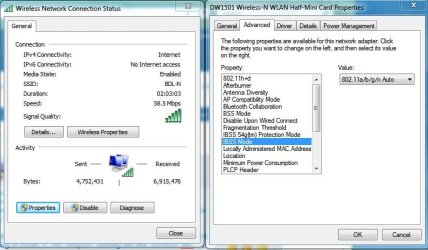
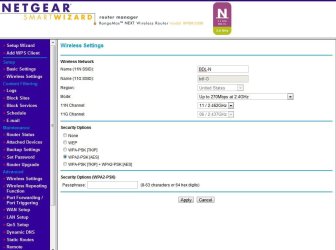
Yes the router does have the mixed mode (and wireless admin as well :confused:) and it is set to a/b/g/n auto. This setting is made in the adapter setting for the wireless NIC. I will attach a screen shot of the router settings as well as that NIC setting as well.
 

Attachments

  • Capture.JPG
    Capture.JPG
    77.8 KB · Views: 219
  • Capture2.JPG
    Capture2.JPG
    100.1 KB · Views: 151

My Computer

OS
Windows 7 Pro (64)
Hi Guys

Dell have been out for this morning and replaced my DW1510 wireless card with the Intel 6200 and results are what I'm used to 270mbps - 300mbps...awsome speeds :)


day
 

My Computer

OS
windows 7 home premium
Hello everyone!

I had the same problem with the "DW1501 Wiresless-N WLAN Half-Mini Card" about the slow connection.
I fixed it myself in this way.

Go to Device Manager:
Look for the Network Adapters and open the properties of your "DW1501 Wiresless-N WLAN Half-Mini Card"
When you're there, in the Advanced tab, Change the "BSS Mode" to 802.11g Mode.

For me It was set by default on 802.11n Mode, I changed it and that fixed the problem.

I hope this work for any of you guys that have this issue.
 

My Computer

OS
Windows 7 Home Premium 64bit.
Hello everyone!

I had the same problem with the "DW1501 Wiresless-N WLAN Half-Mini Card" about the slow connection.
I fixed it myself in this way.

Go to Device Manager:
Look for the Network Adapters and open the properties of your "DW1501 Wiresless-N WLAN Half-Mini Card"
When you're there, in the Advanced tab, Change the "BSS Mode" to 802.11g Mode.

For me It was set by default on 802.11n Mode, I changed it and that fixed the problem.

I hope this work for any of you guys that have this issue.

I registered just to say thanks. This worked for me. :cool:
 

My Computer

OS
pro 64bit
I registered just to say thanks. This worked for me. :cool:

You're welcome!!!. I'm glad that I helped somebody...
I told dell that there is a driver problem or something and they just didn't care.
 

My Computer

OS
Windows 7 Home Premium 64bit.
72Mbps... I was downloading like 50KBps max... that's not even close to what the doc says.

Anyways It looks like it was fixed because I reinstalled the driver a while ago and it's running on 802.11n just fine...

Regards.! ;)
 

My Computer

OS
Windows 7 Home Premium 64bit.
Back
Top