
Slow Internet

LostArchangelXx

New member
Local time
12:57 AM
Messages
3
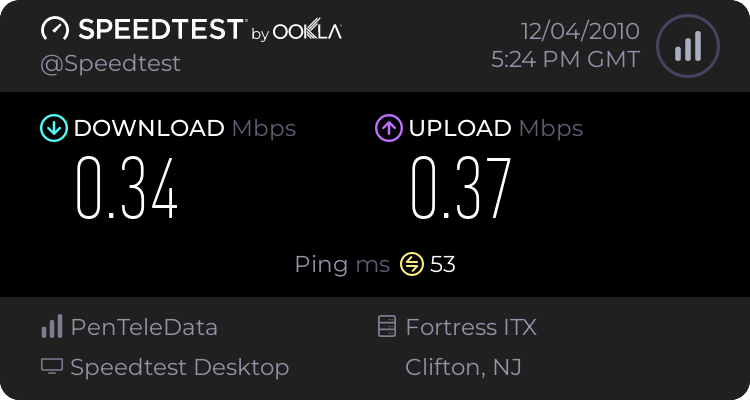
I'm running on a custom system but my issues are this. I'm using a NETGEAR RangeMax(TM) Wireless USB 2.0 Adapter WPN111 with a Linksys WRT54G V.4.1, on Windows 7 64-Bit and I'm suffering some major internet bandwidth issues. Due to the fact that my router is upstairs and my room is in the basement CAT-5 Cable is just totally impossible. I'm getting download rates in the kb and it's unbelievably slow at just about everything I do. While watching Netflix it took 35 minutes to fully buffer a 25 minutes episode of Avatar: The Last Airbender. My drivers are as up to date as possible, is there any way anyone can help me out?

Here's A Speed Test:
 

My Computer

OS
Windows 7 64bit
CPU
AMD Phenom 9850 Quad-Core
Motherboard
Asus M3A78-CM
Memory
4GB DDR2 800MHz
Graphics Card(s)
ATI Radeon 4850 HD Radeon
Hi LostArchangelXx and welcome to SevenForums,

1.) If you have a computer connected directly to the router what speeds do you get then?
2.) Did you used to get faster speeds?

Regards,
JDobbsy1987
 

My Computer

Computer type
PC/Desktop
Computer Manufacturer/Model Number
Self Built
OS
Windows 8.1 Pro x64
CPU
Intel Core i5-2500K @ 3.30GHz - S1155
Motherboard
Asus P8P67 LE Rev3, Intel P67, S115
Memory
8GB Corsair DDR3 XMS3, PC3-12800
Graphics Card(s)
NVIDIA GeForce GTX 650
Sound Card
On-Board
Monitor(s) Displays
3 x 24" {Extended Display}
Screen Resolution
1920 x 1080
Hard Drives
300GB Seagate Barracuda 7200
PSU
550W Coolermaster GX550
Case
Silverstone Precision PS04B
Cooling
Stock
Keyboard
Logitech K120
Mouse
World of Warcraft Cataclysm MMO Gaming Mouse
Internet Speed
80 MB
Antivirus
MSE / Windows Defender
Browser
Chrome
Yes, hardwire is definitely faster, I get a sort of throttle between faster speeds and slow ones, predominately slow, save when I boot up or reset the router or adapter.
 

My Computer

OS
Windows 7 64bit
CPU
AMD Phenom 9850 Quad-Core
Motherboard
Asus M3A78-CM
Memory
4GB DDR2 800MHz
Graphics Card(s)
ATI Radeon 4850 HD Radeon
For steaming video you really need good signal strength and also wireless N.

From what I'm seeing here you don't have either, wireless isn't magic, the connection speed and signal strength is only as good as you make it.

If you really want this to work right you would need to upgrade your router and your adaptor to the 802.11N standard or you could try using a wireless N bridge or access point to improve signal strength.
 

My Computer

Computer type
PC/Desktop
Computer Manufacturer/Model Number
Home built
OS
Windows 7 Ult, Windows 8.1 Pro,
CPU
Q9650-4.275GHz, E8600 4.5GHz, E6750-3.8GHz
Motherboard
Evga 780i FTW
Memory
G.Skill PC2 9600 1200Mhz 5 5 5 15 2T
Graphics Card(s)
GTX480
Sound Card
Asus Xonar D2
Monitor(s) Displays
HannsG
Screen Resolution
1680X1050
Hard Drives
GSkill Phoenix Pro 120GB SSD
PSU
ThermalTake Toughpower 1000Watt modular
Case
ThermalTake XaserV
Cooling
Xigmatek S1283
Keyboard
Logitech G15
Mouse
Logitech G9
Internet Speed
T1
For steaming video you really need good signal strength and also wireless N.

From what I'm seeing here you don't have either, wireless isn't magic, the connection speed and signal strength is only as good as you make it.

If you really want this to work right you would need to upgrade your router and your adaptor to the 802.11N standard or you could try using a wireless N bridge or access point to improve signal strength.


Kinda exactly what i was gonna say :p

Short term, stick a cat5e cable in (even if you have to disconnect it between downloads/streaming) i'm sure the cable wouldn't be anywhere near 100m?
 

My Computer

Computer type
PC/Desktop
Computer Manufacturer/Model Number
Self Built
OS
Windows 8.1 Pro x64
CPU
Intel Core i5-2500K @ 3.30GHz - S1155
Motherboard
Asus P8P67 LE Rev3, Intel P67, S115
Memory
8GB Corsair DDR3 XMS3, PC3-12800
Graphics Card(s)
NVIDIA GeForce GTX 650
Sound Card
On-Board
Monitor(s) Displays
3 x 24" {Extended Display}
Screen Resolution
1920 x 1080
Hard Drives
300GB Seagate Barracuda 7200
PSU
550W Coolermaster GX550
Case
Silverstone Precision PS04B
Cooling
Stock
Keyboard
Logitech K120
Mouse
World of Warcraft Cataclysm MMO Gaming Mouse
Internet Speed
80 MB
Antivirus
MSE / Windows Defender
Browser
Chrome
No it's just the complication of running it from my basement room on one side of the house to the second floor on the other side of the house without making my mother-in-law furious that there are "wires" running about the house.
 

My Computer

OS
Windows 7 64bit
CPU
AMD Phenom 9850 Quad-Core
Motherboard
Asus M3A78-CM
Memory
4GB DDR2 800MHz
Graphics Card(s)
ATI Radeon 4850 HD Radeon
Not sure if it really helps but if you pair equipment from different manufacturers only the "compatible features" of their abilities will be used. The netgear Stick can go up to 108 Mbps (if paired with an Netgear router that supports the RangeMax technology under optimal conditions that is)

Netgear said:
The RangeMax Wireless USB Adapter is optimized for use with the RangeMax Wireless Router which adjusts to the interference and physical barriers in your home, and delivers up to 500,000 square feet of coverage

while your Linksys under optimal circumstances goes up to 54Mbps

But even that would be much more than what you're getting now.
The main question is now WHY is your connection so weak ?
Is it because of the construction material in between (say floors done in steel armored concrete etc.)
In this case you could try a booster or a matching netgear router but that's kind of like a gamble.
Or is it just because the channel you're using is saturated by other wifi nets in the neighborhood?
If that's the case try to switch your router to a different channel. (check the manual ;)

Also check this out:
Top 10 Wi-Fi Boosts, Tweaks and Apps

You say CAT-5 is out of the question....I wonder...there should be existing cable channels going into your basement. (Ethernet 10BaseT or 100BaseTx allows for 100m cable length without any additional stuff) I assume you have at least power lines running down there ;) Granted running CAT-5 next to a power line isn't the best possible solution but always better than a weak wireless connection. A phone like channel would be optimal.
 

My Computer

Computer Manufacturer/Model Number
HP m8000n
OS
Windows 7 Ultimate x86
CPU
DualCore AMD Athlon 64 X2, 2600 MHz 5200+
Motherboard
Asus M2N68-LA (Narra)
Memory
Samsung 2GB DDR2
Graphics Card(s)
Onboard NVIDIA GeForce 6150SE nForce 430
Sound Card
Onboard nVIDIA nForce 6100-430 (MCP61P)
Monitor(s) Displays
Westinghouse 19" LED
Screen Resolution
1280x1024
Hard Drives
SATA II Seagate Barracuda 500GB
USB II WD Elements 500GB
USB II WD My Book 1TB
USB II WD My Book 2TB
PSU
Stock (HP)
Case
Stock (HP)
Cooling
Stock
Keyboard
Logitech Classic KB 200
Mouse
Standard HP opticle USB mouse
Back
Top