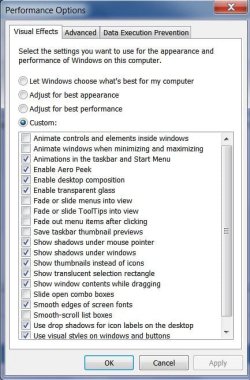
There are lots of ways of seeing this slow action, the easiest demo is this:
(I've just noticed another twist on this, if the 'Open' window covers over the NotePad menu items, and then you press escape (or click close). The greyed out menu items slowly appear in turn through the 'Open' window, and then the 'Open' window disappears. It's quicker if the 'Open' window doesn't cover Notepad. Again XP is instant.)
It gets worse in other situations. Notepad++ has many more items, takes longer.
This greying-out of menu items happens every time the window loses focus.
I noticed this first with VistaSwitcher which doesn't appear until the greying-out is complete, so the frequent alt-tabbing between windows is slowed by a few seconds depending on what I'm switching away from.
- Open Notepad.
- Press ctrl-o - to open a file.
- Watch Notepad's menu items slowly grey out, taking 3 seconds.
- When they are all greyed out the file 'Open' window appears.
- (You can nearly see the 'Open' window components building, but that's not this issue)
(I've just noticed another twist on this, if the 'Open' window covers over the NotePad menu items, and then you press escape (or click close). The greyed out menu items slowly appear in turn through the 'Open' window, and then the 'Open' window disappears. It's quicker if the 'Open' window doesn't cover Notepad. Again XP is instant.)
It gets worse in other situations. Notepad++ has many more items, takes longer.
This greying-out of menu items happens every time the window loses focus.
I noticed this first with VistaSwitcher which doesn't appear until the greying-out is complete, so the frequent alt-tabbing between windows is slowed by a few seconds depending on what I'm switching away from.
My Computer
- Computer type
- Laptop
- Computer Manufacturer/Model Number
- HP EliteBook 840
- OS
- Windows 7 Enterprise x64 SP1
- CPU
- Core i5
- Memory
- 8GB
- Antivirus
- McAfee
- Browser
- FireFix