
Slow performance with LogMeIn and Windows 7

RadxBoy

New member
Member
Local time
11:56 AM
Messages
48
I recently got a new PC (HP TouchScreen 610) with Windows 7, moving up from an old XP machine. When I used LogMeIn on the XP machine, it worked great... nice and fast with good "tactile" control. Now, with the latest version of LogMeIn on my new machine, it is way too "slow"; mouse movements, screen redraws on the remote computer are like molasses. In the general preferences of LogMeIn, I have checked and unchecked the performance categories below with no change:
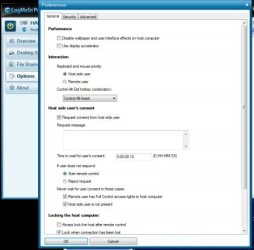
logmein-pref.jpg
Does anyone have any ideas on how to make it work?
Could it be the touchscreen?
Any other ideas?
Thank you.
 

My Computer My Computer

Computer Manufacturer/Model Number
HP TouchSmart 610
OS
Windows 7 Home Premium 64bit
I recently got a new PC (HP TouchScreen 610) with Windows 7, moving up from an old XP machine. When I used LogMeIn on the XP machine, it worked great... nice and fast with good "tactile" control. Now, with the latest version of LogMeIn on my new machine, it is way too "slow"; mouse movements, screen redraws on the remote computer are like molasses. In the general preferences of LogMeIn, I have checked and unchecked the performance categories below with no change:
View attachment 174575
Does anyone have any ideas on how to make it work?
Could it be the touchscreen?
Any other ideas?
Thank you.


I use logmein to support over 75 machines and I havent had this exact issue... a few questions for you:
  1. Are you having problems remoting in to more than 1 machine? If you can try remote controlling other PC's.
  2. Are you having the issue on your new PC when using it to remote other PC's, or only when you remote into that new PC?
  3. Have you checked into the logmein forums or help?
  4. Have you tried checking disable wallpaper and interface effects in host PC?
Here is logmein support for speeding a connection... FAQ:*How can I speed up my connection to the host computer?*-*LogMeIn Help

I have also had success by deleting the logmein video mirror driver on some machines. Hope this helps...
 

My Computer My Computer

Computer Manufacturer/Model Number
Homebrew PC - "Alpha_Dawg"
OS
Windows 7 Ultimate 64 bit Steve Ballmer Signature Edition
CPU
Intel Core 2 Quad - Q9550 - 2.83GHz stock - OC'd to 3.6GHz
Motherboard
Gigabyte EP45-UD3P
Memory
4GB DDR2 800MHz (PC6400) OCZ Reaper
Graphics Card(s)
Nvidia GE Force 8800 GTS
Sound Card
Asus Xonar DX
Monitor(s) Displays
Samsung SyncMaster 2333HD
Screen Resolution
1920 x 1080
Hard Drives
WD Caviar Black 750GB - 7200RPM - 32MB cache
WD Caviar Green 1.5TB - 5400RPM - 64MB cache
WD Caviar Green 2.0TB - 5400RPM - 64MB cache
PSU
PC Power & Cooling Silencer 750
Case
Gigabyte 3D Aurora
Cooling
Case is Air - 5ea. 120mm fans (mix of Arctic and Xigmatec)
Keyboard
MS Natural Wireless KB
Mouse
MS Wireless Mouse
Internet Speed
50 mbps down/5 mbps up
Other Info
AVerMedia - AVerTVHD G2 Dual Tuner Card
Thanks for your reply Darryl,
Currently, I have only tried remoting into my host (the new Windows 7 PC) from my PC at work. This worked fine a couple months ago when I had the older XP host set-up. Now, with the new host, I'm having problems. I have read through (and posted) the LogMeIn forums and could only find reference to
1. the performance options which I showed in the image of my original post,
2. reinstalling LogMeIn, and
3. reference to the video mirror driver which you mentioned. See Logmein slow on Windows 7 computer - LogMeIn Community.

I have also played around a little with the color quality which you suggested from the link without success.
Darryl, could you walk me trough the steps for deleting the video driver that you suggested? I would like to try that, as well as any other ideas. Thanks!
 

My Computer My Computer

Computer Manufacturer/Model Number
HP TouchSmart 610
OS
Windows 7 Home Premium 64bit
Darryl, could you walk me trough the steps for deleting the video driver that you suggested? I would like to try that, as well as any other ideas. Thanks!

Easy as PII...
  • Right click on "Computer"
  • Choose "Manage" (a cool place if you've never used it)
  • Go to "Device Manager" in left pane
  • Now in main pane, click on the chevron (triangle) next to Display Adapters
  • The Right click on the Logmein Mirror Driver and select "Uninstall"
Reboot and retry!

Also, it might be a good idea to add a friends or relative PC to your logmein to test your outbound PC...
 

My Computer My Computer

Computer Manufacturer/Model Number
Homebrew PC - "Alpha_Dawg"
OS
Windows 7 Ultimate 64 bit Steve Ballmer Signature Edition
CPU
Intel Core 2 Quad - Q9550 - 2.83GHz stock - OC'd to 3.6GHz
Motherboard
Gigabyte EP45-UD3P
Memory
4GB DDR2 800MHz (PC6400) OCZ Reaper
Graphics Card(s)
Nvidia GE Force 8800 GTS
Sound Card
Asus Xonar DX
Monitor(s) Displays
Samsung SyncMaster 2333HD
Screen Resolution
1920 x 1080
Hard Drives
WD Caviar Black 750GB - 7200RPM - 32MB cache
WD Caviar Green 1.5TB - 5400RPM - 64MB cache
WD Caviar Green 2.0TB - 5400RPM - 64MB cache
PSU
PC Power & Cooling Silencer 750
Case
Gigabyte 3D Aurora
Cooling
Case is Air - 5ea. 120mm fans (mix of Arctic and Xigmatec)
Keyboard
MS Natural Wireless KB
Mouse
MS Wireless Mouse
Internet Speed
50 mbps down/5 mbps up
Other Info
AVerMedia - AVerTVHD G2 Dual Tuner Card
Hi Darryl,
With your direction, removing the LogMeIn driver was easy and went smoothly.
Unfortunately, there is still this huge latency problem. I have tested it with three remote computers using LogMeIn without success.
This is so bizarre as I was using it fine with my old XP machine. I thought it would be faster, if anything. No help yet from the LogMeIn Forums.
Do you think it could have any think to do with my Windows 7 machine being a touchscreen?
If you have any other suggestions I am happy to entertain them. Thanks!
 

My Computer My Computer

Computer Manufacturer/Model Number
HP TouchSmart 610
OS
Windows 7 Home Premium 64bit
Hi Darryl,
With your direction, removing the LogMeIn driver was easy and went smoothly.
Unfortunately, there is still this huge latency problem. I have tested it with three remote computers using LogMeIn without success.
This is so bizarre as I was using it fine with my old XP machine. I thought it would be faster, if anything. No help yet from the LogMeIn Forums.
Do you think it could have any think to do with my Windows 7 machine being a touchscreen?
If you have any other suggestions I am happy to entertain them. Thanks!

I support Win7, Veesta, and XP machines with logmein... the only latency issues I've ever had are with slow Internet connections at the remote ends.

I doubt that the touchscreen is at fault, however... if you ahve access to a USB mouse and keyboard that should be easy enough to rule out.

I'd try uninstalling and reinstalling logmein on the offending machine! Also might be a good idea to check and make sure the remote is also updated. A firewall shouldnt have anything to do with this issue as logmein uses port 80, same as http traffic.
 

My Computer My Computer

Computer Manufacturer/Model Number
Homebrew PC - "Alpha_Dawg"
OS
Windows 7 Ultimate 64 bit Steve Ballmer Signature Edition
CPU
Intel Core 2 Quad - Q9550 - 2.83GHz stock - OC'd to 3.6GHz
Motherboard
Gigabyte EP45-UD3P
Memory
4GB DDR2 800MHz (PC6400) OCZ Reaper
Graphics Card(s)
Nvidia GE Force 8800 GTS
Sound Card
Asus Xonar DX
Monitor(s) Displays
Samsung SyncMaster 2333HD
Screen Resolution
1920 x 1080
Hard Drives
WD Caviar Black 750GB - 7200RPM - 32MB cache
WD Caviar Green 1.5TB - 5400RPM - 64MB cache
WD Caviar Green 2.0TB - 5400RPM - 64MB cache
PSU
PC Power & Cooling Silencer 750
Case
Gigabyte 3D Aurora
Cooling
Case is Air - 5ea. 120mm fans (mix of Arctic and Xigmatec)
Keyboard
MS Natural Wireless KB
Mouse
MS Wireless Mouse
Internet Speed
50 mbps down/5 mbps up
Other Info
AVerMedia - AVerTVHD G2 Dual Tuner Card
I know this is old, but if anyone else has this problem, I'd recommend trying at least two different web browsers first. I've noticed LogMeIn runs better or worse on different browsers (chrome/IE/firefox) and also depending on what operating system you're using. So try a different browser!
 

My Computer My Computer

Computer type
PC/Desktop
OS
Win7-64
Back
Top