Slow running and start up

RonBin79

New member
Member
VIP
Local time
8:57 AM
Messages
311
Location
West Sussex
My computer takes ages to start up and has been running slow, in fact I thought I had either a Trojan or worm, or maybe a virus. I have Kapersky installed and running, plus MalwareBytes. I have carried out a Malware Bytes full scan, a Super Anti Spy full scan plus a Kapersky full scan including the firewall and a Microsoft firewall scan. All of these have reported no problems. I have tried to do a System Restore but that would not work and I ended up with Microsoft attempting a repair which also failed. In the end it closed down my computer. I re-started it and was able to get back on line but only after waiting for about 25 minutes.

I am not particularly well skilled in this sort of thing so was wondering whether there is anyone in the forum who could look at my computer by remote and sort out the problem or perhaps give me detailed instructions (in simple and easy language terms) what I can do to overcome this problem?

Regards,
RonBin79 (now 81!:))
 

My Computer My Computer

Computer Manufacturer/Model Number
Dell XP8300
OS
Windows Seven Premium
CPU
Intel Core i5-2300
Motherboard
Unknown
Memory
8GB
Graphics Card(s)
1GB ATI Raedon HD 5450
Sound Card
Integrated 7.1 with THX TrueStudio
Monitor(s) Displays
Dell 17"
Hard Drives
1 Terrabyte Serial ATA
Case
Dell (Metal)
Cooling
None
Keyboard
Dell
Mouse
Dell Laser
Internet Speed
2.8Gb

My Computer My Computer

Computer type
Laptop
Computer Manufacturer/Model Number
Acer
OS
Windows 7 Ultimate -SP1 x32
CPU
Intel Pentium P6100 2.00ghz
Memory
2gb Ram
Graphics Card(s)
Intel HD Graphics 3000
Sound Card
High Definition Audio Device
Monitor(s) Displays
Generic PnP Monitor
Screen Resolution
1366 x 768
Hard Drives
Hitachi HTS545050B9A300
Keyboard
Standard PS/2 Keyboard
Mouse
3D Optical Mouse
Internet Speed
786 kbps (this connection is shitty)
Antivirus
Eset Smart Security 6
Browser
Google Chrome and Mozilla Firefox
Other Info
plays basketball and plays for provincial...download super-antispyware and malwarebytes for solid protection for your pc
My computer takes ages to start up and has been running slow, in fact I thought I had either a Trojan or worm, or maybe a virus. I have Kapersky installed and running, plus MalwareBytes. I have carried out a Malware Bytes full scan, a Super Anti Spy full scan plus a Kapersky full scan including the firewall and a Microsoft firewall scan. All of these have reported no problems. I have tried to do a System Restore but that would not work and I ended up with Microsoft attempting a repair which also failed. In the end it closed down my computer. I re-started it and was able to get back on line but only after waiting for about 25 minutes.

I am not particularly well skilled in this sort of thing so was wondering whether there is anyone in the forum who could look at my computer by remote and sort out the problem or perhaps give me detailed instructions (in simple and easy language terms) what I can do to overcome this problem?

Regards,
RonBin79 (now 81!:))

Hi RonBin79,

I believe best would be if you do clean reinstall on the system. If you have taken a backup using our software then check this video to restore your system to factory settings:

Factory reset using Dell Datasafe

If you have not made the same then best would be do a clean install on the windows follow this tutorial below:

http://www.sevenforums.com/tutorials/1649-clean-install-windows-7-a.html

And for requesting backup discs if needed then go to the link below:

http://dell.to/Zj7oHA

Keep us posted with the results so we can advise you further.
 

My Computer My Computer

Computer type
PC/Desktop
OS
Winndows 7 32 bit
Slow running computer

Hi Sandeep,

Having read all the advice, I am rather worried about diving into this sort of activity. I have printed out the instructions you gave from Dell but am worried that if I do a clean reinstall on the system I will loose some of my data, especially photographs. My problem is that I am 81 years old and am not as confident as someone in the 30's or 40's plus the fact that I am not computer software etc my any stretch of the imagination which is why I ask in my initial enquiry if there was anyone who could have a look at my machine by remote or the buddy system and see what is going wrong.

I will do a back up right away but am still very apprehensive about delving too deep into the depths of my software and how it works. Do you think that as a novice I would be able to carry out the exercises you recommend?

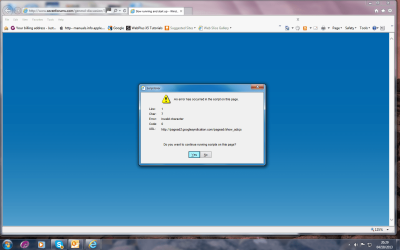
At the moment, every time I open Windows7 Forum I get this screen, as long I keep clicking on YES, I eventually get through and can communicate, its all very frustrating.

Regards,

RonBin79
 

Attachments

  • Script.png
    Script.png
    73.5 KB · Views: 5

My Computer My Computer

Computer Manufacturer/Model Number
Dell XP8300
OS
Windows Seven Premium
CPU
Intel Core i5-2300
Motherboard
Unknown
Memory
8GB
Graphics Card(s)
1GB ATI Raedon HD 5450
Sound Card
Integrated 7.1 with THX TrueStudio
Monitor(s) Displays
Dell 17"
Hard Drives
1 Terrabyte Serial ATA
Case
Dell (Metal)
Cooling
None
Keyboard
Dell
Mouse
Dell Laser
Internet Speed
2.8Gb
Ron, you should always have your data backed up externally since the HD could die at any time.

If you'd like for me to connect to go over your install to do basic troubleshooting and optimizing to bring it as close as possible to the perfect install in Clean Reinstall - Factory OEM Windows 7 then install TeamViewer Download at all defaults, private message me the ID and password, leave it open on your desktop.

It would help if you have a way to back up your files if you could do that first.
 
Last edited:
Hi Sandeep,

Having read all the advice, I am rather worried about diving into this sort of activity. I have printed out the instructions you gave from Dell but am worried that if I do a clean reinstall on the system I will loose some of my data, especially photographs. My problem is that I am 81 years old and am not as confident as someone in the 30's or 40's plus the fact that I am not computer software etc my any stretch of the imagination which is why I ask in my initial enquiry if there was anyone who could have a look at my machine by remote or the buddy system and see what is going wrong.

I will do a back up right away but am still very apprehensive about delving too deep into the depths of my software and how it works. Do you think that as a novice I would be able to carry out the exercises you recommend?

At the moment, every time I open Windows7 Forum I get this screen, as long I keep clicking on YES, I eventually get through and can communicate, its all very frustrating.

Regards,

RonBin79

Hi RonBin79,

I understand that it might not be easy for you to follow the steps so easily. However, it is always advised to have a backup of the data as re-install might be required.

You should try a clean boot on the system and let me know if it helps in increasing performance of the system:

Clean Boot

You can check with Greg as well or provide me with your service tag on a private message along with the contact details so I can check the details and if required arrange a callback for you.

If you have any further queries, please feel free to contact us.
 

My Computer My Computer

Computer type
PC/Desktop
OS
Winndows 7 32 bit
Back
Top