Slow Startup and Performance after 3 days in Hibernation Mode Win 64

TJGOA

New member
Local time
8:06 AM
Messages
93
Hey everyone, just came back from a Thanksgiving trip after 3 days to notice my computer was in hibernation mode the whole time, and not simply turned off as I intended. When I came back to boot up the computer a message popped up saying hibersys or hiber(something) could not be found or loaded etc. I didn't take a good look at it, had no idea of the problem that would start. After I pressed the OK button and to restart, it took a couple attempts to actually log into windows. For the few few times it would take forever, up to 20 minutes, then reach a black screen with blinking cursor. I got impatient and restarted a few times. I then tried to do a system repair but it said no found errors. Safe mode wouldn't log in at either or would take just as much time. After my latest attempt to logon I was successful after just letting it take its time, way more than 20 minutes. It finally made it past the welcome page and showed my desktop, this time it took another 15-20 minutes to load fully. Performance is now kinda shaky at times, taking a few minutes to complete tasks such as saving a music file to documents etc, and doing other arbitrary actions. At one point the black screen appeared again and only the cursor, but I waited and the desktop came back. A file render was in progress at that time. The cpu and ram are reading very low in task manager. As soon as I was able to login this time I also turned off the hibernation option in command prompt. I am running Win7 64 Home Edition with 4 gig ram and 1tb storage, with quad 2.7 ghz cpu. Make Dell Inspiron One. Any idea of what could be the problem?
 

My Computer My Computer

At a glance

Windows 7 Home Premium 64-bit SP16.00GB Dual-Channel DDR3 @ 666MHz (9-9-9-24)2 gigNSPIRON ONE (1280x768@60Hz) ATI Mobility Rade...
Computer type
PC/Desktop
Computer Manufacturer/Model Number
custom build
OS
Windows 7 Home Premium 64-bit SP1
CPU
6.00GB Dual-Channel DDR3 @ 666MHz (9-9-9-24)
Motherboard
Dell Inc. 0DPRF9 (CPU 1)
Memory
2 gig
Graphics Card(s)
NSPIRON ONE (1280x768@60Hz) ATI Mobility Radeon HD 4200 (Del
Hard Drives
System 500gb
Primary 500GB
Pretty weird, just had a message in bottom corner saying that this copy of windows 7 is not genuine (it is). Went to activate online, but before I did that, it now says it is activated and the message disappeared before doing anything?
 

My Computer My Computer

At a glance

Windows 7 Home Premium 64-bit SP16.00GB Dual-Channel DDR3 @ 666MHz (9-9-9-24)2 gigNSPIRON ONE (1280x768@60Hz) ATI Mobility Rade...
Computer type
PC/Desktop
Computer Manufacturer/Model Number
custom build
OS
Windows 7 Home Premium 64-bit SP1
CPU
6.00GB Dual-Channel DDR3 @ 666MHz (9-9-9-24)
Motherboard
Dell Inc. 0DPRF9 (CPU 1)
Memory
2 gig
Graphics Card(s)
NSPIRON ONE (1280x768@60Hz) ATI Mobility Radeon HD 4200 (Del
Hard Drives
System 500gb
Primary 500GB
Untitled.jpgwarning.jpg

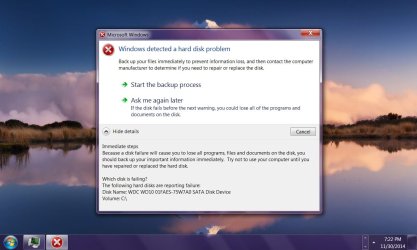
Got this message, so am now running ubuntu on usb to back up my files. Was taking way too long to do otherwise. So far that windows OS is unusable on this system. However ubuntu is running very smoothly without a hitch. Whats up with that, if there was something wrong with the hard drive wouldn't ubuntu also be running shaky? Any idea of what could be going on or what info I should post to help figure out problems/solutions?

Also on a side note, is it possible to install programs running ubuntu from flash drive without having to install it. Thanks in advance..
 

My Computer My Computer

At a glance

Windows 7 Home Premium 64-bit SP16.00GB Dual-Channel DDR3 @ 666MHz (9-9-9-24)2 gigNSPIRON ONE (1280x768@60Hz) ATI Mobility Rade...
Computer type
PC/Desktop
Computer Manufacturer/Model Number
custom build
OS
Windows 7 Home Premium 64-bit SP1
CPU
6.00GB Dual-Channel DDR3 @ 666MHz (9-9-9-24)
Motherboard
Dell Inc. 0DPRF9 (CPU 1)
Memory
2 gig
Graphics Card(s)
NSPIRON ONE (1280x768@60Hz) ATI Mobility Radeon HD 4200 (Del
Hard Drives
System 500gb
Primary 500GB
I'm thinking of just installing the ubuntu to the hard drive so I can for the time being install vlc player. Is there any danger of messing of the system further?
 

My Computer My Computer

At a glance

Windows 7 Home Premium 64-bit SP16.00GB Dual-Channel DDR3 @ 666MHz (9-9-9-24)2 gigNSPIRON ONE (1280x768@60Hz) ATI Mobility Rade...
Computer type
PC/Desktop
Computer Manufacturer/Model Number
custom build
OS
Windows 7 Home Premium 64-bit SP1
CPU
6.00GB Dual-Channel DDR3 @ 666MHz (9-9-9-24)
Motherboard
Dell Inc. 0DPRF9 (CPU 1)
Memory
2 gig
Graphics Card(s)
NSPIRON ONE (1280x768@60Hz) ATI Mobility Radeon HD 4200 (Del
Hard Drives
System 500gb
Primary 500GB
If when the system does ever boot fully, run commandline as admin, and try sfc /scannow
 

My Computer My Computer

At a glance

Windows 7 Home Premium 64 bitAMD A45 GBIntegrated Radeon
Computer type
PC/Desktop
Computer Manufacturer/Model Number
HP
OS
Windows 7 Home Premium 64 bit
CPU
AMD A4
Memory
5 GB
Graphics Card(s)
Integrated Radeon
Hard Drives
500 gb WD
Antivirus
360 TS
Browser
IE
the drive/OS might have been just corrupted, or, drive might actually be failing....

(If you have any other partitions on the same physical hard drive that seem to copy/transfer fine within Ubuntu, that would at least point to the fact that the drive still communicates fine with other non-corrupted partitions.)

Is a repair install an option? (Or you can insert the correct boot disk, select 'upgrade', but then install on top of the existing Win7 installation, which will not nuke your other apps/folders.

Beyond that, delete partitions, reformat, see if any errors on disk check prior to install....
 

My Computer My Computer

At a glance

Windows 7 Home Premium 64 bitAMD A45 GBIntegrated Radeon
Computer type
PC/Desktop
Computer Manufacturer/Model Number
HP
OS
Windows 7 Home Premium 64 bit
CPU
AMD A4
Memory
5 GB
Graphics Card(s)
Integrated Radeon
Hard Drives
500 gb WD
Antivirus
360 TS
Browser
IE
If when the system does ever boot fully, run commandline as admin, and try sfc /scannow

Thanks for your reply. Can you tell me exactly what type sfc/scannow in windows command prompt as administrator will do. Will it delete any files. If it take too long is it safe to shut down the computer while in progress. Like days etc.

Also when booting up ubuntu I also noticed a scan drive for errors option, is this similar and maybe a faster or better alternative. Thanks again
 

My Computer My Computer

At a glance

Windows 7 Home Premium 64-bit SP16.00GB Dual-Channel DDR3 @ 666MHz (9-9-9-24)2 gigNSPIRON ONE (1280x768@60Hz) ATI Mobility Rade...
Computer type
PC/Desktop
Computer Manufacturer/Model Number
custom build
OS
Windows 7 Home Premium 64-bit SP1
CPU
6.00GB Dual-Channel DDR3 @ 666MHz (9-9-9-24)
Motherboard
Dell Inc. 0DPRF9 (CPU 1)
Memory
2 gig
Graphics Card(s)
NSPIRON ONE (1280x768@60Hz) ATI Mobility Radeon HD 4200 (Del
Hard Drives
System 500gb
Primary 500GB
the drive/OS might have been just corrupted, or, drive might actually be failing....

(If you have any other partitions on the same physical hard drive that seem to copy/transfer fine within Ubuntu, that would at least point to the fact that the drive still communicates fine with other non-corrupted partitions.)

Is a repair install an option? (Or you can insert the correct boot disk, select 'upgrade', but then install on top of the existing Win7 installation, which will not nuke your other apps/folders.

Beyond that, delete partitions, reformat, see if any errors on disk check prior to install....

Thanks so much for your suggestions and taking the time to help me with this. I really appreciate it. To reinstall everything on this computer would take days so I'm going to avoid a full re-installation of windows as the very very last resort.

The partition where windows is installed has all my files and while in ubuntu I can freely copy and paste without any hitches whatsoever.

What is a repair install? Is it available from a bios window by hitting f(*) keys? Again it is really important to not overwrite all my software. I have already copied all my important file safely to another drive so I'm just looking into more what can be done to fix the computer. I don't think I have an physical copy of windows 7, would i be able to download it from Microsoft and still be able to activate it using the code found on the sticker on my computer?

How is a repair install different from selecting the upgrade option on the disk or iso? Does both preserve my software and files? I will first try this suggestion before asking the specifics about reformatting and creating other partitions which will be a last resort. Thanks again for your time and help.

All the best,

Tim
 

My Computer My Computer

At a glance

Windows 7 Home Premium 64-bit SP16.00GB Dual-Channel DDR3 @ 666MHz (9-9-9-24)2 gigNSPIRON ONE (1280x768@60Hz) ATI Mobility Rade...
Computer type
PC/Desktop
Computer Manufacturer/Model Number
custom build
OS
Windows 7 Home Premium 64-bit SP1
CPU
6.00GB Dual-Channel DDR3 @ 666MHz (9-9-9-24)
Motherboard
Dell Inc. 0DPRF9 (CPU 1)
Memory
2 gig
Graphics Card(s)
NSPIRON ONE (1280x768@60Hz) ATI Mobility Radeon HD 4200 (Del
Hard Drives
System 500gb
Primary 500GB
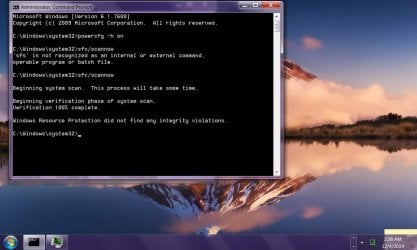
Okay just finished the sfc/scannow via command prompt as administrator and all came back good. No problems detected. I was hoping it would find something though..

cprompt.jpg

On the other hand the computer is running pretty well so far, no problems whatsoever except a slightly longer startup. But still getting the above error messages....
 

My Computer My Computer

At a glance

Windows 7 Home Premium 64-bit SP16.00GB Dual-Channel DDR3 @ 666MHz (9-9-9-24)2 gigNSPIRON ONE (1280x768@60Hz) ATI Mobility Rade...
Computer type
PC/Desktop
Computer Manufacturer/Model Number
custom build
OS
Windows 7 Home Premium 64-bit SP1
CPU
6.00GB Dual-Channel DDR3 @ 666MHz (9-9-9-24)
Motherboard
Dell Inc. 0DPRF9 (CPU 1)
Memory
2 gig
Graphics Card(s)
NSPIRON ONE (1280x768@60Hz) ATI Mobility Radeon HD 4200 (Del
Hard Drives
System 500gb
Primary 500GB

My Computer My Computer

At a glance

Windows 7 Home Premium 64-bit SP16.00GB Dual-Channel DDR3 @ 666MHz (9-9-9-24)2 gigNSPIRON ONE (1280x768@60Hz) ATI Mobility Rade...
Computer type
PC/Desktop
Computer Manufacturer/Model Number
custom build
OS
Windows 7 Home Premium 64-bit SP1
CPU
6.00GB Dual-Channel DDR3 @ 666MHz (9-9-9-24)
Motherboard
Dell Inc. 0DPRF9 (CPU 1)
Memory
2 gig
Graphics Card(s)
NSPIRON ONE (1280x768@60Hz) ATI Mobility Radeon HD 4200 (Del
Hard Drives
System 500gb
Primary 500GB
Found some viruses, removed, but still getting the error messages. Also when i first start computer I get this message: "Hard Drive SELF MONITORING SYSTEM has reported that a parameter has exceeded its normal operating range. Dell recommends that you back up your data regularly. A parameter out of range may or may not indicate a potential hard drive problem". Appears before I even log on to windows so I guess its safe to say its not a virus?

Also ran the western digital diagnostic test and it failed the QUICK TEST. Wouldn't even finish, says Quick Test on drive did not complete!.

Safe to assume then there is indeed a hardware problem I assume. Any other test to run before I go and install a new HD??
 

My Computer My Computer

At a glance

Windows 7 Home Premium 64-bit SP16.00GB Dual-Channel DDR3 @ 666MHz (9-9-9-24)2 gigNSPIRON ONE (1280x768@60Hz) ATI Mobility Rade...
Computer type
PC/Desktop
Computer Manufacturer/Model Number
custom build
OS
Windows 7 Home Premium 64-bit SP1
CPU
6.00GB Dual-Channel DDR3 @ 666MHz (9-9-9-24)
Motherboard
Dell Inc. 0DPRF9 (CPU 1)
Memory
2 gig
Graphics Card(s)
NSPIRON ONE (1280x768@60Hz) ATI Mobility Radeon HD 4200 (Del
Hard Drives
System 500gb
Primary 500GB
Back
Top