Solved slow switching between web site links etc

Vonda

New member
Power User
VIP
Local time
2:14 AM
Messages
160
Location
Canada
For about a month now I have this problem with really slow switching between links. For instance on this web site 01-17-1955_13058 Hond op de step | Flickr - Photo Sharing!
On my husband's computer I can switch between pictures as soon I click on "next" while on my computer I have to click several times and wait up to 7 sec or more before the next pic comes up. The same thing happens when I am on a web site and want click on a link to view another page. I looked into restore, but I can not find a place to change the date selection to a month back.
I did a chkdsk, but I do not think that anything amiss is in the event viewer.
I am not sure if these are the correct log files, but those where the only ones with a negative description that I could find.
 

Attachments

My Computer My Computer

Computer Manufacturer/Model Number
HPE-400f
OS
Widows 7 home premium 64 bit
CPU
AMD phenom(tm) 11 x 4 processor 3.00 GHz
Motherboard
?
Memory
8.00 GB
Graphics Card(s)
ATI Radeon HD 5450
Sound Card
?
Monitor(s) Displays
HP vs17
Hard Drives
1 TB Sata
Mouse
usb
Internet Speed
download 15 mbps
  • Like
Reactions: JMH
Sonetimes it takes 2 seconds, sometimes 7 to switch pictures on my PC with IE8. Perhaps your computer is slower than your husbands, or he is using a faster browser. You may want to try Start/All Programs/System Tools/Internet Explorer(no add-ons). If that helps you can manage your add-ons and delete or disable ones you don't need. You can also do an IE reset: Tools/Internet Options/Advanced/Reset.
 

My Computer My Computer

Computer type
PC/Desktop
Computer Manufacturer/Model Number
OQO 2+
OS
Windows 8 Pro w/MC 32-bit
CPU
Intel Atom 1.86 GHz
Motherboard
OQO 2+
Memory
2 GB
Graphics Card(s)
Intel GMA 500
Sound Card
IDT
Monitor(s) Displays
LCD
Screen Resolution
800 x 480 (portable) 1280 x 1024 (docked)
Hard Drives
64 GB SSD
PSU
9 Ah Battery (portable) or OQO Brick (docked)
Case
Shirt Pocket Sized
Cooling
Tiny Fan
Keyboard
Slide out (portable) DiNovo Edge (docked)
Mouse
Eraser head (portable) Logitech Bluetooth (docked)
Internet Speed
WWAN or 802.11G (portable) T1 (docked)
Browser
IE 10
Other Info
DVD-RW OQO Docking Station
Thank you for the reply. We did disable all add-ons, changed from IE8 to IE9, and reset both browsers. We also tried firefox and had the same results. My computer is actually a tad faster than the one from my husband plus I have 5 gigs more memory. This problem started about a month ago, but beside updating my grandson's I-Pod, we did not install any new programs. This slow response time is not just with changing pictures, but also between links on web sites. SuperAntiSpyware, malwarebytes and Zone Alarm Extreme security did not detect any malware.
 

My Computer My Computer

Computer Manufacturer/Model Number
HPE-400f
OS
Widows 7 home premium 64 bit
CPU
AMD phenom(tm) 11 x 4 processor 3.00 GHz
Motherboard
?
Memory
8.00 GB
Graphics Card(s)
ATI Radeon HD 5450
Sound Card
?
Monitor(s) Displays
HP vs17
Hard Drives
1 TB Sata
Mouse
usb
Internet Speed
download 15 mbps
To compare the PCs you could compare their Windows 7 experience indices. Right-click on Computer, select Properties. (You can also refresh the reading by clicking on the blue text and using "Re-run the assessment".) Also try switching their Ethernet connectors to see if that's the issue. If you're using Wi-Fi, try Ethernet temporarily to see if it affects the speed.
 

My Computer My Computer

Computer type
PC/Desktop
Computer Manufacturer/Model Number
OQO 2+
OS
Windows 8 Pro w/MC 32-bit
CPU
Intel Atom 1.86 GHz
Motherboard
OQO 2+
Memory
2 GB
Graphics Card(s)
Intel GMA 500
Sound Card
IDT
Monitor(s) Displays
LCD
Screen Resolution
800 x 480 (portable) 1280 x 1024 (docked)
Hard Drives
64 GB SSD
PSU
9 Ah Battery (portable) or OQO Brick (docked)
Case
Shirt Pocket Sized
Cooling
Tiny Fan
Keyboard
Slide out (portable) DiNovo Edge (docked)
Mouse
Eraser head (portable) Logitech Bluetooth (docked)
Internet Speed
WWAN or 802.11G (portable) T1 (docked)
Browser
IE 10
Other Info
DVD-RW OQO Docking Station
Hi roncerr, I did the above suggested tasks, beside that I did a performance trouble shoot and it stated that the prefetch was disabled (fixed now). My computer shows an overall rating of 5.1 and my husband's 3.0. In both computers it is the graphics that pull down the overall rating otherwise it would be a rating of 7.0 and 5.0 rating.
I did notice a slight improvement.
On this 01-17-1955_13058 Hond op de step | Flickr - Photo Sharing!
webpage it seem to be the same except if I go to click inside the picture and it then goes to a black background with the pictures inside (without showing the rest of the ad-page) then it switches as fast as on my husband's pc.
Should i go back to IE8?
 

My Computer My Computer

Computer Manufacturer/Model Number
HPE-400f
OS
Widows 7 home premium 64 bit
CPU
AMD phenom(tm) 11 x 4 processor 3.00 GHz
Motherboard
?
Memory
8.00 GB
Graphics Card(s)
ATI Radeon HD 5450
Sound Card
?
Monitor(s) Displays
HP vs17
Hard Drives
1 TB Sata
Mouse
usb
Internet Speed
download 15 mbps
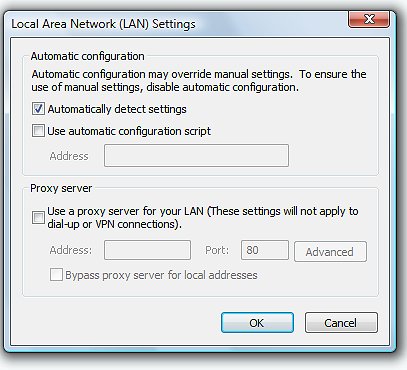
Tools/Internet Options/Connections/LAN Settings >> Make sure all boxes are UNchecked. If that doesn't fix it you could try running IE with "No-Addons" via the Start Menu list. You may want to check the Tools/Manage Add-ons window to remove unneeded stuff. You could also do a "Disk Cleanup".

It was my understanding that IE9 is supposed to be faster than IE8 and the main reason people switch to it. I haven't bothered to switch yet, do to the problems/changes that have been reported by some users; but I don't recall anyone saying it was slower.

BTW my experience index is only 2.6, due to my relatively slow processor speed of 1.86 GHz.

The link you provided works fast for me, including the switch to the black background.
 

My Computer My Computer

Computer type
PC/Desktop
Computer Manufacturer/Model Number
OQO 2+
OS
Windows 8 Pro w/MC 32-bit
CPU
Intel Atom 1.86 GHz
Motherboard
OQO 2+
Memory
2 GB
Graphics Card(s)
Intel GMA 500
Sound Card
IDT
Monitor(s) Displays
LCD
Screen Resolution
800 x 480 (portable) 1280 x 1024 (docked)
Hard Drives
64 GB SSD
PSU
9 Ah Battery (portable) or OQO Brick (docked)
Case
Shirt Pocket Sized
Cooling
Tiny Fan
Keyboard
Slide out (portable) DiNovo Edge (docked)
Mouse
Eraser head (portable) Logitech Bluetooth (docked)
Internet Speed
WWAN or 802.11G (portable) T1 (docked)
Browser
IE 10
Other Info
DVD-RW OQO Docking Station
lan.jpg
I did remove all the ad-ons already and after re-enabling the pre-fetch it went a little better, but not like it was last month.
Do you mean to uncheck all the boxes like in the second half of the attachment?
 

My Computer My Computer

Computer Manufacturer/Model Number
HPE-400f
OS
Widows 7 home premium 64 bit
CPU
AMD phenom(tm) 11 x 4 processor 3.00 GHz
Motherboard
?
Memory
8.00 GB
Graphics Card(s)
ATI Radeon HD 5450
Sound Card
?
Monitor(s) Displays
HP vs17
Hard Drives
1 TB Sata
Mouse
usb
Internet Speed
download 15 mbps
By "Tools/Internet Options/Connections/LAN Settings" I was referring to the Tools item in the IE command bar. You can also get there by using "Control Panel/Internet Options..."
 

My Computer My Computer

Computer type
PC/Desktop
Computer Manufacturer/Model Number
OQO 2+
OS
Windows 8 Pro w/MC 32-bit
CPU
Intel Atom 1.86 GHz
Motherboard
OQO 2+
Memory
2 GB
Graphics Card(s)
Intel GMA 500
Sound Card
IDT
Monitor(s) Displays
LCD
Screen Resolution
800 x 480 (portable) 1280 x 1024 (docked)
Hard Drives
64 GB SSD
PSU
9 Ah Battery (portable) or OQO Brick (docked)
Case
Shirt Pocket Sized
Cooling
Tiny Fan
Keyboard
Slide out (portable) DiNovo Edge (docked)
Mouse
Eraser head (portable) Logitech Bluetooth (docked)
Internet Speed
WWAN or 802.11G (portable) T1 (docked)
Browser
IE 10
Other Info
DVD-RW OQO Docking Station
lan2.jpg
You mean that I need to un-check the box in the attachment? There are two more computers connected to the router with the Cat cable and one via wireless with a d-link.
 

My Computer My Computer

Computer Manufacturer/Model Number
HPE-400f
OS
Widows 7 home premium 64 bit
CPU
AMD phenom(tm) 11 x 4 processor 3.00 GHz
Motherboard
?
Memory
8.00 GB
Graphics Card(s)
ATI Radeon HD 5450
Sound Card
?
Monitor(s) Displays
HP vs17
Hard Drives
1 TB Sata
Mouse
usb
Internet Speed
download 15 mbps
...You mean that I need to un-check the box in the attachment? There are two more computers connected to the router with the Cat cable and one via wireless with a d-link.
Yes. That auto detect process involves a long series of checks that are unneeded for most people who don't use a proxy. So any computer that has it checked should be better off without it. Of course if the two PCs you've been comparing both have it checked, then that won't explain why the one with with the higher experience index is slower.
 

My Computer My Computer

Computer type
PC/Desktop
Computer Manufacturer/Model Number
OQO 2+
OS
Windows 8 Pro w/MC 32-bit
CPU
Intel Atom 1.86 GHz
Motherboard
OQO 2+
Memory
2 GB
Graphics Card(s)
Intel GMA 500
Sound Card
IDT
Monitor(s) Displays
LCD
Screen Resolution
800 x 480 (portable) 1280 x 1024 (docked)
Hard Drives
64 GB SSD
PSU
9 Ah Battery (portable) or OQO Brick (docked)
Case
Shirt Pocket Sized
Cooling
Tiny Fan
Keyboard
Slide out (portable) DiNovo Edge (docked)
Mouse
Eraser head (portable) Logitech Bluetooth (docked)
Internet Speed
WWAN or 802.11G (portable) T1 (docked)
Browser
IE 10
Other Info
DVD-RW OQO Docking Station
First off, thank you for your patience.
Un-checking that box did not make a difference. The only thing that made a slight difference was to re-enable the pre fetch. I thought of restoring the PC to the time I figure the problems started (about a month ago), but I can't find a way to create a restore point date that far back. I did check in the tutorials and created a restore point, but it does not show how far back it goes.
 

My Computer My Computer

Computer Manufacturer/Model Number
HPE-400f
OS
Widows 7 home premium 64 bit
CPU
AMD phenom(tm) 11 x 4 processor 3.00 GHz
Motherboard
?
Memory
8.00 GB
Graphics Card(s)
ATI Radeon HD 5450
Sound Card
?
Monitor(s) Displays
HP vs17
Hard Drives
1 TB Sata
Mouse
usb
Internet Speed
download 15 mbps
Resolved by system recovery

While I tried to learn to do these fixes myself, I finally decided to get my husband do a complete system restore. He backed up the files with WET and now the PC works like it was new. Thanks for your patience and help.
 

My Computer My Computer

Computer Manufacturer/Model Number
HPE-400f
OS
Widows 7 home premium 64 bit
CPU
AMD phenom(tm) 11 x 4 processor 3.00 GHz
Motherboard
?
Memory
8.00 GB
Graphics Card(s)
ATI Radeon HD 5450
Sound Card
?
Monitor(s) Displays
HP vs17
Hard Drives
1 TB Sata
Mouse
usb
Internet Speed
download 15 mbps
...Thanks for your patience and help.
Thank your husband. That's a lot of work, but works wonders for any system.
 

My Computer My Computer

Computer type
PC/Desktop
Computer Manufacturer/Model Number
OQO 2+
OS
Windows 8 Pro w/MC 32-bit
CPU
Intel Atom 1.86 GHz
Motherboard
OQO 2+
Memory
2 GB
Graphics Card(s)
Intel GMA 500
Sound Card
IDT
Monitor(s) Displays
LCD
Screen Resolution
800 x 480 (portable) 1280 x 1024 (docked)
Hard Drives
64 GB SSD
PSU
9 Ah Battery (portable) or OQO Brick (docked)
Case
Shirt Pocket Sized
Cooling
Tiny Fan
Keyboard
Slide out (portable) DiNovo Edge (docked)
Mouse
Eraser head (portable) Logitech Bluetooth (docked)
Internet Speed
WWAN or 802.11G (portable) T1 (docked)
Browser
IE 10
Other Info
DVD-RW OQO Docking Station
Back
Top