Slow System

olumide

New member
Local time
7:37 AM
Messages
4
Location
Nigeria
Hi everyone,
I just got a dell laptop with windows 7 pre-installed.I just notice that it always take time to shut down and if i start it it takes long to execute a simple click.Theres this display that comes out that EXPLORER.EXE is not responding! with 3 options of to either restart the explore.exe or close it or wait till it responds,please what do i do?:mad:
 

My Computer

Computer Manufacturer/Model Number
Dell
OS
window 7
Hi, olumide.

Well, I'll let you know that I've got the same problem as you. I've been with Windows 7 for about a year now, and when I hit 'Shut Down', my computer can be 'shutting down' for over half an hour. I'm not sure how to fix the problem. One solution I tried was to alter a Windows Registry entry which was in control of shutdown time - it did not work.

As for the 'Explorer.exe' issue, it can happen every once in a while - especially when you're undergoing severe operations and particularly if you manage to stall the system. What you do here isn't important.

I'd like to recommend running a scan or two, as it sounds like you've congested your system. A Registry scan with an application such as CCleaner will improve performance. Also, if you feel as though you may have fallen victim to a form of malware, you could run a scan with Malwarebytes' Anti-Malware or an antivirus application.

If you'd like, I can get you some secure links.

Can you tell me about your RAM and CPU? Best of luck!

Thanks,
Harvey Meale
 

My Computer

Computer Manufacturer/Model Number
Dell Inspiron 1545
OS
Windows 7 Home Premium 32-bit, BackTrack 4, Ubuntu
thank you

The RAM is 1GB,cpu is intel celeron.
 

My Computer

Computer Manufacturer/Model Number
Dell
OS
window 7
1GB of RAM is not much for Windows 7. You should have a minimum of 2GB of RAM.

I didn't know Dell was still selling NEW PC's with the Celeron processor?
 

My Computer

Computer type
PC/Desktop
Computer Manufacturer/Model Number
My Own Build
OS
Windows 10 64 bit
CPU
Intel i7 6700K
Motherboard
ASUS ROG Maximus VIII Hero
Memory
16GB Corsair Dominator
Graphics Card(s)
Intel CPU Graphics
Sound Card
RealTek
Monitor(s) Displays
27" Dell S2719dgf
Screen Resolution
2560X1440
Hard Drives
1 TB Samsung 850 EVO SSD for Win 10 Pro
500GB Samsung 850 EVO SSD for Win 10 Insider
2 TB drive for backup
PSU
EVGA Supernova 750G2
Case
BeQuiet Silent Base 600
Cooling
Deepcool Captain 120EX
Keyboard
Microsoft Wireless 2000
Mouse
Microsoft wireless
Internet Speed
100 MB/sec (Cable)
Antivirus
Microsoft Defender and Malwarebytes
Browser
Edge/Firefox
Other Info
Cakewalk (Sonar) by BandLab and Studio One 4.1 Pro recording studio software. MOTU 896Mk3 Hybrid recording interface, Frontier Tranzport wireless control unit, Behringer X-Touch Control Surface.
Five USB connected optical drives for CD Audio production using Nero BurningROM
Yes, it could either be the work of malware or lack of maintenance??? Did this recently got slow or it slower and slower until it came to this???

Your RAM and CPU look OK but using CCleaner would be a good option..
 

My Computer

Computer Manufacturer/Model Number
Custom Built
OS
Windows 7 Ultimate 32 Bit, Windows Developer Preview, Linux Mint 9 Gnome 32 Bit
CPU
Intel Pentium Dual CPU E2180@2GHz
Motherboard
Elitegroup 671T-M3
Graphics Card(s)
NVIDIA GeForce 7200 GS
Monitor(s) Displays
AOC TFT1560 15" LCD Monitor
Screen Resolution
1024x768
Keyboard
Logitech USB Keyboard
So what do you mean?:confused:
 

My Computer

Computer Manufacturer/Model Number
Dell
OS
window 7
:shock:
Yes, it could either be the work of malware or lack of maintenance??? Did this recently got slow or it slower and slower until it came to this???

Your RAM and CPU look OK but using CCleaner would be a good option..


I do not think its lack of maintanance cos i scan the systen once in 2weeks
besides i git the system newly about 7weeks ago.
 

My Computer

Computer Manufacturer/Model Number
Dell
OS
window 7
You might have too much (too many programs) running in the background for the laptop to handle - since it has 1gb ram.

When you "scan" you system, what program does the scan? Do you run disk defragmenter under windows? Do you scan for viruses?

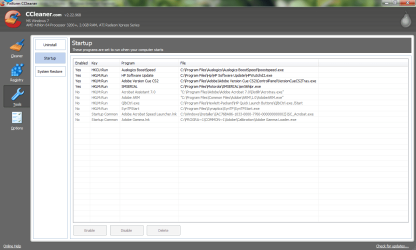
Use CCleaner to clean temp files, and disable startup files.

Capture-ccleaner.PNG <=== "clean junk files"
~~~~~~~~~~~
Capture-ccleaner2.PNG <=== "disable startup entries"
 

My Computer

Computer Manufacturer/Model Number
ATX Custom Build 2012
OS
Windows 7 Enterprise x64 SP1
CPU
Intel Core i3-2100 @ 3.10GHz
Motherboard
Intel DH67CL desktop ATX
Memory
10 GB DDR3
Graphics Card(s)
Asus EAH5450 series (Radeon)
Monitor(s) Displays
Samsung SyncMaster 226BW, Samsung Syncmaster P2450H
Screen Resolution
226BW: 1680 x 1050 & P2450H: 1920 x 1080
Hard Drives
Western Digital 320 GB sata (boot), Samsung 640 GB sata, Seagate 2 TB sata (data)
PSU
Cooler Master Extreme Power Plus 500W
Case
Thermaltake V3 Black Edition
Cooling
stock cooling with added intake fan
Keyboard
HP Wireless Elite Keyboard Wireless Keyboard
Mouse
Microsoft Touch
Internet Speed
Comcast Cable business class <=18Mb {averages 12Mb}
Other Info
Optical drives: LG SuperMulti Blue, HP DVD 1260T
Other: Kensington Bluetooth Receiver
Network: Buffalo Wireless N USB, DLink N router/DLink Ethernet Switch/DLink Xtreme N wireless bridge
Printer: HP Photosmart Plus, HP Officejet Pro 8600 Plus
PCs: HP dv6-3040us (7 x64 SP1), HP DM4-2165dx (7 x64 SP1), HP Pavilion zv6130us (7 x86), Apple Macbook Air (Lion)
************
Hi, Olumide.

I just want to reiterate what some of the above users have said. The most likely cause for your slowness is that you've jammed your system full of games and/or resourceful applications. The truth is, 1 gigabyte of RAM isn't going to handle much at all. If you've set programs to launch on startup, I'd strongly recommend you disable them (use the instructions merkat106 posted). This way, you can reduce startup time and improve upon overall efficiency.

Alternatively, you could consider upgrading your RAM to either 2 gigabytes, or preferably 4 or more. Another thing you can do is to run malware scans along with the aforementioned defragmentation and Registry scan. Good luck!

Thanks,
Harvey Meale
 

My Computer

Computer Manufacturer/Model Number
Dell Inspiron 1545
OS
Windows 7 Home Premium 32-bit, BackTrack 4, Ubuntu
The RAM is 1GB,cpu is intel celeron.

That's a slow computer in general. 1GB should be decent but I take it that the Intel Celeron is a single core CPU. Not a good idea for any modern PC let a lone a laptop. Next time, spend a little more and get a dual core Pentium or better.
 

My Computer

OS
Windows 7 Home Premium x64
CPU
Intel Core 2 Quad Q9450 @ 3.2GHz
Motherboard
Asus P5Q PRO Turbo
Memory
4GB DDR2-800
Graphics Card(s)
MSI Radeon HD 5850
Sound Card
Creative Labs Audigy2 ZS
Monitor(s) Displays
Samsung 225BW
Hard Drives
(2) 1TB Samsung F1, (2) 1.5TB Samsung F2, 1TB Samsung F2, 2TB Samsung F3
PSU
Corsair HX650
Case
Antec Nine Hundred
my cpu is a intel celeron and i run 64 bit version of windows but i have 3gb of ram and only have my anti virus start up no other programs and i delete my temp files often so it can't be the processor it's the ram or temp files.
 

My Computer

Computer Manufacturer/Model Number
HP Pavilion p6795a
OS
windows 7 64 bit
CPU
intel core i5 3.30GHz Quad Core
Motherboard
HP
Memory
6gb
Graphics Card(s)
AMD RADEON HD 6450 1GB Dedicated
Sound Card
ATI HIGH DEFINITION SOUND
Monitor(s) Displays
LG
Screen Resolution
16:9 Hd
Hard Drives
1TB
Cooling
Fan
Keyboard
Wireless
Mouse
HP wireless keyboard and mouse
Internet Speed
fast enough
Other Info
Beast Of A Machine!
While yes ram is an important part of running Windows 7 and I do not think 1 GB is enough to get the whole experience although my sons desktop runs 7 on 1.25 Gigs of ram and runs slick as snot and the only thing he does not have is the aero option but he does not seem to mind.

I have a Dell laptop that runs Vista and the shutdown process on that too is painstakingly slow and can take quite sometime to shut down , although I have never investigated it because the only thing I use it for is work , so it could be a Dell issue too ? could it not ?
 

My Computer

Computer type
PC/Desktop
Computer Manufacturer/Model Number
HP
OS
Windows 8 Pro / Windows 7 Home Premium x64 dual boot
Memory
6 gigs
Graphics Card(s)
Nvidia GEForce 9400 GT
Screen Resolution
1600 x 900
Hard Drives
Internal - Western Digital 600 gb HDD
Internal - Western Digital 250 gb HDD
External - Western Digital 1 TB HDD
Antivirus
Avast!
Browser
Pale Moon
Back
Top