Slow Wifi Speed

r00ploi

New member
VIP
Local time
8:18 AM
Messages
269
Hi,

I have one of these wireless cards Asus WL-138g v2 and I have it running on Windows 7 Ultimate 64bit the card stays connected but is painfully slow when downloading and using the internet. I have tried a collection of different drivers removed anti virus software, disabled all start up items and services but this does not solve the issue. The only thing I have found so far that does solve this problem is to boot into safe mode and then it works fine and is not slow at all. Anyone have any ideas on what might cause this issue?

THanks
 

My Computer

Computer type
Laptop
Computer Manufacturer/Model Number
HP
OS
Windows 7
As always check to make sure you have the most up to date driver from Asus. Also check and/or disable any software firewall that may be negatively affecting the connection.

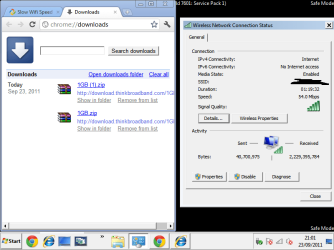
Another thought that comes to mind is... what are you connecting to with this wifi card? Is this your own network, or? What is the signal strength of this connection? Screenshots may be helpful here.
 

My Computer

Computer Manufacturer/Model Number
Homebrew PC - "Alpha_Dawg"
OS
Windows 7 Ultimate 64 bit Steve Ballmer Signature Edition
CPU
Intel Core 2 Quad - Q9550 - 2.83GHz stock - OC'd to 3.6GHz
Motherboard
Gigabyte EP45-UD3P
Memory
4GB DDR2 800MHz (PC6400) OCZ Reaper
Graphics Card(s)
Nvidia GE Force 8800 GTS
Sound Card
Asus Xonar DX
Monitor(s) Displays
Samsung SyncMaster 2333HD
Screen Resolution
1920 x 1080
Hard Drives
WD Caviar Black 750GB - 7200RPM - 32MB cache
WD Caviar Green 1.5TB - 5400RPM - 64MB cache
WD Caviar Green 2.0TB - 5400RPM - 64MB cache
PSU
PC Power & Cooling Silencer 750
Case
Gigabyte 3D Aurora
Cooling
Case is Air - 5ea. 120mm fans (mix of Arctic and Xigmatec)
Keyboard
MS Natural Wireless KB
Mouse
MS Wireless Mouse
Internet Speed
50 mbps down/5 mbps up
Other Info
AVerMedia - AVerTVHD G2 Dual Tuner Card
Hi,

Thanks for your response,

I have disabled all the firewall and anti virus software that I have installed this has not helped with the issue. I'm also using the latest driver for the card as well. I have attached a screenshot showing the signal strength and speed that the card is currently running at. As I mentioned in my first post the card works fine in safe mode but when I boot backup into windows normally its very slow to load or download things from the internet.
 

Attachments

  • wireless card2.png
    wireless card2.png
    28.4 KB · Views: 74

My Computer

Computer type
Laptop
Computer Manufacturer/Model Number
HP
OS
Windows 7
Hi wizkid,

Depending on your broadband speed as well. What's your signed up bandwidth?
Are there any other home users that utilizing the bandwidth heavily as well?

You may try changing the Wireless Mode from the router's settings from a Mixed (usually a default) to a B/G or a G.

Make sure that you are using the highest network security which is WPA2, so that no one can tap in to your network and using a free Wi-Fi connection.
 
Last edited:

My Computer

Computer Manufacturer/Model Number
Lenovo Desktop/Samsung Laptop
OS
Win7 & Win8 64bit
CPU
Intel i5
Internet Speed
Charter-20 Mbps
Antivirus
Avast
Browser
FF, IE9 and Chrome
Great point 2xg... I had asked OP earlier whether this was his/her Internet or??? If it is your Internet connection, what type is it... Fiber, Cable, DSL??? And as asked, what speed are you paying for? For example, DSL still has speed of 1.5 mbps and faster.

According to the screenshot you are connecting at full strength (54mbps)... have you measured your actual speed using www.speedtest.net ???
 

My Computer

Computer Manufacturer/Model Number
Homebrew PC - "Alpha_Dawg"
OS
Windows 7 Ultimate 64 bit Steve Ballmer Signature Edition
CPU
Intel Core 2 Quad - Q9550 - 2.83GHz stock - OC'd to 3.6GHz
Motherboard
Gigabyte EP45-UD3P
Memory
4GB DDR2 800MHz (PC6400) OCZ Reaper
Graphics Card(s)
Nvidia GE Force 8800 GTS
Sound Card
Asus Xonar DX
Monitor(s) Displays
Samsung SyncMaster 2333HD
Screen Resolution
1920 x 1080
Hard Drives
WD Caviar Black 750GB - 7200RPM - 32MB cache
WD Caviar Green 1.5TB - 5400RPM - 64MB cache
WD Caviar Green 2.0TB - 5400RPM - 64MB cache
PSU
PC Power & Cooling Silencer 750
Case
Gigabyte 3D Aurora
Cooling
Case is Air - 5ea. 120mm fans (mix of Arctic and Xigmatec)
Keyboard
MS Natural Wireless KB
Mouse
MS Wireless Mouse
Internet Speed
50 mbps down/5 mbps up
Other Info
AVerMedia - AVerTVHD G2 Dual Tuner Card
Hi

Thanks for your responses,

Sorry for missing the question about my internet I am on an up to 20mb service and the throughput speed on the card is showing about 16mb. I am the only one using the internet. I have tried changing the router from B/G/N none of these have helped. I am also using the highest security level WPA2 and have a very strong encryption key.


The card continues to work ok in safe mode but not when running windows normally.
 

My Computer

Computer type
Laptop
Computer Manufacturer/Model Number
HP
OS
Windows 7
That sounds about normal speed to me. I get about 16mbits in a wireless connectionas well, try a wired connection, you might get close to a 20mbits.
Sorry for missing the question about my internet I am on an up to 20mb service and the throughput speed on the card is showing about 16mb.
You may try disabling unnecessary Startup Apps and Services that are not needed. Click on start and type msconfig then locate Startup and Services Tab.
The card continues to work ok in safe mode but not when running windows normally.
 

My Computer

Computer Manufacturer/Model Number
Lenovo Desktop/Samsung Laptop
OS
Win7 & Win8 64bit
CPU
Intel i5
Internet Speed
Charter-20 Mbps
Antivirus
Avast
Browser
FF, IE9 and Chrome
HI,

Thanks for your reply

I've disabled all start up items and services that are not needed but the card is still slow when using the internet. But is fine in safe mode I cant work out what might be causing this issue. I have also disabled the LAN ports on the motherboard to see if this made any difference but it did not help.


Do you have any other suggestions?

Thanks,
 

My Computer

Computer type
Laptop
Computer Manufacturer/Model Number
HP
OS
Windows 7
Can you please wired your computer directly to the router? What's the speed?

Another test, wired your computer to the Modem bypassing the router, what's the speed?
 

My Computer

Computer Manufacturer/Model Number
Lenovo Desktop/Samsung Laptop
OS
Win7 & Win8 64bit
CPU
Intel i5
Internet Speed
Charter-20 Mbps
Antivirus
Avast
Browser
FF, IE9 and Chrome
Can you please wired your computer directly to the router? What's the speed?

Another test, wired your computer to the Modem bypassing the router, what's the speed?


Speed comes out around the same 16mb, on speed tests. Wired is fine in normal windows I only seem to have the problem with the wireless being slow.
 

My Computer

Computer type
Laptop
Computer Manufacturer/Model Number
HP
OS
Windows 7
Does your router has the latest firmware? I would definitely verify this.

Also, you may try WPA encryption, see if it makes any difference. Sometimes, when you change encryption even lowering it to WEP, then upgrading it to WPA2 would do magic. :D
 

My Computer

Computer Manufacturer/Model Number
Lenovo Desktop/Samsung Laptop
OS
Win7 & Win8 64bit
CPU
Intel i5
Internet Speed
Charter-20 Mbps
Antivirus
Avast
Browser
FF, IE9 and Chrome
Does your router has the latest firmware? I would definitely verify this.

Also, you may try WPA encryption, see if it makes any difference. Sometimes, when you change encryption even lowering it to WEP, then upgrading it to WPA2 would do magic. :D


Hi,

Thanks for your response,

Would this make any difference though as the card is working fine in safe mode but not when running in windows normally. I'm sure you are probably right but just wanted to check first?

Also the router is currently running on the latest firmware.


Edit - have tried changing the security settings still the same.
 
Last edited:

My Computer

Computer type
Laptop
Computer Manufacturer/Model Number
HP
OS
Windows 7
What is your AV/Firewall or Security Software installed?
 

My Computer

Computer Manufacturer/Model Number
Lenovo Desktop/Samsung Laptop
OS
Win7 & Win8 64bit
CPU
Intel i5
Internet Speed
Charter-20 Mbps
Antivirus
Avast
Browser
FF, IE9 and Chrome
What is your AV/Firewall or Security Software installed?

At the moment the system has no AV/Firewall software installed
 

My Computer

Computer type
Laptop
Computer Manufacturer/Model Number
HP
OS
Windows 7
That might be an issue, if you're speed is way better in Safe Mode and not Normal Mode your system might be infected.

Let's do some minor Virus and Malware scan. Please install MSE Free, then scan your computer, no need to post the logs. Also, install SuperAntiSpyware and run it as well.

Test your connection after.
 

My Computer

Computer Manufacturer/Model Number
Lenovo Desktop/Samsung Laptop
OS
Win7 & Win8 64bit
CPU
Intel i5
Internet Speed
Charter-20 Mbps
Antivirus
Avast
Browser
FF, IE9 and Chrome
That might be an issue, if you're speed is way better in Safe Mode and not Normal Mode your system might be infected.

Let's do some minor Virus and Malware scan. Please install MSE Free, then scan your computer, no need to post the logs. Also, install SuperAntiSpyware and run it as well.

Test your connection after.


Thanks for your response,

I did all these before uninstalling the AV/Firewall software. I dont think its an infection as I can connect through Ethernet fine in windows but its just the wireless card that I have slow speeds with. It seems like something is interfering with the card in windows because it works fine in safe mode.
 

My Computer

Computer type
Laptop
Computer Manufacturer/Model Number
HP
OS
Windows 7
Hi, wizkid.

2xg asked me to take a look at your thread since it was suspected the problem may be a malware issue. If you are completely comfortable that it is not a malware issue, fine. However, you may wish to consider an on-line scan. If so, please do the following:

Please go here to run an on-line scan from ESET.

  • Note: It is easiest if you use Internet explorer for this scan. (If you use an alternate browser, it will be necessary to download the ESET Smart Installer)
  • Turn off the real time scanner of any existing antivirus program while performing the online scan
  • Tick the box next to YES, I accept the Terms of Use.
  • Click Start
  • When asked, allow the ActiveX control to install
  • Click Start
  • Make sure that the option Remove found threats is unticked and the Scan Archives option is ticked.
  • Click on Advanced Settings, ensure the options Scan for potentially unwanted applications, Scan for potentially unsafe applications, and Enable Anti-Stealth Technology are ticked.
  • Click Scan
  • Wait for the scan to finish
  • Use notepad to open the logfile located at C:\Program Files\Eset\Eset Online Scanner\log.txt
  • Copy and paste that log as a reply to this topic.

Possible malware issues aside, please realize that when you boot to Safe Mode, certain generic safe drivers (i.e., VGA drivers) are loaded instead of the drivers for your hardware. Also, even though you tested disabling unnecessary services, nonetheless, the system still loads only minimal services when booting to Safe Mode. Thus, it is not unexpected that your connection would be faster.

I spent a bit of time researching the ASUS WL-138g v2 Wireless Network Adapter PCI Card and discovered that slowness issues with that particular card is common.

Sample at ASUS WL-138G V2 recognized as airport card but running slow (Note: there are suggestions in that thread that adjusting the antenna made a major difference.)
When I installed the WL-138G v2, my results are around .4 to 1MBps.
Comments in the topic at the ASUS Support Forum here dating back a number of years with slowness issues with this card.
 

My Computer

OS
Windows 7 & Windows Vista Ultimate
Thanks Corrine...much appreciated. :)
Hi, wizkid.

2xg asked me to take a look at your thread since it was suspected the problem may be a malware issue. If you are completely comfortable that it is not a malware issue, fine. However, you may wish to consider an on-line scan. If so, please do the following:

Please go here to run an on-line scan from ESET.

  • Note: It is easiest if you use Internet explorer for this scan. (If you use an alternate browser, it will be necessary to download the ESET Smart Installer)
  • Turn off the real time scanner of any existing antivirus program while performing the online scan
  • Tick the box next to YES, I accept the Terms of Use.
  • Click Start
  • When asked, allow the ActiveX control to install
  • Click Start
  • Make sure that the option Remove found threats is unticked and the Scan Archives option is ticked.
  • Click on Advanced Settings, ensure the options Scan for potentially unwanted applications, Scan for potentially unsafe applications, and Enable Anti-Stealth Technology are ticked.
  • Click Scan
  • Wait for the scan to finish
  • Use notepad to open the logfile located at C:\Program Files\Eset\Eset Online Scanner\log.txt
  • Copy and paste that log as a reply to this topic.

Possible malware issues aside, please realize that when you boot to Safe Mode, certain generic safe drivers (i.e., VGA drivers) are loaded instead of the drivers for your hardware. Also, even though you tested disabling unnecessary services, nonetheless, the system still loads only minimal services when booting to Safe Mode. Thus, it is not unexpected that your connection would be faster.

I spent a bit of time researching the ASUS WL-138g v2 Wireless Network Adapter PCI Card and discovered that slowness issues with that particular card is common.

Sample at ASUS WL-138G V2 recognized as airport card but running slow (Note: there are suggestions in that thread that adjusting the antenna made a major difference.)
When I installed the WL-138G v2, my results are around .4 to 1MBps.
Comments in the topic at the ASUS Support Forum here dating back a number of years with slowness issues with this card.
 

My Computer

Computer Manufacturer/Model Number
Lenovo Desktop/Samsung Laptop
OS
Win7 & Win8 64bit
CPU
Intel i5
Internet Speed
Charter-20 Mbps
Antivirus
Avast
Browser
FF, IE9 and Chrome
Back
Top