
Solved Slow windows boot with SSD.

AnthonyP

New member
Local time
5:35 PM
Messages
17
It's taking 107 seconds to completely restart even with 7 installed on the SSD.

Before I installed Windows I used OCZ toolbox to SE the SSDs since they were in RAID TRIM wasn't running. I installed Windows with the RAID still on but not the drives part of the array anymore. Windows boots in seconds the first boot, no problems. I get to installing all the drivers and I notice the boot seems to stall some time at Welcome afterwards.

I format the other SSD and mount the drive as a folder in the OS SSD. Install the mobo utilities and it slows and install all my programs and now its taking a good 30-40 seconds from the Windows logo to the desktop. The Windows logo is a split second and most of the time doesn't finish the animation Welcome takes the longest time and after the screen can stay black for 10-20 seconds until the desktop shows up. But other than that everything is nice and snappy.

I don't have a lot of programs running at boot only about 7, mostly the intel stuff AMD catalyst and my printer software which shouldn't be making it take so long to boot. Is there something I can post here so someone can help me troubleshoot this? I also dunno if it matters but I ran WEI after I installed all the drivers and the drive showed up as a 7.9 now its a 7.6, it never went down before and is just strange.

Also I used the latest drivers from gigabyte's support site. And installed them in the proper order. A lot of the bootup time is taken by the motherboard enumerating all the IDE drives that don't exist and I cannot disable IDE mode even though there are no PATA connectors on the motherboard.

In RAID the motherboard also then starts the AHCI BIOS and detects the SATA devices then starts the OROM and then boots the OS. In AHCI mode only the OROM is skipped and from what I see the performance of the system takes a hit. Why I don't know since RAID is a subset of AHCI. But TRIM doesn't work in RAID and the system just slows down so much the little bit of boot time it gives doesn't seem to be worth it.
 

Attachments
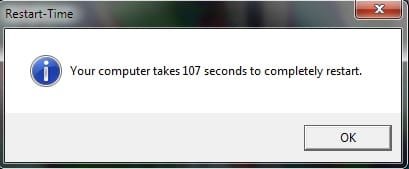
  • Untitled2.jpg
    Untitled2.jpg
    7.6 KB · Views: 38

My Computer

Computer type
PC/Desktop
Computer Manufacturer/Model Number
Custom
OS
Windows 7 Home Premium x64 SP1
CPU
Intel Core i5 2500K 3.3GHz
Motherboard
Gigabyte Z68XP-UD3P [rev 1.3] F7 BIOS
Memory
8GB (2 x 4GB) Patriot G series ‘Sector 5’ (PC3 12800)
Graphics Card(s)
GIGABYTE GV-R685OC-1GD
Sound Card
Onboard
Monitor(s) Displays
Dell 1707FP(Digital)
Screen Resolution
1280x1024
Hard Drives
2x OCZ Agility 3 60GB [FW 2.50]
1x Hitachi Travelstar HTS541616J9SA00 160GB 5400 RPM
PSU
OCZ600MXSP ModXStream Pro 600W
Cooling
Stock
Keyboard
Logitech G15 (2004)
Mouse
Gigabye m6880 gaming mouse
Internet Speed
Cable 2Mb/s Download 1Mb/s Upload
Antivirus
ESET Smart Security 7
Browser
Chrome
Other Info
ASUS DRW-24B3LT DVD-RW Drive
Vantec Multi-Memory Internal Card Reader w/USB 2.0
Rosewill USB 2.0 4-Port Hub
Trendnet Wireless N Router
RCA modem
Why are you wanting to install SSD's in a RAID? What benefit could this possibly have. They're not even redundant so if one fails you lose everything.

Windows 7 doesn't much like RAID as we see only problems with it here for all 5 years.

Try a test install to one SSD with the other unplugged.

Also it sounds like you lined up drivers like this is XP. Win7 is a driver-complete OS in the installer and via Windows Updates after install. Only import those which are still missing in Device Manager after enabling Automatically deliver drivers via Windows Update (Step 3) then running all rounds of Important and Optional Windows Updates until there are no more.
 
Why are you wanting to install SSD's in a RAID? What benefit could this possibly have. They're not even redundant so if one fails you lose everything.

> They are not in RAID they are being controlled by the RAID controller. I've switched it to AHCI and it doesn't change much. Redundancy is not even important for an SSD. I could just do a Windows Image Backup anyway you know...

Windows 7 doesn't much like RAID as we see only problems with it here for all 5 years.

>The problem still persists without the RAID controller.

Try a test install to one SSD with the other unplugged

>Ok, there is no difference.

Also it sounds like you lined up drivers like this is XP. Win7 is a driver-complete OS in the installer and via Windows Updates after install. Only import those which are still missing in Device Manager after enabling Automatically deliver drivers via Windows Update (Step 3) then running all rounds of Important and Optional Windows Updates until there are no more.

>I'm confused are you telling me I should update my drivers or use windows update to install drivers, which is always a horrible idea except for maybe a USB device.

Thanks for your input.
 

My Computer

Computer type
PC/Desktop
Computer Manufacturer/Model Number
Custom
OS
Windows 7 Home Premium x64 SP1
CPU
Intel Core i5 2500K 3.3GHz
Motherboard
Gigabyte Z68XP-UD3P [rev 1.3] F7 BIOS
Memory
8GB (2 x 4GB) Patriot G series ‘Sector 5’ (PC3 12800)
Graphics Card(s)
GIGABYTE GV-R685OC-1GD
Sound Card
Onboard
Monitor(s) Displays
Dell 1707FP(Digital)
Screen Resolution
1280x1024
Hard Drives
2x OCZ Agility 3 60GB [FW 2.50]
1x Hitachi Travelstar HTS541616J9SA00 160GB 5400 RPM
PSU
OCZ600MXSP ModXStream Pro 600W
Cooling
Stock
Keyboard
Logitech G15 (2004)
Mouse
Gigabye m6880 gaming mouse
Internet Speed
Cable 2Mb/s Download 1Mb/s Upload
Antivirus
ESET Smart Security 7
Browser
Chrome
Other Info
ASUS DRW-24B3LT DVD-RW Drive
Vantec Multi-Memory Internal Card Reader w/USB 2.0
Rosewill USB 2.0 4-Port Hub
Trendnet Wireless N Router
RCA modem
Your driver method is from the XP era. Please do not Assume it applies at all
To the first driver-complete OS. MS now vets every piece if hardware's driver before loading into
Updates, which error rate is one in a million.

I have no idea what you are doing with RAID. Use AHCI like everyone else does successfully. Someone else may understand. I need to return to the present day.
 
It turns out it was one or all of the Gigabyte utilities because I just uninstalled them all and I don't even see the welcome screen anymore.
 

My Computer

Computer type
PC/Desktop
Computer Manufacturer/Model Number
Custom
OS
Windows 7 Home Premium x64 SP1
CPU
Intel Core i5 2500K 3.3GHz
Motherboard
Gigabyte Z68XP-UD3P [rev 1.3] F7 BIOS
Memory
8GB (2 x 4GB) Patriot G series ‘Sector 5’ (PC3 12800)
Graphics Card(s)
GIGABYTE GV-R685OC-1GD
Sound Card
Onboard
Monitor(s) Displays
Dell 1707FP(Digital)
Screen Resolution
1280x1024
Hard Drives
2x OCZ Agility 3 60GB [FW 2.50]
1x Hitachi Travelstar HTS541616J9SA00 160GB 5400 RPM
PSU
OCZ600MXSP ModXStream Pro 600W
Cooling
Stock
Keyboard
Logitech G15 (2004)
Mouse
Gigabye m6880 gaming mouse
Internet Speed
Cable 2Mb/s Download 1Mb/s Upload
Antivirus
ESET Smart Security 7
Browser
Chrome
Other Info
ASUS DRW-24B3LT DVD-RW Drive
Vantec Multi-Memory Internal Card Reader w/USB 2.0
Rosewill USB 2.0 4-Port Hub
Trendnet Wireless N Router
RCA modem
Those come with the OEM's mobo drivers which should be also from Windows Update to assure you have the ones Win7 wants, and which almost always exclude the software add-ons which are in almost every case bloatware unneeded by Win7.

I study the OEM software closely to make it sell me on what feature I may really need, then research it online to verify what I find. For example on a Lenovo laptop I travel with, I allow the Power management OEM software solely to keep it set at 60% battery charge when not mobile to preserve battery life. When I get ready to travel I open the Program and change it to 100% then kill the Process to turn it off. Everything else offered by it is duplicated in Win7 with better versions.

We are OS-centric here and this is what's worked best in tens of thousands of installs we've helped with, tutorials which have millions of users. Those who force drivers Win7 may not want can get in trouble.
 
Last edited:
It was all optional and didn't come part of the driver package I just installed them cause I thought I'd use them for the features. But in the end its not worth it.
 

My Computer

Computer type
PC/Desktop
Computer Manufacturer/Model Number
Custom
OS
Windows 7 Home Premium x64 SP1
CPU
Intel Core i5 2500K 3.3GHz
Motherboard
Gigabyte Z68XP-UD3P [rev 1.3] F7 BIOS
Memory
8GB (2 x 4GB) Patriot G series ‘Sector 5’ (PC3 12800)
Graphics Card(s)
GIGABYTE GV-R685OC-1GD
Sound Card
Onboard
Monitor(s) Displays
Dell 1707FP(Digital)
Screen Resolution
1280x1024
Hard Drives
2x OCZ Agility 3 60GB [FW 2.50]
1x Hitachi Travelstar HTS541616J9SA00 160GB 5400 RPM
PSU
OCZ600MXSP ModXStream Pro 600W
Cooling
Stock
Keyboard
Logitech G15 (2004)
Mouse
Gigabye m6880 gaming mouse
Internet Speed
Cable 2Mb/s Download 1Mb/s Upload
Antivirus
ESET Smart Security 7
Browser
Chrome
Other Info
ASUS DRW-24B3LT DVD-RW Drive
Vantec Multi-Memory Internal Card Reader w/USB 2.0
Rosewill USB 2.0 4-Port Hub
Trendnet Wireless N Router
RCA modem
It was all optional and didn't come part of the driver package I just installed them cause I thought I'd use them for the features. But in the end its not worth it.

Ya it usually isn't.

Asus software that comes with their motherbaords is junk too. Hardware is fantastic love them, but hate there software.

There stress testing program works well though.
 

My Computer

Computer type
PC/Desktop
Computer Manufacturer/Model Number
Custom Built
OS
Windows 10 Pro
CPU
AMD Ryzen 5 2400G Processor with Radeon RX Vega 11 Graphics
Motherboard
ASRock X470 Master SLI/AC AM4 AMD Promontory X470 SATA 6Gb/s
Memory
G.SKILL Ripjaws V Series 16GB (2 x 8GB) 288-Pin DDR4 SDRAM D
Graphics Card(s)
2047MB NVIDIA GeForce GTX 1060 6GB (EVGA)
Sound Card
Motherboard Built in
Monitor(s) Displays
Acer R240HY bidx 23.8-Inch IPS HDMI DVI VGA (1920 x 1080) Wi
Screen Resolution
1920 x 1080
Hard Drives
1TB Sandisk SSD PLUS (Main drive)
500 GB Seagate 7200 RPM (Games)
500 GB Western Digital 7200 RPM (Virtual Machines)
PSU
CORSAIR TX Series TX650M 650W 80+ Gold Modular Power Supply
Case
CORSAIR CARBIDE SPEC-02 Mid-Tower Gaming Case, Red LED Fan
Cooling
220mm, two 120mm, and four 60mm fans
Keyboard
Wired Dell keyboard
Mouse
Wireless Logitech mouse
Internet Speed
250mb down, 30mb up
Antivirus
Panda Cloud Antivirus
Browser
Chrome-ish x64
Other Info
Your awesome for reading this.
Back
Top