sm bus controller driver windows 7, Cant install

Deception35

New member
Local time
4:20 PM
Messages
10
hi im having trouble finding my motherboard and its model and when i go to dell to run the service tag it says i need net framwork 4.0 or higher (which i do) and im just relaly confused cause i just did a reinstall of my OS last night.

Thanks
 

My Computer

Computer Manufacturer/Model Number
Dell inc. 0m5dcd/aoo
OS
windows 7 pro 64 bit
CPU
intel core i3 2120
Memory
8 gb
Graphics Card(s)
nvidea GEforce 9500 GT
any1 got any ideas?
 

My Computer

Computer Manufacturer/Model Number
Dell inc. 0m5dcd/aoo
OS
windows 7 pro 64 bit
CPU
intel core i3 2120
Memory
8 gb
Graphics Card(s)
nvidea GEforce 9500 GT
Hi Deception35,

You may refer to the following 'web article' to locate the system 'Service Tag': What is a Service Tag and How Do I Locate It?
If the 'Service Tag' does not retrieve the details, please share the exact system make and model. Will help you with the relevant drivers.

Do reply with the information; wold be glad to assist.


My Computer

OS
Windows 7 64bit
Well I don't have the sticker on my computer and the service tag detected wont work like I said in my post. I'm also not around my computer but when I set this account up I put my computer info on my profile so u should be able to see it on my profile somewhere. Thanks
 

My Computer

Computer Manufacturer/Model Number
Dell inc. 0m5dcd/aoo
OS
windows 7 pro 64 bit
CPU
intel core i3 2120
Memory
8 gb
Graphics Card(s)
nvidea GEforce 9500 GT
Hi Deception35,

Please check if you are able to log-into your account: Dell.com - Login
As you added this computer in the 'account', you should be able to find that information.

If you still face difficulty, please share the system's 'Service Tag or Express Service Code' with me through a 'private message'. Assuming that the 'Service Tag' doesn't work at my end also, you may share other details like 'Dell Order Number' or 'Customer Number'. Let me check if I can pull up the system information and details of drivers required.

Do reply with the findings; would be glad to assist.


My Computer

OS
Windows 7 64bit
well i actually looked on my computer and i found the service number but im rly not sure what to do from here i would like everything to be up to date and im not sure but i guess u need to install motherboard drivers or something but i have no idea how to go about doing that
 

My Computer

Computer Manufacturer/Model Number
Dell inc. 0m5dcd/aoo
OS
windows 7 pro 64 bit
CPU
intel core i3 2120
Memory
8 gb
Graphics Card(s)
nvidea GEforce 9500 GT
im so lost lol
 

My Computer

Computer Manufacturer/Model Number
Dell inc. 0m5dcd/aoo
OS
windows 7 pro 64 bit
CPU
intel core i3 2120
Memory
8 gb
Graphics Card(s)
nvidea GEforce 9500 GT
Hi Deception35

May I get your Service Tag number ?

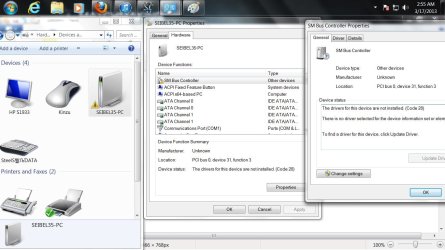
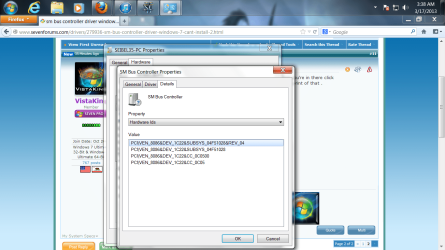
Can I get an image of the device with the " :warn: " icon on it ? Right click on the icon choose Properties . Once the Properties window opens up click on the Details tab . Inside the Details tab click on the down arrow under property and choose Hardware Ids . That is what I need a print screen of and upload it here.
 

My Computer

Computer Manufacturer/Model Number
Custom Built
OS
Windows 7 Ultimate 32-Bit & Windows 7 Ultimate 64-Bit
CPU
Intel Core i7 CPU 950 @ 3.07GHz
Motherboard
ASUS P6T DELUXE V2
Memory
OCZ 6GB (3 x 2GB) 240-Pin DDR3 SDRAM DDR3 1600 OCZ3X1600R2
Graphics Card(s)
ATI Radeon HD 5700 Series
Sound Card
OnBoard
Hard Drives
WD6400AACS-00M3B0 (640GB SATA )
PSU
CORSAIR 850w
Case
NZXT LEXA
Cooling
Intel Stock Heatsink Fan
Keyboard
Microsoft Wireless Laser Keyboard 7000
Mouse
Microsoft Wireless Laser Mouse 7000
Hi Deception35,

I agree with what 'VistaKing' stated. You may open 'Device Manager' to see if any device is listed with a 'exclamation/question mark'. Hardware ID of that device http://www.sevenforums.com/tutorials/73420-hardware-identification.html may help us identify the 'device driver' required. (If needed, at all)

Would also like to know details of the issue(s) that you are facing. Are you facing any performance issues? Or any issues with the functionality of the system?

If the 'sticker' on the system is not available/readable, you may open the system BIOS to retrieve the 'Service Tag' detail": how to obtain your service tag from the Dell bios
- To access BIOS, restart the system and repeatedly tap 'F2' key to enter the 'System Setup'

It is also likely that the 'Service Tag' of the system is not recognized by 'Dell Website'. If yes, we may have to check if the tag is associated to the 'purchase order'. You may want to share the 'Service Tag' details through a private message (to ensure confidentiality of your personal information). That will allow us to investigate things further.

Do reply with the findings; would be glad to assist.


My Computer

OS
Windows 7 64bit

My Computer

Computer Manufacturer/Model Number
Dell inc. 0m5dcd/aoo
OS
windows 7 pro 64 bit
CPU
intel core i3 2120
Memory
8 gb
Graphics Card(s)
nvidea GEforce 9500 GT
On the SM Bus Controller Properties window click on the Details tab and once you're in there click on the down arrow under property and choose Hardware Ids . I need a screen print of that .
 

My Computer

Computer Manufacturer/Model Number
Custom Built
OS
Windows 7 Ultimate 32-Bit & Windows 7 Ultimate 64-Bit
CPU
Intel Core i7 CPU 950 @ 3.07GHz
Motherboard
ASUS P6T DELUXE V2
Memory
OCZ 6GB (3 x 2GB) 240-Pin DDR3 SDRAM DDR3 1600 OCZ3X1600R2
Graphics Card(s)
ATI Radeon HD 5700 Series
Sound Card
OnBoard
Hard Drives
WD6400AACS-00M3B0 (640GB SATA )
PSU
CORSAIR 850w
Case
NZXT LEXA
Cooling
Intel Stock Heatsink Fan
Keyboard
Microsoft Wireless Laser Keyboard 7000
Mouse
Microsoft Wireless Laser Mouse 7000

Attachments

  • Untitled1.png
    Untitled1.png
    143.8 KB · Views: 8

My Computer

Computer Manufacturer/Model Number
Dell inc. 0m5dcd/aoo
OS
windows 7 pro 64 bit
CPU
intel core i3 2120
Memory
8 gb
Graphics Card(s)
nvidea GEforce 9500 GT
:ar: Intel 6 Series/C200 Series Chipset Family SMBus Controller


Download


ADDED

   Tip
If the top one doesn't fix the issue try the bottom one


:ar: Intel Chipset Software Installation Utility, v.9.2.0.1019


Download


I believe your computer is a DELL OPTIPLEX 390 .
 
Last edited:

My Computer

Computer Manufacturer/Model Number
Custom Built
OS
Windows 7 Ultimate 32-Bit & Windows 7 Ultimate 64-Bit
CPU
Intel Core i7 CPU 950 @ 3.07GHz
Motherboard
ASUS P6T DELUXE V2
Memory
OCZ 6GB (3 x 2GB) 240-Pin DDR3 SDRAM DDR3 1600 OCZ3X1600R2
Graphics Card(s)
ATI Radeon HD 5700 Series
Sound Card
OnBoard
Hard Drives
WD6400AACS-00M3B0 (640GB SATA )
PSU
CORSAIR 850w
Case
NZXT LEXA
Cooling
Intel Stock Heatsink Fan
Keyboard
Microsoft Wireless Laser Keyboard 7000
Mouse
Microsoft Wireless Laser Mouse 7000
cool that seems to have worked thanks :D. now how would i go about downloading motherboard drivers or do i not have to do that?
 

My Computer

Computer Manufacturer/Model Number
Dell inc. 0m5dcd/aoo
OS
windows 7 pro 64 bit
CPU
intel core i3 2120
Memory
8 gb
Graphics Card(s)
nvidea GEforce 9500 GT
Hi Deception35,

Thank you for the response.

Glad that the issue is fixed.

The device with the 'yellow bang' listed in 'Device Manager' was the 'Intel Chipset SM Bus Controller' driver. You may also want to run the 'Intel auto-update' utility that scans the system to see if any 'Intel related update' is required: Intel® Driver Update Utility

You may also refer to the steps below that will help you to locate and install apt drivers for your system (May help in future, if needed):
Click How to Use the Drivers and Downloads Website > Refer to step 4 (How to Download and Install a Driver?) in this article for detailed steps on installing a driver from 'Dell Support Website'. You may find this video also useful: http://www.dell.com/support/troubleshooting/us/en/19/supportvideos/ShowFavoriteVideo?VideoEmbedCodeParam=ptYzhyNTpWicq4XgXDKRqhc3yz2eSU7i

Hope this helps. Do reply if you have any further questions.
 

My Computer

OS
Windows 7 64bit
The chipset drivers are your motherboard drivers

Are you referring to Network, Audio , and such ?

If I could get the service tag number I could get you the correct drivers for your machine .

Open up a command prompt by clicking on :orb: and typing CMD inside the search box once the command prompt window opens up type the command that's on the bottom and press ENTER key .

Code:
wmic bios get serialnumber
 

My Computer

Computer Manufacturer/Model Number
Custom Built
OS
Windows 7 Ultimate 32-Bit & Windows 7 Ultimate 64-Bit
CPU
Intel Core i7 CPU 950 @ 3.07GHz
Motherboard
ASUS P6T DELUXE V2
Memory
OCZ 6GB (3 x 2GB) 240-Pin DDR3 SDRAM DDR3 1600 OCZ3X1600R2
Graphics Card(s)
ATI Radeon HD 5700 Series
Sound Card
OnBoard
Hard Drives
WD6400AACS-00M3B0 (640GB SATA )
PSU
CORSAIR 850w
Case
NZXT LEXA
Cooling
Intel Stock Heatsink Fan
Keyboard
Microsoft Wireless Laser Keyboard 7000
Mouse
Microsoft Wireless Laser Mouse 7000
Dr8n5v1
 

My Computer

Computer Manufacturer/Model Number
Dell inc. 0m5dcd/aoo
OS
windows 7 pro 64 bit
CPU
intel core i3 2120
Memory
8 gb
Graphics Card(s)
nvidea GEforce 9500 GT
Here is the link

:ar: Drivers & Downloads | Dell US

Under Operating System choose your version and click on the down arrow and choose the most recent driver . Then click download file and choose single file


Click on this LINK

Conexant HD Audio


Download


Added :

The drivers should extract to their own folders inside C:\drivers ( I think ) save folder in a safe place just incase you need to reinstall the drivers .
 
Last edited:

My Computer

Computer Manufacturer/Model Number
Custom Built
OS
Windows 7 Ultimate 32-Bit & Windows 7 Ultimate 64-Bit
CPU
Intel Core i7 CPU 950 @ 3.07GHz
Motherboard
ASUS P6T DELUXE V2
Memory
OCZ 6GB (3 x 2GB) 240-Pin DDR3 SDRAM DDR3 1600 OCZ3X1600R2
Graphics Card(s)
ATI Radeon HD 5700 Series
Sound Card
OnBoard
Hard Drives
WD6400AACS-00M3B0 (640GB SATA )
PSU
CORSAIR 850w
Case
NZXT LEXA
Cooling
Intel Stock Heatsink Fan
Keyboard
Microsoft Wireless Laser Keyboard 7000
Mouse
Microsoft Wireless Laser Mouse 7000
o also i just noticed that since i reinstalled windows i have much less Hard Drive space i have only 171 free of 464gb. and i have no idea why b4 i did the reinstall i had a lot more available storage .
 

My Computer

Computer Manufacturer/Model Number
Dell inc. 0m5dcd/aoo
OS
windows 7 pro 64 bit
CPU
intel core i3 2120
Memory
8 gb
Graphics Card(s)
nvidea GEforce 9500 GT
Back
Top