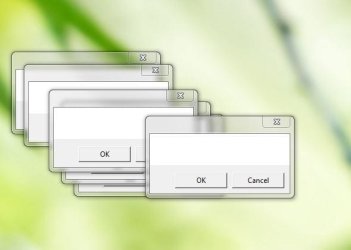
Small blank windows keep poping up on my desktop. Windows 7 Prof 64bit

spanishflyer

New member
Local time
10:24 AM
Messages
19
As I was trying to find out why my computer was crashing, in one instance I started getting small windows poping up on my screen with nothing on them; blank and with two options OK or Cancel, plus the red X on the top right corner. WHatever I chose, the window closes but almost imediately another one pops up. If I leave them alone, they just start building up on my desktop.

The crashing seems to be the charger, because if I use the battery alone it just doesn't crash.

I have upgraded windows in the process of finding the cause and some corrupt files have been repaired, but now I get this and I don't even know where to start. Have had Avast check my whole system, Malware and CCleaner check everything, but I still get those annoying little blank windows...:confused:

Any clues?

Best regards,

Spanish Flyer
 

My Computer My Computer

At a glance

Windows 7 Home Premium 64 bits
OS
Windows 7 Home Premium 64 bits
forgot the screenshots

Sorry, I forgot two screenshots so you can see exactly what I mean..

Best regards,

Spanish Flyer
 

Attachments

  • what is this.JPG
    what is this.JPG
    28.3 KB · Views: 31
  • was ist das.JPG
    was ist das.JPG
    24.5 KB · Views: 31

My Computer My Computer

At a glance

Windows 7 Home Premium 64 bits
OS
Windows 7 Home Premium 64 bits

My Computer My Computer

At a glance

Windows 7 Pro 32Intel(R) Core(TM) i5 CPU M 540 @ 2.53GHz4,00 GB (Usable 2,98)NVIDIA NVS 5100M
Computer type
Laptop
Computer Manufacturer/Model Number
HP Elitebook 8540p
OS
Windows 7 Pro 32
CPU
Intel(R) Core(TM) i5 CPU M 540 @ 2.53GHz
Motherboard
Hewlett-Packard 1521
Memory
4,00 GB (Usable 2,98)
Graphics Card(s)
NVIDIA NVS 5100M
Sound Card
NVIDIA High Definition Audio
Screen Resolution
1600x900
Hard Drives
INTEL SSDSA2CW120G3
Antivirus
F-Secure Internet Security
Browser
IE, Firefox, Opera
Other Info
Sandboxie,
SRP (Software Restriction Policy),
EMET (Enhanced Mitigation Experience Toolkit),
WFC (Windows Firewall Control by BiniSoft),
Malwarebytes Premium
Thanks a lot Tookeri,

As you say, now I have to learn how to use this powerful tool.

Right now the windows still keep popping up.

Best regards,

Spanish Flyer
 

My Computer My Computer

At a glance

Windows 7 Home Premium 64 bits
OS
Windows 7 Home Premium 64 bits
It's not difficult and doesn't require installation. Just extract the the zip file after download, and then launch the .exe file

Then see the video on how to proceed.

If you follow the instructions in the video but can't find what program or process that is creating these blank windows, launch Process Explorer as Administrator. Then it'll be able to show all processes including those belonging to system and not only your user. Then follow the video instructions again.
 

My Computer My Computer

At a glance

Windows 7 Pro 32Intel(R) Core(TM) i5 CPU M 540 @ 2.53GHz4,00 GB (Usable 2,98)NVIDIA NVS 5100M
Computer type
Laptop
Computer Manufacturer/Model Number
HP Elitebook 8540p
OS
Windows 7 Pro 32
CPU
Intel(R) Core(TM) i5 CPU M 540 @ 2.53GHz
Motherboard
Hewlett-Packard 1521
Memory
4,00 GB (Usable 2,98)
Graphics Card(s)
NVIDIA NVS 5100M
Sound Card
NVIDIA High Definition Audio
Screen Resolution
1600x900
Hard Drives
INTEL SSDSA2CW120G3
Antivirus
F-Secure Internet Security
Browser
IE, Firefox, Opera
Other Info
Sandboxie,
SRP (Software Restriction Policy),
EMET (Enhanced Mitigation Experience Toolkit),
WFC (Windows Firewall Control by BiniSoft),
Malwarebytes Premium
I have traced the windows to usb3mon.exe, a USB 3. Monitor from intel; My laptop an ASUS G75VW has all the USB's 3.0 type and I don't dare modify any of it; from my 4 usb 3.0 ports I have 6 external USB 3.0 HDD for backup and I wonder why this usb3mon.exe is creating these blank windows; if it was clearly some program or file that was not certified by Microsoft or something weird I would no doubt kill the processes, but in this case I am more than worried to make a wrong move....

BR,

Spanish Flyer
 

My Computer My Computer

At a glance

Windows 7 Home Premium 64 bits
OS
Windows 7 Home Premium 64 bits
I tried searching on it but couldn't find any useful information. You could try checking the Event Viewer if there perhaps are any logged events related to this. And check if there are any specific logs for this program that might give you more info. Then see if perhaps there's a new version from Intel you can try.

I would also run Process Explorer again and first select a process other than usb3mon.exe before using the "Find Window's process" to really make sure the windows belong to that process.
 

My Computer My Computer

At a glance

Windows 7 Pro 32Intel(R) Core(TM) i5 CPU M 540 @ 2.53GHz4,00 GB (Usable 2,98)NVIDIA NVS 5100M
Computer type
Laptop
Computer Manufacturer/Model Number
HP Elitebook 8540p
OS
Windows 7 Pro 32
CPU
Intel(R) Core(TM) i5 CPU M 540 @ 2.53GHz
Motherboard
Hewlett-Packard 1521
Memory
4,00 GB (Usable 2,98)
Graphics Card(s)
NVIDIA NVS 5100M
Sound Card
NVIDIA High Definition Audio
Screen Resolution
1600x900
Hard Drives
INTEL SSDSA2CW120G3
Antivirus
F-Secure Internet Security
Browser
IE, Firefox, Opera
Other Info
Sandboxie,
SRP (Software Restriction Policy),
EMET (Enhanced Mitigation Experience Toolkit),
WFC (Windows Firewall Control by BiniSoft),
Malwarebytes Premium
Thanks a lot Tookeri for taking your time in helping me; One thing I'm sure of is that the Process Explorer will be most handy to many of my future problems, specially as I learn how to use it and understand it better.

What I ended doing was to use my latest Acronis True image, one where I didn't get those annoying little windows and rolled back my windows to that date (three days earlier), and at the moment they are gone... hope it is forever...

Thanks again and best regards,

Spanish Flyer
 

My Computer My Computer

At a glance

Windows 7 Home Premium 64 bits
OS
Windows 7 Home Premium 64 bits

My Computer My Computer

At a glance

Windows 7 Pro 32Intel(R) Core(TM) i5 CPU M 540 @ 2.53GHz4,00 GB (Usable 2,98)NVIDIA NVS 5100M
Computer type
Laptop
Computer Manufacturer/Model Number
HP Elitebook 8540p
OS
Windows 7 Pro 32
CPU
Intel(R) Core(TM) i5 CPU M 540 @ 2.53GHz
Motherboard
Hewlett-Packard 1521
Memory
4,00 GB (Usable 2,98)
Graphics Card(s)
NVIDIA NVS 5100M
Sound Card
NVIDIA High Definition Audio
Screen Resolution
1600x900
Hard Drives
INTEL SSDSA2CW120G3
Antivirus
F-Secure Internet Security
Browser
IE, Firefox, Opera
Other Info
Sandboxie,
SRP (Software Restriction Policy),
EMET (Enhanced Mitigation Experience Toolkit),
WFC (Windows Firewall Control by BiniSoft),
Malwarebytes Premium
Back
Top