Small print size on HP printer

gregrocker

New member
Guru
Local time
4:40 PM
Messages
50,634
Dad called today to say his HP printer is printing much smaller than before. It may be IE10 which is pretty new there. I connected to have a look and it is mainly internet printing - using Yahoo Print formatting or raw web pages. They say the size is nearly microscopic in some cases.

I looked at the HP Control Panel from its desktop icon and see no settings, so am wondering how to get into the printer to adjust them or if that's even possible. He has an HP Deskjet 6600.

The Page Setup>Font Options do not change the type size to larger even if selected up to max 14 pt.

Print size is too small - HP Support Forum - 207443 shows that this may help but I didn't try it yet. Anyone know for sure?

[FONT=courier new,courier]First - it has nothing to do with your printer.[/FONT]
[FONT=courier new,courier][FONT=courier new,courier]Second[/FONT] - don't bother with the "edit clip" you can't do anything with the clip as it is an image[/FONT]
[FONT=courier new,courier]Third - try this:[/FONT]
[FONT=courier new,courier] 1- select the clip you want to print (little checkmark in the box by the clip)[/FONT]
[FONT=courier new,courier] 2- go to "File"; choose "Page setup"[/FONT]
[FONT=courier new,courier] 3- Deselect "Shrink to fit"[/FONT]
[FONT=courier new,courier] 4- click on "Change Font" choose a simple font like garamond and choose size 14[/FONT]
[FONT=courier new,courier] 5- click "ok"[/FONT]
[FONT=courier new,courier] 6- go to "file"[/FONT]
[FONT=courier new,courier] 7- select "print" It should now print so you can read it[/FONT]
 

Attachments

  • CANON.PNG
    CANON.PNG
    28.2 KB · Views: 6

My Computer My Computer

Computer type
PC/Desktop
Computer Manufacturer/Model Number
Own build (new) Desk1 / Asus ROG Win 7 / Desk2 1st build
OS
Desk1 7 Home Prem / Desk2 10 Pro / Main lap Asus ROG 10 Pro 2 laptop Toshiba 7 Pro Asus P2520 7 & 10
CPU
Desk1 i5 3750K / Laptop i7 GTX 860M / Desk2 i5 2500
Motherboard
Desk1 Asus P877-V / Desk2 Gigabyte H67 UD3H / Laptop ?
Memory
Desk1 8GB (1866) / Desk2 16GB (1333) / Laptop 8Gb DDR3
Graphics Card(s)
Desk 1& 2NVidia GTX 650 & Laptops on board Intel
Sound Card
Desk 1 & 2 -XONAR DG Realtek High Def audio Laptop
Monitor(s) Displays
Desk 1 Benq HD 2450 / Desk2 Philips 24" / Laptop 17.5"
Screen Resolution
1920x1080 D1 & D2 & Laptop 1
Hard Drives
Desk1 Samsung 120GB 830 SSD
Asus ROG 256GB 850 Pro SSD
Desk2 Samsung 840 256 SSD
Toshiba 120GB EVO
PSU
Desk 1 Corsair HX 1050/ Laptop ? / Desk 2 Corsair HX 650
Case
Desk 1 Cooler HAF XM ? Toshiba laptop / Desk2 Coolermaster
Cooling
Fans on all Desk1 -2 Desk2 - all Coolermasters 5 Laptop ?
Keyboard
Desk 1 MS Sidewinder X6 Desk 2 MS Sidewinder X 4
Mouse
Desk 1&2 - Gigabyte MS 900 gamer - laptop - Logitec wireless
Internet Speed
ADSL2+
Other Info
One other Desktop (tester) and spare Toshba laptop both with SSD's
Running Kaspersky 2016 ISS on all machines config'd identically
Logitec audio stereo systems on each machine (x3)
Canon MG5250MFC
Router/modem TP-Link running WPA2SK
I did find one Update for it ... But it is not related to the problem 2012-05-07 , Version:1.0, 478.57k Error message "The parameter is incorrect" appears when performing maintenance tasks in the HP printer toolbox
 

My Computer My Computer

Computer Manufacturer/Model Number
W530-3630QM1
OS
windows 7 home 64bit
CPU
INTEL-CORE I7
Memory
16GB
Hard Drives
750GB
Browser
Chrome
Recently updated again to IE10 And I'm still having problems with all sorts of display and rendering problems, I'm kind of glad to hear others are having problems with IE10 (Misery loves company :().

My latest tale. The wife who uses IE goes on to her company website to print her weekly work schedule.

With IE9 the schedule prints out in portrait at a reasonable font size of 10.
With IE10 it prints out with a font size of 6, the only way to get it back close to the way she is used to is to print in landscape.

Until we can figure this out, I have suggested to her to copy the schedule into our word processor, see what it looks like and make any adjustments necessary.

In my humble opinion, the pre-requsit/platform update KB2670838 for IE10 is part of the problem. How or why? I'm not sure, but that's my opinion and I'm sticking with it.

I have tried to install IE10 without KB2670838, but when I check installed updates it shows it was installed successfully.

Greg, I just thought of something I'm going to try.

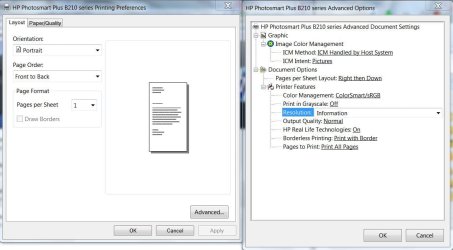
Looking at the platform update, it made changes to the Windows Imaging Component (WIC), and the printer settings on our HP, that would be the second pix advanced settings near the top, has a setting to allow the printer or the host system to handle Image Color Management (ICM) even to turn ICM off, I'm going to test those settings and see if it makes a difference. Right now it's set for the host to handle and I changed it to printer, after a bit I'll change it to off and see the reaction.

Why or even if printer settings would affect the IE10 operations is anybody's guess, but stranger things have happened with programming relationships.

IE10 and printing.JPGie10and printing2.JPG


EDIT:

Greg, rather than the solution you posted in your thread starter I'm also going to follow these tips on page two of: Print size is too small - Page 2 - HP Support Forum - 207443 Scroll down to VisionAiry's post #13
 
Last edited:

My Computer My Computer

Computer type
PC/Desktop
Computer Manufacturer/Model Number
Gateway DX4831-01e (Mid-Tower Desktop)
OS
Originally Win 7 Hm Prem x64 Ver 6.1.7600 Build 7601-SP1 | Upgraded to Windows 10 December 14, 2019
CPU
Intel i3 530 2.93GHz, 2933MHz 2 Cores 4 Logical Processors
Motherboard
Gateway H57M01 133 megahertz
Memory
6GB of 1,333MHz DDR3 SDRAM
Graphics Card(s)
32MB Intel Graphics Media Accelerator HD IGChip
Sound Card
Realtek High Definition Audio
Monitor(s) Displays
Gateway HX2000 20inch TFT active matrix TN
Screen Resolution
1600 x 900 x 59 hertz
Hard Drives
WDC WD10EADS-00M2B0 [HDD] (1000.20 GB) -- drive 0,
HL-DT-ST DVDRAM GH41N [CD-ROM dr]
Four card readers, and Four USB 2.0
PSU
300watts.
Case
Mid-Tower Desktop
Cooling
Stock from Gateway
Keyboard
Natural Ergonomic Keyboard 4000, see Other Info
Mouse
Orig. Gateway wore out now using Insignia USB wired optical
Internet Speed
Vz FIOS 10ms png 57.64Mbps down 65.53Mbps up Speedtest.org
Antivirus
Zamana Anti-logger with Anti-malware, MSE, Windows Firewall,
Browser
IE11.0.9600.19399-Upd ver11.0.135, Firefox 68.0.1 x64
Other Info
System Specs by Belarc.

BIOS: American Megatrends Inc. P01-A0 11/17/2009

Replaced the MS 'Natural' Standard PS/2 Enhanced 101-102 Keyboard with a new Natural Ergonomic Keyboard 4000 on August 1st 2014.

Canon Pixma MG3222 Printer.

Updated to IE11 on 12102015 | Fios Quantum Router g1100

Additional AV: SpywareBlaster, manual Mbam, SAS
Anak, looking at VisionAiry's post there:

The majority of the problems on this thread have to do with small print after printing from a web browser. To fix that problem in Internet Explorer, select the Page option in the command bar (at the top) and then Text Size and tell me what you have it set to. I have mine at Medium and I don't have any problem with my printouts being too small to read.
Where is this "Page" option? I don't use Internet Explorer, and can't find it in the Tools or on Menu Bar when selected.

The solution I'd posted originally from the HP thread has seemed to work for Dad so far when printing from IE10:

[FONT=courier new,courier]2- go to "File"; choose "Page setup"[/FONT]
[FONT=courier new,courier] 3- Deselect "Shrink to fit"[/FONT]
 
Anak, looking at VisionAiry's post there:

The majority of the problems on this thread have to do with small print after printing from a web browser. To fix that problem in Internet Explorer, select the Page option in the command bar (at the top) and then Text Size and tell me what you have it set to. I have mine at Medium and I don't have any problem with my printouts being too small to read.

Where is this "Page" option? I don't use Internet Explorer, and can't find it in the Tools or on Menu Bar when selected.

Right click on the top and enable the command bar,

http://www.sevenforums.com/tutorials/1048-internet-explorer-command-bar-turn-off.html
 

My Computer My Computer

Computer type
PC/Desktop
Computer Manufacturer/Model Number
Self Built
OS
Win 10 Pro x64
CPU
Intel I5-2500K @3.3GHz
Motherboard
Asrock P67 Extreme4
Memory
16GB G.Skill Ripjaws X (4x4GB)
Graphics Card(s)
EVGA GeForce 750 Ti SC 2GB
Sound Card
ASUS Xonar DG 5.1 Channels 24-bit 96KHz PCI Interface Sound
Monitor(s) Displays
auria eq2367
Screen Resolution
1920 x 1080
Hard Drives
250GB Samsung 850 EVO SSD
1TB WD Blue
1TB Hitachi
PSU
SeaSonic X 650W 80 Plus Gold
Case
Corsair Obsidian 750D
Cooling
Corsair H60, Three 140mm case fans
Keyboard
Logitech Wireless Keyboard K520
Mouse
Logitech Wireless Mouse M310
Internet Speed
Wave Broadband ~ 100 dn 5 up
Antivirus
Windows Defender, Malwarebytes Premium
Browser
Edge, IE11, Chrome
Other Info
Laptop specs: HP g7-1365dx /
CPU: AMD A6-3420M APU with Radeon(tm) HD Graphics /
RAM: Crucial 8Gb (2x4Gb) /
SSD: Crucial M4-CT128M4SSD2 ATA Device/ FW 000F /
GFX: AMD Radeon HD 6520G /
OS: Windows 10 Pro x64
Thanks Derekimo, Greg, I have my text size set to medium and it still comes out small.

I have to wait till the wife comes home from work to test my theories, and I'll try [FONT=courier new,courier] Deselect "Shrink to fit"[/FONT]
 

My Computer My Computer

Computer type
PC/Desktop
Computer Manufacturer/Model Number
Gateway DX4831-01e (Mid-Tower Desktop)
OS
Originally Win 7 Hm Prem x64 Ver 6.1.7600 Build 7601-SP1 | Upgraded to Windows 10 December 14, 2019
CPU
Intel i3 530 2.93GHz, 2933MHz 2 Cores 4 Logical Processors
Motherboard
Gateway H57M01 133 megahertz
Memory
6GB of 1,333MHz DDR3 SDRAM
Graphics Card(s)
32MB Intel Graphics Media Accelerator HD IGChip
Sound Card
Realtek High Definition Audio
Monitor(s) Displays
Gateway HX2000 20inch TFT active matrix TN
Screen Resolution
1600 x 900 x 59 hertz
Hard Drives
WDC WD10EADS-00M2B0 [HDD] (1000.20 GB) -- drive 0,
HL-DT-ST DVDRAM GH41N [CD-ROM dr]
Four card readers, and Four USB 2.0
PSU
300watts.
Case
Mid-Tower Desktop
Cooling
Stock from Gateway
Keyboard
Natural Ergonomic Keyboard 4000, see Other Info
Mouse
Orig. Gateway wore out now using Insignia USB wired optical
Internet Speed
Vz FIOS 10ms png 57.64Mbps down 65.53Mbps up Speedtest.org
Antivirus
Zamana Anti-logger with Anti-malware, MSE, Windows Firewall,
Browser
IE11.0.9600.19399-Upd ver11.0.135, Firefox 68.0.1 x64
Other Info
System Specs by Belarc.

BIOS: American Megatrends Inc. P01-A0 11/17/2009

Replaced the MS 'Natural' Standard PS/2 Enhanced 101-102 Keyboard with a new Natural Ergonomic Keyboard 4000 on August 1st 2014.

Canon Pixma MG3222 Printer.

Updated to IE11 on 12102015 | Fios Quantum Router g1100

Additional AV: SpywareBlaster, manual Mbam, SAS
So nothing came up with my suggestions Greg?? I just thought maybe the OS support or the software might have come up with something maybe I am in the wrong league here.
 

My Computer My Computer

Computer type
PC/Desktop
Computer Manufacturer/Model Number
Own build (new) Desk1 / Asus ROG Win 7 / Desk2 1st build
OS
Desk1 7 Home Prem / Desk2 10 Pro / Main lap Asus ROG 10 Pro 2 laptop Toshiba 7 Pro Asus P2520 7 & 10
CPU
Desk1 i5 3750K / Laptop i7 GTX 860M / Desk2 i5 2500
Motherboard
Desk1 Asus P877-V / Desk2 Gigabyte H67 UD3H / Laptop ?
Memory
Desk1 8GB (1866) / Desk2 16GB (1333) / Laptop 8Gb DDR3
Graphics Card(s)
Desk 1& 2NVidia GTX 650 & Laptops on board Intel
Sound Card
Desk 1 & 2 -XONAR DG Realtek High Def audio Laptop
Monitor(s) Displays
Desk 1 Benq HD 2450 / Desk2 Philips 24" / Laptop 17.5"
Screen Resolution
1920x1080 D1 & D2 & Laptop 1
Hard Drives
Desk1 Samsung 120GB 830 SSD
Asus ROG 256GB 850 Pro SSD
Desk2 Samsung 840 256 SSD
Toshiba 120GB EVO
PSU
Desk 1 Corsair HX 1050/ Laptop ? / Desk 2 Corsair HX 650
Case
Desk 1 Cooler HAF XM ? Toshiba laptop / Desk2 Coolermaster
Cooling
Fans on all Desk1 -2 Desk2 - all Coolermasters 5 Laptop ?
Keyboard
Desk 1 MS Sidewinder X6 Desk 2 MS Sidewinder X 4
Mouse
Desk 1&2 - Gigabyte MS 900 gamer - laptop - Logitec wireless
Internet Speed
ADSL2+
Other Info
One other Desktop (tester) and spare Toshba laptop both with SSD's
Running Kaspersky 2016 ISS on all machines config'd identically
Logitec audio stereo systems on each machine (x3)
Canon MG5250MFC
Router/modem TP-Link running WPA2SK
Thanks, John. I made a note to make sure his printer is updated when I next connect.

So far he says the print size is normal after unchecking "Shrink to Fit" in Page Setup options.
 
Thanks, John. I made a note to make sure his printer is updated when I next connect.

So far he says the print size is normal after unchecking "Shrink to Fit" in Page Setup options.
Great to hear Greg cos that HP site it was so hard to read the print was so tiny:)
 

My Computer My Computer

Computer type
PC/Desktop
Computer Manufacturer/Model Number
Own build (new) Desk1 / Asus ROG Win 7 / Desk2 1st build
OS
Desk1 7 Home Prem / Desk2 10 Pro / Main lap Asus ROG 10 Pro 2 laptop Toshiba 7 Pro Asus P2520 7 & 10
CPU
Desk1 i5 3750K / Laptop i7 GTX 860M / Desk2 i5 2500
Motherboard
Desk1 Asus P877-V / Desk2 Gigabyte H67 UD3H / Laptop ?
Memory
Desk1 8GB (1866) / Desk2 16GB (1333) / Laptop 8Gb DDR3
Graphics Card(s)
Desk 1& 2NVidia GTX 650 & Laptops on board Intel
Sound Card
Desk 1 & 2 -XONAR DG Realtek High Def audio Laptop
Monitor(s) Displays
Desk 1 Benq HD 2450 / Desk2 Philips 24" / Laptop 17.5"
Screen Resolution
1920x1080 D1 & D2 & Laptop 1
Hard Drives
Desk1 Samsung 120GB 830 SSD
Asus ROG 256GB 850 Pro SSD
Desk2 Samsung 840 256 SSD
Toshiba 120GB EVO
PSU
Desk 1 Corsair HX 1050/ Laptop ? / Desk 2 Corsair HX 650
Case
Desk 1 Cooler HAF XM ? Toshiba laptop / Desk2 Coolermaster
Cooling
Fans on all Desk1 -2 Desk2 - all Coolermasters 5 Laptop ?
Keyboard
Desk 1 MS Sidewinder X6 Desk 2 MS Sidewinder X 4
Mouse
Desk 1&2 - Gigabyte MS 900 gamer - laptop - Logitec wireless
Internet Speed
ADSL2+
Other Info
One other Desktop (tester) and spare Toshba laptop both with SSD's
Running Kaspersky 2016 ISS on all machines config'd identically
Logitec audio stereo systems on each machine (x3)
Canon MG5250MFC
Router/modem TP-Link running WPA2SK
Back
Top