
Solved Small (unreadable) font in old legacy application

cherrycomp8088

New member
Local time
9:52 PM
Messages
9
I've been going crazy trying to come up with a fix for this problem. It's a very old software package that only a few of out users are running (but, of course, it's essential)

It works fine on an older image of Win 7 32-bit that we use, but on the newest image of Win 7 64-bit, some of the tab fonts are barely readable and I can't adjust them.

I've tried so many different things and nothing seems to work. Changes resolution, changes scaling, updated video drivers (AMD), removed video drivers (went back to stock Windows display driver), compared/imported some of the font keys in the registry from the working PC to the test PC with the problem.

No luck.

Any ideas are appreciated!

R1l5j92g.png
 

My Computer My Computer

Computer type
PC/Desktop
OS
Windows 7 pro 64 bit, Windows 7 Enterprise 64 bit
Hi cherrycomp8088, welcome to the Forum.

It would help if you could tell what the name of the software package is.

In some cases old programs that might have been written in 16 bit architecture will not work properly in 64 bit architecture. Have you checked to see if you can get a later version of it.
 

My Computer My Computer

Computer type
PC/Desktop
Computer Manufacturer/Model Number
Self built using existing case
OS
Windows 7 Home Premium 64 bit sp1
CPU
Intel i5 3570 3.4Ghz Ivy Bridge SKT 1155 quad core
Motherboard
Gigabyte Z77-HD3 SKT 1155 2xSata 3, 4x USB 3.0
Memory
G-Skill Rip Jaws 16Gb (8x2) DDR3 -1600 PC3 12800 CL 10 red
Graphics Card(s)
Gigabyte NVIDIA GT610 1Gb DDR3 810/1200 PCI-E 2.0 Silent
Sound Card
NVIDIA High Definition & Realtech High Definition Audio
Monitor(s) Displays
2 x Philips 226V4L 16:9 aspect ratio
Screen Resolution
1920 x 1080 HD
Hard Drives
Samsung 840 Pro 256gb SSD, SATA 3.
Hitachi Touro Portable 1tb, USB 3.0 HDD used for image b/ups.
PSU
Corsair VS450
Case
Codeng
Cooling
PSU fan & CPU fan
Keyboard
Logitech
Mouse
Logitech Wireless trackball M570
Internet Speed
Wireless 3G. 3mg down & 550kb up.
Antivirus
Bitdefender Internet Security 2020
Browser
Opera (Current Version) & Firefox
Other Info
MS Office 2013 Pro. Davis weather station software. MGE Nova 600 avr UPS.
i wonder how it would look if you ran it within Win7 XP Mode
 

My Computer My Computer

Computer type
PC/Desktop
Computer Manufacturer/Model Number
diy
OS
Win7 pro x64
CPU
stock i7 7700k
Motherboard
Gigabyte Z270N-WIFI mini-ITX
Memory
Corsair Vengeance LPX 16GB (2x8GB) DDR4 @ 3200MHz
Graphics Card(s)
integrated Intel HD 630
Sound Card
onboard Realtek ALC1220
Monitor(s) Displays
two vertically mounted samsung 55" 4k un55mu8000
Screen Resolution
1920x1280
Hard Drives
256GB Samsung EVO 960 M.2 pci-e NVMe SSD
PSU
SilverStone Nightjar ST45NF 450Watt Fanless
Case
No case. Motherboard is mounted directly onto power supply
Cooling
Evercool low profile 815EP with Panaflow 12L fan at 7v
Keyboard
Ortek MCK-86 mini
Mouse
Belkin 5-button USB
Internet Speed
spectrum 400mbps
It's a program called KS600 / Best. I think it's used to track keys for buildings.

I have tried running it in compatibility mode and all the other options under Properties -> Options with no luck.

I'm not sure if a newer version is available, my supervisor tried contacting the publisher for support and got no response.
 

My Computer My Computer

Computer type
PC/Desktop
OS
Windows 7 pro 64 bit, Windows 7 Enterprise 64 bit
Windows XP Mode is different from compatibility mode and unfortunately its not as easy so maybe its a last resort for you. From microsoft:

"Windows XP Mode for Windows 7 makes it easy to install and run many of your productivity programs that run on Windows XP directly from a computer that runs Windows 7. Windows XP Mode provides a 32-bit virtual Windows XP Professional Service Pack 3 (SP3) environment. This download includes a virtual hard disk (.vhd file) with Windows XP SP3 preinstalled. Windows XP Mode is available free of charge to users of Windows 7 Professional, Enterprise, and Ultimate"

https://www.microsoft.com/en-us/download/details.aspx?id=8002
 

My Computer My Computer

Computer type
PC/Desktop
Computer Manufacturer/Model Number
diy
OS
Win7 pro x64
CPU
stock i7 7700k
Motherboard
Gigabyte Z270N-WIFI mini-ITX
Memory
Corsair Vengeance LPX 16GB (2x8GB) DDR4 @ 3200MHz
Graphics Card(s)
integrated Intel HD 630
Sound Card
onboard Realtek ALC1220
Monitor(s) Displays
two vertically mounted samsung 55" 4k un55mu8000
Screen Resolution
1920x1280
Hard Drives
256GB Samsung EVO 960 M.2 pci-e NVMe SSD
PSU
SilverStone Nightjar ST45NF 450Watt Fanless
Case
No case. Motherboard is mounted directly onto power supply
Cooling
Evercool low profile 815EP with Panaflow 12L fan at 7v
Keyboard
Ortek MCK-86 mini
Mouse
Belkin 5-button USB
Internet Speed
spectrum 400mbps
Windows XP Mode is different from compatibility mode and unfortunately its not as easy so maybe its a last resort for you. From microsoft:

"Windows XP Mode for Windows 7 makes it easy to install and run many of your productivity programs that run on Windows XP directly from a computer that runs Windows 7. Windows XP Mode provides a 32-bit virtual Windows XP Professional Service Pack 3 (SP3) environment. This download includes a virtual hard disk (.vhd file) with Windows XP SP3 preinstalled. Windows XP Mode is available free of charge to users of Windows 7 Professional, Enterprise, and Ultimate"

https://www.microsoft.com/en-us/download/details.aspx?id=8002

I've looked at that, but I was hoping there was an easier way to alter the fonts in the application since it works and the only issue is the tiny text.

I've fooled around with the system fonts a bit, but can't seem to find the font that this application is using.
 

My Computer My Computer

Computer type
PC/Desktop
OS
Windows 7 pro 64 bit, Windows 7 Enterprise 64 bit
I had a thought, and this may not work, but since you've tried everything else...

Try going to the Command Prompt under Accessories, and instead of opening it, click on Properties. You'll find a Font tab where you can set the Command Font. The program might be using the Command System fonts, and if you set them larger, you may be able to see the fonts on the tabs in question. Programmers years ago did some funny tricks to get things to work.

It's worth a try, at least. Other than that, I think your best bet is XP Mode.
 

My Computer My Computer

Computer type
PC/Desktop
Computer Manufacturer/Model Number
Mellon Labs (custom build)
OS
Win 7 Pro x64/Win 10 Pro x64 dual boot
CPU
AMD FX 8350 Vishera @ 4200
Motherboard
ASUS M5A97 R2.0
Memory
16 GB Mushkin Blackline DDR3-2400 @ 1866 (9-10-10-10-31)
Graphics Card(s)
XFX Radeon R9 280 Double D Black Edition
Sound Card
Realtek HD Audio on MB. Sounds great.
Monitor(s) Displays
Acer 24", Acer 22"
Screen Resolution
3840 x 1080
Hard Drives
1 x Mushkin Chronos 120 GB SSD (Win 10)
1 x Samsung 850 EVO 250 GB SSD (Win 7)
1 x WD 1TB SATA Blue
1 x WD 1TB SATA Green
PSU
Corsair TX-750
Case
CoolerMaster HAF 912+
Cooling
Coolermaster Seidon 240M Liquid AIO. 6 case fans
Keyboard
Logitech G710+
Mouse
Logitech G500s
Internet Speed
Much better since I got fiber, but still way overpriced.
Antivirus
MSE, Malware Bytes for scanning
Browser
Firefox
Other Info
Corsair VOID USB headphones.

A Mellon Labs X-1 - LCD Smartie driven system status display.

Brought to you by the letter E

My Computer My Computer

Computer type
Laptop
Computer Manufacturer/Model Number
ASUS
OS
Microsoft Windows 7 Home Premium 64-bit 7601 Multiprocessor Free Service Pack 1
CPU
AMD C-60 APU with Radeon(tm) HD Graphics
Motherboard
ASUSTeK COMPUTER INC. X501U
Memory
4.00 GB
Graphics Card(s)
AMD Radeon HD 6290 Graphics
Sound Card
(1) AMD High Definition Audio Device (2) Realtek High Defi
Screen Resolution
1366 x 768 x 32 bits (4294967296 colors) @ 60 Hz
Hard Drives
Hitachi HTS545050A7E380 SATA Disk Device
Antivirus
Comodo CIS & FW, SecureAplus App Whitelisting, Threatfire
Browser
Cyberfox 64bit, Opera 64bit, Airfox
Other Info
Spy-The-Spy, HitmanPro.Alert, Norton Connect Safe, MJRegWatcher, BitDefender TrafficLight, Voodoo Shield, Zemana AntiMalware
Yes, I had tried the Command Prompt font change and that didn't work, and I just tried clearing the font cache (per Callender's tip) and that didn't work either.

Thanks for the suggestions though!
 

My Computer My Computer

Computer type
PC/Desktop
OS
Windows 7 pro 64 bit, Windows 7 Enterprise 64 bit
I've been going crazy trying to come up with a fix for this problem. It's a very old software package that only a few of out users are running (but, of course, it's essential)

It works fine on an older image of Win 7 32-bit that we use, but on the newest image of Win 7 64-bit, some of the tab fonts are barely readable and I can't adjust them.

I've tried so many different things and nothing seems to work. Changes resolution, changes scaling, updated video drivers (AMD), removed video drivers (went back to stock Windows display driver), compared/imported some of the font keys in the registry from the working PC to the test PC with the problem.

No luck.

Any ideas are appreciated!

R1l5j92g.png


Hi there, very small world! You're using Keystone for your key management system. I came across your post on Google, because I was having the same issue. I had an assumption that the application was defaulting to another font on the 64-bit operating systems. Sure enough, I compared the installation with a 32-bit OS and its 64-bit variant.

If you look on one of your 32-bit computers with Keystone installed, open the Windows Fonts folder.

You should see two fonts named: BL Sans Serif Regular and Small Regular.

Export each font by right clicking each one, click copy, and paste it to another location (i.e. flash drive or desktop).

Copy the two font files to the 64-bit OS and install them. Re-open Keystone and your font tabs and the detailed tabs at the bottom of the program should be easier to read!

Hope this helps!
 

My Computer My Computer

Computer type
PC/Desktop
OS
Windows 7/8/8.1/10 (32-bit/64-bit)
Hi there, very small world! You're using Keystone for your key management system. I came across your post on Google, because I was having the same issue. I had an assumption that the application was defaulting to another font on the 64-bit operating systems. Sure enough, I compared the installation with a 32-bit OS and its 64-bit variant.

If you look on one of your 32-bit computers with Keystone installed, open the Windows Fonts folder.

You should see two fonts named: BL Sans Serif Regular and Small Regular.

Export each font by right clicking each one, click copy, and paste it to another location (i.e. flash drive or desktop).

Copy the two font files to the 64-bit OS and install them. Re-open Keystone and your font tabs and the detailed tabs at the bottom of the program should be easier to read!

Hope this helps!

Didn't work. I couldn't find the BL Sans Serif Regular on the 32-bit PC, so I went ahead and copied the entire Fonts folder from the 32-bit PC to a 64-bit and still no luck :confused::confused::confused:

Is there somewhere in the OS I need to set the font to Small Regular? I tried setting all my defaults to that in Personilization but still nothing.
 

My Computer My Computer

Computer type
PC/Desktop
OS
Windows 7 pro 64 bit, Windows 7 Enterprise 64 bit
Didn't work. I couldn't find the BL Sans Serif Regular on the 32-bit PC, so I went ahead and copied the entire Fonts folder from the 32-bit PC to a 64-bit and still no luck :confused::confused::confused:

Is there somewhere in the OS I need to set the font to Small Regular? I tried setting all my defaults to that in Personilization but still nothing.

Interesting... do you have a 32-bit VM you can install Keystone on? You may have a newer or older version than me. Once you install Keystone, go to the Fonts folder and change the view to Detail. Right click one of the column headers and add the Date Modified column. Sort by the Date Modified column and see if new fonts were installed.
 

My Computer My Computer

Computer type
PC/Desktop
OS
Windows 7/8/8.1/10 (32-bit/64-bit)
Interesting... do you have a 32-bit VM you can install Keystone on? You may have a newer or older version than me. Once you install Keystone, go to the Fonts folder and change the view to Detail. Right click one of the column headers and add the Date Modified column. Sort by the Date Modified column and see if new fonts were installed.

It's Keystone ver 3.53 (ancient - circa 1998).

The Small Fonts Regular definitely copied over and is there. It's even an option in Windows Personalization. I'm just not sure if there's a font type I need to assign that font to, and if so, where?

Thanks for your input!
 

My Computer My Computer

Computer type
PC/Desktop
OS
Windows 7 pro 64 bit, Windows 7 Enterprise 64 bit
It's Keystone ver 3.53 (ancient - circa 1998).

The Small Fonts Regular definitely copied over and is there. It's even an option in Windows Personalization. I'm just not sure if there's a font type I need to assign that font to, and if so, where?

Thanks for your input!

You're using a way older version than we are. Let me find the installer and I'll extract the BL Sans Serif Regular font you're missing and see if that fixes it. I'll update with a new link shortly.
 

My Computer My Computer

Computer type
PC/Desktop
OS
Windows 7/8/8.1/10 (32-bit/64-bit)
It's Keystone ver 3.53 (ancient - circa 1998).

The Small Fonts Regular definitely copied over and is there. It's even an option in Windows Personalization. I'm just not sure if there's a font type I need to assign that font to, and if so, where?

Thanks for your input!

I uploaded the font files to my Dropbox folder:

Dropbox - Public Folder

Give that a try.
 

My Computer My Computer

Computer type
PC/Desktop
OS
Windows 7/8/8.1/10 (32-bit/64-bit)
I uploaded the font files to my Dropbox folder:

Dropbox - Public Folder

Give that a try. 1 Hour Ago 13:56
I couldn't import the fonts. Says they are not valid font files. They're from a Win 7 machine?
 

My Computer My Computer

Computer type
PC/Desktop
OS
Windows 7 pro 64 bit, Windows 7 Enterprise 64 bit
I couldn't import the fonts. Says they are not valid font files. They're from a Win 7 machine?

What error are you receiving? Try double clicking each one and clicking the Install button in the upper left hand corner.
 

My Computer My Computer

Computer type
PC/Desktop
OS
Windows 7/8/8.1/10 (32-bit/64-bit)
What error are you receiving? Try double clicking each one and clicking the Install button in the upper left hand corner.
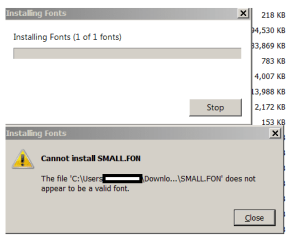
When I click the .fon files I get the attached error. Tried on another PC and same error.
 

Attachments

  • Fonterror2.PNG
    Fonterror2.PNG
    7.9 KB · Views: 8

My Computer My Computer

Computer type
PC/Desktop
OS
Windows 7 pro 64 bit, Windows 7 Enterprise 64 bit
What error are you receiving? Try double clicking each one and clicking the Install button in the upper left hand corner.
GOT IT!!!

For some reason my PC and the other one are having problems importing .fon files (I probably hosed them with all my testing)

But I just tried it on 2 other PCs and it works!

Thanks so much!!!!!!!!
 

My Computer My Computer

Computer type
PC/Desktop
OS
Windows 7 pro 64 bit, Windows 7 Enterprise 64 bit
GOT IT!!!

For some reason my PC and the other one are having problems importing .fon files (I probably hosed them with all my testing)

But I just tried it on 2 other PCs and it works!

Thanks so much!!!!!!!!

Glad it worked out! Save a copy of those font files. I'll be removing my shared dropbox folder :)
 

My Computer My Computer

Computer type
PC/Desktop
OS
Windows 7/8/8.1/10 (32-bit/64-bit)
Back
Top