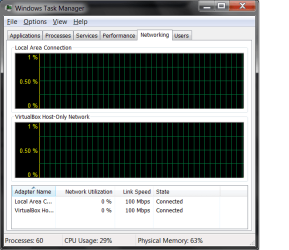
Small use of network

Folkmann

New member
Local time
3:59 AM
Messages
3
Hi,

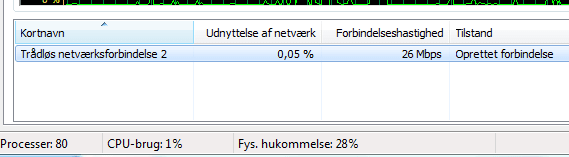
I have recently switched my internet connection from a cable to wireless. (The cable got all torn up and dropped connection from time to time.) Since I did that I have experienced a higher ping in games where I used to have good/decent ping before. When I checked my task manager I saw that the "exploit of network" (Not sure if that is what it is called. Just translated directly from danish) was swining between 0,01% and 0,10%. I am thinking it might be something to do with the router setup, but I don't think I should start playing with it since I known nearly nothing about it. I attached a photo of it. Yes, I know it's in danish, but try and see if you figgure it out either way.

Thanks,
Folkmann
 

Attachments
  • Udklip.PNG
    Udklip.PNG
    4.3 KB · Views: 14

My Computer

Computer type
PC/Desktop
Computer Manufacturer/Model Number
Acer
OS
Windows 7 x64
CPU
Unknown
Motherboard
Unknown
Memory
Unknown
Graphics Card(s)
Unknown
Hard Drives
Unknown
Antivirus
Unknown
Browser
Google Chrome
To be honest I don't think that should be there only your adapter's. Like Local Area Connection and Wireless or even virtual adapters. Is this under networking tab? Also hard to understand since I don't know what is means
 

My Computer

Computer type
PC/Desktop
Computer Manufacturer/Model Number
Dell / Lenovo g550
OS
Windows 7 Ultimate 64-bit
CPU
Intel Core 2 Duo E6550 @2.33GHz
Motherboard
foxconn g33m02
Memory
4GB DDR"
Graphics Card(s)
NVIDIA GeForce 8600 GS
Hard Drives
HDD 1 = 150GB
HDD 2 = 1.5TB
PSU
450W
Cooling
Stock fan
Internet Speed
12Mb
Antivirus
AVG Internet Security
Hi,

I tried to change the language of my computer, but I can't really figgure it out. (As you might have guessed by now I am not a fantastic computer genius)
The picture shows the (from top left to bottom right):

Name of the network --- Exploit of the network --- Speed of the net --- Status

Processes --- CPU-usage --- Physical memory

Sorry, if some of the names are translated wrong, but try and see if you can understand it.

Thanks,
Folkmann
 

My Computer

Computer type
PC/Desktop
Computer Manufacturer/Model Number
Acer
OS
Windows 7 x64
CPU
Unknown
Motherboard
Unknown
Memory
Unknown
Graphics Card(s)
Unknown
Hard Drives
Unknown
Antivirus
Unknown
Browser
Google Chrome
Should it not be this you mean?
 

Attachments

  • task manager.png
    task manager.png
    17.2 KB · Views: 6

My Computer

Computer type
PC/Desktop
Computer Manufacturer/Model Number
Dell / Lenovo g550
OS
Windows 7 Ultimate 64-bit
CPU
Intel Core 2 Duo E6550 @2.33GHz
Motherboard
foxconn g33m02
Memory
4GB DDR"
Graphics Card(s)
NVIDIA GeForce 8600 GS
Hard Drives
HDD 1 = 150GB
HDD 2 = 1.5TB
PSU
450W
Cooling
Stock fan
Internet Speed
12Mb
Antivirus
AVG Internet Security
Yes. That is the one. It looks like yours also say that it also only uses 0,0x% of the network. So if that isn't the problem, do you have any other solution to my network then?
 

My Computer

Computer type
PC/Desktop
Computer Manufacturer/Model Number
Acer
OS
Windows 7 x64
CPU
Unknown
Motherboard
Unknown
Memory
Unknown
Graphics Card(s)
Unknown
Hard Drives
Unknown
Antivirus
Unknown
Browser
Google Chrome
That "exploit of network" is the percentage of current bandwidth usage relative to the network card maximum allowed. It's normal to see such low values when not using internet or playing or something, but it will grow as you're downloading something or playing games. Also, keep in mind that often the network cards are much faster than internet connections, so it's not uncommon to max out your download speed while having a low network usage.
Just compare your internet speed to your network card speed. For example, if your internet is 10mbps and your card is 100mbps, using only internet you can, at most, have a 10% network usage (without considering local network), yet having a full 100% internet usage. I don't think, because of that, the "network usage percentage" indicator is very helpful.

A normal cause of slowdown may be due to the fact that wi-fi is normally slower than a cabled network.
 

My Computer

Computer type
Laptop
Computer Manufacturer/Model Number
Toshiba Sattelite A665-S6092
OS
Windows 7 Ultimate x64
CPU
Intel Core i7-740QM
Memory
8 GB DDR3
Graphics Card(s)
NVIDIA GeForce 330GT
Screen Resolution
1366x768
Hard Drives
Samsung 840 SSD 500GB
1TB USB3 external HD
Cooling
Coolermaster Notepal U3 notebook cooling pad
Internet Speed
3mbps ASDL
Antivirus
ClamWin 0.98.7
Browser
Opera 12.17 x86 (main), Firefox 38 (sec), IE11 (last resort)
Back
Top