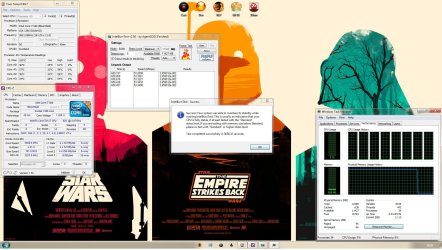
Smart 6 quick boost OC

Damonlandsdown

New member
Local time
3:26 PM
Messages
80
hello,
Core i7 950, 3.06GhZ
BCLK 133MhZ
Gigabyte x58-usb3/UD3R
Coolermaster 850W silent pro 80 plus/bronze
corsair H70 , with 70cfm + 30cfm push pull config
Huge air flow with 5 100cfm fans + 1 70cfm + 2 30cfm fans
all fans run max :)
thermal grease, arctic silver for north/south chipsets. CPU micro diamond TIM, GPU micro diamond TIM/ saphiire 5770 OC edition. runs 32 idle :D

i am using smart quick boost to overclock my intel i7 950 to 3.22 ghz as we speak. no messing around with numbers, just a button and a restart.

now, i use a corsair h70 with micro diamond TIM dont know the exact name, but.
before cpu temps-3.06GhZ
BCLK:133MhZ
cores
1: 29
2: 29
3: 34
4: 29
averages on an idle test for 1 minute
after cpu temps-3.22GhZ
BCLK:140MhZ
cores
1: 34
2: 33
3: 37
4: 31
averages on an idle test for 1 minute

i have not tested under load for temps, but i have used prime 95 for an hour, no faults.

now,
the next ramp up in clock is;
turbo- 3.45GhZ
BCLK:150MhZ

judging by the increase of only about 5 degrees, would the next ramp up be viable?
Capture.PNG
[faster] = active OC
 

My Computer

Computer Manufacturer/Model Number
-
OS
windows 7 ultimate x64
CPU
Intel i7 950
Motherboard
gigabyte usb3
Memory
3x2gb corsair xms 1600mhz ddr3
Graphics Card(s)
ATI saphire 5770 OC 1GB
Sound Card
-
Monitor(s) Displays
22'' acer
Screen Resolution
1680 1050
Hard Drives
320gb WD blue
PSU
cooler master modular silent pro 850watt
Case
thermaltake soprano
Internet Speed
20mbps
I never use Gigabytes Oc tool since it over volts things to give you a stable OC.
and we all know more volts = high temps.

the High Temps is the Temperatures you want to care about. idle don't really mean anything, but it is also good to have it as low as you can, as it will give you a good idea on ya max OC. you could have a easy time reaching a better oc in the bios with a few changes here and there. i could give you some settings but every system is different. but you should always Run Prime95 or Linx for a good 4 - 12hrs as some OC can reach 10hrs and fail. i doubt you will use 100% on everything for 12hrs hehe its just a Stable test ect.

the push/pull config is kinda odd to me? 70cfm -Rad - 30cfm? would that not constrict airflow.

Also the Tim on the Corsair H50/70/60 is Shin-Etsu and it is a really good tim.

as for idle temps i have seen people with 45c 48c but there OC not go above 77c. when primed.
NH-D14 ;) mind you that was on 4.2 - 4.4Ghz oc. as not every chip is the same and some need loads more volts.
Stable test software you should use to check stability
OCCT, Linpack, LinX, IBT, Prime95

here is a good link to a Good Overclock bios Template. http://i31.tinypic.com/rs6gwn.jpg i used that the first time i OC my 920. with a lil tweaking you can get something that is stable and Beastly. (also you will learn a little something and never use software overclocking again)

here is another guide that will help you a lot.
Core i7 Overclocking Guide For Beginners

like my 920 is rock solid with 166Bclk @ 1.1 Vcore but need's a bump for that 4.2 v1.295
btw. here is a Oc on my setup.. 3.8 24/7 (4.2 Occasionally)
To give you a idea what these i7 can do+

Remember HT on = more heat to ;)

H50 + Apache Fans push/pull running @ 800rpm ( silence :) ) + 1 140 outtake fan. so 3 fan setup. in my case.. Antec Fusion Remote Max /HTPC case.
i7 920 @ 3.8/4.2 when i need that profile.
vcore 1.212 in bios. 1.18 in windows when 100%
181 Bclk
Room Temp at the time was 21c
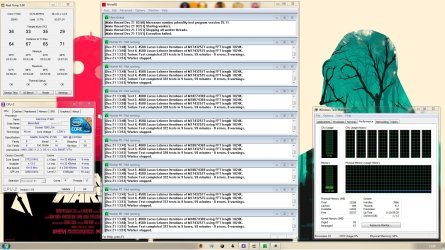
10hr run in prime95. Linx will make the Temps go up as it stress test harder + IBT 20 to 50 rounds is good on max.

remote max case ain't got the best cooling in the world, but it is a Beast of a case and works well on my setup.
anyway. there should be more people with a lot more understanding come along soon.

here is the 3.8 Prime/IBT
 

Attachments

  • 3.8Ghz 10hr prime95 pass.jpg
    3.8Ghz 10hr prime95 pass.jpg
    355.6 KB · Views: 86
  • 3.8Ghz 10hr IBT pass.jpg
    3.8Ghz 10hr IBT pass.jpg
    268.3 KB · Views: 49
Last edited:

My Computer

Computer Manufacturer/Model Number
Goonie Build 8 2010
OS
Windows 7 64bit Ultimate SP1, VMware Windows 7 64bit Ultimate SP1
CPU
Intel Core i7 920 @ 3.8 or 4.2 when i need it
Motherboard
Gigabyte GA-X58-UD5
Memory
Corsair XMS3 12GB DDR3 1600 1.5v
Graphics Card(s)
MSI GeForce GTX 560Ti OC Twin FrozR II
Sound Card
7.1 HD
Monitor(s) Displays
2x BenQ 24 LED 1080p + LG 50PK590 1080p
Screen Resolution
3840 x 1080p
Hard Drives
Intel X25-M 80GB OS/
Intel X25-M 160GB
Data Robotics Drobo V2 8TB
PSU
Corsair AX 750W ATX Modular
Case
Antec Fusion Remote Max
Cooling
Noctua NH D14
Keyboard
Logitech
Mouse
Logitech
Internet Speed
15Mbs Down 1.3Mbs Up
Other Info
Hauppauge HD PVR/
Pioneer 1017-k - 7.1 THX/
Xbox 360 250 Slim
SkyHD/LG 50PK590 TV
that is a really good guide thanks so much man!!!! rep+++
 

My Computer

Computer Manufacturer/Model Number
-
OS
windows 7 ultimate x64
CPU
Intel i7 950
Motherboard
gigabyte usb3
Memory
3x2gb corsair xms 1600mhz ddr3
Graphics Card(s)
ATI saphire 5770 OC 1GB
Sound Card
-
Monitor(s) Displays
22'' acer
Screen Resolution
1680 1050
Hard Drives
320gb WD blue
PSU
cooler master modular silent pro 850watt
Case
thermaltake soprano
Internet Speed
20mbps
If you want a good, stable overclock, go in your BIOS and figure out your optimal settings manually. Your temperatures are perfectly fine, but only the "twin turbo" overclock there is remotely decent, and it is honestly pretty crappy for a Bloomfield.

Software overclocking is generally pretty mediocre. The best software overclocking I've seen is AMD's OverDrive program, and it isn't up to the standard of overclocking through the BIOS. I'm forced to use it since one of my cores won't run nearly as fast as the other three; some overclocking software allows you to independently set CPU multipliers. I've yet to see a BIOS allow that.
 

My Computer

OS
Windows 7 Ultimate x64
CPU
Intel Core i5 2500K
Motherboard
Gigabyte GA-Z68A-D3-B3
Memory
8GB G.SKILL Ripjaws X DDR3 2133
Graphics Card(s)
nVidia Geforce 9500GT
Monitor(s) Displays
Acer H233H
Screen Resolution
1920x1080
Case
Antec Three Hundred
Back
Top