

Smart Audio Equalizer
I have a weird question, why is when I manually adjust the equilzer... the output is all focused on the right speaker? Its very obvious.. The bass for example is all over on the right side and the left side is faded and barley noticeable... If I have normal settings... its balanced... I put a picture below to explain what I hear...
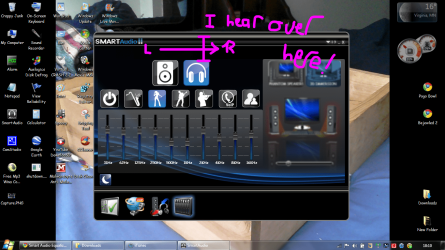
Is this a bug? Or is this a weird feature..
I have a weird question, why is when I manually adjust the equilzer... the output is all focused on the right speaker? Its very obvious.. The bass for example is all over on the right side and the left side is faded and barley noticeable... If I have normal settings... its balanced... I put a picture below to explain what I hear...
Is this a bug? Or is this a weird feature..
My Computer
At a glance
Windows 7 Home Premium 64 bit SP1[01]: Intel64 GenuineIntel 2.20 GHz2.0GB Dual-Channel DDR2 @ 332MHz (5-5-5-14)Mobile Intel(R) GMA 4500M (797MB Memory)(64 D...
- Computer Manufacturer/Model Number
- Compaq Presario CQ60
- OS
- Windows 7 Home Premium 64 bit SP1
- CPU
- [01]: Intel64 GenuineIntel 2.20 GHz
- Motherboard
- Hewlett-Packard 3612 (CPU)
- Memory
- 2.0GB Dual-Channel DDR2 @ 332MHz (5-5-5-14)
- Graphics Card(s)
- Mobile Intel(R) GMA 4500M (797MB Memory)(64 Dedicated)
- Sound Card
- Conexant Pebble High Definition SmartAudio
- Screen Resolution
- 1366x768 HD Intel 4 Series Express
- Hard Drives
- 245GB High Speed TOSHIBA Disk Drive ATA Device (SATA) (Primary)
- Cooling
- Stock, w/ High Quality Cooling Pad.
- Mouse
- Synaptics Touchpad V 7.0
- Internet Speed
- Around 10 to 20 MB Per Sec. Comcast Internet.
