Solved smart not enabled

seven2

New member
Member
VIP
Local time
2:38 PM
Messages
267
Win 7 Home Premium, 64 byte, Dell 8300, i5,1T 3.30GHz,

I have a Seagate ST31000528AS hard drive and when I run a test on it provided by Dell, it passes but says that "SMART" is not enabled on this device.
Is this something I should/can enable or not?
Thank you
 

My Computer

Computer Manufacturer/Model Number
Dell
OS
Windows 7 Home premium 64 bit
CPU
Intel R i5 3.3Ghz
Motherboard
Dell 2.6
Memory
6 GB
Graphics Card(s)
Nvidea GT 420
Sound Card
Nvidea Hi Def
Monitor(s) Displays
Dell pnp
Hard Drives
Seagate 931 GB
PSU
Dell xps 8300
Case
Dell Balck
Cooling
unknown
Hi,

SMART are some disk attributes that give you some information about the reliability of the hard disk, and try to use that information to predict when the disk might fail. Its useful when you are troubleshooting hardware problems, but apart from that it has no other use.

To enable it, you would have to go into the BIOS and turn it on.

Regards,
Golden
 

My Computer

Computer type
PC/Desktop
Computer Manufacturer/Model Number
Golden Mk. I.4
OS
Windows 10 Pro x64 ; Xubuntu x64
CPU
Intel i7 860 @ 2.80 GHz O/C'ed to 4.0GHz
Motherboard
Gigabyte P55A-UD3R Rev.1. Award BIOS F13
Memory
16GB Corsair Vengance DDR3 @ 661 MHz Dual Channel (9-9-9-24)
Graphics Card(s)
EVGA NVidia GTX 560 1024MB
Sound Card
Realtek Integrated
Monitor(s) Displays
Dual Samsung SyncMaster 2494HS
Screen Resolution
1920*1080 and 1920*1080
Hard Drives
1*Samsung 840 EVO 120GB SSD;
1*OCZ Vertex 2 60GB SSD;
2*Samsung F3 SpinPoint 1TB in RAID0;
1*Samsung F1 SpinPoint 1TB;
2*Western Digital 1TB External USB 3.0
1*Western Digital 500GB External USB 3.0
1*Seagate 500GB External USB 2.0
PSU
Thermaltake ToughPower QFan 750W
Case
Thermaltake Element S VK60001W2Z
Cooling
Corsair H60 Water Cooling, 2*230mm and 2*80mm case fans
Keyboard
Logitech G110
Mouse
Logitech MX518
I don't know how thorough that Dell test is, nor why you you ran it, but you might want to try the diagnostics direct from the manufacturer:

SeaTools | Seagate
 

My Computer

OS
Windows 7 Ultimate x64
smart

Hello
Dell runs a schedued test which I have disabled.

My primary concern was that there was something wrong with the drive because of the smart report. Now that I know what it is for, I have no reason to pursue this further.
I do thank you for the information.
Peter
 

My Computer

Computer Manufacturer/Model Number
Dell
OS
Windows 7 Home premium 64 bit
CPU
Intel R i5 3.3Ghz
Motherboard
Dell 2.6
Memory
6 GB
Graphics Card(s)
Nvidea GT 420
Sound Card
Nvidea Hi Def
Monitor(s) Displays
Dell pnp
Hard Drives
Seagate 931 GB
PSU
Dell xps 8300
Case
Dell Balck
Cooling
unknown
You're quite welcome!
 

My Computer

OS
Windows 7 Ultimate x64
smart

In response to the email, smart is not a feature of this hard drive.
 

My Computer

Computer Manufacturer/Model Number
Dell
OS
Windows 7 Home premium 64 bit
CPU
Intel R i5 3.3Ghz
Motherboard
Dell 2.6
Memory
6 GB
Graphics Card(s)
Nvidea GT 420
Sound Card
Nvidea Hi Def
Monitor(s) Displays
Dell pnp
Hard Drives
Seagate 931 GB
PSU
Dell xps 8300
Case
Dell Balck
Cooling
unknown
Email?

Just curious about that drive that doesn't have the SMART "feature", what make/model is it? It can't be the one referenced in the OP, is it?
 

My Computer

OS
Windows 7 Ultimate x64
smart

I called Dell and went to the Seagate site.
The drive is ST320000528AS.
I wanted to enable it but was told it is for detection of early warning of a drive going bad and I do not have it.

When I ordered the pc I thought with i5,1T 3.30GHz etc i would get a good package but was not informed enought to obtain a good hard drive.
 

My Computer

Computer Manufacturer/Model Number
Dell
OS
Windows 7 Home premium 64 bit
CPU
Intel R i5 3.3Ghz
Motherboard
Dell 2.6
Memory
6 GB
Graphics Card(s)
Nvidea GT 420
Sound Card
Nvidea Hi Def
Monitor(s) Displays
Dell pnp
Hard Drives
Seagate 931 GB
PSU
Dell xps 8300
Case
Dell Balck
Cooling
unknown

My Computer

Computer type
PC/Desktop
Computer Manufacturer/Model Number
Dell Inspiron 660
OS
Windows 7 Home Premium 64bit
CPU
Intel Core i3-3240
Motherboard
Dell 084J0R
Memory
8GB DDR3 SDRAM
Graphics Card(s)
EVGA GeForce GT 620
Sound Card
Intel Panther Point PCH High Definition Audio
Monitor(s) Displays
Acer G205HV
Screen Resolution
1600 x 900
Hard Drives
Sandisk SSD 64GB SDSSDP064G
Seagate HDD 1TB ST1000DM003-1CH162
PSU
Dell 300W
Case
Dell Inspiron
Keyboard
Logitech Wireless K320/B350
Mouse
Microsoft
Internet Speed
25Mbps/4Mbps
Antivirus
Avast
Browser
Mozilla Firefox
smart

I gave you the number in device manager of the hard drive.
Please indicate where I can find the number you wish to see.
 

My Computer

Computer Manufacturer/Model Number
Dell
OS
Windows 7 Home premium 64 bit
CPU
Intel R i5 3.3Ghz
Motherboard
Dell 2.6
Memory
6 GB
Graphics Card(s)
Nvidea GT 420
Sound Card
Nvidea Hi Def
Monitor(s) Displays
Dell pnp
Hard Drives
Seagate 931 GB
PSU
Dell xps 8300
Case
Dell Balck
Cooling
unknown
The model number you posted in your OP is a valid Seagate model, and from what I can tell it does have the SMART feature (although somewhere along the line it may have been turned off -- I would turn it back on).

Your recent post specifies a different model number.
 

My Computer

OS
Windows 7 Ultimate x64
turn on smart

How do I tirn it on?
 

My Computer

Computer Manufacturer/Model Number
Dell
OS
Windows 7 Home premium 64 bit
CPU
Intel R i5 3.3Ghz
Motherboard
Dell 2.6
Memory
6 GB
Graphics Card(s)
Nvidea GT 420
Sound Card
Nvidea Hi Def
Monitor(s) Displays
Dell pnp
Hard Drives
Seagate 931 GB
PSU
Dell xps 8300
Case
Dell Balck
Cooling
unknown
How do I tirn it on?

I've never run across a drive where its SMART feature was really turned off. It may be that SMART monitoring is turned off in your BIOS. You can go into your BIOS, find your drive, and see if there are any options in there to turn monitoring on.

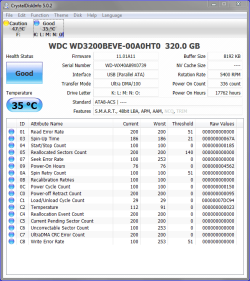
To check the drive itself (to see whether SMART is on or off), see what this app has to say about the drive:

Download Center - Crystal Dew World

There's a bunch of links on that page; you want CrystalDiskInfo, portable edition (it's a no-install version, and you don't get ads), see the link that's highlighted in yellow below:

View attachment 226993

If you get a listing of SMART attributes and their values I think you can assume SMART is actually turned on. You might post a screenshot of what it reports so we can see.
 

My Computer

OS
Windows 7 Ultimate x64
Is the link below what I use for my Win 7 x64 intel i5.?

Portable Edition (zip) from SourceForge.JP [7/2008/Vista/2003/XP/2000, x86/WoW64, i18n]

When I clcik the approriate link, what should i expect? is this a way to see if smart exists, is monitoring,is running etc.?

I would like to look before I leap.I did not see anything hilited in yellow.
I will look at my hard drive in the BIOS to see if there are any hints.
 

My Computer

Computer Manufacturer/Model Number
Dell
OS
Windows 7 Home premium 64 bit
CPU
Intel R i5 3.3Ghz
Motherboard
Dell 2.6
Memory
6 GB
Graphics Card(s)
Nvidea GT 420
Sound Card
Nvidea Hi Def
Monitor(s) Displays
Dell pnp
Hard Drives
Seagate 931 GB
PSU
Dell xps 8300
Case
Dell Balck
Cooling
unknown
Is the link below what I use for my Win 7 x64 intel i5.?

Portable Edition (zip) from SourceForge.JP [7/2008/Vista/2003/XP/2000, x86/WoW64, i18n]

When I clcik the approriate link, what should i expect? is this a way to see if smart exists, is monitoring,is running etc.?

I would like to look before I leap.I did not see anything hilited in yellow.
I will look at my hard drive in the BIOS to see if there are any hints.

Yep, that's the link (that's where the yellow hilite in the second attachment would have taken you upon clicking that particular link).

Download the zip, extract it to a folder and launch the following:

Capture4.PNG

The app should open to a screen similar to this:

Capture5.PNG

Probably should've posted this as well (developer's website) but I didn't want you to have to search through pages/links to find the appropriate link:

http://crystalmark.info/?lang=en
 

My Computer

OS
Windows 7 Ultimate x64
smart

Hello again

If I executed the process properly, it appears there is a mention of smart.
I went through the BIOS this am and saw no refernce to it.
I particularly looked into "advanced" to no avail.
Dell xps 8300, i5, 1T, 3.30 GHz,
Where would it be located and what would I do to access this feature?
I hope the attachment comes through and that it hasmeaning to you as I do not understand it.
Thank you
Peter
 
Last edited:

My Computer

Computer Manufacturer/Model Number
Dell
OS
Windows 7 Home premium 64 bit
CPU
Intel R i5 3.3Ghz
Motherboard
Dell 2.6
Memory
6 GB
Graphics Card(s)
Nvidea GT 420
Sound Card
Nvidea Hi Def
Monitor(s) Displays
Dell pnp
Hard Drives
Seagate 931 GB
PSU
Dell xps 8300
Case
Dell Balck
Cooling
unknown
smart

Hi again
When I run the Dell dx tool for the entire pc, it always says that the hard drive cannot be tested due to smart.

Do you know where I can look in the BIOS to see it?
I will run the test and come back with better specifics.
 

My Computer

Computer Manufacturer/Model Number
Dell
OS
Windows 7 Home premium 64 bit
CPU
Intel R i5 3.3Ghz
Motherboard
Dell 2.6
Memory
6 GB
Graphics Card(s)
Nvidea GT 420
Sound Card
Nvidea Hi Def
Monitor(s) Displays
Dell pnp
Hard Drives
Seagate 931 GB
PSU
Dell xps 8300
Case
Dell Balck
Cooling
unknown
Read my prior link again. I added a Wikipedia article to it while you were creating your last reply.

I checked Dell's website for info about your machine yesterday and it only had limited info about your BIOS options.

Are you running that diagnostics app online (launched from Windows) or offline immediately after a boot (before Windows loads)?
 

My Computer

OS
Windows 7 Ultimate x64
smart

This is one of the tests i was referring to - it is Dell Support Center - PC Check up.
It resides on my desktop in programs. It has never been able to test smart.

I wonder if dell has it hidden inthe BIOS?
 
Last edited:

My Computer

Computer Manufacturer/Model Number
Dell
OS
Windows 7 Home premium 64 bit
CPU
Intel R i5 3.3Ghz
Motherboard
Dell 2.6
Memory
6 GB
Graphics Card(s)
Nvidea GT 420
Sound Card
Nvidea Hi Def
Monitor(s) Displays
Dell pnp
Hard Drives
Seagate 931 GB
PSU
Dell xps 8300
Case
Dell Balck
Cooling
unknown
Back
Top