
smartcard login

Night

New member
Local time
4:11 AM
Messages
40
Hey, im trying to enable smartcard login/bitlocker for my win7 (7100)
all i get is this error

A smart card was detected but is not the one required for the current operation. The smart card you are using may be missing required driver software or a required certificate
 

Attachments
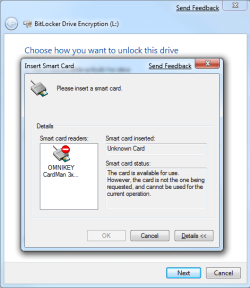
  • bitlocker.png
    bitlocker.png
    20.7 KB · Views: 969

My Computer

Computer Manufacturer/Model Number
Home made
OS
Win 7 7600 x64
CPU
AMD X2 4400+ S939 @ 2.7Ghz
Motherboard
DFI NF4 DR Expert
Memory
4x1GB OCZ 3200/Platium
Graphics Card(s)
HD4870 1GB
Sound Card
Creative X-Fi Elite Pro
Monitor(s) Displays
2x BenQ W2400
Screen Resolution
3840 x 1200
Hard Drives
a few TB here and there.
Case
Lian Li V2100B Plus
Keyboard
DiNovo Edge
Mouse
Logitech G5
Internet Speed
1gigabit/1gigabit
Possible solution

A commen reason for this, is that the "Certificate Propagation" service is set to manual by default.
Check if both of the following services are running; "Smart Card" and "Certificate Propagation". Both have to be started, so unless you use your SmartCard very rarely, I'd recommend you set them to "automatic".

This should give you a message that the driver was installed. That's for the minidriver which should get you back up and running.

Please note, that I've seen instances where the driver (the minidriver) wasn't able to be automatcially installed even though the Certificat Propagation service was started. If so, just go to Windows Update (after you've started that service) and it shoudl appear as an optional download to install.

Anna
Microsoft Developer Division
 

My Computer

OS
Windows 7
both are enabled and set to automatic startup.
in "Driver Software Installation"
"it says Device driver software was not successfully installed."
"Smart Car x No driver found"
 

My Computer

Computer Manufacturer/Model Number
Home made
OS
Win 7 7600 x64
CPU
AMD X2 4400+ S939 @ 2.7Ghz
Motherboard
DFI NF4 DR Expert
Memory
4x1GB OCZ 3200/Platium
Graphics Card(s)
HD4870 1GB
Sound Card
Creative X-Fi Elite Pro
Monitor(s) Displays
2x BenQ W2400
Screen Resolution
3840 x 1200
Hard Drives
a few TB here and there.
Case
Lian Li V2100B Plus
Keyboard
DiNovo Edge
Mouse
Logitech G5
Internet Speed
1gigabit/1gigabit
Hm... it could be several things then...
  1. Check your installation history in Windows Update. Any "minidriver" entries that have been installed? (or failed?)
  2. Configure Windows Update to automatically install the Smartcard drivers
    • Go to Start, navigate to Control Panel, click System and Security, and then click System
    • Click Change Settings
    • Navigate to Hardware tab
    • Click Windows Update Driver Settings
    • Select Yes, do this automatically (optional, but recommended)
    • Click Save
    • Re-insert your Smartcard, and the driver should download

    [*]If #2 didn't work, try going to Windows Update and "manually" force a scan for for updates for you, to see if the minidriver (an optional hardware driver download) will show up for download and installation
    [*]Have you verified with your Smart Card issuer (your company) that your Smartcard actually supports the .NET Framework versions with Windows 7?
  3. It could be an issue with your Smartcard reader not being supported with Windows 7. What SmartCard reader are you using (name and vesion)? I'll try to check for you if it should be compatible.
Anna
 

My Computer

OS
Windows 7
all that is done, no update is found.
my Smartcard read is a "CardMan 3021"
works for other things i use it for ( with same smartcard)
i use it to login to different web services.

as for support for .net framework i have no idea.


Theres also nothing about minidriver in windows update history.
 

My Computer

Computer Manufacturer/Model Number
Home made
OS
Win 7 7600 x64
CPU
AMD X2 4400+ S939 @ 2.7Ghz
Motherboard
DFI NF4 DR Expert
Memory
4x1GB OCZ 3200/Platium
Graphics Card(s)
HD4870 1GB
Sound Card
Creative X-Fi Elite Pro
Monitor(s) Displays
2x BenQ W2400
Screen Resolution
3840 x 1200
Hard Drives
a few TB here and there.
Case
Lian Li V2100B Plus
Keyboard
DiNovo Edge
Mouse
Logitech G5
Internet Speed
1gigabit/1gigabit
Omni key cardman 3021 not installed

Hi,

Followed the steps given in the above thread for installation of smart card (Cardman Omnikey) for windows 7.0. However we are getting an error WindowsUpdate_800F020B. I have the card reader inserted in the port.In the device manager we can view Smart card is not installed.
We are using Cardman 3021 by omni key.Installed the cardman reader which is compatible with Vista since from the omnikey site could not get the cardman reader software for windows 7.0.


Can anyone help in resolving the issue please?
 

My Computer

OS
Windows 7
Hey, im trying to enable smartcard login/bitlocker for my win7 (7100)
all i get is this error

A smart card was detected but is not the one required for the current operation. The smart card you are using may be missing required driver software or a required certificate

I have an exactly same issue with smart card login. all "Smart Card" and "Certificate Propagation" services are running correctly and are set to automatic start. Windows update is turned on and I manully force it to check any new driver but got nothing. the card reader is OMNIKEY Cardman 3021. It worked for me before even it works on my windows 7 ultimate laptop. looks like the minidriver is not intalled or not running but i have no idea where the hell I can find it. Any idea?
 

My Computer

OS
windows 7
I have an exactly same issue with smart card login. all "Smart Card" and "Certificate Propagation" services are running correctly and are set to automatic start. Windows update is turned on and I manully force it to check any new driver but got nothing. the card reader is OMNIKEY Cardman 3021. It worked for me before even it works on my windows 7 ultimate laptop. looks like the minidriver is not intalled or not running but i have no idea where the hell I can find it. Any idea?
BTW, I know my smart card is campabile with .net framework.
 

My Computer

OS
windows 7
ok, finally, I fixed this. that is what I did, jsut copy driver from your friend machine on which your smart card works well then manully install that driver. I don't know why his machine can download driver but mine cannot. anywah, it is working now.
 

My Computer

OS
windows 7
Does anyone know how to enable smart card login for just an admin account? I know my smart card works because I use it at work but I can't figure out how to make it work for just an admin account on my home computer. I know that it can work with 7 because I use to to connect to work related websites.
 

My Computer

OS
Windows 7 Ultimate Signature edition (32-Bit)
CPU
AMD Phenom X4
Memory
4Gb 900Mhz
Graphics Card(s)
GeForce 9500GT
Sound Card
OnBoard
Monitor(s) Displays
Acer 22"
Hard Drives
500 WD X2
Back
Top