SMB Share Issue with Win8.1

MiMadreMia87

New member
Local time
2:13 PM
Messages
37
I have this issue, I am upgrading some clients from Windows XP to Windows 8.1

The issue am facing is the following:
The PCs communicate with a print server in order to print the documents from the system, the print server is Linux based. In order to enable system printing, the printer has to be shared and has a share name and a specific account has to be configured on the machine.. from the server side the printer is added using the share name and the account defined so basically nothing much to do from the server side

I am unable to print as I used to do before, the PC is listening on required ports and I even turned off firewall and antivirus for testing with no luck.. I ran a Wireshark capture on the client side, everything looks fine until the local PC sends a TCP RST packet.. although the port is open and listening, I even tried to access the printer from another windows machine and it was fine (the only difference is that the windows machine used SMBv2 or 3 while the Server was using SMBv1)

So I tried to dig more into SMBv1 compatibility and found some suggested solutions but with no luck..
 

My Computer My Computer

At a glance

Windows 7 - 64bit
Computer type
PC/Desktop
OS
Windows 7 - 64bit
Here is what the capture looks like.. the 10.10.10.62 is the print server..
it just keep repeating this sequence.. I think something has to do with the TCP RST, but the PC is listening on SMB port and I tried accessing the printer from a windows machine and I had no problems
 

Attachments

  • DSC_0083.JPG
    DSC_0083.JPG
    368.5 KB · Views: 2

My Computer My Computer

At a glance

Windows 7 - 64bit
Computer type
PC/Desktop
OS
Windows 7 - 64bit
Pardon my confusion,
- there are client PCs (XP, now 8.1)
- a PC running Linux which acts as a print server (printer already shared from Linux)

Which PC has trouble printing? The clients or the server?

May have other questions later :)
 

My Computer My Computer

At a glance

Windows 7 Ultimate x64 SP1AMD Phenom 2 1090T2x8GB Kingston HyperX Fury Black 1600Mhz Unga...MSI GTX 970 Gaming 4G
Computer type
PC/Desktop
Computer Manufacturer/Model Number
Custom Build
OS
Windows 7 Ultimate x64 SP1
CPU
AMD Phenom 2 1090T
Motherboard
Gigabyte GA-890FXA-UD5
Memory
2x8GB Kingston HyperX Fury Black 1600Mhz Unganged
Graphics Card(s)
MSI GTX 970 Gaming 4G
Sound Card
Realtek On-Board HD 7.1 Audio / Logitech G35
Monitor(s) Displays
3xAcer GD245HQ
Screen Resolution
1920x1080
Hard Drives
Samsung 850 Pro 512GB SSD - OS /
WD Caviar Black SATA 3 - 1 TBx2 - Dynamic RAID 0 /
WD Caviar Green SATA 2 - 640GBx2 - Dynamic RAID 0 /
WD Caviar Green SATA 2 - 640GB - Internal Backup /
Seagate Barracude SATA 3 - 3TB - External Backup/ Sync
PSU
HighPower 1000W
Case
Cooler Master HAF 932
Cooling
Noctua NH-D14
Keyboard
Logitech G19
Mouse
Logitech G500
Internet Speed
100/4 Mbit Cable (100GB quota)
Antivirus
ZoneAlarm Extreme Security / MBAM Pro / MBAE Free / SAS Free
Browser
IE 11 - Firefox - Chrome
Other Info
Logitech F710/ G27/ G940/ Z5500 // TrackIR 5 // Nvidia 3D Surround Vision
Pardon my confusion,
- there are client PCs (XP, now 8.1)
- a PC running Linux which acts as a print server (printer already shared from Linux)

Which PC has trouble printing? The clients or the server?

May have other questions later :)

Oh Finally a reply.. have as much questions as you will!

The clients run XP and are to be upgraded to Win 8.1, and the PC is the testing PC actually
The printer is shared from the Windows machine
Linux server communicates with the client using the printer share name and SMB protocol

The client access a server, and submits a printer order through an oracle based system they use.. this server contacts the linux machines which sends the print order to the printer

so the problem occurs when a print order is sent from the linux machine to the windows 8.1 machine
 

My Computer My Computer

At a glance

Windows 7 - 64bit
Computer type
PC/Desktop
OS
Windows 7 - 64bit

My Computer My Computer

At a glance

Windows 7 Ultimate x64 SP1AMD Phenom 2 1090T2x8GB Kingston HyperX Fury Black 1600Mhz Unga...MSI GTX 970 Gaming 4G
Computer type
PC/Desktop
Computer Manufacturer/Model Number
Custom Build
OS
Windows 7 Ultimate x64 SP1
CPU
AMD Phenom 2 1090T
Motherboard
Gigabyte GA-890FXA-UD5
Memory
2x8GB Kingston HyperX Fury Black 1600Mhz Unganged
Graphics Card(s)
MSI GTX 970 Gaming 4G
Sound Card
Realtek On-Board HD 7.1 Audio / Logitech G35
Monitor(s) Displays
3xAcer GD245HQ
Screen Resolution
1920x1080
Hard Drives
Samsung 850 Pro 512GB SSD - OS /
WD Caviar Black SATA 3 - 1 TBx2 - Dynamic RAID 0 /
WD Caviar Green SATA 2 - 640GBx2 - Dynamic RAID 0 /
WD Caviar Green SATA 2 - 640GB - Internal Backup /
Seagate Barracude SATA 3 - 3TB - External Backup/ Sync
PSU
HighPower 1000W
Case
Cooler Master HAF 932
Cooling
Noctua NH-D14
Keyboard
Logitech G19
Mouse
Logitech G500
Internet Speed
100/4 Mbit Cable (100GB quota)
Antivirus
ZoneAlarm Extreme Security / MBAM Pro / MBAE Free / SAS Free
Browser
IE 11 - Firefox - Chrome
Other Info
Logitech F710/ G27/ G940/ Z5500 // TrackIR 5 // Nvidia 3D Surround Vision
Already done it with no luck.. but yes it makes since that it is more like a server in my case..
One more thing to try! thank you
 

My Computer My Computer

At a glance

Windows 7 - 64bit
Computer type
PC/Desktop
OS
Windows 7 - 64bit
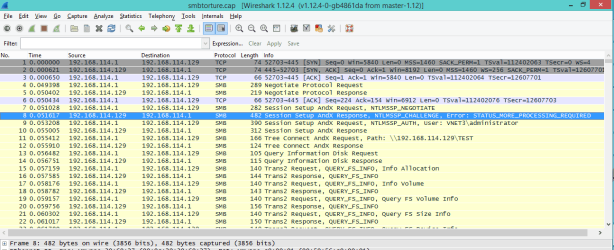
Here is a capture of what happens,
A connection is opened.. SMB negotiated but doesn't go anywhere aferwards.. connection is closed..
 

Attachments

My Computer My Computer

At a glance

Windows 7 - 64bit
Computer type
PC/Desktop
OS
Windows 7 - 64bit
anyone....
 

My Computer My Computer

At a glance

Windows 7 - 64bit
Computer type
PC/Desktop
OS
Windows 7 - 64bit
I am out of ideas, but is there an update to the Linux server perhaps?
 

My Computer My Computer

At a glance

Windows 7 Ultimate x64 SP1AMD Phenom 2 1090T2x8GB Kingston HyperX Fury Black 1600Mhz Unga...MSI GTX 970 Gaming 4G
Computer type
PC/Desktop
Computer Manufacturer/Model Number
Custom Build
OS
Windows 7 Ultimate x64 SP1
CPU
AMD Phenom 2 1090T
Motherboard
Gigabyte GA-890FXA-UD5
Memory
2x8GB Kingston HyperX Fury Black 1600Mhz Unganged
Graphics Card(s)
MSI GTX 970 Gaming 4G
Sound Card
Realtek On-Board HD 7.1 Audio / Logitech G35
Monitor(s) Displays
3xAcer GD245HQ
Screen Resolution
1920x1080
Hard Drives
Samsung 850 Pro 512GB SSD - OS /
WD Caviar Black SATA 3 - 1 TBx2 - Dynamic RAID 0 /
WD Caviar Green SATA 2 - 640GBx2 - Dynamic RAID 0 /
WD Caviar Green SATA 2 - 640GB - Internal Backup /
Seagate Barracude SATA 3 - 3TB - External Backup/ Sync
PSU
HighPower 1000W
Case
Cooler Master HAF 932
Cooling
Noctua NH-D14
Keyboard
Logitech G19
Mouse
Logitech G500
Internet Speed
100/4 Mbit Cable (100GB quota)
Antivirus
ZoneAlarm Extreme Security / MBAM Pro / MBAE Free / SAS Free
Browser
IE 11 - Firefox - Chrome
Other Info
Logitech F710/ G27/ G940/ Z5500 // TrackIR 5 // Nvidia 3D Surround Vision
I believe the TCP Reset is causing the issue as it is closing the connection. As to why it is doing that? My most likely guess is the incompatible version numbers. Since you are upgrading from XP to 8.1 then you will find the SMB compatibility change.

I would personally strongly look into upgrading the print server software to support the new protocol standard as opposed to trying to get the clients to downgrade.

A normal SMB action should have queries and after the negotiation. Something in the negotiation phase caused the PC to close the connection. This could either be the incompatible software or an issue in generating a tokenID for authentication. More likely the compatibility issue since older machines are still working I believe?

smb.PNG

Best Regards,

Josh :)
 

My Computer My Computer

At a glance

Windows 7 Professional x64 SP1 ; Windows Serv...Intel Core i5 2400 @ 3.10GHz8.0GB DDR3 @ 665MHz (2GBx4)AMD Radeon HD 6870
Computer type
PC/Desktop
Computer Manufacturer/Model Number
Custom Built
OS
Windows 7 Professional x64 SP1 ; Windows Server 2012 R2 Standard
CPU
Intel Core i5 2400 @ 3.10GHz
Motherboard
Foxconn H67MP-S/-V/H67MP
Memory
8.0GB DDR3 @ 665MHz (2GBx4)
Graphics Card(s)
AMD Radeon HD 6870
Sound Card
Realtek High Definition Audio
Monitor(s) Displays
AOC 2243W & SMB1930NW
Screen Resolution
1440x900 & 1920x1080
Hard Drives
977GB Seagate ST31000524AS ATA Drive (SATA)
250GB WD iSCSI attached Drive
PSU
750W Gaming PSU
Case
Novatech Night
Cooling
Fan
Keyboard
Dell Standard PS/2 Keyboard
Mouse
R.A.T 07 Gaming Mouse
Internet Speed
Download: 10 Mbps Ping: 30ms Upload: 0.81 Mbps
Browser
Google Chrome
Other Info
Optiarc DVD RW AD-5260S ATA Device
Exactly it should Setup a Session after the: Request, Response
The print server is managed by a different team and there is no way of upgrading it at the moment..
the problem is that Windows 8.1 supports all of the Legacy standards, some of them require to be enabled in specific though.. so I don't think it should be a compatibility problem, but atleast I want to know what part was not agreed during negotiating that resulted in dropping the connection.. this would be the perfect place to start!

Thank you
 

My Computer My Computer

At a glance

Windows 7 - 64bit
Computer type
PC/Desktop
OS
Windows 7 - 64bit
Exactly it should Setup a Session after the: Request, Response
The print server is managed by a different team and there is no way of upgrading it at the moment..
the problem is that Windows 8.1 supports all of the Legacy standards, some of them require to be enabled in specific though.. so I don't think it should be a compatibility problem, but atleast I want to know what part was not agreed during negotiating that resulted in dropping the connection.. this would be the perfect place to start!

Thank you

Well I'd personally get into close contact with that team about changing it. Typically when it comes to client/server relationships, you should make sure the server can meet the requirements of the client. Not the other way round (Unless it is an enforced policy though this is more in Domain environments...). Your clients are the attack vector for your network and is the easiest point of access that an attacker can use to break in.

As for a short term solution, have you read through this to enable the relevant support and see if that allows SMB to continue?

https://support.microsoft.com/en-us/kb/2696547

Best Regards,

Josh :)
 

My Computer My Computer

At a glance

Windows 7 Professional x64 SP1 ; Windows Serv...Intel Core i5 2400 @ 3.10GHz8.0GB DDR3 @ 665MHz (2GBx4)AMD Radeon HD 6870
Computer type
PC/Desktop
Computer Manufacturer/Model Number
Custom Built
OS
Windows 7 Professional x64 SP1 ; Windows Server 2012 R2 Standard
CPU
Intel Core i5 2400 @ 3.10GHz
Motherboard
Foxconn H67MP-S/-V/H67MP
Memory
8.0GB DDR3 @ 665MHz (2GBx4)
Graphics Card(s)
AMD Radeon HD 6870
Sound Card
Realtek High Definition Audio
Monitor(s) Displays
AOC 2243W & SMB1930NW
Screen Resolution
1440x900 & 1920x1080
Hard Drives
977GB Seagate ST31000524AS ATA Drive (SATA)
250GB WD iSCSI attached Drive
PSU
750W Gaming PSU
Case
Novatech Night
Cooling
Fan
Keyboard
Dell Standard PS/2 Keyboard
Mouse
R.A.T 07 Gaming Mouse
Internet Speed
Download: 10 Mbps Ping: 30ms Upload: 0.81 Mbps
Browser
Google Chrome
Other Info
Optiarc DVD RW AD-5260S ATA Device
Any other solutions?
Tried everything suggested on a fresh new installation with no luck.. still the same behaviour
 

My Computer My Computer

At a glance

Windows 7 - 64bit
Computer type
PC/Desktop
OS
Windows 7 - 64bit
Bumping ...
 

My Computer My Computer

At a glance

Windows 7 - 64bit
Computer type
PC/Desktop
OS
Windows 7 - 64bit
Back
Top