Snipping Tool is not working on your computer right now.

JustWatching

New member
Member
Local time
10:09 AM
Messages
71
I started getting this error.
Going into windows features, unchecking tablet pc options, rebooting, checking tablet pc, rebooting, did not resolve.
cmd as admin sfc /scannow did not resolve.
Tempted to find snipping tool.exe online and just copy it into my system.
Any ideas?

TIA
 

My Computer My Computer

At a glance

Windows 7 Ultimate x64Intel Core i5-3350P Ivy Bridge Quad-Core 3.1GHzzHyperX XMP 10th Anniversary Series 16GBEVGA GeForce GTX 970 4GB
Computer type
PC/Desktop
Computer Manufacturer/Model Number
Custom
OS
Windows 7 Ultimate x64
CPU
Intel Core i5-3350P Ivy Bridge Quad-Core 3.1GHzz
Motherboard
Asus P8H77-v
Memory
HyperX XMP 10th Anniversary Series 16GB
Graphics Card(s)
EVGA GeForce GTX 970 4GB
Sound Card
Onboard
Monitor(s) Displays
Acer S241HL 24", ASUS V238h 23"
Screen Resolution
1920x1080
Hard Drives
Kingston SSD 240GB
Samsung 2TB
PSU
XION AXP-700K14XE 700W ATX
Case
HEC 6C28BBX585 Black Steel ATX Mid Tower
Cooling
ZALMAN CNPS9500 AT 2 Ball CPU Cooling Fan/Heatsink
Keyboard
Logitech G710+
Mouse
Anker Wireless Vertical Mouse
Internet Speed
220/20
Antivirus
Webroot
Browser
Chrome
Have you tried a system restore to a point before this started? Easiest first......
 

My Computer My Computer

At a glance

Windows 10x64 Build 1709Intel i7 7700HQ Kaby Lake16 GB DDR4 @2400Nvidia Geforce GTX 1060
Computer type
Laptop
Computer Manufacturer/Model Number
MSI GE72VR Apache Pro-416
OS
Windows 10x64 Build 1709
CPU
Intel i7 7700HQ Kaby Lake
Motherboard
Micro-Star Intl. MS-179B (U3C1)
Memory
16 GB DDR4 @2400
Graphics Card(s)
Nvidia Geforce GTX 1060
Screen Resolution
1920x1080 120Hz
Hard Drives
256 GB Nvme M.2 SSD

1TB HDD@7200
Cooling
Cooler Blast 4
Keyboard
Steel Series
Antivirus
Bit Defender Free
Browser
Edge
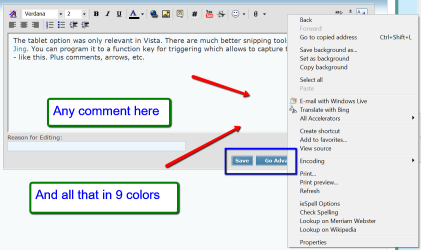
The tablet option was only relevant in Vista. There are much better snipping tools out there. I use Jing. You can program it to a function key for triggering which allows to capture tooltips and fly-outs - like this. Plus comments, arrows, etc.


2013-12-28_2308.png
 

My Computer My Computer

At a glance

Vista, Windows7, Mint Mate, Zorin, Windows 8from 1.6GHz Duo to i7
Computer Manufacturer/Model Number
HP, Dell, Gateway, Toshiba - 4 laptops and 2 desktops
OS
Vista, Windows7, Mint Mate, Zorin, Windows 8
CPU
from 1.6GHz Duo to i7
Monitor(s) Displays
2x HP w2207
Hard Drives
5x HDD, 7x SSD, 12x Externals
Keyboard
with trackball - no mices
Mouse
Trackball mice
Internet Speed
DSL 6000
Have you tried a system restore to a point before this started? Easiest first......

Yes a system restore did not resolve the issue either unfortunately.
I don't understand what is going on, it has always worked fine.
 

My Computer My Computer

At a glance

Windows 7 Ultimate x64Intel Core i5-3350P Ivy Bridge Quad-Core 3.1GHzzHyperX XMP 10th Anniversary Series 16GBEVGA GeForce GTX 970 4GB
Computer type
PC/Desktop
Computer Manufacturer/Model Number
Custom
OS
Windows 7 Ultimate x64
CPU
Intel Core i5-3350P Ivy Bridge Quad-Core 3.1GHzz
Motherboard
Asus P8H77-v
Memory
HyperX XMP 10th Anniversary Series 16GB
Graphics Card(s)
EVGA GeForce GTX 970 4GB
Sound Card
Onboard
Monitor(s) Displays
Acer S241HL 24", ASUS V238h 23"
Screen Resolution
1920x1080
Hard Drives
Kingston SSD 240GB
Samsung 2TB
PSU
XION AXP-700K14XE 700W ATX
Case
HEC 6C28BBX585 Black Steel ATX Mid Tower
Cooling
ZALMAN CNPS9500 AT 2 Ball CPU Cooling Fan/Heatsink
Keyboard
Logitech G710+
Mouse
Anker Wireless Vertical Mouse
Internet Speed
220/20
Antivirus
Webroot
Browser
Chrome
The tablet option was only relevant in Vista. There are much better snipping tools out there. I use Jing. You can program it to a function key for triggering which allows to capture tooltips and fly-outs - like this.

I'll be checking this out myself. Thanks whs!


JustWatching ...... I'm assuming you have some version of MS Office installed on your machine? Try this:

Start an Office application, MS Word for instance > In the top left corner click on the MS Office Logo > Click the Options button > In the box that comes up look in the left hand side for Resources > choose Diagnostics. It will run and repair any errors (snipping tool)
 

My Computer My Computer

At a glance

Windows 10x64 Build 1709Intel i7 7700HQ Kaby Lake16 GB DDR4 @2400Nvidia Geforce GTX 1060
Computer type
Laptop
Computer Manufacturer/Model Number
MSI GE72VR Apache Pro-416
OS
Windows 10x64 Build 1709
CPU
Intel i7 7700HQ Kaby Lake
Motherboard
Micro-Star Intl. MS-179B (U3C1)
Memory
16 GB DDR4 @2400
Graphics Card(s)
Nvidia Geforce GTX 1060
Screen Resolution
1920x1080 120Hz
Hard Drives
256 GB Nvme M.2 SSD

1TB HDD@7200
Cooling
Cooler Blast 4
Keyboard
Steel Series
Antivirus
Bit Defender Free
Browser
Edge
The tablet option was only relevant in Vista. There are much better snipping tools out there. I use Jing. You can program it to a function key for triggering which allows to capture tooltips and fly-outs - like this.

I'll be checking this out myself. Thanks whs!


JustWatching ...... I'm assuming you have some version of MS Office installed on your machine? Try this:

Start an Office application, MS Word for instance > In the top left corner click on the MS Office Logo > Click the Options button > In the box that comes up look in the left hand side for Resources > choose Diagnostics. It will run and repair any errors (snipping tool)


Actually I just have open office. htm...
 

My Computer My Computer

At a glance

Windows 7 Ultimate x64Intel Core i5-3350P Ivy Bridge Quad-Core 3.1GHzzHyperX XMP 10th Anniversary Series 16GBEVGA GeForce GTX 970 4GB
Computer type
PC/Desktop
Computer Manufacturer/Model Number
Custom
OS
Windows 7 Ultimate x64
CPU
Intel Core i5-3350P Ivy Bridge Quad-Core 3.1GHzz
Motherboard
Asus P8H77-v
Memory
HyperX XMP 10th Anniversary Series 16GB
Graphics Card(s)
EVGA GeForce GTX 970 4GB
Sound Card
Onboard
Monitor(s) Displays
Acer S241HL 24", ASUS V238h 23"
Screen Resolution
1920x1080
Hard Drives
Kingston SSD 240GB
Samsung 2TB
PSU
XION AXP-700K14XE 700W ATX
Case
HEC 6C28BBX585 Black Steel ATX Mid Tower
Cooling
ZALMAN CNPS9500 AT 2 Ball CPU Cooling Fan/Heatsink
Keyboard
Logitech G710+
Mouse
Anker Wireless Vertical Mouse
Internet Speed
220/20
Antivirus
Webroot
Browser
Chrome
Ended up going with Jing, never got snipping tool working again.
 

My Computer My Computer

At a glance

Windows 7 Ultimate x64Intel Core i5-3350P Ivy Bridge Quad-Core 3.1GHzzHyperX XMP 10th Anniversary Series 16GBEVGA GeForce GTX 970 4GB
Computer type
PC/Desktop
Computer Manufacturer/Model Number
Custom
OS
Windows 7 Ultimate x64
CPU
Intel Core i5-3350P Ivy Bridge Quad-Core 3.1GHzz
Motherboard
Asus P8H77-v
Memory
HyperX XMP 10th Anniversary Series 16GB
Graphics Card(s)
EVGA GeForce GTX 970 4GB
Sound Card
Onboard
Monitor(s) Displays
Acer S241HL 24", ASUS V238h 23"
Screen Resolution
1920x1080
Hard Drives
Kingston SSD 240GB
Samsung 2TB
PSU
XION AXP-700K14XE 700W ATX
Case
HEC 6C28BBX585 Black Steel ATX Mid Tower
Cooling
ZALMAN CNPS9500 AT 2 Ball CPU Cooling Fan/Heatsink
Keyboard
Logitech G710+
Mouse
Anker Wireless Vertical Mouse
Internet Speed
220/20
Antivirus
Webroot
Browser
Chrome
Jing is a much better snipping tool anyhow. Did you program it to trigger from a Function key ?? That is really handy because you can also catch the context menus.
 

My Computer My Computer

At a glance

Vista, Windows7, Mint Mate, Zorin, Windows 8from 1.6GHz Duo to i7
Computer Manufacturer/Model Number
HP, Dell, Gateway, Toshiba - 4 laptops and 2 desktops
OS
Vista, Windows7, Mint Mate, Zorin, Windows 8
CPU
from 1.6GHz Duo to i7
Monitor(s) Displays
2x HP w2207
Hard Drives
5x HDD, 7x SSD, 12x Externals
Keyboard
with trackball - no mices
Mouse
Trackball mice
Internet Speed
DSL 6000
I do not follow these thread and replies. Windows7 under accessories has built in snipping tool that works very well for me. Why the need to go elsewhere?
 

My Computer My Computer

At a glance

W7 pro 32-bit.4GBATI Mobility Radeon HD 4650 (M96)
Computer type
Laptop
Computer Manufacturer/Model Number
HP Pavilion dv7-2173cl Entertainment Notebook PC
OS
W7 pro 32-bit.
Memory
4GB
Graphics Card(s)
ATI Mobility Radeon HD 4650 (M96)
Sound Card
•Altec Lansing with SRS Premium Sound and Sub-Woofer
Monitor(s) Displays
17.3” Diagonal HD+ High-Definition HP LED BrightView W
Screen Resolution
1600 x 900
Hard Drives
500GB (5400RPM)
Keyboard
101-key compatible with full size keyboard
Antivirus
MSE
Browser
IE 11
I do not follow these thread and replies. Windows7 under accessories has built in snipping tool that works very well for me. Why the need to go elsewhere?
There are 2 possible reasons:

1. On some systems, the snipping tool does not seem to work. So it is an alternative (there are others too)

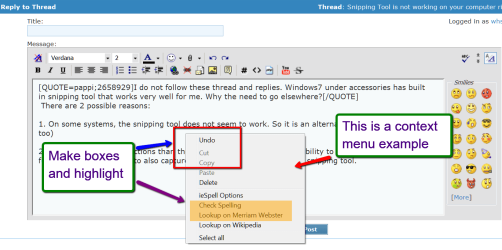
2. Jing has a lot more functions than the snipping tool - especially the ability to trigger it from a function key. That allows to also capture context stuff. Try this with the snipping tool.
 

Attachments

  • 2014-01-16_1206.png
    2014-01-16_1206.png
    44.5 KB · Views: 0

My Computer My Computer

At a glance

Vista, Windows7, Mint Mate, Zorin, Windows 8from 1.6GHz Duo to i7
Computer Manufacturer/Model Number
HP, Dell, Gateway, Toshiba - 4 laptops and 2 desktops
OS
Vista, Windows7, Mint Mate, Zorin, Windows 8
CPU
from 1.6GHz Duo to i7
Monitor(s) Displays
2x HP w2207
Hard Drives
5x HDD, 7x SSD, 12x Externals
Keyboard
with trackball - no mices
Mouse
Trackball mice
Internet Speed
DSL 6000
My snipping tool is compatibility configured by default to W95. Maybe, thread author should look into this compatibility issue. I find anything simpler is better.
 

My Computer My Computer

At a glance

W7 pro 32-bit.4GBATI Mobility Radeon HD 4650 (M96)
Computer type
Laptop
Computer Manufacturer/Model Number
HP Pavilion dv7-2173cl Entertainment Notebook PC
OS
W7 pro 32-bit.
Memory
4GB
Graphics Card(s)
ATI Mobility Radeon HD 4650 (M96)
Sound Card
•Altec Lansing with SRS Premium Sound and Sub-Woofer
Monitor(s) Displays
17.3” Diagonal HD+ High-Definition HP LED BrightView W
Screen Resolution
1600 x 900
Hard Drives
500GB (5400RPM)
Keyboard
101-key compatible with full size keyboard
Antivirus
MSE
Browser
IE 11
For me it worked great until yesterday, and i have only word viewer installed. Got jing but i'd like to know what is wrong with ST
 

My Computer My Computer

At a glance

Windows 7 Home Premium x64Intel Core 2 Quad Q9550 2.83Ghz6 GB, 2X 2GB Corsair Dominator Twin DDR2 AND ...Ati Radeon HD 5750 1 GB
Computer type
PC/Desktop
OS
Windows 7 Home Premium x64
CPU
Intel Core 2 Quad Q9550 2.83Ghz
Motherboard
Gigabyte UD3
Memory
6 GB, 2X 2GB Corsair Dominator Twin DDR2 AND 1X 2GB KINGSTON
Graphics Card(s)
Ati Radeon HD 5750 1 GB
Sound Card
onboard, or MOTU 896HD FIREWIRE INTERFACE
Monitor(s) Displays
1x Acer v193HQ 18'5 1366x768 and 1x Netsys 23'6 1920x1080
Hard Drives
2 x Seagate barracuda 1.5 TB, 7200 rpm
PSU
Corsair 650W
Case
Antec Three Hundred Ultimate Gaming Case
Internet Speed
6 Mbit/s
Mine seems to be working fine,
You might try this and post the info in a new question
Use Clean boot,
http://www.sevenforums.com/tutorials/179159-troubleshoot-application-conflicts-performing-clean-startup.html
Click Start and type in the search box,
msconfig
Click on the suggestion on top or hit the Enter key,
Go to the Startup section and take some screen shots for a complete list,
Go to the Services section and on the bottom left Check the box to Hide All Microsoft services,
Repeat the screen shots,
See the links above my signature on how to take and upload screen shots here,
Cheers.
 

My Computer My Computer

At a glance

Win-7-Pro64bit 7-H-Prem-64biti7-5930K 2nd i9-9940x both water blocked VRM'...Trident-z 3200C14 2nd Trident-z 3600C16EVGA 1080ti ftw3 2nd Titan Xp both water blocked
Computer type
PC/Desktop
Computer Manufacturer/Model Number
Custom assembled by me :}
OS
Win-7-Pro64bit 7-H-Prem-64bit
CPU
i7-5930K 2nd i9-9940x both water blocked VRM's too
Motherboard
ASUS SABERTOOTH X99 2nd ASUS x299 Apex
Memory
Trident-z 3200C14 2nd Trident-z 3600C16
Graphics Card(s)
EVGA 1080ti ftw3 2nd Titan Xp both water blocked
Sound Card
Built-in Realtek
Monitor(s) Displays
1-AOC G2460PG 24"G-Sync 144Hz/ 2nd 1-ASUS VG248QE 24" 144Hz
Screen Resolution
1920 x 1080 144Hz
Hard Drives
2-Samsung M.2 Evo & Evo Plus
2-Samsung 850 EVO 500GB SSD's/ 3-2.5 W.D. Black 1tb-&3-1tb/3-3.5 WD Black 1tb hdd's
PSU
EVGA SuperNOVA 1000-P2 2nd 1200-P2
Case
2-Corsair Obsidian Series 450D Black ATX Mid Tower
Cooling
Custom water loops
Keyboard
Logitech G710+/ 2nd Logitech G910
Mouse
2-RedDragon M901 Perdition 16400 dpi Gaming mouse = wired
Internet Speed
Comcast Ping 19ms 89.31mbps download speed 6.12mbps upload
Antivirus
Malwarebytes Pro/ Superantispyware Pro
Browser
FireFox & Pale moon
Other Info
2nd ASUS X299 Apex/Intel i9-9940x with Custom water loop/7H-Prem-x64/Corsair 450D case/Ram Trident-z 3600C16 4x8gb / Samsung970Evo plus 500gb SSD/Dual ssd EZ swap evo/PSU EVGA SuperNova 1200w-P2 80+Platinum/GPU Titan Xp /8-ML-140 on push-pull on 2-280GTX rads
Back
Top