
You are using an out of date browser. It may not display this or other websites correctly.
You should upgrade or use an alternative browser.
You should upgrade or use an alternative browser.
snipping tool not working
- Thread starter Rose1
- Start date

I think that is normal. See this link: How to use the Snipping Tool in Vista - Vista Forums
Snipping tool is the same in Vista and 7.
Snipping tool is the same in Vista and 7.
My Computer
- Computer Manufacturer/Model Number
- Custom
- OS
- Windows 7 Professional x64
- CPU
- Intel i7 2600K OC'd @ 4620 MHz
- Motherboard
- Asus P8Z68-V Pro
- Memory
- 16GB GSkill Sniper 2133 Mhz (4x4GB)
- Graphics Card(s)
- EVGA GeForce GTX 480 SuperClocked+
- Sound Card
- Realtek High Definition Audio
- Monitor(s) Displays
- 2x Acer S273HLbmii 27"
- Screen Resolution
- 2 x 1920x1080
- Hard Drives
- 64GB Crucial M4 SSD
Storage: Hitachi 1TB 5400RPM, Samsung 1.5TB 5400RPM
- PSU
- Corsair HW Series 750w (modular)
- Case
- Cooler Master HAF 932 Advanced Blue Edition
- Cooling
- CM Hyper 212+ CPU cooler, 3x 230mm + 1x 140mm case fans
- Keyboard
- Logitech MK320 (wireless)
- Mouse
- Logitech MK320 (wireless)
- Internet Speed
- 30 Mb/s : 2 Mb/s
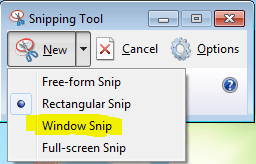
You can select a Full Windows snip from the drop-down menu.
My Computer
- Computer Manufacturer/Model Number
- Custom
- OS
- Windows 7 Professional x64
- CPU
- Intel i7 2600K OC'd @ 4620 MHz
- Motherboard
- Asus P8Z68-V Pro
- Memory
- 16GB GSkill Sniper 2133 Mhz (4x4GB)
- Graphics Card(s)
- EVGA GeForce GTX 480 SuperClocked+
- Sound Card
- Realtek High Definition Audio
- Monitor(s) Displays
- 2x Acer S273HLbmii 27"
- Screen Resolution
- 2 x 1920x1080
- Hard Drives
- 64GB Crucial M4 SSD
Storage: Hitachi 1TB 5400RPM, Samsung 1.5TB 5400RPM
- PSU
- Corsair HW Series 750w (modular)
- Case
- Cooler Master HAF 932 Advanced Blue Edition
- Cooling
- CM Hyper 212+ CPU cooler, 3x 230mm + 1x 140mm case fans
- Keyboard
- Logitech MK320 (wireless)
- Mouse
- Logitech MK320 (wireless)
- Internet Speed
- 30 Mb/s : 2 Mb/s

- Local time
- 12:36 AM
- Messages
- 416
That's the problem. I don't have those choices. I don't see those at all. Its a tiny window with minimize, maximize and X. The little scissor doesn't have a arrow at all. Its like disable or corrupted or something. I can't use it at all 
My Computer
- Computer type
- Laptop
- Computer Manufacturer/Model Number
- compaq
- OS
- windows Ultimate
How long has it been like this? Might a system restore help?
My Computer
- Computer Manufacturer/Model Number
- Custom
- OS
- Windows 7 Professional x64
- CPU
- Intel i7 2600K OC'd @ 4620 MHz
- Motherboard
- Asus P8Z68-V Pro
- Memory
- 16GB GSkill Sniper 2133 Mhz (4x4GB)
- Graphics Card(s)
- EVGA GeForce GTX 480 SuperClocked+
- Sound Card
- Realtek High Definition Audio
- Monitor(s) Displays
- 2x Acer S273HLbmii 27"
- Screen Resolution
- 2 x 1920x1080
- Hard Drives
- 64GB Crucial M4 SSD
Storage: Hitachi 1TB 5400RPM, Samsung 1.5TB 5400RPM
- PSU
- Corsair HW Series 750w (modular)
- Case
- Cooler Master HAF 932 Advanced Blue Edition
- Cooling
- CM Hyper 212+ CPU cooler, 3x 230mm + 1x 140mm case fans
- Keyboard
- Logitech MK320 (wireless)
- Mouse
- Logitech MK320 (wireless)
- Internet Speed
- 30 Mb/s : 2 Mb/s
I have problems with it too. Some days it works and other days.....
Try FastStone Screen Capture - The Best Screen Capture Software
Try FastStone Screen Capture - The Best Screen Capture Software
My Computer
- Computer Manufacturer/Model Number
- Acer 7738G
- OS
- Windows 7 Home Premium X64 SP1
- CPU
- Intel Core2 duo T6600
- Memory
- 4gb
- Graphics Card(s)
- Nvidia GeForce GT 1gb
- Hard Drives
- 2 X 500 gb

Try a repair install, or in command prompt sfc /scannow
~Lordbob
~Lordbob
My Computer
- Computer Manufacturer/Model Number
- Hera
- OS
- Windows 7 Ultimate x64, Mint 9
- CPU
- Intel i5-2500k
- Motherboard
- ASUS P8P67 Pro
- Memory
- 2x 4Gb Corsair VENGEANCE DDR3-1600
- Graphics Card(s)
- NVidia GeForce N260GTX Twin Frozr
- Sound Card
- Realtek HD OnBoard Audio
- Monitor(s) Displays
- ASUS 24" Monitor
- Screen Resolution
- 1920x1080
- Hard Drives
- G.SKILL Phoenix Series 60GB SATA II MLC Internal Solid State Drive (SSD)
SAMSUNG Spinpoint F3R 1TB 7200 RPM 32MB Cache SATA II
- PSU
- Cooler Master Real Power Pro 750W
- Case
- Cooler Master Haf 932
- Cooling
- Fans
- Keyboard
- Razer Tarantula
- Mouse
- Razer Lachesis
- Internet Speed
- not fast enough
A system restore may take you back to a point in time where it worked.
My Computer
- Computer Manufacturer/Model Number
- Custom
- OS
- Windows 7 Professional x64
- CPU
- Intel i7 2600K OC'd @ 4620 MHz
- Motherboard
- Asus P8Z68-V Pro
- Memory
- 16GB GSkill Sniper 2133 Mhz (4x4GB)
- Graphics Card(s)
- EVGA GeForce GTX 480 SuperClocked+
- Sound Card
- Realtek High Definition Audio
- Monitor(s) Displays
- 2x Acer S273HLbmii 27"
- Screen Resolution
- 2 x 1920x1080
- Hard Drives
- 64GB Crucial M4 SSD
Storage: Hitachi 1TB 5400RPM, Samsung 1.5TB 5400RPM
- PSU
- Corsair HW Series 750w (modular)
- Case
- Cooler Master HAF 932 Advanced Blue Edition
- Cooling
- CM Hyper 212+ CPU cooler, 3x 230mm + 1x 140mm case fans
- Keyboard
- Logitech MK320 (wireless)
- Mouse
- Logitech MK320 (wireless)
- Internet Speed
- 30 Mb/s : 2 Mb/s
- Local time
- 12:36 AM
- Messages
- 416
How do I do the repair install, and the command you gave me didn't do anything.Try a repair install, or in command prompt sfc /scannow
~Lordbob
My Computer
- Computer type
- Laptop
- Computer Manufacturer/Model Number
- compaq
- OS
- windows Ultimate
My Computer
- Computer Manufacturer/Model Number
- Custom
- OS
- Windows 7 Professional x64
- CPU
- Intel i7 2600K OC'd @ 4620 MHz
- Motherboard
- Asus P8Z68-V Pro
- Memory
- 16GB GSkill Sniper 2133 Mhz (4x4GB)
- Graphics Card(s)
- EVGA GeForce GTX 480 SuperClocked+
- Sound Card
- Realtek High Definition Audio
- Monitor(s) Displays
- 2x Acer S273HLbmii 27"
- Screen Resolution
- 2 x 1920x1080
- Hard Drives
- 64GB Crucial M4 SSD
Storage: Hitachi 1TB 5400RPM, Samsung 1.5TB 5400RPM
- PSU
- Corsair HW Series 750w (modular)
- Case
- Cooler Master HAF 932 Advanced Blue Edition
- Cooling
- CM Hyper 212+ CPU cooler, 3x 230mm + 1x 140mm case fans
- Keyboard
- Logitech MK320 (wireless)
- Mouse
- Logitech MK320 (wireless)
- Internet Speed
- 30 Mb/s : 2 Mb/s
Hit start, and type cmd then right click and run as admin. Then type:How do I do the repair install, and the command you gave me didn't do anything.Try a repair install, or in command prompt sfc /scannow
~Lordbob
sfc /scannow
For repair install: http://www.sevenforums.com/tutorials/3413-repair-install.html
~Lordbob
My Computer
- Computer Manufacturer/Model Number
- Hera
- OS
- Windows 7 Ultimate x64, Mint 9
- CPU
- Intel i5-2500k
- Motherboard
- ASUS P8P67 Pro
- Memory
- 2x 4Gb Corsair VENGEANCE DDR3-1600
- Graphics Card(s)
- NVidia GeForce N260GTX Twin Frozr
- Sound Card
- Realtek HD OnBoard Audio
- Monitor(s) Displays
- ASUS 24" Monitor
- Screen Resolution
- 1920x1080
- Hard Drives
- G.SKILL Phoenix Series 60GB SATA II MLC Internal Solid State Drive (SSD)
SAMSUNG Spinpoint F3R 1TB 7200 RPM 32MB Cache SATA II
- PSU
- Cooler Master Real Power Pro 750W
- Case
- Cooler Master Haf 932
- Cooling
- Fans
- Keyboard
- Razer Tarantula
- Mouse
- Razer Lachesis
- Internet Speed
- not fast enough

Here is a free version of the Faststone snipping tool. This is an excellent program that is far superior to the Windows snipping tool.The software you suggested is a Trial version. Can't the snipping tool be fixed or should I keep checking to see if it will work?
Another free option is Jing. It is a little fuzzy to set up, but once you got that done, it works really well. I like especially that you can program it on a Function key. That allows you to snip e.g. things like open context menus etc. - those would normally disappear from the screen if you have to click for a snipping tool.
Finally you can also use Paint for screenshots. That is a little more involved but well explained in Brinks tutorial.
PS: Try to start the snipping tool .exe directly. You find it in C\Windows\System32 - but you have to go pretty far to the end of System32 which is a very big folder.
My Computer
- Computer Manufacturer/Model Number
- HP, Dell, Gateway, Toshiba - 4 laptops and 2 desktops
- OS
- Vista, Windows7, Mint Mate, Zorin, Windows 8
- CPU
- from 1.6GHz Duo to i7
- Monitor(s) Displays
- 2x HP w2207
- Hard Drives
- 5x HDD, 7x SSD, 12x Externals
- Keyboard
- with trackball - no mices
- Mouse
- Trackball mice
- Internet Speed
- DSL 6000
The snipping tool is part of the Tablet PC components. Perhaps you could go to Programs and Features in the control panel and look at windows components. If you un-check, it should remove the utility. Rechecking should reinstall it.
My Computer
- Computer Manufacturer/Model Number
- Homebuilt
- OS
- Windows 7 x64
- CPU
- i7-2600K
- Motherboard
- Asus P8Z77-v Pro
- Memory
- 8 G
- Graphics Card(s)
- GTX 480
- Sound Card
- Onboard
- Monitor(s) Displays
- LG W2753V
- Screen Resolution
- 1920x1080
- Hard Drives
- Crucial M4 128 G SSD
This was the case in Vista. But I am not sure whether that is true in Win7.The snipping tool is part of the Tablet PC components. Perhaps you could go to Programs and Features in the control panel and look at windows components. If you un-check, it should remove the utility. Rechecking should reinstall it.
My Computer
- Computer Manufacturer/Model Number
- HP, Dell, Gateway, Toshiba - 4 laptops and 2 desktops
- OS
- Vista, Windows7, Mint Mate, Zorin, Windows 8
- CPU
- from 1.6GHz Duo to i7
- Monitor(s) Displays
- 2x HP w2207
- Hard Drives
- 5x HDD, 7x SSD, 12x Externals
- Keyboard
- with trackball - no mices
- Mouse
- Trackball mice
- Internet Speed
- DSL 6000

It is not part of Tablet PC in Win7. I have Tablet PC un-checked in the "Turn Win7 Features on or off", and yet I use the snip tool every day....it's pinned to my taskbar.This was the case in Vista. But I am not sure whether that is true in Win7.The snipping tool is part of the Tablet PC components. Perhaps you could go to Programs and Features in the control panel and look at windows components. If you un-check, it should remove the utility. Rechecking should reinstall it.

My Computer
- Computer type
- PC/Desktop
- Computer Manufacturer/Model Number
- Gigabyte Technology Co., Ltd.
- OS
- Win 7 Ultimate 64-bit SP1 (desktop)
- CPU
- Intel Core 2 Duo E8400
- Motherboard
- Gigabyte GA-EP35-DS3R
- Memory
- 2x 2GB OCZ DDR II SDRAM PC2-6400
- Graphics Card(s)
- NVIDIA GeForce 9400GT
- Monitor(s) Displays
- HP 2009m(primary), Acer P191W
- Screen Resolution
- 1600x900, 1440x900
- Hard Drives
- Internal:WD Caviar Black 640GB 32MB cache 7200RPM
External:Samsung Story Station 1TB HDD desktop drive
500GB Toshiba portable drive
- PSU
- Antec Earthwatts EA500D
- Case
- Antec Sonata III
- Cooling
- 4 fans
- Keyboard
- Logitech Wave
- Mouse
- Logitech M-SBF90
- Internet Speed
- Slow due to home Wireless-G router
- Antivirus
- MSE, Hitman Pro, Malwarebytes
- Browser
- Chrome and Palemoon
- Other Info
- Laptop....Acer 5750Z-4835
15.6" HD Widescreen CineCrystal™ LED-backlit LCD Display: (1366x768 resolution, 16:9 aspect ratio)
Intel® Pentium® Processor B940 (2.0GHz, 2MB L3 cache)
Windows® 7 Home Premium,500GB Hard Drive,4GB DDR3 RAM, Intel® HD Graphics,8X DVD-Super Multi Double-Layer Drive
Multi-in-1 Digital Media Card Reader,802.11b/g/n Wi-Fi
Chrome and Palemoon, MSE, Hitman Pro

- Local time
- 5:36 PM
- Messages
- 111
Enter Options in your Snipping Tool and choose to show "all suggestions" or words to that effect. Then you will be able to choose Window Snip. If you're Option Button is missing, then do as suggested and type sfc /scannow in your Start/Search field.
My Computer
- Computer Manufacturer/Model Number
- My own Custom Build: Asus, Corsair, Transcend, AMD, PNY, Ultra
- OS
- W7 64 Bit
- CPU
- AMD Phenom x4 4000Mhz
- Memory
- 8 GB DDR-2
- Graphics Card(s)
- PNY-NVIDIA GeForce GTX 460 1GB GDDR5 PCI-e
- Monitor(s) Displays
- Dual: Flatron L1942T
- Hard Drives
- C: Drive (Agility 2 Solid State Drive 60 GB)
D: Drive (HDD Internal Western Digital 640 GB)
- PSU
- 650 Watt
- Cooling
- Corsair Hydro H6 Liquid Cooler
- Internet Speed
- 25 mbps down - 3 mbps up
You are correct, sorry I did not realize it had been changed.This was the case in Vista. But I am not sure whether that is true in Win7.
My Computer
- Computer Manufacturer/Model Number
- Homebuilt
- OS
- Windows 7 x64
- CPU
- i7-2600K
- Motherboard
- Asus P8Z77-v Pro
- Memory
- 8 G
- Graphics Card(s)
- GTX 480
- Sound Card
- Onboard
- Monitor(s) Displays
- LG W2753V
- Screen Resolution
- 1920x1080
- Hard Drives
- Crucial M4 128 G SSD