So i have this problem when i tried to activate "System Protection"

axs

New member
Local time
1:35 AM
Messages
5
So i have this problem when i tried to activate "System Protection"

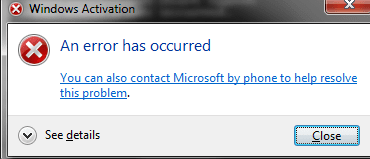
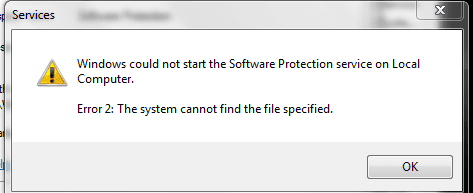
So i recently got this problem where i can't activate my Windows Activation key due to something like "Status not available" including the Product ID. Then i found out the problem what is causing this and tried to solve it. I opened Services and tried to Start "System Protection" but i can't. Idk the problem but it is the same as running slui.exe there is a popup saying "an error has occured" CODE: 0x80070002 Description: The system cannot find the specified file. It is the same problem as the System Protection and i think there is something that wipes all of these files. I tried searching youtube for solutions and recovery and not a single tutorial helped me. Please guys, what do i do???
 

Attachments
  • Capture.PNG
    Capture.PNG
    6.7 KB · Views: 4
  • gdsge.PNG
    gdsge.PNG
    8.3 KB · Views: 4

My Computers My Computers

  • At a glance

    Windows 7 Professional x64
    OS
    Windows 7 Professional x64
  • Computer type
    PC/Desktop

My Computer My Computer

At a glance

W7 home premium 32bit/W7HP 64bit/w10 tp insid...E5300 dual core3gbNvidia Geforce 7100 Nforce 630i
Computer type
PC/Desktop
Computer Manufacturer/Model Number
medionl/Aspire 6930G/acer x55a
OS
W7 home premium 32bit/W7HP 64bit/w10 tp insider ring
CPU
E5300 dual core
Motherboard
medion MS7366
Memory
3gb
Graphics Card(s)
Nvidia Geforce 7100 Nforce 630i
Monitor(s) Displays
avixc
Internet Speed
n (isp resticted to 72)
Antivirus
mse/pands
Browser
palemoon
Other Info
Belkin Fd7050 n USB using Railink RT2870 drivers, more upto date
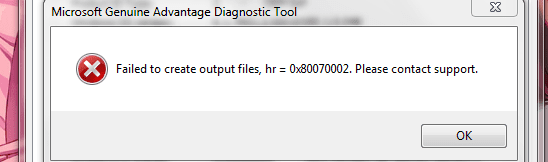
Thankyou torchwood, it helped me but i am facing a new issue now. Do you know any solution? After running diagnostics and witnessing the results. I clicked copy and showed me this popup
 

Attachments

  • uh oh.PNG
    uh oh.PNG
    9.4 KB · Views: 4

My Computers My Computers

  • At a glance

    Windows 7 Professional x64
    OS
    Windows 7 Professional x64
  • Computer type
    PC/Desktop
ooooooh thats annoying

the tool puts together about 5 different pages..... can you actually view any off them..... especially the pages for the error i quoted


lets try this anyway,
NOTE this is a standard fix...... but as sppsvc is not present. youll likely get an error ignore and continue


Recreate the Licensing Store
Go to Start > All Programs > Accessories
Right-Click on Command Prompt and select Run as Administrator - accept the UAC prompt
Run the following commands in the Command Prompt window, using the Enter key at the end of each

net stop sppsvc
(wait until the service has stopped before entering the following lines)

Code:

CD %windir%\ServiceProfiles\NetworkService\AppData\Roaming\Microsoft\SoftwareProtectionPlatform
REN tokens.dat tokens.bar
(all one line)
net start sppsvc

slui.exe


After a couple of seconds Windows Activation dialog will appear.
You may be asked to re-activate and/or re-enter your product key or Activation may occur automatically.
If you are asked for your Key, use the one on the COA sticker on the machine's case

Reboot and Post back with a new MGADiag report


Is this a new (re)install
 

My Computer My Computer

At a glance

W7 home premium 32bit/W7HP 64bit/w10 tp insid...E5300 dual core3gbNvidia Geforce 7100 Nforce 630i
Computer type
PC/Desktop
Computer Manufacturer/Model Number
medionl/Aspire 6930G/acer x55a
OS
W7 home premium 32bit/W7HP 64bit/w10 tp insider ring
CPU
E5300 dual core
Motherboard
medion MS7366
Memory
3gb
Graphics Card(s)
Nvidia Geforce 7100 Nforce 630i
Monitor(s) Displays
avixc
Internet Speed
n (isp resticted to 72)
Antivirus
mse/pands
Browser
palemoon
Other Info
Belkin Fd7050 n USB using Railink RT2870 drivers, more upto date
same problem :(
system still cannot find the file specified. The last picture is the slui.exe (same problem "cannot find the file specified")
Is there anything i can do to get all these "missing files"?

and i got the same as you quoted but the code is different
"On a computer running microsoft windows non-core edition, run slui.exe 0x2a 0x80070002 to display the error text error: 0x80070002
 

Attachments

  • dsasad.PNG
    dsasad.PNG
    1.5 KB · Views: 5
  • awh...PNG
    awh...PNG
    1.5 KB · Views: 5
  • slui.PNG
    slui.PNG
    6.7 KB · Views: 5

My Computers My Computers

  • At a glance

    Windows 7 Professional x64
    OS
    Windows 7 Professional x64
  • Computer type
    PC/Desktop
is it a new (re)install??
 

My Computer My Computer

At a glance

W7 home premium 32bit/W7HP 64bit/w10 tp insid...E5300 dual core3gbNvidia Geforce 7100 Nforce 630i
Computer type
PC/Desktop
Computer Manufacturer/Model Number
medionl/Aspire 6930G/acer x55a
OS
W7 home premium 32bit/W7HP 64bit/w10 tp insider ring
CPU
E5300 dual core
Motherboard
medion MS7366
Memory
3gb
Graphics Card(s)
Nvidia Geforce 7100 Nforce 630i
Monitor(s) Displays
avixc
Internet Speed
n (isp resticted to 72)
Antivirus
mse/pands
Browser
palemoon
Other Info
Belkin Fd7050 n USB using Railink RT2870 drivers, more upto date
idk it was all good months ago until it turned out like this...honestly i don't even know what is going on :(
 

My Computers My Computers

  • At a glance

    Windows 7 Professional x64
    OS
    Windows 7 Professional x64
  • Computer type
    PC/Desktop

My Computer My Computer

At a glance

W7 home premium 32bit/W7HP 64bit/w10 tp insid...E5300 dual core3gbNvidia Geforce 7100 Nforce 630i
Computer type
PC/Desktop
Computer Manufacturer/Model Number
medionl/Aspire 6930G/acer x55a
OS
W7 home premium 32bit/W7HP 64bit/w10 tp insider ring
CPU
E5300 dual core
Motherboard
medion MS7366
Memory
3gb
Graphics Card(s)
Nvidia Geforce 7100 Nforce 630i
Monitor(s) Displays
avixc
Internet Speed
n (isp resticted to 72)
Antivirus
mse/pands
Browser
palemoon
Other Info
Belkin Fd7050 n USB using Railink RT2870 drivers, more upto date
Back
Top