
Hello,
I was just checking my new disk in Disk Management, and I was about to extend the volume I already had, when I miss clicked and deleted the whole volume. After some research it seems that I can recover it, because the data isn't lost yet, but I didn't find any solutions for win7 yet.
Source: How To Recover an Accidentally Deleted NTFS or FAT32 Dynamic Volume
I looked for Dskprobe.exe but it seems to not work in win7.
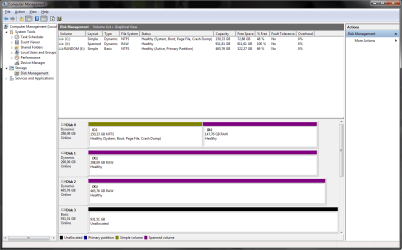
In the attachment you can see that I have three disks made into C: and X: I have already gotten that far in my reconstruction (as I read in the link)
But I don't know what to do know, can someone please help me? I kinda lost gigs of work and almost a TB of media
If you need more information, I'll be here updating this thread every minute
Maybe this one should have gone in the Software forum, please move it if so.
Looking forward for any support.
Kind Regards
Stig
I was just checking my new disk in Disk Management, and I was about to extend the volume I already had, when I miss clicked and deleted the whole volume. After some research it seems that I can recover it, because the data isn't lost yet, but I didn't find any solutions for win7 yet.
Source: How To Recover an Accidentally Deleted NTFS or FAT32 Dynamic Volume
I looked for Dskprobe.exe but it seems to not work in win7.
In the attachment you can see that I have three disks made into C: and X: I have already gotten that far in my reconstruction (as I read in the link)
But I don't know what to do know, can someone please help me? I kinda lost gigs of work and almost a TB of media
If you need more information, I'll be here updating this thread every minute
Maybe this one should have gone in the Software forum, please move it if so.
Looking forward for any support.
Kind Regards
Stig
Attachments
Last edited:
My Computer
At a glance
Windows 7 Ultimate x64
- OS
- Windows 7 Ultimate x64

