ProbleMatic
New member
There's this piece of software that got installed to my computer called Pro Reg Cleaner that starts when I arrive at the windows desktop, and I'm not sure how to remove it, because the program is not listed in the add/remove programs, so I'm totally lost on how to stop it from popping up. Here's the screenshot of the program.
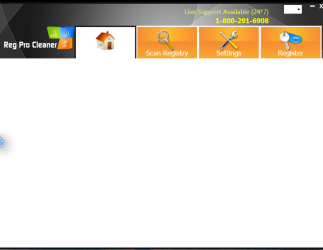
and this is usually what happens, I don't see any kind of other graphics. It just kinda stays there for a bit and then I click x on it and it's as if nothing happened after that. Hopefully this is the right section to talk about this sort of issue, if not, if someone could kindly redirect me, i'd appreciate it.
and this is usually what happens, I don't see any kind of other graphics. It just kinda stays there for a bit and then I click x on it and it's as if nothing happened after that. Hopefully this is the right section to talk about this sort of issue, if not, if someone could kindly redirect me, i'd appreciate it.
My Computer
- Computer type
- PC/Desktop
- Computer Manufacturer/Model Number
- Custom
- OS
- Windows 7 Home Premium 64bit
- CPU
- Intel Core 2 Quad Q9550 @ 2.83GHz
- Motherboard
- Gigabyte Technology Co., Ltd. EP45-UD3L
- Memory
- 8.0GB Dual-Channel DDR2 @ 333MHz (5-5-5-15)
- Graphics Card(s)
- NVIDIA GeForce GTX 660
- Sound Card
- C-Media PCI Audio Device
- Monitor(s) Displays
- 2 - DELL 24 LED Monitor & Samsung SyncMaster 2233
- Screen Resolution
- 1920x1080
- Hard Drives
- 313GB Western Digital WDC WD3200AAJS-00L7A0 ATA Device (SATA)
977GB Western Digital WDC WD10EADS-00M2B0 ATA Device (SATA)
- Keyboard
- Logitech G105 Gaming Keyboard
- Mouse
- ENHANCE GX-M1 High Precision 6-Button Optical Gaming Mouse