Software For Securely Deleting Data

r00ploi

New member
VIP
Local time
9:57 AM
Messages
269
Hi,

I have had one of these hard drives for about a week now and its turned faulty it does not always power up properly. When it worked okay it was used to make a back up of each computer in the house these backups included emails, letters, and other confidential information. I am now looking for some software to securely wipe the drive so I can return it for a replacement. I have found this software below has anyone had any experiences with this software? Or could someone recommend some alternative software.


Hard disk drive wipe software providing complete disk cleanup, erasing the whole partition or HDD files
 

My Computer

Computer type
Laptop
Computer Manufacturer/Model Number
HP
OS
Windows 7
Acronis generally has a decent reputation, but I don't know anything about that particular application.

I certainly would not pay a dime to erase a drive when there are free tools.

Other things you can do:

get DBAN here; i don't think it works from Windows:

Darik's Boot And Nuke | Hard Drive Disk Wipe and Data Clearing

Get eraser here; i do think it works from Windows:


Eraser


Or go to your hard drive manufacturer's web site and download their utility package for your hard drive. It certainly should contain a little application that can "write zeroes" to your drive. Use that. Run it maybe twice. Unless you turn the drive over to the CIA, no one is going to be able to get anything from it.

If you are really worried, don't turn it over, just replace it on your own without warranty.
 

My Computer

Computer type
PC/Desktop
Computer Manufacturer/Model Number
Ignatz Special; 4 speed manual gearbox; factory air conditioning; one of one
OS
Windows 7 Home Premium SP1, 64-bit
CPU
Intel Skylake i5-6600K, not overclocked
Motherboard
AsRock Z170M Extreme 4, micro ATX
Memory
8 GB HyperX DDR4-2666 (2 x 4 GB)
Graphics Card(s)
none; graphics are integrated on CPU
Sound Card
onboard: Realtek ALC1150; external: USB Behringer UF0-202
Monitor(s) Displays
Dell S2340M 23 inch IPS
Screen Resolution
1600 x 900
Hard Drives
System: Crucial MX100 series SSD, 128 GB;
Data: Samsung Spinpoint 103SJ, 1 TB;
Backup: WD Caviar Green WD30EZRX-00D8PB0, 3 TB
PSU
Rosewill SilentNight 500 watt fanless, semi-modular
Case
Antec Solo II
Cooling
Noctua NH-U12S; Noctua F12 intake, Noctua S12A exhaust
Keyboard
Microsoft 200 6JH-00001 USB
Mouse
Dell or Microsoft optical wired; USB
Antivirus
Microsoft Security Essentials and Malwarebytes Premium
Browser
Pale Moon
Other Info
All fans PWM; speeds at idle: CPU circa 500 rpm; intake circa 600 rpm; exhaust circa 600 rpm; CPU temps 27 idle and 47 C load in a warm room (27 C/81 F) when running Intel Extreme Tuning Utility stress test.
Hi ignatzatsonic

Thanks for your reply

I went for eraser in the end and set it on Gutman 35 passes it's going to take a while but at least no one will be able to recover the data.
 

My Computer

Computer type
Laptop
Computer Manufacturer/Model Number
HP
OS
Windows 7
Hi ignatzatsonic

Thanks for your reply

I went for eraser in the end and set it on Gutman 35 passes it's going to take a while but at least no one will be able to recover the data.

I wouldn't bother with the 35 passes when one random pass is thought sufficient by most enlightened users and it will take far too long.
 

My Computer

Computer Manufacturer/Model Number
Compaq desktop
OS
Windows 7 Home Premium 64bit
CPU
Athlon II x2 215 2.7 GHz
Motherboard
Foxconn
Memory
4 GB DDR3
Graphics Card(s)
ATI Radeon 3000 integrated
Monitor(s) Displays
20" Compaq
Screen Resolution
1600 x 900
Hard Drives
2x 320 GB 7200 rpm, various USB backup drives
PSU
400w Zalman (quiet)
Hi

Thanks for your reply.

I went for Eraser in the end and I have now set it up to do 7 passes over the drives free space I deleted the data that was stored on the disk first. Its been running for 12hours on 7 passes and has only over written about 160gb of the hard drive. Is there anything else I can do in order to speed this up but still use a good erase setting. The reason I ask is because the drive is going back this Thursday so I need to make sure that its done by that time.


Thanks in advance
 

My Computer

Computer type
Laptop
Computer Manufacturer/Model Number
HP
OS
Windows 7
It depends on your level of paranoia.

Extreme paranoia: you don't send the drive back because you are afraid someone can read it, regardless of what you do.

High paranoia: you do what you are doing, making multiple passes. You don't send the drive back until the passes complete. Period. No exceptions.

Average paranoia: You go to the drive manufacturer's web site and download their disk utility. You have it write zeros to the drive. You make one to three passes. Going from memory it takes about 1 hour per 100 gigabytes per pass---maybe 24 hours per pass in your case.

Low paranoia: You just reformat the disk and send it back.

No paranoia: You delete your data and nothing else.

What you do depends on where you are on that scale. No one can force you to send the drive back.

I'd do "average paranoia", but do what makes you sleep easily.

You might use this test:

Suppose they can read it and do read it.

How much would you pay to avoid that?

If the answer is "more than the cost of the drive", then don't send it back.
 

My Computer

Computer type
PC/Desktop
Computer Manufacturer/Model Number
Ignatz Special; 4 speed manual gearbox; factory air conditioning; one of one
OS
Windows 7 Home Premium SP1, 64-bit
CPU
Intel Skylake i5-6600K, not overclocked
Motherboard
AsRock Z170M Extreme 4, micro ATX
Memory
8 GB HyperX DDR4-2666 (2 x 4 GB)
Graphics Card(s)
none; graphics are integrated on CPU
Sound Card
onboard: Realtek ALC1150; external: USB Behringer UF0-202
Monitor(s) Displays
Dell S2340M 23 inch IPS
Screen Resolution
1600 x 900
Hard Drives
System: Crucial MX100 series SSD, 128 GB;
Data: Samsung Spinpoint 103SJ, 1 TB;
Backup: WD Caviar Green WD30EZRX-00D8PB0, 3 TB
PSU
Rosewill SilentNight 500 watt fanless, semi-modular
Case
Antec Solo II
Cooling
Noctua NH-U12S; Noctua F12 intake, Noctua S12A exhaust
Keyboard
Microsoft 200 6JH-00001 USB
Mouse
Dell or Microsoft optical wired; USB
Antivirus
Microsoft Security Essentials and Malwarebytes Premium
Browser
Pale Moon
Other Info
All fans PWM; speeds at idle: CPU circa 500 rpm; intake circa 600 rpm; exhaust circa 600 rpm; CPU temps 27 idle and 47 C load in a warm room (27 C/81 F) when running Intel Extreme Tuning Utility stress test.

My Computer

Computer Manufacturer/Model Number
HP 6000 Pro Micro Tower
OS
W7 Professional x64
CPU
Core 2 Duo 2.93
Memory
2 GB
Graphics Card(s)
ATI Radeon 4695
Monitor(s) Displays
Two HP 17's
Hard Drives
150GB Sata Drive
Case
Tiny. Kinda cute.
Keyboard
HP Supplied. Surprisingly nice.
Mouse
Gateway Mouse from an E2610D
Internet Speed
45 mbps
Hi. WebMattR

how long on average would you say Darik's Boot and Nuke takes to complete ?
 

My Computer

Computer type
Laptop
Computer Manufacturer/Model Number
HP
OS
Windows 7
Hi Wizlid

While ignatzatsonic has spelt out the options quite fairly - most government and businesses etc use multi-pass erasing techniques - for most purposes a single pass will suffice so there is an option missing from his list, format and do a single pass of random data. This is the quickest. Personally, when I want to erase data I combine a random pass with a zero write so that I can visually check that all data has gone. Not sure if Eraser allows you to make a custom algorithm but the Russian GOST algorithm of two passes might be the equivalent. There might be data left in badblocks which is always a risk but it does take more skill to access this if it actually exists. Use something like Recuva with deepscan to check that all data has gone. Anyone trying to retrieve your data will be using software to do this.

Steve
 

My Computer

Computer Manufacturer/Model Number
Compaq desktop
OS
Windows 7 Home Premium 64bit
CPU
Athlon II x2 215 2.7 GHz
Motherboard
Foxconn
Memory
4 GB DDR3
Graphics Card(s)
ATI Radeon 3000 integrated
Monitor(s) Displays
20" Compaq
Screen Resolution
1600 x 900
Hard Drives
2x 320 GB 7200 rpm, various USB backup drives
PSU
400w Zalman (quiet)

My Computer

Computer type
PC/Desktop
Computer Manufacturer/Model Number
Golden Mk. I.4
OS
Windows 10 Pro x64 ; Xubuntu x64
CPU
Intel i7 860 @ 2.80 GHz O/C'ed to 4.0GHz
Motherboard
Gigabyte P55A-UD3R Rev.1. Award BIOS F13
Memory
16GB Corsair Vengance DDR3 @ 661 MHz Dual Channel (9-9-9-24)
Graphics Card(s)
EVGA NVidia GTX 560 1024MB
Sound Card
Realtek Integrated
Monitor(s) Displays
Dual Samsung SyncMaster 2494HS
Screen Resolution
1920*1080 and 1920*1080
Hard Drives
1*Samsung 840 EVO 120GB SSD;
1*OCZ Vertex 2 60GB SSD;
2*Samsung F3 SpinPoint 1TB in RAID0;
1*Samsung F1 SpinPoint 1TB;
2*Western Digital 1TB External USB 3.0
1*Western Digital 500GB External USB 3.0
1*Seagate 500GB External USB 2.0
PSU
Thermaltake ToughPower QFan 750W
Case
Thermaltake Element S VK60001W2Z
Cooling
Corsair H60 Water Cooling, 2*230mm and 2*80mm case fans
Keyboard
Logitech G110
Mouse
Logitech MX518
Hi. WebMattR

how long on average would you say Darik's Boot and Nuke takes to complete ?
I'm actually unaware. I've never sat and watched it. I usually turn it on, and then check on it the next day. I'd say at least 12-18 hours, depending on the size of the drive?
 

My Computer

Computer Manufacturer/Model Number
HP 6000 Pro Micro Tower
OS
W7 Professional x64
CPU
Core 2 Duo 2.93
Memory
2 GB
Graphics Card(s)
ATI Radeon 4695
Monitor(s) Displays
Two HP 17's
Hard Drives
150GB Sata Drive
Case
Tiny. Kinda cute.
Keyboard
HP Supplied. Surprisingly nice.
Mouse
Gateway Mouse from an E2610D
Internet Speed
45 mbps
Looking back on your problem in retrospect perhaps the best thing to have done if the data stored was not a substantial volume of the disk would have been to partition the drive after your data and just have wiped the first partition. Since you were using it to backup data it would have been written sequencially and would not have been fragmented. A defrag program like Defraggler would show where the data was on the disk. With a smaller amount to erase then a more secure method could have been employed but stilll take less time. It is often the case when erasing data that this will happen especially now that very large drives are being used. :rolleyes:
 

My Computer

Computer Manufacturer/Model Number
Compaq desktop
OS
Windows 7 Home Premium 64bit
CPU
Athlon II x2 215 2.7 GHz
Motherboard
Foxconn
Memory
4 GB DDR3
Graphics Card(s)
ATI Radeon 3000 integrated
Monitor(s) Displays
20" Compaq
Screen Resolution
1600 x 900
Hard Drives
2x 320 GB 7200 rpm, various USB backup drives
PSU
400w Zalman (quiet)
I always use Eraser. Great tool for removing files that you don't want the authorities to find.
 

My Computer

OS
Windows 7
Hi,

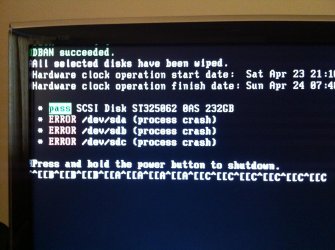
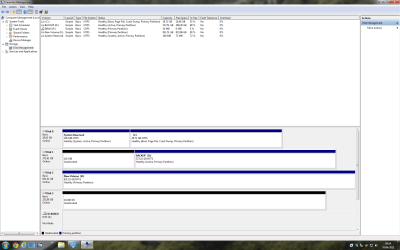
I decided to use DBAN on an spare Hard Drive that I have and no longer use and which I am looking at selling on. I went for the 3 passes option and left it running over night I have checked this morning and the following screen has appeared saying that DBAN completed on the drive okay but then it mentions errors underneath it. I assume this is not right?

Edit - I checked the drive in Windows and its showing as unallocated space so it looks like it completed okay?


Please can someone advise

Thanks
 

Attachments

  • IMG_0296.jpg
    IMG_0296.jpg
    448 KB · Views: 2
  • hard drives.png
    hard drives.png
    69.8 KB · Views: 1

My Computer

Computer type
Laptop
Computer Manufacturer/Model Number
HP
OS
Windows 7
Sorry to bump this thread but I still need help in solving the issue with DBAN.

Thanks
 

My Computer

Computer type
Laptop
Computer Manufacturer/Model Number
HP
OS
Windows 7
Well, the guide on their website says to run it again, and see if it produces the errors twice. I'd say that, if the drive wiped successfully, it isn't worth worrying about. :)
 

My Computer

Computer Manufacturer/Model Number
HP 6000 Pro Micro Tower
OS
W7 Professional x64
CPU
Core 2 Duo 2.93
Memory
2 GB
Graphics Card(s)
ATI Radeon 4695
Monitor(s) Displays
Two HP 17's
Hard Drives
150GB Sata Drive
Case
Tiny. Kinda cute.
Keyboard
HP Supplied. Surprisingly nice.
Mouse
Gateway Mouse from an E2610D
Internet Speed
45 mbps
Hi,

Thanks for your response,

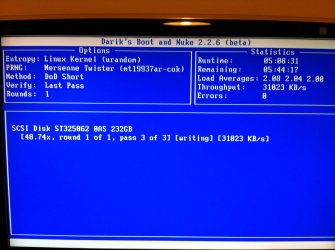
I decided to run DBAN again and here is a screenshot of how things are looking at the moment.
 

Attachments

  • IMG_0302.jpg
    IMG_0302.jpg
    351.1 KB · Views: 2

My Computer

Computer type
Laptop
Computer Manufacturer/Model Number
HP
OS
Windows 7
Thanks for the update! Post back on if it has any troubles, and we'll go from there. :)
 

My Computer

Computer Manufacturer/Model Number
HP 6000 Pro Micro Tower
OS
W7 Professional x64
CPU
Core 2 Duo 2.93
Memory
2 GB
Graphics Card(s)
ATI Radeon 4695
Monitor(s) Displays
Two HP 17's
Hard Drives
150GB Sata Drive
Case
Tiny. Kinda cute.
Keyboard
HP Supplied. Surprisingly nice.
Mouse
Gateway Mouse from an E2610D
Internet Speed
45 mbps
Hi WebbMattR

Thanks for your response,

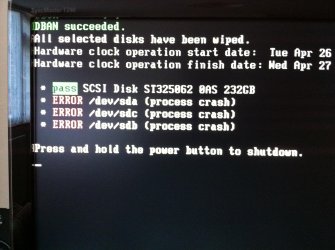
I checked the results this morning and its still saying that it completed but then it shows errors underneath the results. I checked the hard drive again in windows and it showed again as unallocated space and it asks me to choose either GBT or MBR as the partition table so I think that it has wiped it okay.
 

Attachments

  • IMG_0306.jpg
    IMG_0306.jpg
    482.1 KB · Views: 0

My Computer

Computer type
Laptop
Computer Manufacturer/Model Number
HP
OS
Windows 7
Well, I'd say that if it says it succeeded, and it ran twice, your drive should be blank.
 

My Computer

Computer Manufacturer/Model Number
HP 6000 Pro Micro Tower
OS
W7 Professional x64
CPU
Core 2 Duo 2.93
Memory
2 GB
Graphics Card(s)
ATI Radeon 4695
Monitor(s) Displays
Two HP 17's
Hard Drives
150GB Sata Drive
Case
Tiny. Kinda cute.
Keyboard
HP Supplied. Surprisingly nice.
Mouse
Gateway Mouse from an E2610D
Internet Speed
45 mbps
Back
Top