Software that monitors Disk Read/Write activity sorted by Drive

w7forever

New member
Local time
10:53 AM
Messages
3
Hey, I'm looking for a software that does what the task manager in Windows 8 and 10 does for monitoring disk activity which is basically just to break down disk read\write or i\o usage down by the individual hard drives.

I spent a while searching for such a software on google and downloaded and installed over 10 applications including Microsoft's Sysinternals Suite, Crystal disk info, IOmeter, OpenHardwareMonitor, Process Explorer, and several more, and none of them seem to have this function. I was surprised that I wasn't able to find any such function over many google searches but it's possible I was just using poor search terms.

Does anyone know such a software\program\utility that will monitor my disk read\write usage and break it down per drive so I can monitor it during backups, transfers and other disk operations?

Thanks
 

My Computer

Computer type
PC/Desktop
Computer Manufacturer/Model Number
Custom Asus
OS
Windows 7 Ultimate 64 bit
CPU
FX9370
Memory
16GB

My Computer

Computer type
PC/Desktop
Computer Manufacturer/Model Number
All
OS
Windows 7 Home Premium
Other Info
I work on many PCs/Laptops for people to get hands on experience. I am a student at a technical college learning about computers and networks.
Installed activity indicator:

It only indicates when there's any disk activity, not the total KB/s that's being read or written like the Windows 8 and 10 task managers do for each drive. Also only one drive can be selected at a time.

Installed DriveGLEAM:

It also only indicates whether or not there's activity but not the total KB/s, this one can monitor multiple drives but doesn't have the function I need.


Unfortunately neither of these have the function I'm looking for, the function that comes default with the Windows 8 and 10 task managers under the performance tab, where it shows the disk KB/s being read and written and broken down by drive. I need this functionality but on Windows 7.
 

My Computer

Computer type
PC/Desktop
Computer Manufacturer/Model Number
Custom Asus
OS
Windows 7 Ultimate 64 bit
CPU
FX9370
Memory
16GB
Take a look at resource monitor in Windows 7. Then select the disk tab once it opens. To get to resource monitor: Click Start> All programs> accessories> system tools> resource monitor. Then select Disk tab. I believe this is what you want. You can create a shortcut for it to the desktop for future access.
 

My Computer

Computer type
PC/Desktop
Computer Manufacturer/Model Number
All
OS
Windows 7 Home Premium
Other Info
I work on many PCs/Laptops for people to get hands on experience. I am a student at a technical college learning about computers and networks.
Is something like this what you are looking for?

Code:
SIV64X - System Information Viewer V4.44 PC::Chris  Released 14-Apr-2014  [1252]  Command ["C:\Users\Chris\Desktop\Toolbox\System Information Viewer\SIV64X.exe" ] [] [C:\Windows\system32\SIV_PC.txt]


[ntfs]  [windows]


SIV64X - NTFS Volumes on \\PC - Windows 7 x64 Home Premium  V6.01  Build 7601  Service Pack 1

C:\ NTFS        User Reads     Read Size   User Writes    Write Size    Disk Reads   Disk Writes  |_||_||_|System Total
 User Data          75,979        2.93GB        73,637      392.95MB        79,758        74,732  Windows
 Meta Data           9,961       42.02MB         3,433       18.34MB        11,307         4,366  |G|Delay 0ms
 Root Index              0             0             0             0
 User Index          1,652        6.59MB           931        3.73MB      Log File          Lazy           Due to    Due to    Due to    Due to
 Log File                7       28.00KB        10,286       40.18MB         Flush        Writer            Write    Create   SetInfo     Flush
 Bitmap                234        3.90MB           933        6.92MB             0           917                0         0         0
 MFT                 9,227       36.04MB         2,216        9.23MB             0         2,057               12         0         0        99
 MFT Mirror                                          0             0             0             0                0         0         0         0
 MFT Bitmap              8       32.00KB           138      600.00KB             0           111                0         0         0         0

D:\ NTFS        User Reads     Read Size   User Writes    Write Size    Disk Reads   Disk Writes  |_||_||_|System Total
 User Data               6      144.00KB             0             0             4             0  Data
 Meta Data              52        6.30MB            15       60.00KB            69            19  |G|Delay 0ms
 Root Index              0             0             0             0
 User Index             17       68.00KB             4       16.00KB      Log File          Lazy           Due to    Due to    Due to    Due to
 Log File                7       28.00KB            35      144.00KB         Flush        Writer            Write    Create   SetInfo     Flush
 Bitmap                  6        6.00MB             1        4.00KB             0             0                0         0         0
 MFT                    25      100.00KB             7       28.00KB             0             5                0         0         0         0
 MFT Mirror                                          0             0             0             0                0         0         0         0
 MFT Bitmap              2        8.00KB             1        4.00KB             0             1                0         0         0         0

F:\ NTFS        User Reads     Read Size   User Writes    Write Size    Disk Reads   Disk Writes  |_||_||_|System Total
 User Data               3       12.00KB             0             0             2             0  Local Disk
 Meta Data              21        2.20MB             7       28.00KB            22             9  |G|Delay 0ms
 Root Index              0             0             0             0
 User Index              1        4.00KB             2        8.00KB      Log File          Lazy           Due to    Due to    Due to    Due to
 Log File                7       28.00KB            29      116.00KB         Flush        Writer            Write    Create   SetInfo     Flush
 Bitmap                  2        2.00MB             1        4.00KB             0             0                0         0         0
 MFT                    13       52.00KB             4       16.00KB             0             3                0         0         0         0
 MFT Mirror                                          0             0             0             0                0         0         0         0
 MFT Bitmap              1        4.00KB             1        4.00KB             0             0                0         0         0         0

NTFS Volumes    User Reads     Read Size   User Writes    Write Size    Disk Reads   Disk Writes  [_][_][_]System Total
 User Data          75,988        2.93GB        73,637      392.95MB        79,764        74,732
 Meta Data          10,034       50.52MB         3,455       18.43MB        11,398         4,394  |G|Delay 47ms
 Root Index              0             0             0             0
 User Index          1,670        6.66MB           937        3.75MB      Log File          Lazy           Due to    Due to    Due to    Due to
 Log File               21       84.00KB        10,350       40.43MB         Flush        Writer            Write    Create   SetInfo     Flush
 Bitmap                242       11.90MB           935        6.93MB             0           917                0         0         0
 MFT                 9,265       36.19MB         2,227        9.28MB             0         2,065               12         0         0        99
 MFT Mirror                                          0             0             0             0                0         0         0         0
 MFT Bitmap             11       44.00KB           140      608.00KB             0           112                0         0         0         0

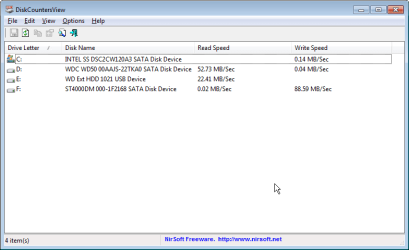
Or maybe this?

DiskCountersView.jpg
 
Last edited:

My Computer

Computer type
Laptop
Computer Manufacturer/Model Number
ASUS
OS
Microsoft Windows 7 Home Premium 64-bit 7601 Multiprocessor Free Service Pack 1
CPU
AMD C-60 APU with Radeon(tm) HD Graphics
Motherboard
ASUSTeK COMPUTER INC. X501U
Memory
4.00 GB
Graphics Card(s)
AMD Radeon HD 6290 Graphics
Sound Card
(1) AMD High Definition Audio Device (2) Realtek High Defi
Screen Resolution
1366 x 768 x 32 bits (4294967296 colors) @ 60 Hz
Hard Drives
Hitachi HTS545050A7E380 SATA Disk Device
Antivirus
Comodo CIS & FW, SecureAplus App Whitelisting, Threatfire
Browser
Cyberfox 64bit, Opera 64bit, Airfox
Other Info
Spy-The-Spy, HitmanPro.Alert, Norton Connect Safe, MJRegWatcher, BitDefender TrafficLight, Voodoo Shield, Zemana AntiMalware
Take a look at resource monitor in Windows 7. Then select the disk tab once it opens. To get to resource monitor: Click Start> All programs> accessories> system tools> resource monitor. Then select Disk tab. I believe this is what you want. You can create a shortcut for it to the desktop for future access.

Resource monitor is what I was using up until now, thank you though.

The trouble with resource monitor for my purposes is under Disk Activity it only shows the total amount of disk I/O across all drives, and on the graphs to the right, it only shows the Queue Length and not the amount of MB/sec being read\written\total like the Windows 8\10 taskmgr does.

Callender said:
Or maybe this?

I downloaded DiskCountersView (your 2nd screenshot) and tried it out.

Yes, this has most of what I'm looking for, it shows me the Read and Write speeds in MB/sec broken down by drive which lets me monitor performance during copies and backups, attached screenshot showing what I'm using it for.

I'm still looking for an application with a bit more of a polished GUI that has a graph of recent history and also the total amount of MB/sec in addition to the read+write amounts that your application covers, but this is very good and gets me most of the way there.

Thank you for your help so far, if nobody else responds with another version of this with the stats graph like in Win 8\10 task manager in the next few days I'll just mark it solved, you've been a big help.
 

Attachments

  • 2015-10-25 19_12_48-DiskCountersView.png
    2015-10-25 19_12_48-DiskCountersView.png
    19.9 KB · Views: 0
Last edited:

My Computer

Computer type
PC/Desktop
Computer Manufacturer/Model Number
Custom Asus
OS
Windows 7 Ultimate 64 bit
CPU
FX9370
Memory
16GB
Back
Top