Solved Software Update: BIOS version 6.20

Farahh

New member
Local time
3:38 PM
Messages
10
I have a Toshiba SATELLITE L855D-S5220
Windows 7 Home Premium, 64-bit operating system
Processor AMD A8-4500M APU with Radeon(tm) HD Graphics 1.9 GHz

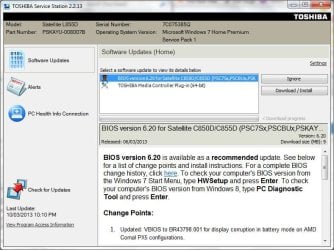
Just yesterday i got this message about a recommended software update, but i don't know if i should download and install it. I am afraid I may mess things up.
The current BIOS version is 1.20.
How would it affect my laptop if i just left this version without updating?
This is a shot of the message
 

Attachments
  • Capture.JPG
    Capture.JPG
    81.5 KB · Views: 35

My Computer

Computer Manufacturer/Model Number
Toshiba
OS
Windows 7 Home Premium 64bit
It's a scam/phishing message. Don't click on anything on that screen or you could be downloading malware. May be a good idea to do a full scan.

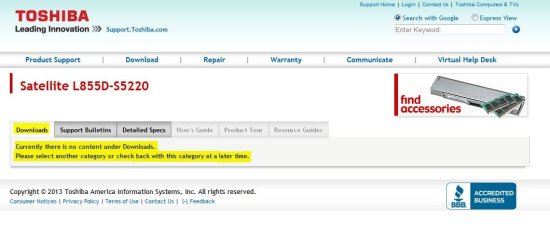
According to the Toshiba support site (US) there are NO updates for your model at present.
 

Attachments

  • Toshiba Update.JPG
    Toshiba Update.JPG
    53.5 KB · Views: 20

My Computer

Computer type
PC/Desktop
Computer Manufacturer/Model Number
Built 2/11/2011
OS
Windows 7 Pro-x64
CPU
i7-2600 3.4GHz - 3.8GHz Turbo
Motherboard
Intel DH67BL-B3
Memory
8Gb - 2x4GB, Muskin 991770 PC3-1333
Graphics Card(s)
Integrated Intel HD 2000
Sound Card
Integrated Intel 10.1 HD, RealTek ALC892
Monitor(s) Displays
Asus LCD VH222H, Haier HL24XSL2a
Screen Resolution
1920x1080, 1920x1080
Hard Drives
Crucial SSD C300-128Gb,
Western Digital WD5002AALX - 500Gb,
Western Digital WD7501AALS - 750Gb
PSU
Seasonic 650W 80+ Gold Modular
Case
Rosewill Defender
Cooling
Stock CPU, Four 120mm case fans, PCH fan added
Keyboard
Logitech EX100 Y-RBH94 Wireless
Mouse
Logitech EX100 M-RCE95 Wireless
Internet Speed
3.0/1.5 Mbs
Antivirus
Microsoft Security Essentials
Browser
Microsoft Internet Explorer 11
Other Info
Antec Veris Premier-Multimedia IR Station,
Cyber Accoustics-3602 Speakers,
AFT XM-5U Card Reader,
Hauppauge TV-HVR-2250,
Sony LX300 USB Turntable
Thank you carwiz for this information. I have just started the full scan.
 

My Computer

Computer Manufacturer/Model Number
Toshiba
OS
Windows 7 Home Premium 64bit
Farahh, here is the quote from the toshiba site for your machine.
"searched in downloads for L855D S5220"
came back with this:

ACPI Flash BIOS version 6.20 for Satellite C850D/C855D


Change History
  • Version 6.20 - 2012-11-22
    • Updated: VBIOS to BR43798.001 for display corruption in battery mode on AMD Comal PX5 configurations.
    Version 6.10 - 2012-10-10
    • Fixed: LCD (Lid) Power On issue if system is shut down during a restart.
    Version 6.00 - 2012-08-23
    • First release for Windows 8.
    Version 1.30 - 2012-06-15
    • Updated: AMD AGESA version to 1.1.0.3.
    • Made a change to the VGA INT 10h function call order.
    • Fixed: USB 2.0 device in a USB 3.0 port does not show the "Safely Remove Hardware..." icon when upgrading from Windows 7 to Windows 8.
    Version 1.20 - 2012-04-16
    • Improved: "HDMI Audio Device Auto Switch" issue.
I am not sure why the C and L difference on the bios updates.

My Bottom line, if it ain't broke, don't fix it. Updating the bios is not necessary
if everything you do is working and the FIX of a newer version of bios doesn't
specify your problem.


Rich
 

My Computer

Computer type
Laptop
Computer Manufacturer/Model Number
Toshiba Laptop Qosimo X870
OS
Windows 7 Pro x64 SP1
CPU
Intel Core I7
Motherboard
Toshiba Qosmio
Memory
16 Gigs
Graphics Card(s)
NVIDIA GeForce GTX 670M
Monitor(s) Displays
17.7" laptop
Screen Resolution
1600 x 900
Hard Drives
256 Gig SanDisk SSD for C
256 Gig Intel SSD for D
Internet Speed
50/25 FIOS
Antivirus
Vipre (all you can eat for 10 machines)
Browser
IE and FF
Other Info
I have dos 6.22, wfwg 3.11, win98, 2000 and xp VHD's available for testing. MS's Virtual PC works great.
Thank you Rich for your reply, i downloaded and tried to install this recommended BIOS version but my Kaspersky av detected it as a real damaging program so i cancelled the operation.

I want to add that every time i turn on my laptop i get messages about important/optional windows update (such as security update for windows 7...) I always download those important updates. When i bought my laptop they told me I will have to deal with such updates for a couple of times but it has been few months.

I also want to mention that I am trying to install "Microsoft Visual Studio" but the installation fails every time saying that the application data folder could not be created.

I am sorry for this big reply but i don't know if these things are even related.
Any help is appreciated .
Thank you.
 

My Computer

Computer Manufacturer/Model Number
Toshiba
OS
Windows 7 Home Premium 64bit
Thank you Rich for your reply, i downloaded and tried to install this recommended BIOS version but my Kaspersky av detected it as a real damaging program so i cancelled the operation.

I want to add that every time i turn on my laptop i get messages about important/optional windows update (such as security update for windows 7...) I always download those important updates. When i bought my laptop they told me I will have to deal with such updates for a couple of times but it has been few months.

I also want to mention that I am trying to install "Microsoft Visual Studio" but the installation fails every time saying that the application data folder could not be created.

I am sorry for this big reply but i don't know if these things are even related.
Any help is appreciated .
Thank you.

Hi there
Glad you didn't update the bios.

Believe me as an "Old School Engineer" (not too many left these days !!) I subscribe to the well known and trusted formula "If it Ain't Broke Don't Fix it". If you adopt this principle it will stand you in good stead over the years.

For Visual Studio you need to download the Visual Studio EXPRESS version - this will be more than sufficient than the full blown version that is found on MSDN. The 2012 version is for Windows 8 but the 2010 version is still available for W7.

http://www.microsoft.com/visualstudio/eng/products/visual-studio-2010-express

Cheers
jimbo
 

My Computer

Computer type
PC/Desktop
Computer Manufacturer/Model Number
Custom built, several laptops HP/ASUS
OS
Linux CENTOS 7 / various Windows OS'es and servers
CPU
Intel i7 Intel i5
Memory
8GB, 16GB
Graphics Card(s)
On Motherboard
Sound Card
Realtek HD audio
Monitor(s) Displays
Apple Cinema display, Samsung LCD
Screen Resolution
1920 X 1080
Hard Drives
4 X 1TB SATA
Mouse
Toshiba wireless laser
Internet Speed
> 20MB up
Back
Top