- Local time
- 7:56 PM
- Messages
- 1,009
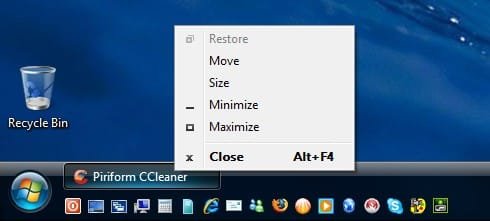
I saw people are trying to get icons to the lower right side of the taskbar, so I played around and found this way. Starting with Windows Live Messenger 9.
1. Pin the program to the taskbar.
2. Close the program so it's not running.
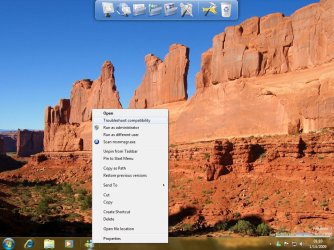
3. Hold down shift key and right-click the program's icon.
4. Select Compatibility Troubleshooter.
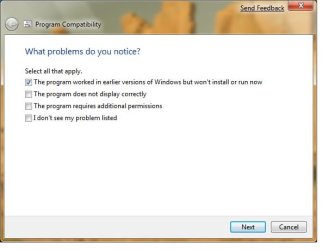
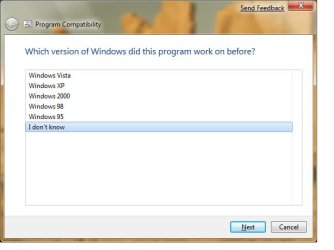
5. Move along the selections , select "The program worked in earlier versions of Windows..." and when asked for OS of compatibility mode choose Windows XP or "I don't know" (should default to Windows XP).
6. Finish the wizard and you're done. I'm including screenshots for messenger.
7. You can now unpin the program from the taskbar. It will appear on the notification area when minimized.
The difference with this way is that instead of manually setting compatibility mode to the executable, Windows sets it to all the application's resources and dependency files.
Try it and let me know of your results.
1. Pin the program to the taskbar.
2. Close the program so it's not running.
3. Hold down shift key and right-click the program's icon.
4. Select Compatibility Troubleshooter.
5. Move along the selections , select "The program worked in earlier versions of Windows..." and when asked for OS of compatibility mode choose Windows XP or "I don't know" (should default to Windows XP).
6. Finish the wizard and you're done. I'm including screenshots for messenger.
7. You can now unpin the program from the taskbar. It will appear on the notification area when minimized.
The difference with this way is that instead of manually setting compatibility mode to the executable, Windows sets it to all the application's resources and dependency files.
Try it and let me know of your results.
Attachments


My Computer
- Computer Manufacturer/Model Number
- ENIAC
- OS
- Windows 7 RC 7100 32bit/64bit
- CPU
- Intel Core2Duo E4500 2.20 GHz
- Motherboard
- ASUS P5LD2-X/1333
- Memory
- 2x1GB Kinsgston DDR2 800MHz
- Graphics Card(s)
- Nvidia 8500GT
- Sound Card
- Onboard High Definition Audio Device
- Monitor(s) Displays
- Sony Bravia 42"
- Case
- LINKW 2222
- Cooling
- Standard Intel
- Keyboard
- Some cheap one
- Mouse
- Microsoft Intellimouse something
- Internet Speed
- 24MBps ADSL