
Solved Solution to Windows-7 Backup failure - Work around?

Mike Lynch

New member
Pro User
VIP
Local time
11:08 AM
Messages
958
Location
Clearwater Florida
I tried to Attach the two Attachments and got a message that "I was blocked" WHY?

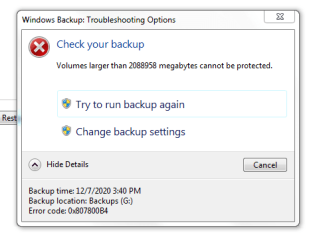
I have never figured out a way to resolve this error message on my PC: see the first Attachment.


I found this explanation in searching for an understanding and or a solution: see the Post, three down from here in lieu of the second Attachment.


If I understand it correctly, if I temporarily SHRINK my drives System Partition to 2088958 MB or less prior to creating a System Image, then run the Backup, it should work.

I was able to Attach the first Attachment, the second failed as I described above.

Then I went back to the second Attachment and did a copy / paste and that worked.


If I do this, I would hope I should be able to UN-SHRINK the System Partition back to it's original size.


Since it's the System Partition, I am a little apprehensive on just doing it.


I'd appreciate any feed back and or advice.


I choose not to use Third Party Software as I have more than enough to deal with using Windows-7.
 

Attachments
  • Z Capture - Backup.PNG
    Z Capture - Backup.PNG
    21.5 KB · Views: 16
Last edited:

My Computer

Computer type
PC/Desktop
Computer Manufacturer/Model Number
Two HP Desktops. One in the Laundry Room / Bed Room.
OS
Microsoft Windows 7 Professional 64-bit 7601 Multiprocessor Free Service Pack 1
CPU
Intel(R) Core(TM) i7-3770 CPU @ 3.40GHz
Motherboard
Hewlett-Packard 3396
Memory
8.00 GB
Graphics Card(s)
Intel(R) HD Graphics 4000
Sound Card
(1) Realtek High Definition Audio (2) Intel(R) Display Aud
Monitor(s) Displays
Hanns-G
Screen Resolution
1440 x 900 x 32 bits (4294967296 colors) @ 59 Hz
Hard Drives
(1) ATA WDC WD40EZRX-00S SCSI Disk Device (2) HP Officejet Pro 86 USB Device (3) WD My Book 1230 USB Device
PSU
Whatever came with the CMT.
Case
HP CMT Black.
Cooling
Whatever came with the CMT.
Keyboard
Logitech K740.
Mouse
Microsoft Optical Mouse 1000.
Internet Speed
Spectrum 25Mbs.
Antivirus
WebRoot, Microsoft Security Essentials.
Browser
EDGE
Other Info
HP Officejet Pro 8600 Plus.
WD MyBook 4TB.
Mike Lynch

If you shrink a partition then create a new partition, place data then expand partitions, you may run the risk of losing data. I don't use Windows build in disk management for any partition manipulation. I use EaseUS Partition Master or AOMEI Partition Assistant, both free.

Why are you opposed to 3rd party backup programs? We recommend AOMEI Backupper Standard and Macrium Reflect Free. Both free programs. I create backup images on an external hard drive with AOMEI. Never had an issue.

I have had numerous problems with Microsoft's System Restore and Backups. Seems like every time you need them, they fail.
You don't really want to backup you system on the same drive as your OS or your DATA. In the event of a drive failure, you run the risk of losing your backups, besides it eats space on your drive. I usually keep several backups on my external hard drive, current one, two priors and delete any older than that.

This time of year, there are numerous deals on external hard drives. I'm not talking SSD external drives. HDDs are more reliable and last longer being that they don't use flash memory as SSDs do.

Here's a link to Google Deals on External Hard Drives

Please read blue text in my footer.

Snick
 

My Computer

Computer type
PC/Desktop
Computer Manufacturer/Model Number
HP Desktop & Compaq Laptop
OS
Win 10 x64, Linux Lite, Win 7 x64, BlackArch, & Kali
Hard Drives
Samsung 850 Pro 256Gb,
Hitachi HDD 1Tb,
Crucial MX SSD 250Gb
Segate 3Tb USB 3.0 Ext. Backup HDD
Internet Speed
150Mbps dn, 20Mbps up
Antivirus
Avast Free, Malwarebytes Anti-Exploit & Anti-Ransomware
Browser
Firefox, Chrome, Opera, & VPN
Snick,

I am not opposed to them.
I have reach a point where I find it difficult to understand / absorb additional software technology.
I will try and attach a Snip of my current System which was just re-configured / re-built.
The backup location for my PC is on a secondary, internal Drive, Drive G:.

Thank you for your feedback.

Mike
 

Attachments

  • Capture - To Snick.PNG
    Capture - To Snick.PNG
    80.4 KB · Views: 1

My Computer

Computer type
PC/Desktop
Computer Manufacturer/Model Number
Two HP Desktops. One in the Laundry Room / Bed Room.
OS
Microsoft Windows 7 Professional 64-bit 7601 Multiprocessor Free Service Pack 1
CPU
Intel(R) Core(TM) i7-3770 CPU @ 3.40GHz
Motherboard
Hewlett-Packard 3396
Memory
8.00 GB
Graphics Card(s)
Intel(R) HD Graphics 4000
Sound Card
(1) Realtek High Definition Audio (2) Intel(R) Display Aud
Monitor(s) Displays
Hanns-G
Screen Resolution
1440 x 900 x 32 bits (4294967296 colors) @ 59 Hz
Hard Drives
(1) ATA WDC WD40EZRX-00S SCSI Disk Device (2) HP Officejet Pro 86 USB Device (3) WD My Book 1230 USB Device
PSU
Whatever came with the CMT.
Case
HP CMT Black.
Cooling
Whatever came with the CMT.
Keyboard
Logitech K740.
Mouse
Microsoft Optical Mouse 1000.
Internet Speed
Spectrum 25Mbs.
Antivirus
WebRoot, Microsoft Security Essentials.
Browser
EDGE
Other Info
HP Officejet Pro 8600 Plus.
WD MyBook 4TB.
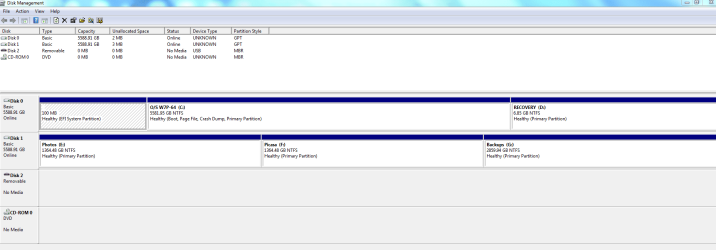
I tried doing this procedure however, it would not let me make the Logical Partition small enough to agree with the 2TB limit. Next, I'll try and shrink the drive twice in a row to see if I can get it below the threshold.


Backup fails in Windows 7 when trying to create a system image

Symptoms

Consider the following scenario:


  • You are running Windows 7.
  • In the Backup and Restore Control Panel applet, you click on the link to "Create a system image".
  • The source volume that you are imaging is 2 terabytes in size or larger.
In this scenario, after the backup process has started, you may see an error similar to the following:

The backup failed.

Volumes larger than 2088958 megabyes cannot be protected. (0x807800B4)

The only option is to close the dialog box and exit out of the "Create a system image" wizard.

Cause

When creating a system image in Windows 7 using the "Create a system image" wizard, a virtual hard disk (.vhd) is created and the system image is written to it. The current virtual hard disk specification limits the size of a virtual hard disk to be 2040 GB, which can fit a volume size of 2040 GB - 2 MB (i.e. 2088958 MB). Due to this limitation, the source volume size must be 2088958 MB or less for the system image to be created.

Note: All of the above values values are slightly under 2 TB in size (2 TB = 2048 GB = 2097152 MB).


Resolution

To work around this limit, shrink your volume size to 2088958 MB or less prior to creating the system image. More information on shrinking a basic volume can be found in the following TechNet article:

Shrink a Basic Volume
http://technet.microsoft.com/en-us/library/cc731894.aspx
 
Last edited:

My Computer

Computer type
PC/Desktop
Computer Manufacturer/Model Number
Two HP Desktops. One in the Laundry Room / Bed Room.
OS
Microsoft Windows 7 Professional 64-bit 7601 Multiprocessor Free Service Pack 1
CPU
Intel(R) Core(TM) i7-3770 CPU @ 3.40GHz
Motherboard
Hewlett-Packard 3396
Memory
8.00 GB
Graphics Card(s)
Intel(R) HD Graphics 4000
Sound Card
(1) Realtek High Definition Audio (2) Intel(R) Display Aud
Monitor(s) Displays
Hanns-G
Screen Resolution
1440 x 900 x 32 bits (4294967296 colors) @ 59 Hz
Hard Drives
(1) ATA WDC WD40EZRX-00S SCSI Disk Device (2) HP Officejet Pro 86 USB Device (3) WD My Book 1230 USB Device
PSU
Whatever came with the CMT.
Case
HP CMT Black.
Cooling
Whatever came with the CMT.
Keyboard
Logitech K740.
Mouse
Microsoft Optical Mouse 1000.
Internet Speed
Spectrum 25Mbs.
Antivirus
WebRoot, Microsoft Security Essentials.
Browser
EDGE
Other Info
HP Officejet Pro 8600 Plus.
WD MyBook 4TB.
Thanks to every one that has tried to help me regarding this Post!
I have been met with several problems that in my opinion are major.
1. A Blue Screen of Death.
2. An Alias issue.
3. Not being able to print.
4. Permissions problems.
5. YIKES – I give up!
I will be trying to Restore my PC to its former condition from about two weeks ago, via MS Restore.
Then I will use Restore Points to go back as far as I can.
Then I will take a complete Backup with a System Image.
I should be able to run the Backup with the System Image, as I now know about the 2TB limit.
With that accomplished, I’ll sign back on and hopefully, most if not all of the above, will be in the past.
Again, thank you all for your assistance and help.

Mike
 

My Computer

Computer type
PC/Desktop
Computer Manufacturer/Model Number
Two HP Desktops. One in the Laundry Room / Bed Room.
OS
Microsoft Windows 7 Professional 64-bit 7601 Multiprocessor Free Service Pack 1
CPU
Intel(R) Core(TM) i7-3770 CPU @ 3.40GHz
Motherboard
Hewlett-Packard 3396
Memory
8.00 GB
Graphics Card(s)
Intel(R) HD Graphics 4000
Sound Card
(1) Realtek High Definition Audio (2) Intel(R) Display Aud
Monitor(s) Displays
Hanns-G
Screen Resolution
1440 x 900 x 32 bits (4294967296 colors) @ 59 Hz
Hard Drives
(1) ATA WDC WD40EZRX-00S SCSI Disk Device (2) HP Officejet Pro 86 USB Device (3) WD My Book 1230 USB Device
PSU
Whatever came with the CMT.
Case
HP CMT Black.
Cooling
Whatever came with the CMT.
Keyboard
Logitech K740.
Mouse
Microsoft Optical Mouse 1000.
Internet Speed
Spectrum 25Mbs.
Antivirus
WebRoot, Microsoft Security Essentials.
Browser
EDGE
Other Info
HP Officejet Pro 8600 Plus.
WD MyBook 4TB.
All the problems with Win backup and restore. I don't deal with it.

I use AOMEI Backupper, have external hard drive, backup regularly no issues.
I have CD and USB stick with AOMEI Win PE too.
SIW2's Win PE creations as sweet!
Sees to me you may need to perform a Repair Install?
Have ISO if you need to borrow a copy.
 

My Computer

Computer type
PC/Desktop
Computer Manufacturer/Model Number
HP Desktop & Compaq Laptop
OS
Win 10 x64, Linux Lite, Win 7 x64, BlackArch, & Kali
Hard Drives
Samsung 850 Pro 256Gb,
Hitachi HDD 1Tb,
Crucial MX SSD 250Gb
Segate 3Tb USB 3.0 Ext. Backup HDD
Internet Speed
150Mbps dn, 20Mbps up
Antivirus
Avast Free, Malwarebytes Anti-Exploit & Anti-Ransomware
Browser
Firefox, Chrome, Opera, & VPN
Back
Top