Solved Win 7 backup failure - 0x80070002 - after new system drive installed

DLisak

New member
Local time
11:39 AM
Messages
12
Hi,

I've decided to post here to see if anyone knows how to solve this before I go any further.

Recently I installed a new SSD drive to replace my old SSD drive as the Windows system/C: drive. After a round of using a combination of Macrium Reflect Free (for cloning the system drive) and EasyBCD (to set up the boot partition on the new drive) things seemed to be working fine.

However, after my first attempt to use Windows backup I found that I could not and got the familiar 0x80070002 error with the "The system cannot find the file specified" message without the filename.

Upon more research I found that the filename is not specified because backup is presumably looking for boot configuration data in the "System Reserved" partition.

After investigating various ineffective solutions, I found other suggestions that led me to find initially that the "System Reserved" partition was not online. This particular post seemed to list symptoms similar to my issue: Windows Backup fails with 0x80070002: "The system cannot find the file specified" - Super User. I found that


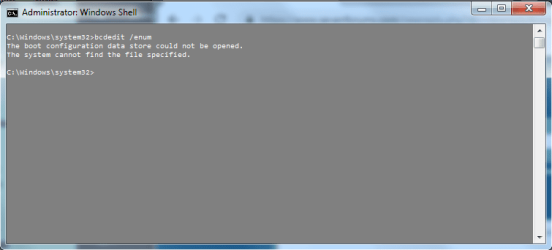
  • bcdedit fails with the error "The system cannot find the file specified" when run from an admin command prompt
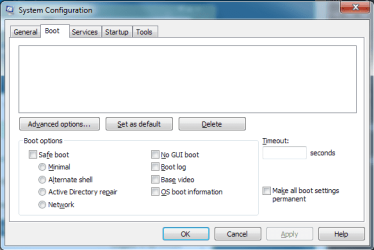
  • the msconfig Boot tab is empty and non-functional
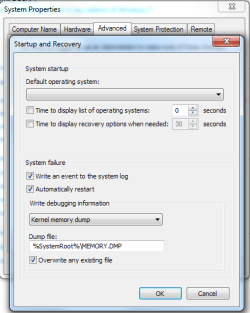
  • The list of operating systems in the System Control Panel Advanced tab is empty
  • Windows Backup fails with 0x80070002


I ended up using 'diskpart' to set that partition online but that did not work. Further suggestions online pointed to the fact that the "System Reserved" partition should also be hidden so I changed the partition type ID to '0x17' from '0x07' to make it hidden. Again, that did not work either and I reverted the partition back to '0x07'.

The last thing I tried was a suggestion in the following SevenForums post: Changing Win7 System/Boot Partition without Reinstall. I started with 'bcdboot c:\windows /s c:' but this gave me an error as follows:

"BFSVC: Failed to open handle to resume object. Status = [c0000034]"

(At least I think it was "to resume object" -- in any case the error code was the same.)

I think this action also ended up creating a duplicate boot device option because back in the BIOS I ended up seeing my system drive in there twice after running that command.

So I am now stuck not willing to go further for fear of screwing up my PC. The current state of that drive using 'diskpart' output is as follows:


Disk ### Status Size Free Dyn Gpt
-------- ------------- ------- ------- --- ---
Disk 2 Online 931 GB 1024 KB


Volume ### Ltr Label Fs Type Size Status Info
---------- --- ----------- ----- ---------- ------- --------- --------
Volume 3 C NTFS Partition 931 GB Healthy System


Partition ### Type Size Offset
------------- ---------------- ------- -------
Partition 1 Primary 100 MB 1024 KB
Partition 2 Primary 931 GB 101 MB


Partition 1
Type : 07
Hidden: No
Active: Yes
Offset in Bytes: 1048576

There is no volume associated with this partition.

Partition 2
Type : 07
Hidden: No
Active: No
Offset in Bytes: 105906176

Volume ### Ltr Label Fs Type Size Status Info
---------- --- ----------- ----- ---------- ------- --------- --------
* Volume 3 C NTFS Partition 931 GB Healthy System


Everything else is working fine. Just the items listed above (backup, bcdedit, msconfig, etc.) are not working. I'm not sure but this might also impact restore points as well, I haven't checked.

In any case, if anyone has a way to fix this it would be much appreciated.

Thanks,
Darko
 

My Computer My Computer

At a glance

Windows 7 Home Premium 64bitIntel i5-6600k16GNVIDIA GeForce GTX 750 Ti
Computer type
PC/Desktop
Computer Manufacturer/Model Number
Custom build
OS
Windows 7 Home Premium 64bit
CPU
Intel i5-6600k
Motherboard
ASUS Z170-P
Memory
16G
Graphics Card(s)
NVIDIA GeForce GTX 750 Ti
Hard Drives
Samsung EVO 860 1TB System drive
Win 7 backup failure - 0x80070002 - more 'diskpart' details

Here is some additional output from 'diskpart':


Disk ### Status Size Free Dyn Gpt
-------- ------------- ------- ------- --- ---
Disk 2 Online 931 GB 1024 KB

DISKPART> select disk 2

Disk 2 is now the selected disk.

DISKPART> det disk

Samsung SSD SCSI Disk Device
Disk ID: 5C2EEFB2
Type : SATA
Status : Online
Path : 0
Target : 4
LUN ID : 0
Location Path : PCIROOT(0)#ATA(C00T04L00)
Current Read-only State : No
Read-only : No
Boot Disk : Yes
Pagefile Disk : Yes
Hibernation File Disk : No
Crashdump Disk : Yes
Clustered Disk : No

Volume ### Ltr Label Fs Type Size Status Info
---------- --- ----------- ----- ---------- ------- --------- --------
Volume 3 B System Rese NTFS Partition 100 MB Healthy
Volume 4 C NTFS Partition 931 GB Healthy System

DISKPART> select vol 3

Volume 3 is the selected volume.

DISKPART> det vol

Disk ### Status Size Free Dyn Gpt
-------- ------------- ------- ------- --- ---
* Disk 2 Online 931 GB 1024 KB

Read-only : No
Hidden : No
No Default Drive Letter: No
Shadow Copy : No
Offline : No
BitLocker Encrypted : No
Installable : Yes

Volume Capacity : 99 MB
Volume Free Space : 70 MB

DISKPART> list part

Partition ### Type Size Offset
------------- ---------------- ------- -------
* Partition 1 Primary 100 MB 1024 KB
Partition 2 Primary 931 GB 101 MB

DISKPART> det part

Partition 1
Type : 07
Hidden: No
Active: Yes
Offset in Bytes: 1048576

Volume ### Ltr Label Fs Type Size Status Info
---------- --- ----------- ----- ---------- ------- --------- --------
* Volume 3 B System Rese NTFS Partition 100 MB Healthy

DISKPART> select part 2

Partition 2 is now the selected partition.

DISKPART> det part

Partition 2
Type : 07
Hidden: No
Active: No
Offset in Bytes: 105906176

Volume ### Ltr Label Fs Type Size Status Info
---------- --- ----------- ----- ---------- ------- --------- --------
* Volume 4 C NTFS Partition 931 GB Healthy System


My Computer My Computer

At a glance

Windows 7 Home Premium 64bitIntel i5-6600k16GNVIDIA GeForce GTX 750 Ti
Computer type
PC/Desktop
Computer Manufacturer/Model Number
Custom build
OS
Windows 7 Home Premium 64bit
CPU
Intel i5-6600k
Motherboard
ASUS Z170-P
Memory
16G
Graphics Card(s)
NVIDIA GeForce GTX 750 Ti
Hard Drives
Samsung EVO 860 1TB System drive
Hi DLisak, welcome to the Forum.

I am curios to know why you used EasyBCD when using Macrium for cloning your old drive as it should have copied all that is necessary. I have used Macrium for cloning without the slightest problem. Once the clone has been completed just change the new SSD to the same connection on the Motherboard as the old one was. Disconnect the old SSD. Then enter the BIOS to make sure the new SSD is first in the boot order. You may need to change the new SSD to drive C but I have found that usually occurs automatically.
 

My Computer My Computer

At a glance

Windows 7 Home Premium 64 bit sp1Intel i5 3570 3.4Ghz Ivy Bridge SKT 1155 quad...G-Skill Rip Jaws 16Gb (8x2) DDR3 -1600 PC3 12...Gigabyte NVIDIA GT610 1Gb DDR3 810/1200 PCI-E...
Computer type
PC/Desktop
Computer Manufacturer/Model Number
Self built using existing case
OS
Windows 7 Home Premium 64 bit sp1
CPU
Intel i5 3570 3.4Ghz Ivy Bridge SKT 1155 quad core
Motherboard
Gigabyte Z77-HD3 SKT 1155 2xSata 3, 4x USB 3.0
Memory
G-Skill Rip Jaws 16Gb (8x2) DDR3 -1600 PC3 12800 CL 10 red
Graphics Card(s)
Gigabyte NVIDIA GT610 1Gb DDR3 810/1200 PCI-E 2.0 Silent
Sound Card
NVIDIA High Definition & Realtech High Definition Audio
Monitor(s) Displays
2 x Philips 226V4L 16:9 aspect ratio
Screen Resolution
1920 x 1080 HD
Hard Drives
Samsung 840 Pro 256gb SSD, SATA 3.
Hitachi Touro Portable 1tb, USB 3.0 HDD used for image b/ups.
PSU
Corsair VS450
Case
Codeng
Cooling
PSU fan & CPU fan
Keyboard
Logitech
Mouse
Logitech Wireless trackball M570
Internet Speed
Wireless 3G. 3mg down & 550kb up.
Antivirus
Bitdefender Internet Security 2020
Browser
Opera (Current Version) & Firefox
Other Info
MS Office 2013 Pro. Davis weather station software. MGE Nova 600 avr UPS.
Hi DLisak, welcome to the Forum.

I am curios to know why you used EasyBCD when using Macrium for cloning your old drive as it should have copied all that is necessary. I have used Macrium for cloning without the slightest problem. Once the clone has been completed just change the new SSD to the same connection on the Motherboard as the old one was. Disconnect the old SSD. Then enter the BIOS to make sure the new SSD is first in the boot order. You may need to change the new SSD to drive C but I have found that usually occurs automatically.

Thanks Ranger.

I realized later on that I may have needed to change the connection -- nothing I read mentioned that so I never did. I just plugged it into a free SATA port. I may try that -- but is it absolutely necessary? If it is, that is no problem. I just thought it could be as easy as just moving the boot information to the new drive irrespective of which port the drive is located.

Thanks,
Darko
 

My Computer My Computer

At a glance

Windows 7 Home Premium 64bitIntel i5-6600k16GNVIDIA GeForce GTX 750 Ti
Computer type
PC/Desktop
Computer Manufacturer/Model Number
Custom build
OS
Windows 7 Home Premium 64bit
CPU
Intel i5-6600k
Motherboard
ASUS Z170-P
Memory
16G
Graphics Card(s)
NVIDIA GeForce GTX 750 Ti
Hard Drives
Samsung EVO 860 1TB System drive
Cloning a drive is making an exact copy of the original drive, so the boot info & everything else is copied exactly as the original.

Perhaps you could reformat the new SSD & then redo the cloning. Reconnect the original drive if it's disconnected, do the cloning.

This Macrium blog might help you. If you don't have partitions on the old SSD then ignore that section.

Techie Tuesday: Cloning a disk – Macrium Software

As you have will have Macrium Reflect installed on the new drive you will find it far more reliable than the Windows back up system, to make images & clones.
 

My Computer My Computer

At a glance

Windows 7 Home Premium 64 bit sp1Intel i5 3570 3.4Ghz Ivy Bridge SKT 1155 quad...G-Skill Rip Jaws 16Gb (8x2) DDR3 -1600 PC3 12...Gigabyte NVIDIA GT610 1Gb DDR3 810/1200 PCI-E...
Computer type
PC/Desktop
Computer Manufacturer/Model Number
Self built using existing case
OS
Windows 7 Home Premium 64 bit sp1
CPU
Intel i5 3570 3.4Ghz Ivy Bridge SKT 1155 quad core
Motherboard
Gigabyte Z77-HD3 SKT 1155 2xSata 3, 4x USB 3.0
Memory
G-Skill Rip Jaws 16Gb (8x2) DDR3 -1600 PC3 12800 CL 10 red
Graphics Card(s)
Gigabyte NVIDIA GT610 1Gb DDR3 810/1200 PCI-E 2.0 Silent
Sound Card
NVIDIA High Definition & Realtech High Definition Audio
Monitor(s) Displays
2 x Philips 226V4L 16:9 aspect ratio
Screen Resolution
1920 x 1080 HD
Hard Drives
Samsung 840 Pro 256gb SSD, SATA 3.
Hitachi Touro Portable 1tb, USB 3.0 HDD used for image b/ups.
PSU
Corsair VS450
Case
Codeng
Cooling
PSU fan & CPU fan
Keyboard
Logitech
Mouse
Logitech Wireless trackball M570
Internet Speed
Wireless 3G. 3mg down & 550kb up.
Antivirus
Bitdefender Internet Security 2020
Browser
Opera (Current Version) & Firefox
Other Info
MS Office 2013 Pro. Davis weather station software. MGE Nova 600 avr UPS.
Unfortunately I'm way beyond that now.

Because the new SSD booted fine after my initial cloning/boot partition swap I never thought anything was wrong. It was only after the first backup attempt, which was about a week after, that I noticed something might be wrong. So the old SSD has been repurposed and reformatted and is serving another purpose on my PC.

So I'm kind of stuck trying to figure out how to fix what I have now.
 

My Computer My Computer

At a glance

Windows 7 Home Premium 64bitIntel i5-6600k16GNVIDIA GeForce GTX 750 Ti
Computer type
PC/Desktop
Computer Manufacturer/Model Number
Custom build
OS
Windows 7 Home Premium 64bit
CPU
Intel i5-6600k
Motherboard
ASUS Z170-P
Memory
16G
Graphics Card(s)
NVIDIA GeForce GTX 750 Ti
Hard Drives
Samsung EVO 860 1TB System drive
From what you are now saying Windows will boot but things are missing, is that the case?.

If you have Widows installation DVD you could try doing a Repair Install, which is run from within Windows & not from the BIOS.

To do a Repair Install follow this Forum Tutorial.

Repair Install
 

My Computer My Computer

At a glance

Windows 7 Home Premium 64 bit sp1Intel i5 3570 3.4Ghz Ivy Bridge SKT 1155 quad...G-Skill Rip Jaws 16Gb (8x2) DDR3 -1600 PC3 12...Gigabyte NVIDIA GT610 1Gb DDR3 810/1200 PCI-E...
Computer type
PC/Desktop
Computer Manufacturer/Model Number
Self built using existing case
OS
Windows 7 Home Premium 64 bit sp1
CPU
Intel i5 3570 3.4Ghz Ivy Bridge SKT 1155 quad core
Motherboard
Gigabyte Z77-HD3 SKT 1155 2xSata 3, 4x USB 3.0
Memory
G-Skill Rip Jaws 16Gb (8x2) DDR3 -1600 PC3 12800 CL 10 red
Graphics Card(s)
Gigabyte NVIDIA GT610 1Gb DDR3 810/1200 PCI-E 2.0 Silent
Sound Card
NVIDIA High Definition & Realtech High Definition Audio
Monitor(s) Displays
2 x Philips 226V4L 16:9 aspect ratio
Screen Resolution
1920 x 1080 HD
Hard Drives
Samsung 840 Pro 256gb SSD, SATA 3.
Hitachi Touro Portable 1tb, USB 3.0 HDD used for image b/ups.
PSU
Corsair VS450
Case
Codeng
Cooling
PSU fan & CPU fan
Keyboard
Logitech
Mouse
Logitech Wireless trackball M570
Internet Speed
Wireless 3G. 3mg down & 550kb up.
Antivirus
Bitdefender Internet Security 2020
Browser
Opera (Current Version) & Firefox
Other Info
MS Office 2013 Pro. Davis weather station software. MGE Nova 600 avr UPS.
From what you are now saying Windows will boot but things are missing, is that the case?.

If you have Widows installation DVD you could try doing a Repair Install, which is run from within Windows & not from the BIOS.

To do a Repair Install follow this Forum Tutorial.

Repair Install

I'm not totally sure.

Basically what I am saying is that:
  • PC boots up fine
  • Windows cannot seem to find boot information leading to backup/msconfig/bcdedit/etc. malfunction
  • Unsure of what misplaced/misconfigured boot information can also lead to (system restore malfunction?)

I know that there are BCD files (even in the "System Reserved" partition).

So while it appears that things look like they are missing (and I do not believe they are corrupt either), they are actually there and Windows may not know how to find them. And I'm not sure how to make Windows see them.

Anyhow, it's rather frustrating because for the most part everything is working. It's just some minor things (and, well, backup) which I am not sure would lead to other problems. I could ignore it and use Macrium to do backups (and hope it works with Windows in this condition). But it's the unknown of what could happen that bugs me :confused:

Thanks for the help so far, Ranger.
 

My Computer My Computer

At a glance

Windows 7 Home Premium 64bitIntel i5-6600k16GNVIDIA GeForce GTX 750 Ti
Computer type
PC/Desktop
Computer Manufacturer/Model Number
Custom build
OS
Windows 7 Home Premium 64bit
CPU
Intel i5-6600k
Motherboard
ASUS Z170-P
Memory
16G
Graphics Card(s)
NVIDIA GeForce GTX 750 Ti
Hard Drives
Samsung EVO 860 1TB System drive
Windows cannot seem to find boot information leading to backup/msconfig/bcdedit/etc. malfunction

I am not sure what you mean here, particularly concerning backup/msconfig/bcdedit. Do you mean these items wont open or you can't get them to work?. These are not boot items they are program items.
 

My Computer My Computer

At a glance

Windows 7 Home Premium 64 bit sp1Intel i5 3570 3.4Ghz Ivy Bridge SKT 1155 quad...G-Skill Rip Jaws 16Gb (8x2) DDR3 -1600 PC3 12...Gigabyte NVIDIA GT610 1Gb DDR3 810/1200 PCI-E...
Computer type
PC/Desktop
Computer Manufacturer/Model Number
Self built using existing case
OS
Windows 7 Home Premium 64 bit sp1
CPU
Intel i5 3570 3.4Ghz Ivy Bridge SKT 1155 quad core
Motherboard
Gigabyte Z77-HD3 SKT 1155 2xSata 3, 4x USB 3.0
Memory
G-Skill Rip Jaws 16Gb (8x2) DDR3 -1600 PC3 12800 CL 10 red
Graphics Card(s)
Gigabyte NVIDIA GT610 1Gb DDR3 810/1200 PCI-E 2.0 Silent
Sound Card
NVIDIA High Definition & Realtech High Definition Audio
Monitor(s) Displays
2 x Philips 226V4L 16:9 aspect ratio
Screen Resolution
1920 x 1080 HD
Hard Drives
Samsung 840 Pro 256gb SSD, SATA 3.
Hitachi Touro Portable 1tb, USB 3.0 HDD used for image b/ups.
PSU
Corsair VS450
Case
Codeng
Cooling
PSU fan & CPU fan
Keyboard
Logitech
Mouse
Logitech Wireless trackball M570
Internet Speed
Wireless 3G. 3mg down & 550kb up.
Antivirus
Bitdefender Internet Security 2020
Browser
Opera (Current Version) & Firefox
Other Info
MS Office 2013 Pro. Davis weather station software. MGE Nova 600 avr UPS.
Hi

got a sneaky feeling its todo with your disk format versus bios
GPT(EUFI) and trying to use MBR (Legacy) - they are incompatible,
hence the 80070002 error basically means it cant find the file/folder/drive


please post a screenshot of your disk management set-up
and what is your BIOS set-up

Using BCD on a single disk set-up is not required, cloning and a system images, (macrium), are 2 totally different things.

note if your new ssd was smaller than the original you need to account for this.


Roy
 

My Computer My Computer

At a glance

W7 home premium 32bit/W7HP 64bit/w10 tp insid...E5300 dual core3gbNvidia Geforce 7100 Nforce 630i
Computer type
PC/Desktop
Computer Manufacturer/Model Number
medionl/Aspire 6930G/acer x55a
OS
W7 home premium 32bit/W7HP 64bit/w10 tp insider ring
CPU
E5300 dual core
Motherboard
medion MS7366
Memory
3gb
Graphics Card(s)
Nvidia Geforce 7100 Nforce 630i
Monitor(s) Displays
avixc
Internet Speed
n (isp resticted to 72)
Antivirus
mse/pands
Browser
palemoon
Other Info
Belkin Fd7050 n USB using Railink RT2870 drivers, more upto date
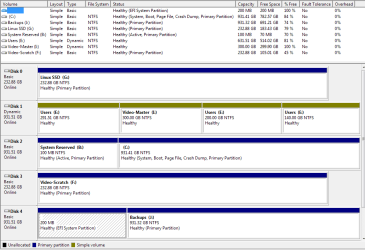
This is my disk management setup:
diskmgmt.PNG

Along with the previously mentioned backup error, here are some other examples of what I am observing:

This is what the 'bcdedit' output looks like.
bcdedit.PNG

This is the System Control Panel Advanced tab.
defaultos.PNG

And finally the msconfig boot tab.
msconfig.PNG

And here are some select details from the BIOS setup for the ASUS Z170-P;

SATA ports
  • SATA6G_3: Samsung 850 EVO 25GB (Disk0 / G: -- called Linux SSD but it only contains a Linux VM image)
  • SATA6G_4: Seagate ST1000DM 1TB (Disk1 / E: and I: (yes I know poorly partitioned :o))
  • SATA6G_5: Samsung 860 EVO 1TB (Disk2 / system drive)
  • SATA6G_6: Maxtor 6L250R0 250GB (Disk3 / F: (old drive))
Note that Disk4 is an external USB drive.

The new 860 EVO replaced the 850 EVO as the system drive.

Boot priority
  1. Windows Boot Manager (SATA6G_5 Samsung 860 EVO)
  2. Seagate Backup+ Desk SH04 (not sure why -- USB?)
  3. SATA6G_5 Samsung 860 EVO

SATA mode selection: AHCI

And there is something else called HDD/SDD SMART Device in this BIOS -- but I can't find anything in the documentation about it. But the Samsung 850 EVO device is listed there.

One thing I did neglect to mention initially: when I was installing the new drive, I had a DVD drive that I disconnected from the SATA port to allow me to connect the new system drive (and left the DVD drive disconnected because I don't really use it anymore).
 

My Computer My Computer

At a glance

Windows 7 Home Premium 64bitIntel i5-6600k16GNVIDIA GeForce GTX 750 Ti
Computer type
PC/Desktop
Computer Manufacturer/Model Number
Custom build
OS
Windows 7 Home Premium 64bit
CPU
Intel i5-6600k
Motherboard
ASUS Z170-P
Memory
16G
Graphics Card(s)
NVIDIA GeForce GTX 750 Ti
Hard Drives
Samsung EVO 860 1TB System drive
Are there any further suggestions?

I haven't been able to get anywhere...
 

My Computer My Computer

At a glance

Windows 7 Home Premium 64bitIntel i5-6600k16GNVIDIA GeForce GTX 750 Ti
Computer type
PC/Desktop
Computer Manufacturer/Model Number
Custom build
OS
Windows 7 Home Premium 64bit
CPU
Intel i5-6600k
Motherboard
ASUS Z170-P
Memory
16G
Graphics Card(s)
NVIDIA GeForce GTX 750 Ti
Hard Drives
Samsung EVO 860 1TB System drive
Disc 4 is showing as having an EFI system partition which is not compatible with your current windows installation. Disconnect Disc 4, go into the BIOS & set Disc 2 (which has the Windows 7 installation) as the first boot item, save & see if everything works.
 

My Computer My Computer

At a glance

Windows 7 Home Premium 64 bit sp1Intel i5 3570 3.4Ghz Ivy Bridge SKT 1155 quad...G-Skill Rip Jaws 16Gb (8x2) DDR3 -1600 PC3 12...Gigabyte NVIDIA GT610 1Gb DDR3 810/1200 PCI-E...
Computer type
PC/Desktop
Computer Manufacturer/Model Number
Self built using existing case
OS
Windows 7 Home Premium 64 bit sp1
CPU
Intel i5 3570 3.4Ghz Ivy Bridge SKT 1155 quad core
Motherboard
Gigabyte Z77-HD3 SKT 1155 2xSata 3, 4x USB 3.0
Memory
G-Skill Rip Jaws 16Gb (8x2) DDR3 -1600 PC3 12800 CL 10 red
Graphics Card(s)
Gigabyte NVIDIA GT610 1Gb DDR3 810/1200 PCI-E 2.0 Silent
Sound Card
NVIDIA High Definition & Realtech High Definition Audio
Monitor(s) Displays
2 x Philips 226V4L 16:9 aspect ratio
Screen Resolution
1920 x 1080 HD
Hard Drives
Samsung 840 Pro 256gb SSD, SATA 3.
Hitachi Touro Portable 1tb, USB 3.0 HDD used for image b/ups.
PSU
Corsair VS450
Case
Codeng
Cooling
PSU fan & CPU fan
Keyboard
Logitech
Mouse
Logitech Wireless trackball M570
Internet Speed
Wireless 3G. 3mg down & 550kb up.
Antivirus
Bitdefender Internet Security 2020
Browser
Opera (Current Version) & Firefox
Other Info
MS Office 2013 Pro. Davis weather station software. MGE Nova 600 avr UPS.
Thanks for the suggestion, Ranger. Unfortunately it didn't work.
 

My Computer My Computer

At a glance

Windows 7 Home Premium 64bitIntel i5-6600k16GNVIDIA GeForce GTX 750 Ti
Computer type
PC/Desktop
Computer Manufacturer/Model Number
Custom build
OS
Windows 7 Home Premium 64bit
CPU
Intel i5-6600k
Motherboard
ASUS Z170-P
Memory
16G
Graphics Card(s)
NVIDIA GeForce GTX 750 Ti
Hard Drives
Samsung EVO 860 1TB System drive
Actually I think I'll try swapping the new SSD SATA port with the old one and see if that works.
 

My Computer My Computer

At a glance

Windows 7 Home Premium 64bitIntel i5-6600k16GNVIDIA GeForce GTX 750 Ti
Computer type
PC/Desktop
Computer Manufacturer/Model Number
Custom build
OS
Windows 7 Home Premium 64bit
CPU
Intel i5-6600k
Motherboard
ASUS Z170-P
Memory
16G
Graphics Card(s)
NVIDIA GeForce GTX 750 Ti
Hard Drives
Samsung EVO 860 1TB System drive
Even swapping the SATA ports didn't work -- back to the drawing board...
 

My Computer My Computer

At a glance

Windows 7 Home Premium 64bitIntel i5-6600k16GNVIDIA GeForce GTX 750 Ti
Computer type
PC/Desktop
Computer Manufacturer/Model Number
Custom build
OS
Windows 7 Home Premium 64bit
CPU
Intel i5-6600k
Motherboard
ASUS Z170-P
Memory
16G
Graphics Card(s)
NVIDIA GeForce GTX 750 Ti
Hard Drives
Samsung EVO 860 1TB System drive
Another thing I have found in my setup:

I have *two* BCD files. One is is B:\Boot\BCD which if you notice in my previous post is the "System Reserved" volume. The other one is in C:\BOOT\BCD which is flagged as the "System" partition.

I'm wondering if this is the problem -- Windows doesn't know which BCD file to use?
 

My Computer My Computer

At a glance

Windows 7 Home Premium 64bitIntel i5-6600k16GNVIDIA GeForce GTX 750 Ti
Computer type
PC/Desktop
Computer Manufacturer/Model Number
Custom build
OS
Windows 7 Home Premium 64bit
CPU
Intel i5-6600k
Motherboard
ASUS Z170-P
Memory
16G
Graphics Card(s)
NVIDIA GeForce GTX 750 Ti
Hard Drives
Samsung EVO 860 1TB System drive
Well months later and this has finally been solved.

I continued to have no problems using the PC except for the original issues that I stated at the beginning of the thread. However, a recent set of Windows updates triggered a bad situation. After the updates were applied, the usual restart had to occur. When the restart began the bootup phase, I got the error 0xc0000428 "Windows cannot verify the digital signature of this file".

This left me in a state where I could not get past the boot manager. In the BIOS everything seemed OK except for multiple duplicate boot device entries some of which had different boot behaviour (some would try to boot into my new SSD, some appeared to try and boot using my old drive). In any case, I tried using the Windows 7 installation drive to use Startup Repair. Initially it could not do anything because it did not see an operating system installed -- even though when I tried looking for drivers to load in that screen it could see all of the drives including the one with Windows installed on it. Even bootrec /scanos returned nothing.

Later I tried disconnecting all but the Windows drive. I found using diskpart that the drive was not active as the boot drive so I set it to be so. Then, when trying the bootrec /scanos, it ended up finding an OS. I then proceeded with the other bootrec commands to try and repair the boot config. However, it still wasn't successful on bootrec /rebuildbcd (something about the device not being found or something -- can't remember now).

Finally, after some more frantic searching on the web, I stumbled upon a post that sounded quite similar to my bootup issue. I did notice that the Windows boot partition was labelled D: while the System partition was labelled C: The magic formula that fixed it then became:

> diskpart
> select vol d
> active
> exit
> bcdboot D:\Windows /s D:
> bootsect /nt60 all /mbr

After the restart and selecting the right boot device in the BIOS to boot from, I finally got Windows to start up. After setting the BIOS boot order correctly and re-attaching the rest of the drives I was able to get everything back up. And the rest of the issues at the beginning of this thread were finally corrected. (You wouldn't believe how close I was to re-installing...)

I hope this post might help others with this extremely frustrating problem.
 

My Computer My Computer

At a glance

Windows 7 Home Premium 64bitIntel i5-6600k16GNVIDIA GeForce GTX 750 Ti
Computer type
PC/Desktop
Computer Manufacturer/Model Number
Custom build
OS
Windows 7 Home Premium 64bit
CPU
Intel i5-6600k
Motherboard
ASUS Z170-P
Memory
16G
Graphics Card(s)
NVIDIA GeForce GTX 750 Ti
Hard Drives
Samsung EVO 860 1TB System drive
I'm bookmarking this, to copy down solution when at home. I thought System Reserved or boot partitions normally do not have drive letters assigned -- this is a bit new to me :)
 

My Computer My Computer

At a glance

Windows 7 Professional 64-bitDesktop i5; Acers i5 & i7desktop 16GB; 1 Acer 8GB & 1 Acer 16GB
Computer type
PC/Desktop
Computer Manufacturer/Model Number
Antec desktop; Acer Aspire laptops
OS
Windows 7 Professional 64-bit
CPU
Desktop i5; Acers i5 & i7
Memory
desktop 16GB; 1 Acer 8GB & 1 Acer 16GB
Hard Drives
1TB split into 2 equal partitions [OS and data] usable by RJS
Internet Speed
AT&T DSL
Browser
FF, GChrome, msIE
Other Info
Windows 7 Firewall, Emsisoft AM/AV, MSE [scan-only], SpywareBlaster, Ruiware/BillP combine
"bcdboot D:\Windows /s D:" Did you mean to type in your post: "bcdboot C:\Windows /s D:" ?
I thought Windows resides in the C partition, even though the boot partition resides in D partition.
 

My Computer My Computer

At a glance

Windows 7 Professional 64-bitDesktop i5; Acers i5 & i7desktop 16GB; 1 Acer 8GB & 1 Acer 16GB
Computer type
PC/Desktop
Computer Manufacturer/Model Number
Antec desktop; Acer Aspire laptops
OS
Windows 7 Professional 64-bit
CPU
Desktop i5; Acers i5 & i7
Memory
desktop 16GB; 1 Acer 8GB & 1 Acer 16GB
Hard Drives
1TB split into 2 equal partitions [OS and data] usable by RJS
Internet Speed
AT&T DSL
Browser
FF, GChrome, msIE
Other Info
Windows 7 Firewall, Emsisoft AM/AV, MSE [scan-only], SpywareBlaster, Ruiware/BillP combine
Back
Top