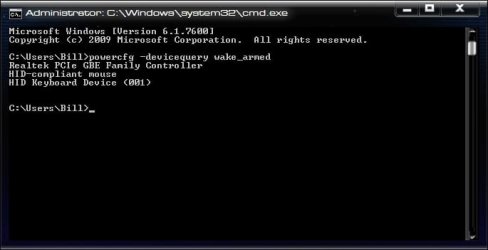
I had given up on sleep working right. I can put it to sleep using a shortcut but then during the night it would wake. I finally gave up on solving this.
Then 2 days ago I updated my soundcard drivers and that night the system went into sleep on its own and was still asleep when I got up. I thought "GREAT!". It didn't last though and last night it did not go into sleep on its own.
Other than trying out some software yesterday, the only thing different from the night before was that my USB connected printer was on. Could that have been the culprit? I don't really know how to check this. I did run the Powercgf -ENERGY command and posted below are the errors it notices. Could someone that understands this stuf take a look and offer some advice or a good troubleshooting guide for me?
Sincere Thanks
Jess
Power Efficiency Diagnostics Report
Computer Name BRAT-PC
Scan Time 2010-09-26T12:09:15Z
Scan Duration 60 seconds
BIOS Date 03/08/2010
BIOS Version 1003
OS Build 7600
Platform Role PlatformRoleDesktop
Plugged In true
Process Count 89
Thread Count 1341
Report GUID {495ca2a0-b078-43b3-967b-2bf873810195}
Analysis Results
Errors
Power Policy: Power Plan Personality is High Performance (Plugged In) The current power plan personality is High Performance when the system is plugged in.
Power Policy:Minimum processor performance state is 100% (Plugged In) The processor is not configured to automatically reduce power consumption based on activity.
Power Policy:PCI Express ASPM is disabled (Plugged In)
The current power policy for PCI Express Active State Power Management (ASPM) is configured to Off.
System Availability Requests:System Required Request
The device or driver has made a request to prevent the system from automatically entering sleep.
Requesting Driver Instance PCI\VEN_1102&DEV_000B&SUBSYS_00431102&REV_03\4&2276c4a6&0&0038
Requesting Driver Device Creative X-Fi Audio Processor (WDM)
USB Suspend:USB Device not Entering Suspend
The USB device did not enter the Suspend state. Processor power management may be prevented if a USB device does not enter the Suspend state when not in use.
Device Name HP Color LaserJet 2550 series (DOT4USB)
Host Controller ID PCI\VEN_8086&DEV_3A3A
Host Controller Location PCI bus 0, device 29, function 7
Device ID USB\VID_03F0&PID_1C17
Port Path 3
(There instances of the following USB for each port/hub I have, all same as below)
USB Suspend:USB Device not Entering Suspend
The USB device did not enter the Suspend state. Processor power management may be prevented if a USB device does not enter the Suspend state when not in use.
Platform Power Management Capabilities:Supported Sleep States
Sleep states allow the computer to enter low-power modes after a period of inactivity. The S3 sleep state is the default sleep state for Windows platforms. The S3 sleep state consumes only enough power to preserve memory contents and allow the computer to resume working quickly. Very few platforms support the S1 or S2 Sleep states.
S1 Sleep Supported: true
S2 Sleep Supported: false
S3 Sleep Supported: true
S4 Sleep Supported: true
Then 2 days ago I updated my soundcard drivers and that night the system went into sleep on its own and was still asleep when I got up. I thought "GREAT!". It didn't last though and last night it did not go into sleep on its own.
Other than trying out some software yesterday, the only thing different from the night before was that my USB connected printer was on. Could that have been the culprit? I don't really know how to check this. I did run the Powercgf -ENERGY command and posted below are the errors it notices. Could someone that understands this stuf take a look and offer some advice or a good troubleshooting guide for me?
Sincere Thanks
Jess
Power Efficiency Diagnostics Report
Computer Name BRAT-PC
Scan Time 2010-09-26T12:09:15Z
Scan Duration 60 seconds
BIOS Date 03/08/2010
BIOS Version 1003
OS Build 7600
Platform Role PlatformRoleDesktop
Plugged In true
Process Count 89
Thread Count 1341
Report GUID {495ca2a0-b078-43b3-967b-2bf873810195}
Analysis Results
Errors
Power Policy: Power Plan Personality is High Performance (Plugged In) The current power plan personality is High Performance when the system is plugged in.
Power Policy:Minimum processor performance state is 100% (Plugged In) The processor is not configured to automatically reduce power consumption based on activity.
Power Policy:PCI Express ASPM is disabled (Plugged In)
The current power policy for PCI Express Active State Power Management (ASPM) is configured to Off.
System Availability Requests:System Required Request
The device or driver has made a request to prevent the system from automatically entering sleep.
Requesting Driver Instance PCI\VEN_1102&DEV_000B&SUBSYS_00431102&REV_03\4&2276c4a6&0&0038
Requesting Driver Device Creative X-Fi Audio Processor (WDM)
USB Suspend:USB Device not Entering Suspend
The USB device did not enter the Suspend state. Processor power management may be prevented if a USB device does not enter the Suspend state when not in use.
Device Name HP Color LaserJet 2550 series (DOT4USB)
Host Controller ID PCI\VEN_8086&DEV_3A3A
Host Controller Location PCI bus 0, device 29, function 7
Device ID USB\VID_03F0&PID_1C17
Port Path 3
(There instances of the following USB for each port/hub I have, all same as below)
USB Suspend:USB Device not Entering Suspend
The USB device did not enter the Suspend state. Processor power management may be prevented if a USB device does not enter the Suspend state when not in use.
Platform Power Management Capabilities:Supported Sleep States
Sleep states allow the computer to enter low-power modes after a period of inactivity. The S3 sleep state is the default sleep state for Windows platforms. The S3 sleep state consumes only enough power to preserve memory contents and allow the computer to resume working quickly. Very few platforms support the S1 or S2 Sleep states.
S1 Sleep Supported: true
S2 Sleep Supported: false
S3 Sleep Supported: true
S4 Sleep Supported: true
My Computer
- OS
- Vista