I just changed from Bose Companion 3 speakers to Companion 5 because the 3 died. The 3 system used a stereo jack plugged into the headphone jack and worked fine until the Bose power supply(?) failed. The 5 uses a USB to connect.
I have an HDMI cable from my TV set top box to computer. Selecting the HDMI input shows only full screen TV display on computer. Also there is a coax cable from set top box to TV tuner card in computer. This allows TV to be displayed via Media Center in an adjustable window and I can open other windows (a browser, for instance) simultaneously. I choose which connection to use on my computer.
Previously with the Companion 3 speakers all sound came from them no matter the source. Now with the 5 speakers the HDMI TV source the sound comes from computer speakers not the Bose speakers. But if I play my music files (using Media Player) or TV (using Media Center) the sound does come from Bose speakers. Also sound from internet (YouTube, news videos, etc.) comes through Bose speakers.
Maybe someone has had this problem and knows a solution.
My Computer
Computer type
PC/Desktop
Computer Manufacturer/Model Number
Dell XPS One 2710
OS
windows 7 home premium 64 bit SP1
CPU
Intel Core i7 3770S @ 3.10GHz
Motherboard
Dell 02XMCT (CPU 1)
Memory
DDR3 16384 MBytes
Graphics Card(s)
Intel(R) HD Graphics 4000, NVIDIA GeForce GT 640M
Sound Card
Realtek High Definition Audio
Monitor(s) Displays
XPS One 2710 on Intel HD Graphics 4000 27"
Screen Resolution
2560x1440@59Hz
Hard Drives
1863GB
Case
All-in-One
Keyboard
Changed to old multimedia wireless set I had on XP machine
Internet Speed
1 Gb
Antivirus
Norton 360
Browser
IE, Chrome & Firefox
Other Info
A little worried about CPU temp that gets up to 180 F when watching TV via Media Center. 140-150 F normally.
I'm confused on where you plug in your hdmi set top box. Into your DISPLAY directly using and HDMI in port or some other HDMI in on your PC (like a graphics card?)
Also you have external computer speakers? do they plug in to your pc analog style? I know you said the Bose 5's are with usb.
An HDMI cable goes from the set top box to the HDMI in port on the computer. It's a Dell All-In-One. The set top box also has a coax cable going to the TV tuner card in the computer. There is a USB cable form the computer to the Bose Acoustimass Module (woofer). This takes the sound to the Module and the speakers connected to it. All sound should come out of the Bose speakers. And it does with the exception of when I choose to select the HDMI input for TV viewing. Then the sound comes from the computer speakers.
If I do not choose HDMI for TV I can choose "Media Center/Play Live TV" to watch TV in a resizeable window and the sound then comes from the Bose speakers. Media Center accesses the TV Tuner card that is connected to the set top box via the coax cable.
My Computer
Computer type
PC/Desktop
Computer Manufacturer/Model Number
Dell XPS One 2710
OS
windows 7 home premium 64 bit SP1
CPU
Intel Core i7 3770S @ 3.10GHz
Motherboard
Dell 02XMCT (CPU 1)
Memory
DDR3 16384 MBytes
Graphics Card(s)
Intel(R) HD Graphics 4000, NVIDIA GeForce GT 640M
Sound Card
Realtek High Definition Audio
Monitor(s) Displays
XPS One 2710 on Intel HD Graphics 4000 27"
Screen Resolution
2560x1440@59Hz
Hard Drives
1863GB
Case
All-in-One
Keyboard
Changed to old multimedia wireless set I had on XP machine
Internet Speed
1 Gb
Antivirus
Norton 360
Browser
IE, Chrome & Firefox
Other Info
A little worried about CPU temp that gets up to 180 F when watching TV via Media Center. 140-150 F normally.
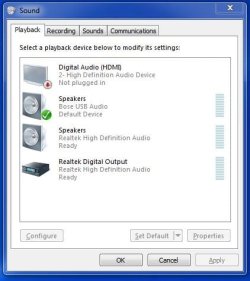
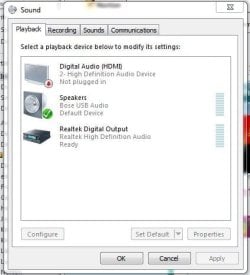
right click your speaker icon and click 'playback devices' and take a screenshot of what it looks like in there. Before you do, first right click in there and check show disconnected devices and show disabled devices.
I had to use clipping tool to get the Playback window. Not sure why the Digital Audio (HDMI) says Not plugged in. The TV signal comes from the set top box via an HDMI cable and I watch TV with it.
Attachments
Capture.JPG
34.4 KB
· Views: 9
My Computer
Computer type
PC/Desktop
Computer Manufacturer/Model Number
Dell XPS One 2710
OS
windows 7 home premium 64 bit SP1
CPU
Intel Core i7 3770S @ 3.10GHz
Motherboard
Dell 02XMCT (CPU 1)
Memory
DDR3 16384 MBytes
Graphics Card(s)
Intel(R) HD Graphics 4000, NVIDIA GeForce GT 640M
Sound Card
Realtek High Definition Audio
Monitor(s) Displays
XPS One 2710 on Intel HD Graphics 4000 27"
Screen Resolution
2560x1440@59Hz
Hard Drives
1863GB
Case
All-in-One
Keyboard
Changed to old multimedia wireless set I had on XP machine
Internet Speed
1 Gb
Antivirus
Norton 360
Browser
IE, Chrome & Firefox
Other Info
A little worried about CPU temp that gets up to 180 F when watching TV via Media Center. 140-150 F normally.
Sorry to hear that. It's as much as I can help you with honestly. Disable that is supposed to disable your internal speakers and route everything through your default playback output. If someone else has any suggestions please feel free.
FYI - Problem somewhat solved by connecting stereo jack cable between computer headphone output port and Bose input port on the volume pod. All content now comes out speakers. There is, however, a slight buzz at higher volume. Oh well....
Thanks again.
My Computer
Computer type
PC/Desktop
Computer Manufacturer/Model Number
Dell XPS One 2710
OS
windows 7 home premium 64 bit SP1
CPU
Intel Core i7 3770S @ 3.10GHz
Motherboard
Dell 02XMCT (CPU 1)
Memory
DDR3 16384 MBytes
Graphics Card(s)
Intel(R) HD Graphics 4000, NVIDIA GeForce GT 640M
Sound Card
Realtek High Definition Audio
Monitor(s) Displays
XPS One 2710 on Intel HD Graphics 4000 27"
Screen Resolution
2560x1440@59Hz
Hard Drives
1863GB
Case
All-in-One
Keyboard
Changed to old multimedia wireless set I had on XP machine
Internet Speed
1 Gb
Antivirus
Norton 360
Browser
IE, Chrome & Firefox
Other Info
A little worried about CPU temp that gets up to 180 F when watching TV via Media Center. 140-150 F normally.