
Some general weirdness with Windows Explorer, etc

stevebeans

New member
Local time
11:51 PM
Messages
8
I have been experiencing some general weirdness with my windows lately, here are some issues....

a) If I click on 'New Updates Available', it doesn't open up Windows Update like it should

b) The same can be said about my notifications to open 'Action Center'

c) When I do a windows search, it just brings up random documents. For example, searching for 'Windows Update' should bring up the program, but instead shows 23 text files that may contain the word windows update.

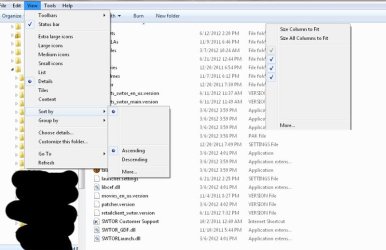
d) My Windows Explorer is messed up by not showing file sizes, and some blank spots where I should be able to sort, etc.

I uploaded a screenshot of the windows explorer weirdness as part of the attachment.

----

Notes:

- I ran Malewarebytes with nothing detected, combofix was fine, and did a scan with avast resulting in 0 threats
- It fixed itself once on a reboot recently but has since gone back to acting strange again.

I'm not really sure what could be causing this, has it happened to anyone else?

Thanks fro any replies
 

Attachments
  • explorerweird.jpg
    explorerweird.jpg
    46.7 KB · Views: 16

My Computer

Computer Manufacturer/Model Number
Custom built desktop
OS
MS Windows 7 64-bit SP1
CPU
Intel Core 2 Duo E7500
Motherboard
ASUSTeK Computer INC, P5B-Deluxe (LGA 775)
Memory
DDR2 6144 MBytes
Graphics Card(s)
ATI Radeon HD 5700
Sound Card
SB Audigy
Monitor(s) Displays
22"
Screen Resolution
1680x1050 pixels
Hard Drives
WDC WD15EARS-00Z5B1 ATA Device
WDC WD1001FALS-00Y6A0 ATA Device
WDC WD3200YS-01PGB0 ATA Device
PSU
650w
Case
Cooler Master
Cooling
fan
Keyboard
Logitech G15
Mouse
Logitech MX518
Internet Speed
Cable
Other Info
Mouse, Keyboard, Logitech Webcam, EPSON NX100 Printer

My Computer

Computer Manufacturer/Model Number
Hewlett packard/p6512uk
OS
Microsoft Windows 7 Home Premium 64-bit 7600
CPU
IIx4 amd athelon 635 processor
Motherboard
FOXCONN 2AA9
Memory
2x2gb
Graphics Card(s)
ati radeon HD 5450
Sound Card
(1) Realtek High Definition Audio (2) AMD High Definition
Monitor(s) Displays
samsung lcd tv 32"
Screen Resolution
1360x 768
Hard Drives
(1) WDC WD10 01FAES-60Z2A0 SATA Disk Device (2) Maxtor OneTouch USB Device (3) ST310003 33AS USB Device (4) WD My Book 1111 USB Device
PSU
?
Cooling
air!
Keyboard
wireless hp
Mouse
wireless Hp,optical
Internet Speed
1.10mb/s
Antivirus
MSE
Browser
Firefox
Thank you for the reply, here is what it found.... apparently quite a few files I could not repair.

Any suggestions?

I am tempted to re-install windows as it's probably due but

a) I don't remember where my license is
b) Every time I do there is always something I forget, like bookmarks UI Settings to some game or something of that nature. Do you know of any programs that run you through a good backup check list, back the items up then restore to new clean windows?

Thanks!
 

Attachments

My Computer

Computer Manufacturer/Model Number
Custom built desktop
OS
MS Windows 7 64-bit SP1
CPU
Intel Core 2 Duo E7500
Motherboard
ASUSTeK Computer INC, P5B-Deluxe (LGA 775)
Memory
DDR2 6144 MBytes
Graphics Card(s)
ATI Radeon HD 5700
Sound Card
SB Audigy
Monitor(s) Displays
22"
Screen Resolution
1680x1050 pixels
Hard Drives
WDC WD15EARS-00Z5B1 ATA Device
WDC WD1001FALS-00Y6A0 ATA Device
WDC WD3200YS-01PGB0 ATA Device
PSU
650w
Case
Cooler Master
Cooling
fan
Keyboard
Logitech G15
Mouse
Logitech MX518
Internet Speed
Cable
Other Info
Mouse, Keyboard, Logitech Webcam, EPSON NX100 Printer
(side note: my HDD was having weird issues, although it could be windows, or both. I bought a new HDD and was going to do a clone, but if I do a re-install it would definitely be on the new HDD which does allow me flexibility if I do forget stuff from the old. But still, a checklist would be nice)
 

My Computer

Computer Manufacturer/Model Number
Custom built desktop
OS
MS Windows 7 64-bit SP1
CPU
Intel Core 2 Duo E7500
Motherboard
ASUSTeK Computer INC, P5B-Deluxe (LGA 775)
Memory
DDR2 6144 MBytes
Graphics Card(s)
ATI Radeon HD 5700
Sound Card
SB Audigy
Monitor(s) Displays
22"
Screen Resolution
1680x1050 pixels
Hard Drives
WDC WD15EARS-00Z5B1 ATA Device
WDC WD1001FALS-00Y6A0 ATA Device
WDC WD3200YS-01PGB0 ATA Device
PSU
650w
Case
Cooler Master
Cooling
fan
Keyboard
Logitech G15
Mouse
Logitech MX518
Internet Speed
Cable
Other Info
Mouse, Keyboard, Logitech Webcam, EPSON NX100 Printer
ok ,these logs are not really my field there are a few guys who know this stuff better than i do,
i would consider a repair install which will keep your settings and user files etc,
but i would also wait for the big hitters here to have a look first,
i'll post to get you some additional help.

also i believe that sometimes running sfc scan several times can get it to complete, so in the meantime run the scan again, maybe twice.
then hopefully you will get some more help here.
 

My Computer

Computer Manufacturer/Model Number
Hewlett packard/p6512uk
OS
Microsoft Windows 7 Home Premium 64-bit 7600
CPU
IIx4 amd athelon 635 processor
Motherboard
FOXCONN 2AA9
Memory
2x2gb
Graphics Card(s)
ati radeon HD 5450
Sound Card
(1) Realtek High Definition Audio (2) AMD High Definition
Monitor(s) Displays
samsung lcd tv 32"
Screen Resolution
1360x 768
Hard Drives
(1) WDC WD10 01FAES-60Z2A0 SATA Disk Device (2) Maxtor OneTouch USB Device (3) ST310003 33AS USB Device (4) WD My Book 1111 USB Device
PSU
?
Cooling
air!
Keyboard
wireless hp
Mouse
wireless Hp,optical
Internet Speed
1.10mb/s
Antivirus
MSE
Browser
Firefox
thank you, not a bad idea. Perhaps a run fixes something that allows something else to be fixed and so forth. I'll try it 1-2 more times and see if the logs change
 

My Computer

Computer Manufacturer/Model Number
Custom built desktop
OS
MS Windows 7 64-bit SP1
CPU
Intel Core 2 Duo E7500
Motherboard
ASUSTeK Computer INC, P5B-Deluxe (LGA 775)
Memory
DDR2 6144 MBytes
Graphics Card(s)
ATI Radeon HD 5700
Sound Card
SB Audigy
Monitor(s) Displays
22"
Screen Resolution
1680x1050 pixels
Hard Drives
WDC WD15EARS-00Z5B1 ATA Device
WDC WD1001FALS-00Y6A0 ATA Device
WDC WD3200YS-01PGB0 ATA Device
PSU
650w
Case
Cooler Master
Cooling
fan
Keyboard
Logitech G15
Mouse
Logitech MX518
Internet Speed
Cable
Other Info
Mouse, Keyboard, Logitech Webcam, EPSON NX100 Printer
Help us to help you.

Please carry out following. You will find that SPECCY and SIW will give you much more info than the forum's System Info link.

Update your SevenForums System Specs
User CP (located on the top menu bar) |
Your Profile | Edit System Spec
(left-hand column)

To gather info, use Speccy (my favorite) or SIW or System Info

ADD the word laptop or desktop or netbook to the
“system manufacturer” block, for example,
Toshiba Satellite L305D notebook.

Provide full windows version info, for example:
MS Windows 7 Ultimate SP1 64-bit

Use the “Other Info” block for Optical Reader,
Mouse, touchpad, wifi adapter, speakers, monitor, etc

Scroll down and click on SAVE CHANGES.
=======================================================
 

My Computer

Computer Manufacturer/Model Number
Toshiba Satellite S875D-S7239 laptop
OS
MS Windows 7 Ultimate SP1 64-bit
CPU
AMD A10-4600M
Motherboard
AMD Pumori (Socket FT1)
Memory
6.00 GB Dual-Channel DDR3 @ 798MHz (11-11-12-28)
Graphics Card(s)
AMD Radeon HD 7660G
Sound Card
High Definition Audio Device
Monitor(s) Displays
Generic PnP Monitor (1600x900@60Hz)
Screen Resolution
1600x900@60Hz
Hard Drives
SSD 119GB Corsair CSSD-V128GB2 ATA Device
Keyboard
Standard PS/2 Keyboard
Mouse
HP Wireless Optical Mobile Mouse Model FHA-3410
Internet Speed
What the local pub, local coffee shop offers.
Other Info
Optical Drive:MATSHITA BD-CMB UJ160B ATA Device


Also have an Asus ha1002xp netbook with Win 7 Ultimate installed.
Thanks for the tip. Updated as best I could. Going to run that scan again now
 

My Computer

Computer Manufacturer/Model Number
Custom built desktop
OS
MS Windows 7 64-bit SP1
CPU
Intel Core 2 Duo E7500
Motherboard
ASUSTeK Computer INC, P5B-Deluxe (LGA 775)
Memory
DDR2 6144 MBytes
Graphics Card(s)
ATI Radeon HD 5700
Sound Card
SB Audigy
Monitor(s) Displays
22"
Screen Resolution
1680x1050 pixels
Hard Drives
WDC WD15EARS-00Z5B1 ATA Device
WDC WD1001FALS-00Y6A0 ATA Device
WDC WD3200YS-01PGB0 ATA Device
PSU
650w
Case
Cooler Master
Cooling
fan
Keyboard
Logitech G15
Mouse
Logitech MX518
Internet Speed
Cable
Other Info
Mouse, Keyboard, Logitech Webcam, EPSON NX100 Printer
sfc /scannow scans sometimes need to be run 3 times rebooting after each. For what ever reason at times it just can't fix everything without being run again.
 

My Computer

Computer type
PC/Desktop
Computer Manufacturer/Model Number
Home made Desktop
OS
Windows 10 Pro. 64/ version 1709 Windows 7 Pro/64
CPU
Intel i7-6800K @ 4.3
Motherboard
ASUS X-99 Deluxe II
Memory
Corsair Platinum 16 gig @2400
Graphics Card(s)
EVGA GTX 1070 OC
Monitor(s) Displays
Asus 27" LED LCD/VE278Q
Screen Resolution
1920-1080 or 1280-720 HDMI
Hard Drives
INTEL SSD 730-240 Gb Sata 3.0/
PSU
EVGA Platium 1200W
Case
Phanteks Luxe Tempered Glass 8 fans/ one radiator
Cooling
XSPC/ Water Cooled CPU
Keyboard
Das 4 Professional
Mouse
Logitech M705/MX Anywhere 2-S
Internet Speed
100 mbits
Antivirus
Microsoft Security Essentials/ Malwarebytes Premium 3.0/ SAS
Browser
I.E. 11 default/Firefox/ ISP Time Warner Cable/Spectrum
Other Info
LG BluRay Burner/
Sound system-KLipsch-THX/
Icy Dock ssd Hot Swap bays.
Yea, I ran it 3x now and still can't fix :( Now my network icon is showing the red x like it's disconnected but I have Internet access.... It may be time to plan a re-install
 

My Computer

Computer Manufacturer/Model Number
Custom built desktop
OS
MS Windows 7 64-bit SP1
CPU
Intel Core 2 Duo E7500
Motherboard
ASUSTeK Computer INC, P5B-Deluxe (LGA 775)
Memory
DDR2 6144 MBytes
Graphics Card(s)
ATI Radeon HD 5700
Sound Card
SB Audigy
Monitor(s) Displays
22"
Screen Resolution
1680x1050 pixels
Hard Drives
WDC WD15EARS-00Z5B1 ATA Device
WDC WD1001FALS-00Y6A0 ATA Device
WDC WD3200YS-01PGB0 ATA Device
PSU
650w
Case
Cooler Master
Cooling
fan
Keyboard
Logitech G15
Mouse
Logitech MX518
Internet Speed
Cable
Other Info
Mouse, Keyboard, Logitech Webcam, EPSON NX100 Printer
Well, I found my win 7 disk, now I need to find my key and possibly do a fresh install on my newer HDD.

Does anyone have any good sites that go down a checklist of things to do before you re-install? Little things I may miss

This is assuming I can't fix my current issue.
 

My Computer

Computer Manufacturer/Model Number
Custom built desktop
OS
MS Windows 7 64-bit SP1
CPU
Intel Core 2 Duo E7500
Motherboard
ASUSTeK Computer INC, P5B-Deluxe (LGA 775)
Memory
DDR2 6144 MBytes
Graphics Card(s)
ATI Radeon HD 5700
Sound Card
SB Audigy
Monitor(s) Displays
22"
Screen Resolution
1680x1050 pixels
Hard Drives
WDC WD15EARS-00Z5B1 ATA Device
WDC WD1001FALS-00Y6A0 ATA Device
WDC WD3200YS-01PGB0 ATA Device
PSU
650w
Case
Cooler Master
Cooling
fan
Keyboard
Logitech G15
Mouse
Logitech MX518
Internet Speed
Cable
Other Info
Mouse, Keyboard, Logitech Webcam, EPSON NX100 Printer
Not a checklist, but the first thing I would do is browse my username folder, typically found within C:\Users. Make sure you've set Explorer options to show hidden and system files, at least for the time being. You don't want Explorer hiding stuff from you in this case. If you've typically saved to default locations under the one username, then you're likely to find most of your data.

Next I'd check Programs and Features in Control Panel, sorting by date can be helpful, and make note of all the stuff I've added. Find the install files for them and copy them out. Or find internet links to reinstall.

I realize it's nowhere near being a comprehensive list (or even any kind of a list), and it'll take some time to scour your user folder, but it can be worthwhile. Might be useful to check the root and it's immediate folders while you're at it, just in case.

Don't forget about drivers you may need.

Saw your mention of cloning. I wouldn't worry about cloning to the new drive as you're likely to have the same problem as you had with the old. Just install fresh, and then work to copy your data from the old.

And then start backing up on a regular schedule. Figure out where you saves are stored and how you can back up and restore your saves. And whenever you start using a new app make sure you figure out how it's saving your data so you can back that up too. Some apps like doing it their own way.
 

My Computer

OS
Windows 7 Ultimate x64

My Computer

Computer Manufacturer/Model Number
Hewlett packard/p6512uk
OS
Microsoft Windows 7 Home Premium 64-bit 7600
CPU
IIx4 amd athelon 635 processor
Motherboard
FOXCONN 2AA9
Memory
2x2gb
Graphics Card(s)
ati radeon HD 5450
Sound Card
(1) Realtek High Definition Audio (2) AMD High Definition
Monitor(s) Displays
samsung lcd tv 32"
Screen Resolution
1360x 768
Hard Drives
(1) WDC WD10 01FAES-60Z2A0 SATA Disk Device (2) Maxtor OneTouch USB Device (3) ST310003 33AS USB Device (4) WD My Book 1111 USB Device
PSU
?
Cooling
air!
Keyboard
wireless hp
Mouse
wireless Hp,optical
Internet Speed
1.10mb/s
Antivirus
MSE
Browser
Firefox
Steve,
I had held off on analyzing the sfcdetails.txt until we had your system specs.

You system specs reveal nothing which would be causing your present problems

The problems you report are probably all self-inflicted rather than hardware problems.

If you desire to perform a reinstall, then we have an excellent tutorial that covers all cases, despite the name of the tutorial: http://www.sevenforums.com/tutorials/219487-clean-reinstall-factory-oem-windows-7-a.html#post1839164

For your 25 character Product Key, then you can use either:
1. Belarc Security Advisor Belarc Advisor - Free Personal PC Audit, for software, hardware and security configuration information on your computer. Software license management, IT asset management, cyber security audits, and more.
2. SIW (llnk is in my signature)
3. Speccy (where I think its called Serail Number)
4. The PowerShell script I'm including.

Do NOT ever post your 25 character Windows Product Key/Serial Number which is
available under:
Speccy | Operating System | Serial Number and under
SIW | Software | Licenses | Windows Product Key
Do NOT ever post your 25 character Windows Product Key/Serial Number.

========================================================================

powershell script:
# ************************************************************
# Get Product License Key
# Source is PowerShell.com > PowerTips > Getttin Windows Product Key
# For those interested in learning PowerShell this is an excellent site.
# See their 'Mastering PowerShell' for a thorough presentation of xx chapters
# ************************************************************

# ************************************************************
# Start copying with next uncommented line (no # in first character;
# Copy thru 2nd EXIT;
# Paste into PowerShell using right-click
# ************************************************************
function Get-ProductKey {
$map="BCDFGHJKMPQRTVWXY2346789"
$value = (get-itemproperty "HKLM:\SOFTWARE\Microsoft\Windows NT\CurrentVersion").digitalproductid[0x34..0x42]
$ProductKey = ""
for ($i = 24; $i -ge 0; $i--) {
$r = 0
for ($j = 14; $j -ge 0; $j--) {
$r = ($r * 256) -bxor $value[$j]
$value[$j] = [math]::Floor([double]($r/24))
$r = $r % 24
}
$ProductKey = $map[$r] + $ProductKey
if (($i % 5) -eq 0 -and $i -ne 0) {
$ProductKey = "-" + $ProductKey
}
}
$ProductKey
}

Get-ProductKey > $env:userprofile\Desktop\ProductKey.TXT


EXIT
EXIT

# ************************************************************
# Places ProductKey.TXT on your DESKTOP
#
# **********************INSTRUCTIONS**************************
# STEP 1 *****************************************************
# RUN PowerShell as administrator
# START ORB | type POWERSHELL | CTRL+SHIFT+ENTER key combo | ALT+Y keycombo
# ************************************************************
# STEP 2 *****************************************************
# COPY, using CTRL+C, every line down thru both EXIT statements
# PASTE into Powershell == Right-Click at the PowerShell Prompt
# (Ctrl+V does not work)
# ************************************************************
# ***************** NOTE - POWERSHELL VERSION*****************
# if you receive this error msg:
# Get-WinEvent: The system can not find the path specified
# you need to update your PowerShell
# you must be using Powershell 2.0 or later.
#
# To determine your Powershell version:
# Run PowerShell
# enter $host.version
# you should see at least:
# Major Minor Build Revision
# ----- ----- ----- --------
# 2 0 -1 -1
#
# If you do not see the above, update your Vista/Win 7.
# ************************************************************
# *************** NOTE - EXECUTION POLICY*********************
# If you haven't set the execution policy, you may need to:
# Run PowerShell
# enter Set-ExecutionPolicy -executionpolicy remotesigned
#
# ************************************************************
 

My Computer

Computer Manufacturer/Model Number
Toshiba Satellite S875D-S7239 laptop
OS
MS Windows 7 Ultimate SP1 64-bit
CPU
AMD A10-4600M
Motherboard
AMD Pumori (Socket FT1)
Memory
6.00 GB Dual-Channel DDR3 @ 798MHz (11-11-12-28)
Graphics Card(s)
AMD Radeon HD 7660G
Sound Card
High Definition Audio Device
Monitor(s) Displays
Generic PnP Monitor (1600x900@60Hz)
Screen Resolution
1600x900@60Hz
Hard Drives
SSD 119GB Corsair CSSD-V128GB2 ATA Device
Keyboard
Standard PS/2 Keyboard
Mouse
HP Wireless Optical Mobile Mouse Model FHA-3410
Internet Speed
What the local pub, local coffee shop offers.
Other Info
Optical Drive:MATSHITA BD-CMB UJ160B ATA Device


Also have an Asus ha1002xp netbook with Win 7 Ultimate installed.
I am still in the process of reinstalling. I tried to install it on a HDD I had a little data on, and got the 'setup was unable to install blah blah' and found the thread about doing a 'clean all'... ugh. I kind of wish I read a little better, this is taking forever. I probably could have gotten away with a 'clean', but 900 gigs is slow. The thread said 500gb took about 2 hours, but I think I have passed the 5 hour mark.

Hopefully it will be done soon, this is the longest format ever.
 

My Computer

Computer Manufacturer/Model Number
Custom built desktop
OS
MS Windows 7 64-bit SP1
CPU
Intel Core 2 Duo E7500
Motherboard
ASUSTeK Computer INC, P5B-Deluxe (LGA 775)
Memory
DDR2 6144 MBytes
Graphics Card(s)
ATI Radeon HD 5700
Sound Card
SB Audigy
Monitor(s) Displays
22"
Screen Resolution
1680x1050 pixels
Hard Drives
WDC WD15EARS-00Z5B1 ATA Device
WDC WD1001FALS-00Y6A0 ATA Device
WDC WD3200YS-01PGB0 ATA Device
PSU
650w
Case
Cooler Master
Cooling
fan
Keyboard
Logitech G15
Mouse
Logitech MX518
Internet Speed
Cable
Other Info
Mouse, Keyboard, Logitech Webcam, EPSON NX100 Printer
Steve,
Clean All is writing zeroes to each and every byte on your hard drive.

This is an excellent method of truly eliminating all malware plus a very positive side advantage is that when a bad spot on your disk is encountered then that sector is taken out-of-service, thus you are also getting an excellent CHKDSK for the surface of your disk.

Clean all does NOT format. The Win 7 will format your drive for you, and format the drive correctly.

Let's see I think I have a link from SeaGate on their equivalents of clean and clean all. The explanation there is better than what I've found from Microsoft.

And yes, a Clean All can take a good half of a day on modern size drives. I've used clean all on my ssd which also is only 128 GB and the time was around 30 minutes.

How Do I Low-Level Format a SATA or ATA (IDE) Hard Drive?
 

My Computer

Computer Manufacturer/Model Number
Toshiba Satellite S875D-S7239 laptop
OS
MS Windows 7 Ultimate SP1 64-bit
CPU
AMD A10-4600M
Motherboard
AMD Pumori (Socket FT1)
Memory
6.00 GB Dual-Channel DDR3 @ 798MHz (11-11-12-28)
Graphics Card(s)
AMD Radeon HD 7660G
Sound Card
High Definition Audio Device
Monitor(s) Displays
Generic PnP Monitor (1600x900@60Hz)
Screen Resolution
1600x900@60Hz
Hard Drives
SSD 119GB Corsair CSSD-V128GB2 ATA Device
Keyboard
Standard PS/2 Keyboard
Mouse
HP Wireless Optical Mobile Mouse Model FHA-3410
Internet Speed
What the local pub, local coffee shop offers.
Other Info
Optical Drive:MATSHITA BD-CMB UJ160B ATA Device


Also have an Asus ha1002xp netbook with Win 7 Ultimate installed.
Back
Top