Some icons disappear and are replaced by generic ones

d3mncln3r

New member
Local time
1:59 PM
Messages
5
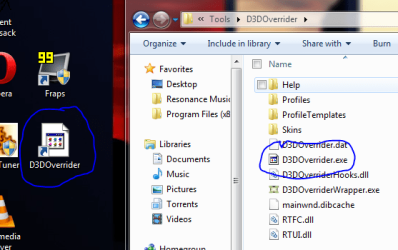
For some reason icons for certain programs will disapear and be replaced with the 'generic window' windows icon. I'll upload a screen shot. First it happend with opera. and now with d3doverrider. Additionally I think I was using the program when it happened, so that may be contributing to the cause.
 

Attachments

  • Capture.PNG
    Capture.PNG
    25.8 KB · Views: 53

My Computer My Computer

At a glance

Windows 7
OS
Windows 7
no sadly that didn't do the trick, thanks for helping though. any other ideas?
 

My Computer My Computer

At a glance

Windows 7
OS
Windows 7

My Computer My Computer

At a glance

Windows 10 HomeIntel Core i5 3550Corsair Vengeance DDR3 16GBNvidia GEForce GTX 970 SSC
Computer type
PC/Desktop
Computer Manufacturer/Model Number
Self build
OS
Windows 10 Home
CPU
Intel Core i5 3550
Motherboard
ASUS P8Z77-V LX (LGA1155)
Memory
Corsair Vengeance DDR3 16GB
Graphics Card(s)
Nvidia GEForce GTX 970 SSC
Monitor(s) Displays
Hanns-G 23.6", Acer 17"
Screen Resolution
1920x1080, 1440x900
Hard Drives
Sandisk SSD 256 GB
WD500GB
WD640GB
Seagage Ultra + 1TB ext.
BWD 800GB
WD 1TB ext
PSU
Antec 650w
Case
Cooler Master Centurion 534
Cooling
COOLER MASTER GeminII S524, 3 120 mm case fans.
Keyboard
Logitech MK300
Mouse
Logitech MK300
Internet Speed
Cable
Antivirus
MSSE, Malwarebytes
Browser
IE 10, Chrome
Bump for help?
 

My Computer My Computer

At a glance

Windows 7
OS
Windows 7
My "Everything Search" exe icon looks like that too. As far as I know that's the only one doing this. The program works fine and the taskbar shortcut has the right icon pic too. The other 4 files in that folder are all common windows files like ini and txt, and they all are fine.

I found that I could move a copy of the exe anywhere else and it would have the right icon, but whenever I put it back in it's own folder it would lose the icon. I made a new folder and moved all of the contents from the old to the new folder and icon was there. I gave the folder the same name as the old one... the icon went away. WTH? I changed the name of the folder slightly and voila, the icon is back.

Don't ask me why, but try it and see if that works.

Rusty

 

My Computer My Computer

At a glance

Windows 7 Home Premium - always up to dateIntel E2210 2.2Ghz3Gb DDR2NVIDIA GeForce 7050/610I GPU
Computer type
PC/Desktop
Computer Manufacturer/Model Number
eMachines ET1810-03 (Acer) - single user
OS
Windows 7 Home Premium - always up to date
CPU
Intel E2210 2.2Ghz
Motherboard
(OEM) ECS MCP73VT-PM with AMI BIOS R01-A3 (4-29-2009)
Memory
3Gb DDR2
Graphics Card(s)
NVIDIA GeForce 7050/610I GPU
Sound Card
Realtek ALC888/1200 8-channel HD integrated
Monitor(s) Displays
AOC 22" LED
Screen Resolution
1920 x 1080
Hard Drives
Internal - Seagate 320Gb SATA; External - Western Digital 320Gb USB (3.5" internal drive inside a RocketFish USB enclosure)
Keyboard
Wireless
Mouse
Logitech M705 laser wireless
Internet Speed
TWC Cable Broadband ~ 15 Mbps Down/1 Mbps Up
Antivirus
NIS
Browser
Chrome
Other Info
Microsoft Office 2007, incl Outlook SP3; Netgear router; ubee modem
Wow that is most odd! I did what you said, I copied the file from its original folder to a different folder (on a different partition) and the icon returned! Then I copied the new icon back to the desktop and it was still good. The weird part is, when I copy the new icon back into its original folder... it goes back to the old 'generic' form! I don't get it. At least I have my icon back on the desktop but it is a temporary fix to a problem that is likely to be persistent. (at least for me)

Thanks to rusty for the tip!
 

My Computer My Computer

At a glance

Windows 7
OS
Windows 7
first try to reinstall with elevated privilege, and also send download link of that software(if u have), so that i try in my system
 

My Computer My Computer

At a glance

windows 7CORE 2 DUO 3.20 GHZ4048
Computer Manufacturer/Model Number
ACER VERITON
OS
windows 7
CPU
CORE 2 DUO 3.20 GHZ
Motherboard
intel Q45
Memory
4048
Monitor(s) Displays
ACER
Screen Resolution
1280*1024
Hard Drives
250+500+500
Keyboard
ACER
Mouse
ACER
Internet Speed
2 MBPS
Same problem - looks like a minor bug to me

I've had the same problem with larger (but not smaller) icons for Adobe Reader files, all icons for IntelliType and IntelliPoint. I haven't tried the trick of moving or renaming them.

Note: rebuilding the icon cache was of no value. I also performed an SFC /scannow in elevated privilege mode with no results.

Does anyone know if Microsoft is aware of this issue?
 

My Computer My Computer

At a glance

Windows 7 Ultimate x64Intel Core2 Quad CPU Q94504GB
Computer Manufacturer/Model Number
Dell XPS 630i
OS
Windows 7 Ultimate x64
CPU
Intel Core2 Quad CPU Q9450
Memory
4GB
My computer just quit doing it. If I recall, I deleted "C:\Users\owner\AppData\Local\IconCache.db" and it's been okay ever since.
 

My Computer My Computer

At a glance

Windows 7 Home Premium - always up to dateIntel E2210 2.2Ghz3Gb DDR2NVIDIA GeForce 7050/610I GPU
Computer type
PC/Desktop
Computer Manufacturer/Model Number
eMachines ET1810-03 (Acer) - single user
OS
Windows 7 Home Premium - always up to date
CPU
Intel E2210 2.2Ghz
Motherboard
(OEM) ECS MCP73VT-PM with AMI BIOS R01-A3 (4-29-2009)
Memory
3Gb DDR2
Graphics Card(s)
NVIDIA GeForce 7050/610I GPU
Sound Card
Realtek ALC888/1200 8-channel HD integrated
Monitor(s) Displays
AOC 22" LED
Screen Resolution
1920 x 1080
Hard Drives
Internal - Seagate 320Gb SATA; External - Western Digital 320Gb USB (3.5" internal drive inside a RocketFish USB enclosure)
Keyboard
Wireless
Mouse
Logitech M705 laser wireless
Internet Speed
TWC Cable Broadband ~ 15 Mbps Down/1 Mbps Up
Antivirus
NIS
Browser
Chrome
Other Info
Microsoft Office 2007, incl Outlook SP3; Netgear router; ubee modem
Back
Top