Some newbie questions after ugrading GPU.

RTXA

New member
Local time
5:40 AM
Messages
3
Hi,

I just upgraded my GPU to an AMD r9-290 Vapor. I am still using my old Antec 900 case and the wires are a bit cluttered after fitting in that GPU.

I have wires sitting on top of the GPU and some wires touching the side of the GPU's heatsink. Do I need to worry about the wires melting? The wires are from the EVGA 850 G2.

Also I used a couple of cable ties (those wrapped metal wires), are they going to damage the mobo?

Thanks in advance.
 

My Computer My Computer

OS
Windows 7 Ultimate x64
Their is no cable ties with wires in them that should be used. None, Zero.
Cable ties should be plastic of some kind with not metal.

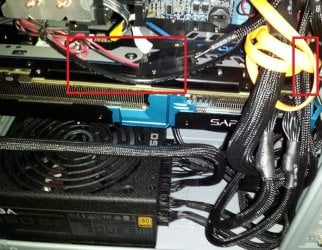
If you have cables laying on or rubbing against your video card then you have a mess. You need to spend some time with cable management.
Cable and harness routing should be very neat and tidy. Cables should not block air flow in any fashion.

Could you post a picture of the inside of your system with everything hooked up.

Use this tutorial to post a picture.

By Brink:

http://www.sevenforums.com/tutorials/9733-screenshots-files-upload-post-seven-forums.html
 

My Computer My Computer

Computer type
PC/Desktop
Computer Manufacturer/Model Number
Home made Desktop
OS
Windows 10 Pro. 64/ version 1709 Windows 7 Pro/64
CPU
Intel i7-6800K @ 4.3
Motherboard
ASUS X-99 Deluxe II
Memory
Corsair Platinum 16 gig @2400
Graphics Card(s)
EVGA GTX 1070 OC
Monitor(s) Displays
Asus 27" LED LCD/VE278Q
Screen Resolution
1920-1080 or 1280-720 HDMI
Hard Drives
INTEL SSD 730-240 Gb Sata 3.0/
PSU
EVGA Platium 1200W
Case
Phanteks Luxe Tempered Glass 8 fans/ one radiator
Cooling
XSPC/ Water Cooled CPU
Keyboard
Das 4 Professional
Mouse
Logitech M705/MX Anywhere 2-S
Internet Speed
100 mbits
Antivirus
Microsoft Security Essentials/ Malwarebytes Premium 3.0/ SAS
Browser
I.E. 11 default/Firefox/ ISP Time Warner Cable/Spectrum
Other Info
LG BluRay Burner/
Sound system-KLipsch-THX/
Icy Dock ssd Hot Swap bays.
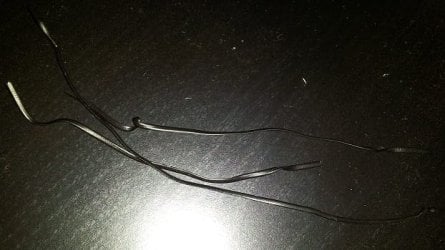
These are the ones I am talking about to shorten the wires.
Ties.jpg

This is the inside. The GPU fit just right into the case and it didn't leave me much room to situate the SATA and mobo wires.
Case.jpg

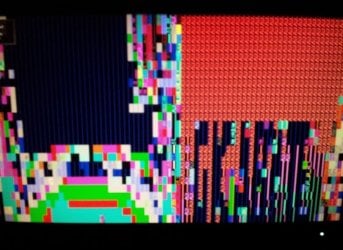
Finally, my post BIOS screen looks like this... which was why I asked if having those ties would damage the mobo.
BIOS.jpg
 

My Computer My Computer

OS
Windows 7 Ultimate x64
You do NOT want to use those ties in your picture.
Yes they can do all kinds of damage because they conduct electricity.

You need to start over and clean up the mess and hope no damage has been done.

That picture of your bios is scary.

To get a idea of what is neat and tidy go to this thread.

http://www.sevenforums.com/pc-custom-builds-overclocking/329173-show-us-your-rig-8-a.html

Check out post
43
76
91
93
154
222
453

Those are just a few to get you started.
 
Last edited:

My Computer My Computer

Computer type
PC/Desktop
Computer Manufacturer/Model Number
Home made Desktop
OS
Windows 10 Pro. 64/ version 1709 Windows 7 Pro/64
CPU
Intel i7-6800K @ 4.3
Motherboard
ASUS X-99 Deluxe II
Memory
Corsair Platinum 16 gig @2400
Graphics Card(s)
EVGA GTX 1070 OC
Monitor(s) Displays
Asus 27" LED LCD/VE278Q
Screen Resolution
1920-1080 or 1280-720 HDMI
Hard Drives
INTEL SSD 730-240 Gb Sata 3.0/
PSU
EVGA Platium 1200W
Case
Phanteks Luxe Tempered Glass 8 fans/ one radiator
Cooling
XSPC/ Water Cooled CPU
Keyboard
Das 4 Professional
Mouse
Logitech M705/MX Anywhere 2-S
Internet Speed
100 mbits
Antivirus
Microsoft Security Essentials/ Malwarebytes Premium 3.0/ SAS
Browser
I.E. 11 default/Firefox/ ISP Time Warner Cable/Spectrum
Other Info
LG BluRay Burner/
Sound system-KLipsch-THX/
Icy Dock ssd Hot Swap bays.
Back
Top