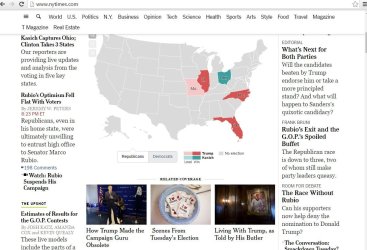
Some parts of my display appear washed out

madaecirp

New member
Local time
1:58 PM
Messages
4
Hi, I'm sorry but I have no idea what is causing this. In my browsers some parts of the display are so washed out as to be invisible (radio buttons, certain fonts, some scroll bars, graphic images), and other parts appear normal How can I fix this?

I've attached a screen capture so that you can see what I'm talking about. Notice that the headlines are fine, but the names of the reporters who wrote the story in the left column are almost invisible, and the map of the United States in the center of the page is completely invisible.

I've got the Aero 7 theme running right now. I've checked brightness. I've tried playing with the size of the fonts. None of that has worked yet.

Thanks in advance for your help.
 

Attachments

  • Capture Faded.JPG
    Capture Faded.JPG
    111.4 KB · Views: 2

My Computer My Computer

At a glance

7
Computer type
PC/Desktop
Computer Manufacturer/Model Number
HP Pavillion
OS
7
Hi madaecirp and Welcome to WSF. According to your image upload I see nothing wrong. Nothing is washed out and the US map is clear. In your post you mentioned "In my browsers" What browsers are you referring to? Do you have this issue with text and images in let say Microsoft Word?
 

My Computer My Computer

At a glance

Windows 10 Pro 64 bitAMD FX 9590 8 Core Black EditionCorsair Vengeance 16GB DDR3AMD Radeon (TM) R9 380 Gaming Series
Computer type
PC/Desktop
Computer Manufacturer/Model Number
Custom Built By Me.
OS
Windows 10 Pro 64 bit
CPU
AMD FX 9590 8 Core Black Edition
Motherboard
MSI 990FXA GAMING (MS-7893)
Memory
Corsair Vengeance 16GB DDR3
Graphics Card(s)
AMD Radeon (TM) R9 380 Gaming Series
Sound Card
AMD High Definition
Monitor(s) Displays
Samsung 32" 60Hz 4ms Curved PLS LED
Screen Resolution
1920 X 1080
Hard Drives
C: 223 GB SSD = E: 465 GB HDD = F: 931 GB HDD = G: 149 GB HDD = H: 931 GB HDD
PSU
EVGA Supernova NEX750B 750W ATX EPS12V 80PLUS Bronze
Case
Cool Master
Cooling
Noctua NH-D15 Premium Cooler with 2x NF-A15 PWM 140mm Fan
Internet Speed
Fiber Optic: Download 332.7 Mbps / Upload 331.5 Mbps
Antivirus
Windows Defender
Browser
Slimjet (64bit)
More info

Ok, I turned the gamma all the way down (toward black?) in the color calibration, and that appears to have helped quite a bit. you'll notice in the new screen grab that the names of the reporters in the left-hand bylines can be seen now. The map of the united states is still invisible though, except when I hover my mouse over a state, and then the borders appear in black.

Any other thoughts to fix this problem?

Thanks!
 

Attachments

  • Capture less faded.JPG
    Capture less faded.JPG
    118.5 KB · Views: 1

My Computer My Computer

At a glance

7
Computer type
PC/Desktop
Computer Manufacturer/Model Number
HP Pavillion
OS
7
Hi Lance, thanks for your quick response--and your helpfully pointed question. As it turns out I have the same problem whether I am in chrome, firefox, or even when I'm looking at a jpg outside of the browser. I can't see the borders of the states in the image under any circumstances right now.

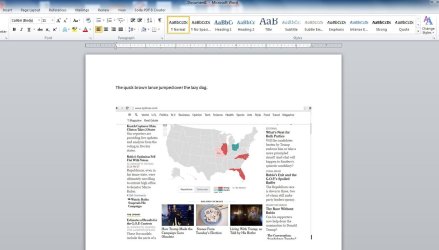
In word the fonts look crisp and dark. The imported image still lacks any discernible state lines. I've attached another capture.

Thank you!
 

Attachments

  • Capture Word.JPG
    Capture Word.JPG
    94.2 KB · Views: 1

My Computer My Computer

At a glance

7
Computer type
PC/Desktop
Computer Manufacturer/Model Number
HP Pavillion
OS
7
I still see no issues in the new screen shot. This could be ether hardware or software. Lets hope it not hardware. Let update your display drivers. Whats the exact model of your HP Pavilion?
 

My Computer My Computer

At a glance

Windows 10 Pro 64 bitAMD FX 9590 8 Core Black EditionCorsair Vengeance 16GB DDR3AMD Radeon (TM) R9 380 Gaming Series
Computer type
PC/Desktop
Computer Manufacturer/Model Number
Custom Built By Me.
OS
Windows 10 Pro 64 bit
CPU
AMD FX 9590 8 Core Black Edition
Motherboard
MSI 990FXA GAMING (MS-7893)
Memory
Corsair Vengeance 16GB DDR3
Graphics Card(s)
AMD Radeon (TM) R9 380 Gaming Series
Sound Card
AMD High Definition
Monitor(s) Displays
Samsung 32" 60Hz 4ms Curved PLS LED
Screen Resolution
1920 X 1080
Hard Drives
C: 223 GB SSD = E: 465 GB HDD = F: 931 GB HDD = G: 149 GB HDD = H: 931 GB HDD
PSU
EVGA Supernova NEX750B 750W ATX EPS12V 80PLUS Bronze
Case
Cool Master
Cooling
Noctua NH-D15 Premium Cooler with 2x NF-A15 PWM 140mm Fan
Internet Speed
Fiber Optic: Download 332.7 Mbps / Upload 331.5 Mbps
Antivirus
Windows Defender
Browser
Slimjet (64bit)
Problem Solved (????)

Hi Lance,

So . . . I rebooted my computer (sorry I didn't try this first), and everything is solved. I can see the map in the browser and in the jpg.

My only final thought--if you have any interest in following the rabbit down the hole--is that my computer tried to auto-download windows updates a few days ago and the update failed. Not sure why. I believe the problem may have started around that time.

My computer is an HP G72 Notebook.

If you feel like you've done your good deed for the night, I'm also ok leaving things where they are.

Thanks again for your interest.
 

My Computer My Computer

At a glance

7
Computer type
PC/Desktop
Computer Manufacturer/Model Number
HP Pavillion
OS
7
Hi Lance,

So . . . I rebooted my computer (sorry I didn't try this first), and everything is solved. I can see the map in the browser and in the jpg.

My only final thought--if you have any interest in following the rabbit down the hole--is that my computer tried to auto-download windows updates a few days ago and the update failed. Not sure why. I believe the problem may have started around that time.

My computer is an HP G72 Notebook.

If you feel like you've done your good deed for the night, I'm also ok leaving things where they are.

Thanks again for your interest.

Sometimes that's all that is needed. I would still look at updating you display drivers. Here's a link for that.

HP Customer Support - Software and Driver Downloads
 

My Computer My Computer

At a glance

Windows 10 Pro 64 bitAMD FX 9590 8 Core Black EditionCorsair Vengeance 16GB DDR3AMD Radeon (TM) R9 380 Gaming Series
Computer type
PC/Desktop
Computer Manufacturer/Model Number
Custom Built By Me.
OS
Windows 10 Pro 64 bit
CPU
AMD FX 9590 8 Core Black Edition
Motherboard
MSI 990FXA GAMING (MS-7893)
Memory
Corsair Vengeance 16GB DDR3
Graphics Card(s)
AMD Radeon (TM) R9 380 Gaming Series
Sound Card
AMD High Definition
Monitor(s) Displays
Samsung 32" 60Hz 4ms Curved PLS LED
Screen Resolution
1920 X 1080
Hard Drives
C: 223 GB SSD = E: 465 GB HDD = F: 931 GB HDD = G: 149 GB HDD = H: 931 GB HDD
PSU
EVGA Supernova NEX750B 750W ATX EPS12V 80PLUS Bronze
Case
Cool Master
Cooling
Noctua NH-D15 Premium Cooler with 2x NF-A15 PWM 140mm Fan
Internet Speed
Fiber Optic: Download 332.7 Mbps / Upload 331.5 Mbps
Antivirus
Windows Defender
Browser
Slimjet (64bit)
Back
Top