some picture subfolders gone in my pictures folder after website

myakkachopper

New member
Local time
12:46 AM
Messages
6
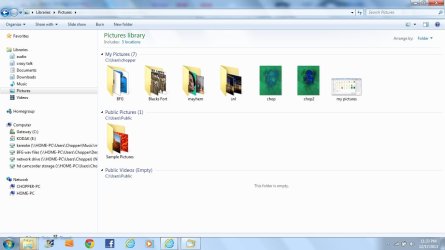
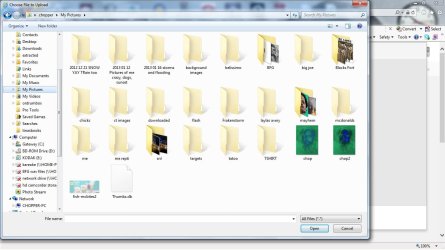
Hi and thanks for any help. I hope someone knows this. Yesterday I made an account on the alesis website for support for a mixer. It asked me if I wanted to make an avatar so I clicked on upload a picture and I saw this screen here my pictures.jpg as you can see that is what me picture folder normally looks like inside except the greyed out folders would appear normally. Anyway that kept me uploading. the pic I wanted as it was in one of the non accessible folders. That was a bummer but no big deal, I have seen youtube and some other upload things like that do that. HOWEVER the real bummer is now when I am just here now not online and I go to my picture folder then the only files or folders visible are the few that were not greyed out in the first pic I posted and now looks like this my pictures now.jpg The end result is now all of those pictures in my subfolders in the first pic I posted are no longer accessible in any way. Any advice or ideas would be greatly appreciated. Thanks.
 

Attachments
  • my pictures.jpg
    my pictures.jpg
    98.2 KB · Views: 6
  • my pictures now.jpg
    my pictures now.jpg
    72.6 KB · Views: 3

My Computer My Computer

At a glance

Windows 7 home premium x64intel core i34 gigintel on board crap
Computer type
Laptop
Computer Manufacturer/Model Number
Gateway
OS
Windows 7 home premium x64
CPU
intel core i3
Motherboard
not sure
Memory
4 gig
Graphics Card(s)
intel on board crap
Hard Drives
500 gig sata drive
Antivirus
avast antivirus
Browser
ie 11

My Computer My Computer

At a glance

Vista, Windows7, Mint Mate, Zorin, Windows 8from 1.6GHz Duo to i7
Computer Manufacturer/Model Number
HP, Dell, Gateway, Toshiba - 4 laptops and 2 desktops
OS
Vista, Windows7, Mint Mate, Zorin, Windows 8
CPU
from 1.6GHz Duo to i7
Monitor(s) Displays
2x HP w2207
Hard Drives
5x HDD, 7x SSD, 12x Externals
Keyboard
with trackball - no mices
Mouse
Trackball mice
Internet Speed
DSL 6000
Thanks for the reply but I don't think they are. Useually when I have that happen at a website when I close it my pics are accessible. Like now if I go back to that website my pics will show up like the first picture I posted but when I close it they are not visable at all. I have tried to find them in different ways, I have reset folder options, shared and unshared, I have hide file and unhid files, I have been to MS and downloaded their fixes and to no avail. I am trying not to restore so I was hoping some one may have expierenced this. ONE UNUSAL THING is when I reboot my machine now, it hangs on the vlack screen with dash in the upper right hand corner until I press the spacebar, then it continues to load normally.
 

My Computer My Computer

At a glance

Windows 7 home premium x64intel core i34 gigintel on board crap
Computer type
Laptop
Computer Manufacturer/Model Number
Gateway
OS
Windows 7 home premium x64
CPU
intel core i3
Motherboard
not sure
Memory
4 gig
Graphics Card(s)
intel on board crap
Hard Drives
500 gig sata drive
Antivirus
avast antivirus
Browser
ie 11
Matter of fact when I get on FB and upload a picture I can see all subfolders but the ones are still greyed out. I am sure they are there but some reason they are hiddin. when I goto sleep I will run a deep scan with avast, and malwarebytes and spybot.
 

My Computer My Computer

At a glance

Windows 7 home premium x64intel core i34 gigintel on board crap
Computer type
Laptop
Computer Manufacturer/Model Number
Gateway
OS
Windows 7 home premium x64
CPU
intel core i3
Motherboard
not sure
Memory
4 gig
Graphics Card(s)
intel on board crap
Hard Drives
500 gig sata drive
Antivirus
avast antivirus
Browser
ie 11
In the first screenshot you are in the "My Pictures" folder. In the second screenshot you are in the Pictures library. The Pictures Library filters out empty folders from showing. It looks like from your first screenshot that all of the missing folders in the second screenshot are empty folders, that why they don't show up in the Library.
 

My Computer My Computer

At a glance

Win 7 x64Core I5
Computer type
PC/Desktop
Computer Manufacturer/Model Number
Dell
OS
Win 7 x64
CPU
Core I5
well xunile I thank you for your careful observation there, however I can assure you that both folders look the same and that those folders contain pictures. The first picture upload was taken on the alesis website where I was trying to upload an image of myself from the folder labeled me. I have had that happen before but I would just logout and take the pic I want and place it outside the folder and go back and upload to my account. This time when I logged out it stayed that way. As I said I can go back to alesis and see them there and greyed out, or I can go get on FB and see the folders there greyed out. But when I log out they are just not there.
 

My Computer My Computer

At a glance

Windows 7 home premium x64intel core i34 gigintel on board crap
Computer type
Laptop
Computer Manufacturer/Model Number
Gateway
OS
Windows 7 home premium x64
CPU
intel core i3
Motherboard
not sure
Memory
4 gig
Graphics Card(s)
intel on board crap
Hard Drives
500 gig sata drive
Antivirus
avast antivirus
Browser
ie 11
OK I tried to do a system restore and it failed! AlSO I said before my machine wont boot unless I press the spacebar on the the black screen with dash on upper left hand corner(I think I said right corner) is wrong it will boot eventually but seems different. Well I am gonna boot in safemeode and run spy bot.
 

My Computer My Computer

At a glance

Windows 7 home premium x64intel core i34 gigintel on board crap
Computer type
Laptop
Computer Manufacturer/Model Number
Gateway
OS
Windows 7 home premium x64
CPU
intel core i3
Motherboard
not sure
Memory
4 gig
Graphics Card(s)
intel on board crap
Hard Drives
500 gig sata drive
Antivirus
avast antivirus
Browser
ie 11
If you are missing the folders when viewing the pictures folder from within a website dialog box the problem is most likely related to IE 10 or 11. Try using Chrome when you need to download or upload to your pictures folder or try rolling back IE to 9.
 

My Computer My Computer

At a glance

Win 7 x64Core I5
Computer type
PC/Desktop
Computer Manufacturer/Model Number
Dell
OS
Win 7 x64
CPU
Core I5
good idea. I tried chrome. firefiox. didn't rollback. im starting to think I aint getting them bak weird how it happened tho. now when I goto alesis ot FB I cant even see the greyed out folders. removed a lot malware with spybot and malwarebytes. I think I am just at the point where I am gonna wipe drive and do a clean install. Thanks all. I am gonna leave this thread open in case someone has a similar issue as I am quite interested as to what happpend. I do recall that when I was trying to upload like that and I had greyed folders I was able to do it in chrome, so maybe some one will figure it out.
 

My Computer My Computer

At a glance

Windows 7 home premium x64intel core i34 gigintel on board crap
Computer type
Laptop
Computer Manufacturer/Model Number
Gateway
OS
Windows 7 home premium x64
CPU
intel core i3
Motherboard
not sure
Memory
4 gig
Graphics Card(s)
intel on board crap
Hard Drives
500 gig sata drive
Antivirus
avast antivirus
Browser
ie 11
Back
Top