Some Program Interface Not Displaying Properly

alcor4ever

New member
Local time
7:17 AM
Messages
3
Hello guys, I don't know what's going on but this has bothered for quite a while. :(

It doesn't happen to all programs but just some.

Below is just a snapshot of the start-up windows for Test Drive Unlimited 2. As you can see, the image as well as the scroll bar is screwed...

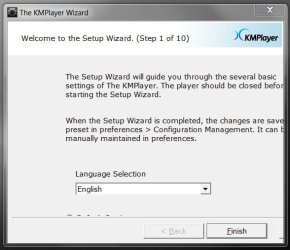
As another example, my KMP wizard window doesn't even show the Next button so I can't proceed. And the texts go beyond the boundary... The size of the windows can't be adjusted.

Things just seem to fall out of places.

Any help is appreciated!
 

Attachments

  • TDU_Error.jpg
    TDU_Error.jpg
    55.5 KB · Views: 3
  • KMP_Error.jpg
    KMP_Error.jpg
    34.8 KB · Views: 3
Last edited:

My Computer

OS
Windows 7 Home Premium 64bit
I don't see any snapshots, but the first thing you should try is updating your video drivers to the latest version available.
 

My Computer

OS
Win7Ultimate x64 + x32, Win7Pro x64, XP x32, Win 2003, Ubuntu and OpenIndiana
I have uploaded an attachment. It works much better than a URL! :D
 

My Computer

OS
Windows 7 Home Premium 64bit
how about trying the compatibility mode upon installing?

right-click the setup file > properties > compatibility tab and check Run this program in compatibility mode for:
and choose Windows XP Service Pack 3

You can try that and see how it goes ;)
 

My Computer

Computer Manufacturer/Model Number
HP G62-340US Notebook
OS
Win7 Pro SP1 x64
CPU
AMD K10 Athlon(tm) II P340 Dual-Core Processor ~2.2GHz
Motherboard
Hewlett-Packard 1444 69.37/AMD 785GX/BIOS F29
Memory
DDR3 4.0GB (3.74 Usable)
Graphics Card(s)
AMD M880G with ATI Mobility Radeon HD 4250 256MB Video
Sound Card
ATI RS785/RS880 - High Definition Audio Controller
Monitor(s) Displays
SAMSUNG 156AT09-H04
Screen Resolution
1366x768 - 344 x 194 mm, Pixel Clock 69.30 MHz
Hard Drives
WDC WD3200BEVT-60A23T0 320GB
Other Info
Bought on July 03, 2011
how about trying the compatibility mode upon installing?

right-click the setup file > properties > compatibility tab and check Run this program in compatibility mode for:
and choose Windows XP Service Pack 3

You can try that and see how it goes ;)


Thanks! But setting the compatibility did not solve the problem. Could it be some corrupted files?
 

My Computer

OS
Windows 7 Home Premium 64bit
Back
Top