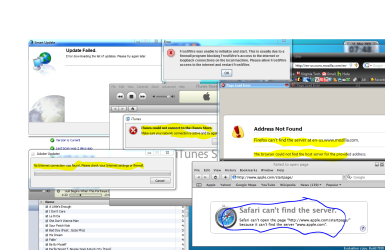
Ok I had to completely redo this post because I have had some new insight into my problem. I use Windows 7 rc build 7100 64 bit. I had a problem with firefox but then downloaded minefield and now can use it. So now my problems are that flash cannot update so that basically takes all games and video and so much more off the internet . Also I noticed that it was not my programs but rather some other problem that limited my programs access to the internet, by this i mean things such as frostwire and itunes store, etc. cannot connect to the internet like their behind a firewall when they aren't. Any suggestions on what might be wrong?
Have you tried uninstalling then re-installing those softwares? It could be that some of the registry keys for them have been corrupted. Both software that you describe work with Windows 7 so it could be due to the update.
I had to do this to Chrome for some reason in 7068 or 7077. But it works fine now. Run the beta and it should work. The others I don't know. Try this in Chrome and see if it's your problem...then you should be able to run from there.
I did the chrome in 64 bit and still had a problem but that was sort of a secondary issue. the main problem was firefox, frostwire, and my flash player not being able to update so i cant watch videos or many other thing.
And i have tried to uninstall all but frostwire and it did nothing .
But i did get a down load for minefield(firefox 64 bit) so now my only issue is frostwire and the flash player.
You will not get flash to install with Firefox 64 bit. It needs to be 32 bit Firefox. Flash does not support 64 bit yet. That will help. Run the 32 bit version. I don't know about frostwire as I do not use it. Hope this helps.
My Computer
Computer Manufacturer/Model Number
Keeps changing - (Custom)
OS
Windows 7 Professional x64
CPU
Intel Core i7 860
Motherboard
Gigabyte GA-P55-UD4P
Memory
4GB DDR3 Mushkin 1600Mhz @ 7-8-7-20
Graphics Card(s)
MSI GTS250 1GB DDR3 Twin Frozr
Sound Card
Onboard realtek
Monitor(s) Displays
Samsung SyncMaster 24" P2450 + Samsung 20" 2033
Screen Resolution
1920 X 1080 and 1600 X 900 (#2 system 1440 X 900)
Hard Drives
Patriot Inferno 120GB SSD + 3 WD Blue 640GB drives
PSU
Corsair 750 HX Modular
Case
Lancool PC-K62
Cooling
Cooler Master TX3 CPU cooler and 4-140mm and 1-120mm case
Keyboard
Gigabyte USB keyboard
Mouse
Microsoft wireless laser mouse 5000
Internet Speed
7 Mb down 1.5 up
Other Info
System #2: AMD Phenom II X6 1055T (Freezer 7 Pro cooler) - Gigabyte 880GMA-UD2H - WD 500GB Black - 9500GT (1GB) 500W OCZ modular PSU - Antec 200 case. System #3 (LapTop) Core 2 Duo T6670 - 320GB 7200RPM HD - 4GB DDR3 RAM.
You will not get flash to install with Firefox 64 bit. It needs to be 32 bit Firefox. Flash does not support 64 bit yet. That will help. Run the 32 bit version.
I can't run the 32 bit version of any browser for some reason, like google chrome, my old firefox, regular IE8. The only browsers i can even access the internet with is minefield and IE 8 64 bit
Nothing with my security is different from vista to 7 and i doubled checked that.
And
nate42nd i just checked that and i have both of those and just to check i opened itunes folder in both files and on the 86 itunes has almost all the files but in the other it had almost nothing if i were to move the itunes file from the 86 to the other would that possibly fix my problem with connections?
Cause the more i use windows seven the more programs i find that do the same thing as in the picture
Yea, you may be installing the x86 programs into the "program files" folder. I don't think that will work. A lot of programs need to be installed into the "program files x86" folder. Anything 32 bit needs to be there.
I would un-install the programs and install again. Most programs can "see" where they need to go. Follow the defaults and see how it works. If you already followed the defaults, there may be something else wrong.
Last edited:
My Computer
Computer Manufacturer/Model Number
Keeps changing - (Custom)
OS
Windows 7 Professional x64
CPU
Intel Core i7 860
Motherboard
Gigabyte GA-P55-UD4P
Memory
4GB DDR3 Mushkin 1600Mhz @ 7-8-7-20
Graphics Card(s)
MSI GTS250 1GB DDR3 Twin Frozr
Sound Card
Onboard realtek
Monitor(s) Displays
Samsung SyncMaster 24" P2450 + Samsung 20" 2033
Screen Resolution
1920 X 1080 and 1600 X 900 (#2 system 1440 X 900)
Hard Drives
Patriot Inferno 120GB SSD + 3 WD Blue 640GB drives
PSU
Corsair 750 HX Modular
Case
Lancool PC-K62
Cooling
Cooler Master TX3 CPU cooler and 4-140mm and 1-120mm case
Keyboard
Gigabyte USB keyboard
Mouse
Microsoft wireless laser mouse 5000
Internet Speed
7 Mb down 1.5 up
Other Info
System #2: AMD Phenom II X6 1055T (Freezer 7 Pro cooler) - Gigabyte 880GMA-UD2H - WD 500GB Black - 9500GT (1GB) 500W OCZ modular PSU - Antec 200 case. System #3 (LapTop) Core 2 Duo T6670 - 320GB 7200RPM HD - 4GB DDR3 RAM.
I got firefox to work in win7 x64, its version 3.0.10 in order to get the flash to work i had to download flash10 from the adobe site and run the install with admin rights. As for itunes I can't say i don't own a ipod.
yea i figured out that the programs aren't the problem but some configuration in windows 7 is preventing almost all of my programs from accessing the internet. they all act as if they are firewalled when they aren't.
I would check the network setting to make sure you have it set to a "home or work" network not a "public" connection. I have noticed that when you change what type of network you are connected on programs are locked out for security reasons. Id take a screen shot but I'm currently at work at the moment.

 . Also I noticed that it was not my programs but rather some other problem that limited my programs access to the internet, by this i mean things such as frostwire and itunes store, etc. cannot connect to the internet like their behind a firewall when they aren't. Any suggestions on what might be wrong?