JavaScript is disabled. For a better experience, please enable JavaScript in your browser before proceeding.
You are using an out of date browser. It may not display this or other websites correctly.
You should upgrade or use an
alternative browser .
some question regarding my PC
Hello all,
Computer Manufacturer/Model Number Acer eMachines EL1850 OS Windows 7 Home Premium 64bit CPU Pentium(R) Dual-Core CPU E5800 @ 3.20GHz Motherboard eMachines EL1850 Memory 4.00 GB Graphics Card(s) Intel(R) G41 Express Chipset Sound Card Realtek High Definition Audio Monitor(s) Displays Intel(R) G41 Express Chipset Screen Resolution 1600 x 900 x 32 bits (4294967296 colors) @ 59 Hz Hard Drives (1) Hitachi HDS721032CLA362 ATA Device (2) Generic- Compact Flash USB Device (3) Multiple Flash Reader USB Device
slightly off center
Guru
Gold Member
VIP
Could be. I would reseat your video card and check all your video cables to make sure they haven't come lose. Check the heat sink for dust accumulation and make sure the cooling fan (if it has one) is working. May also want to check your CPU heat sink and fan.
Computer type PC/Desktop Computer Manufacturer/Model Number Home Built OS Windows 10 Education 64 bit CPU AMD Phenom II X4 980 Black Edition Deneb 3.7GHz Motherboard Asus M4N68T-M V2 µATX Motherboard Memory 8GB 4GBx2 Kingston PC10600 DDR3 1333 Memory Graphics Card(s) Zotac NVIDIA Geforce GT640 2 Gig DDR3 PCIe Sound Card VIA VT1708s High Definition Audio 8-channel Onboard Monitor(s) Displays 22" LG E2242 1080p and 2 19" I-INC AG191D Screen Resolution 1280x1024 - 1920x1080 - 1280x1024 Hard Drives Crucial M100 256 GB SSD and 500 GB WD Blue SATA PSU Thermaltake TR 620 Case Power Up Black ATX Mid-Tower Case Cooling Stock heatsink and fan Keyboard Logitech Wireless K350 Wave Mouse Logitech Wireless M570 Trackman Wheel Internet Speed 80 Mbps Down 30 Mbps Up Antivirus Windows Defender Browser Internet Explorer 11 Other Info HP DVD1040e Lightscribe - External USB2
New member
Member
VIP
Thread Starter
How do i check my cooling fan?
Computer Manufacturer/Model Number Acer eMachines EL1850 OS Windows 7 Home Premium 64bit CPU Pentium(R) Dual-Core CPU E5800 @ 3.20GHz Motherboard eMachines EL1850 Memory 4.00 GB Graphics Card(s) Intel(R) G41 Express Chipset Sound Card Realtek High Definition Audio Monitor(s) Displays Intel(R) G41 Express Chipset Screen Resolution 1600 x 900 x 32 bits (4294967296 colors) @ 59 Hz Hard Drives (1) Hitachi HDS721032CLA362 ATA Device (2) Generic- Compact Flash USB Device (3) Multiple Flash Reader USB Device
R.I.P.
Guru
Gold Member
VIP
You just make sure it`s spinning and make sure there`s no dust on/in the heatsink, if there is, use compressed air to clean it out.
DUSTER.jpg
37.4 KB
· Views: 23
Computer type PC/Desktop Computer Manufacturer/Model Number Skylake Special #666 OS Windows 10 Pro x64 CPU Intel Core i7 6700K Motherboard Asus Sabertooth Z170 Mark 1 Memory GSkill TridentZ RGB 16GB 3600 16-16-16-36 Graphics Card(s) EVGA GTX 980 Ti SC x2 Sound Card Realtek High Definition Monitor(s) Displays AOC G2460PG Screen Resolution 1920 x 1080 144Hz Hard Drives Samsung 860 Pro 256GB, Seagate Barracuda 4TB x2 PSU EVGA 1000 P2, EVGA White Custom Braided Cables Case Corsair Vengeance C70 Gunmetal Black Cooling Corsair H100i v2, Corsair ML120 x2, Thermal Grizzly Kryonaut Keyboard Logitech G910 Orion Spectrum Mouse Logitech G700s Internet Speed Verizon Fios Quantum Gateway 75/75 Antivirus Windows Defender, Malwarebytes Free 3.8.3 Browser Chrome Other Info Corsair SP120 x4, LG Blu-ray Drive, Durabrand HT-395 100 Watt Dolby Digital Amp, Corsair H2100 Wireless 7.1 Headset
New member
Member
VIP
Thread Starter
Thanks.
Computer Manufacturer/Model Number Acer eMachines EL1850 OS Windows 7 Home Premium 64bit CPU Pentium(R) Dual-Core CPU E5800 @ 3.20GHz Motherboard eMachines EL1850 Memory 4.00 GB Graphics Card(s) Intel(R) G41 Express Chipset Sound Card Realtek High Definition Audio Monitor(s) Displays Intel(R) G41 Express Chipset Screen Resolution 1600 x 900 x 32 bits (4294967296 colors) @ 59 Hz Hard Drives (1) Hitachi HDS721032CLA362 ATA Device (2) Generic- Compact Flash USB Device (3) Multiple Flash Reader USB Device
R.I.P.
Guru
Gold Member
VIP
I would really have to say no, but your cpu over heating will.
Computer type PC/Desktop Computer Manufacturer/Model Number Skylake Special #666 OS Windows 10 Pro x64 CPU Intel Core i7 6700K Motherboard Asus Sabertooth Z170 Mark 1 Memory GSkill TridentZ RGB 16GB 3600 16-16-16-36 Graphics Card(s) EVGA GTX 980 Ti SC x2 Sound Card Realtek High Definition Monitor(s) Displays AOC G2460PG Screen Resolution 1920 x 1080 144Hz Hard Drives Samsung 860 Pro 256GB, Seagate Barracuda 4TB x2 PSU EVGA 1000 P2, EVGA White Custom Braided Cables Case Corsair Vengeance C70 Gunmetal Black Cooling Corsair H100i v2, Corsair ML120 x2, Thermal Grizzly Kryonaut Keyboard Logitech G910 Orion Spectrum Mouse Logitech G700s Internet Speed Verizon Fios Quantum Gateway 75/75 Antivirus Windows Defender, Malwarebytes Free 3.8.3 Browser Chrome Other Info Corsair SP120 x4, LG Blu-ray Drive, Durabrand HT-395 100 Watt Dolby Digital Amp, Corsair H2100 Wireless 7.1 Headset
New member
Member
VIP
Thread Starter
What is the main causes for blinking screen?
Computer Manufacturer/Model Number Acer eMachines EL1850 OS Windows 7 Home Premium 64bit CPU Pentium(R) Dual-Core CPU E5800 @ 3.20GHz Motherboard eMachines EL1850 Memory 4.00 GB Graphics Card(s) Intel(R) G41 Express Chipset Sound Card Realtek High Definition Audio Monitor(s) Displays Intel(R) G41 Express Chipset Screen Resolution 1600 x 900 x 32 bits (4294967296 colors) @ 59 Hz Hard Drives (1) Hitachi HDS721032CLA362 ATA Device (2) Generic- Compact Flash USB Device (3) Multiple Flash Reader USB Device
R.I.P.
Guru
Gold Member
VIP
Well, if your video is good, and you have the latest video drivers, then your monitor could be going bad. How old is it ?
Computer type PC/Desktop Computer Manufacturer/Model Number Skylake Special #666 OS Windows 10 Pro x64 CPU Intel Core i7 6700K Motherboard Asus Sabertooth Z170 Mark 1 Memory GSkill TridentZ RGB 16GB 3600 16-16-16-36 Graphics Card(s) EVGA GTX 980 Ti SC x2 Sound Card Realtek High Definition Monitor(s) Displays AOC G2460PG Screen Resolution 1920 x 1080 144Hz Hard Drives Samsung 860 Pro 256GB, Seagate Barracuda 4TB x2 PSU EVGA 1000 P2, EVGA White Custom Braided Cables Case Corsair Vengeance C70 Gunmetal Black Cooling Corsair H100i v2, Corsair ML120 x2, Thermal Grizzly Kryonaut Keyboard Logitech G910 Orion Spectrum Mouse Logitech G700s Internet Speed Verizon Fios Quantum Gateway 75/75 Antivirus Windows Defender, Malwarebytes Free 3.8.3 Browser Chrome Other Info Corsair SP120 x4, LG Blu-ray Drive, Durabrand HT-395 100 Watt Dolby Digital Amp, Corsair H2100 Wireless 7.1 Headset
New member
Member
VIP
Thread Starter
Everything is 4 years old. Its all well until recently. The screen blinks a lot and auto shut down for once..
Computer Manufacturer/Model Number Acer eMachines EL1850 OS Windows 7 Home Premium 64bit CPU Pentium(R) Dual-Core CPU E5800 @ 3.20GHz Motherboard eMachines EL1850 Memory 4.00 GB Graphics Card(s) Intel(R) G41 Express Chipset Sound Card Realtek High Definition Audio Monitor(s) Displays Intel(R) G41 Express Chipset Screen Resolution 1600 x 900 x 32 bits (4294967296 colors) @ 59 Hz Hard Drives (1) Hitachi HDS721032CLA362 ATA Device (2) Generic- Compact Flash USB Device (3) Multiple Flash Reader USB Device
R.I.P.
Guru
Gold Member
VIP
Turn off the pc.
Computer type PC/Desktop Computer Manufacturer/Model Number Skylake Special #666 OS Windows 10 Pro x64 CPU Intel Core i7 6700K Motherboard Asus Sabertooth Z170 Mark 1 Memory GSkill TridentZ RGB 16GB 3600 16-16-16-36 Graphics Card(s) EVGA GTX 980 Ti SC x2 Sound Card Realtek High Definition Monitor(s) Displays AOC G2460PG Screen Resolution 1920 x 1080 144Hz Hard Drives Samsung 860 Pro 256GB, Seagate Barracuda 4TB x2 PSU EVGA 1000 P2, EVGA White Custom Braided Cables Case Corsair Vengeance C70 Gunmetal Black Cooling Corsair H100i v2, Corsair ML120 x2, Thermal Grizzly Kryonaut Keyboard Logitech G910 Orion Spectrum Mouse Logitech G700s Internet Speed Verizon Fios Quantum Gateway 75/75 Antivirus Windows Defender, Malwarebytes Free 3.8.3 Browser Chrome Other Info Corsair SP120 x4, LG Blu-ray Drive, Durabrand HT-395 100 Watt Dolby Digital Amp, Corsair H2100 Wireless 7.1 Headset
New member
Member
VIP
Thread Starter
Hi,
Computer Manufacturer/Model Number Acer eMachines EL1850 OS Windows 7 Home Premium 64bit CPU Pentium(R) Dual-Core CPU E5800 @ 3.20GHz Motherboard eMachines EL1850 Memory 4.00 GB Graphics Card(s) Intel(R) G41 Express Chipset Sound Card Realtek High Definition Audio Monitor(s) Displays Intel(R) G41 Express Chipset Screen Resolution 1600 x 900 x 32 bits (4294967296 colors) @ 59 Hz Hard Drives (1) Hitachi HDS721032CLA362 ATA Device (2) Generic- Compact Flash USB Device (3) Multiple Flash Reader USB Device
New member
Guru
Gold Member
VIP
Computer type PC/Desktop Computer Manufacturer/Model Number Custom Build OS Windows 7 Ultimate x64 SP1 CPU AMD Phenom 2 1090T Motherboard Gigabyte GA-890FXA-UD5 Memory 2x8GB Kingston HyperX Fury Black 1600Mhz Unganged Graphics Card(s) MSI GTX 970 Gaming 4G Sound Card Realtek On-Board HD 7.1 Audio / Logitech G35 Monitor(s) Displays 3xAcer GD245HQ Screen Resolution 1920x1080 Hard Drives Samsung 850 Pro 512GB SSD - OS / PSU HighPower 1000W Case Cooler Master HAF 932 Cooling Noctua NH-D14 Keyboard Logitech G19 Mouse Logitech G500 Internet Speed 100/4 Mbit Cable (100GB quota) Antivirus ZoneAlarm Extreme Security / MBAM Pro / MBAE Free / SAS Free Browser IE 11 - Firefox - Chrome Other Info Logitech F710/ G27/ G940/ Z5500 // TrackIR 5 // Nvidia 3D Surround Vision
New member
Member
VIP
Thread Starter
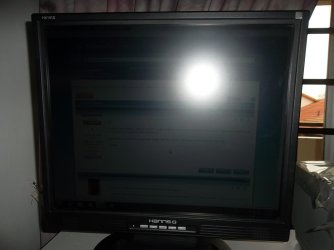
The screen/image seems to big for my monitor.
SAM_5534.JPG
77.1 KB
· Views: 0
SAM_5535.JPG
108.9 KB
· Views: 0
Computer Manufacturer/Model Number Acer eMachines EL1850 OS Windows 7 Home Premium 64bit CPU Pentium(R) Dual-Core CPU E5800 @ 3.20GHz Motherboard eMachines EL1850 Memory 4.00 GB Graphics Card(s) Intel(R) G41 Express Chipset Sound Card Realtek High Definition Audio Monitor(s) Displays Intel(R) G41 Express Chipset Screen Resolution 1600 x 900 x 32 bits (4294967296 colors) @ 59 Hz Hard Drives (1) Hitachi HDS721032CLA362 ATA Device (2) Generic- Compact Flash USB Device (3) Multiple Flash Reader USB Device
New member
Guru
Gold Member
VIP
Well, I cant see anything from the first shot.
Computer type PC/Desktop Computer Manufacturer/Model Number Custom Build OS Windows 7 Ultimate x64 SP1 CPU AMD Phenom 2 1090T Motherboard Gigabyte GA-890FXA-UD5 Memory 2x8GB Kingston HyperX Fury Black 1600Mhz Unganged Graphics Card(s) MSI GTX 970 Gaming 4G Sound Card Realtek On-Board HD 7.1 Audio / Logitech G35 Monitor(s) Displays 3xAcer GD245HQ Screen Resolution 1920x1080 Hard Drives Samsung 850 Pro 512GB SSD - OS / PSU HighPower 1000W Case Cooler Master HAF 932 Cooling Noctua NH-D14 Keyboard Logitech G19 Mouse Logitech G500 Internet Speed 100/4 Mbit Cable (100GB quota) Antivirus ZoneAlarm Extreme Security / MBAM Pro / MBAE Free / SAS Free Browser IE 11 - Firefox - Chrome Other Info Logitech F710/ G27/ G940/ Z5500 // TrackIR 5 // Nvidia 3D Surround Vision
New member
Member
VIP
Thread Starter
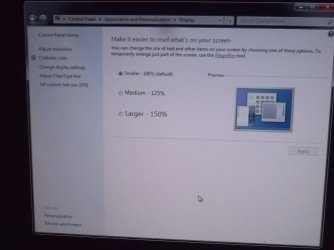
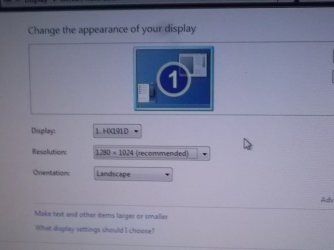
Its already at its smallest. Am i doing it right?
SAM_5536.JPG
78.2 KB
· Views: 0
SAM_5537.JPG
78.3 KB
· Views: 1
Computer Manufacturer/Model Number Acer eMachines EL1850 OS Windows 7 Home Premium 64bit CPU Pentium(R) Dual-Core CPU E5800 @ 3.20GHz Motherboard eMachines EL1850 Memory 4.00 GB Graphics Card(s) Intel(R) G41 Express Chipset Sound Card Realtek High Definition Audio Monitor(s) Displays Intel(R) G41 Express Chipset Screen Resolution 1600 x 900 x 32 bits (4294967296 colors) @ 59 Hz Hard Drives (1) Hitachi HDS721032CLA362 ATA Device (2) Generic- Compact Flash USB Device (3) Multiple Flash Reader USB Device
New member
Guru
Gold Member
VIP
did the image fit the screen with the lower resolution?
Computer type PC/Desktop Computer Manufacturer/Model Number Custom Build OS Windows 7 Ultimate x64 SP1 CPU AMD Phenom 2 1090T Motherboard Gigabyte GA-890FXA-UD5 Memory 2x8GB Kingston HyperX Fury Black 1600Mhz Unganged Graphics Card(s) MSI GTX 970 Gaming 4G Sound Card Realtek On-Board HD 7.1 Audio / Logitech G35 Monitor(s) Displays 3xAcer GD245HQ Screen Resolution 1920x1080 Hard Drives Samsung 850 Pro 512GB SSD - OS / PSU HighPower 1000W Case Cooler Master HAF 932 Cooling Noctua NH-D14 Keyboard Logitech G19 Mouse Logitech G500 Internet Speed 100/4 Mbit Cable (100GB quota) Antivirus ZoneAlarm Extreme Security / MBAM Pro / MBAE Free / SAS Free Browser IE 11 - Firefox - Chrome Other Info Logitech F710/ G27/ G940/ Z5500 // TrackIR 5 // Nvidia 3D Surround Vision
New member
Member
VIP
Thread Starter
I just adjusted the monitor, i guess it should be ok for now. Will get back here if not right. Thanks for the help greatly.
Computer Manufacturer/Model Number Acer eMachines EL1850 OS Windows 7 Home Premium 64bit CPU Pentium(R) Dual-Core CPU E5800 @ 3.20GHz Motherboard eMachines EL1850 Memory 4.00 GB Graphics Card(s) Intel(R) G41 Express Chipset Sound Card Realtek High Definition Audio Monitor(s) Displays Intel(R) G41 Express Chipset Screen Resolution 1600 x 900 x 32 bits (4294967296 colors) @ 59 Hz Hard Drives (1) Hitachi HDS721032CLA362 ATA Device (2) Generic- Compact Flash USB Device (3) Multiple Flash Reader USB Device