
Some questions on windows 7 release

geeve420

I kill threads......
Power User
VIP
Local time
6:43 AM
Messages
352
Location
Never been to Heaven....
I am a little confused about a couple thing when 7 is released and I hope you folks can help me out. I hope this is the right place to pose these questions and I hope they haven't been asked and answered before. so here we go:

Can I use the W7 upgrade disc to go from WXP Pro to W7 Home or does it have to be Pro to Pro? ( I know it will require a clean install)

If I do this I know it'll need my XP disc, no problem I have the Dell OEM that has it on there, will this kill my key as to not be able to use this disc again should I decide to go duel boot or revert (incase my home recording software doesn't like W7 Home)?

That is all I got right now. Thanks again all

Geeve
 

My Computer

Computer Manufacturer/Model Number
Dell Dimension E521
OS
Windows 8, Ubuntu 12.04 64bit, Pear Linux Triple Boot
CPU
AMD AthlonTM 64 X2 dual-core
Memory
3 GB
Graphics Card(s)
ATI Radeon HD 4350 1GB
Sound Card
M-Audio Mobile Pre USB External
Monitor(s) Displays
Acer 1916W x2
Screen Resolution
1440X900
Hard Drives
250 GB internal main, 500 GB internal backup, 1TB External
PSU
300 Watt
Keyboard
Dell
First question would be how do you have the Dell OEM?

As for your other questions, if you do a clean install, and use a new partition, then you can install any version of Windows 7 you have.

If you want a dual boot system then make sure that your XP partition is already installed as it is bloody difficult to create an XP partition after the W7 install
 

My Computer

OS
Windows 7
Perhaps OEM is the wrong term here :( It is the green labled Dell XP pro SP2 disc. I am not sure what you call them (recovery maybe) All I know is the ones that came with my wife's Dell were Blue and the one that came with our laptop was blue as well. However the one I got with my Optiplex is Green and it has never asked for the product key on the numerous Clean Installs I have done on this machine over the years. Sorry if I used the wrong terminology. Here is the disc I have:
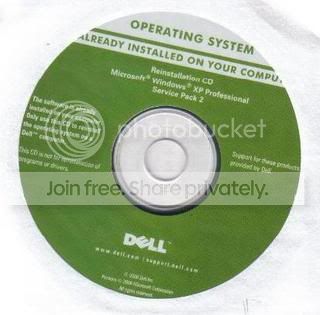
winxpdell.jpg


So If I understand you correctly I can buy the upgrade to W7 home and have no trouble using my XP Pro disc to verify I have a legal copy? I can also use this disc down the road if I need to go back to XP?

I know, I'm a little slow :o

Geeve

Edit: Still not sure if this disc is truly "recovery" It does perform a complete fresh install of XP.
 
Last edited:

My Computer

Computer Manufacturer/Model Number
Dell Dimension E521
OS
Windows 8, Ubuntu 12.04 64bit, Pear Linux Triple Boot
CPU
AMD AthlonTM 64 X2 dual-core
Memory
3 GB
Graphics Card(s)
ATI Radeon HD 4350 1GB
Sound Card
M-Audio Mobile Pre USB External
Monitor(s) Displays
Acer 1916W x2
Screen Resolution
1440X900
Hard Drives
250 GB internal main, 500 GB internal backup, 1TB External
PSU
300 Watt
Keyboard
Dell
According to a recently published Windows 7 upgrade chart, there is no in-place upgrade from any version of XP, so it basically doesn't matter what version you have installed now. From what I recall, the in-place upgrades were only from Vista.

Also, from what I read, you will need your XP key, not the CD. That key should be on a sticker attached to the PC case somewhere.

If anyone KNOWS that this second part is not correct, please speak up -- as I have several XP systems I will be looking to "upgrade" too.
 

My Computer

Computer type
PC/Desktop
Computer Manufacturer/Model Number
Custom
OS
Win7 Pro 32-bit, Win8 Pro 32-bit
CPU
AMD Phenom II X6 1090T
Motherboard
Gigabyte
Memory
4GB ddr3 1300
Graphics Card(s)
AMD HD 4290 onboard
Sound Card
Builtin Realtek HD Audio
Monitor(s) Displays
Samsung 24" widescreen, LG 23" widescreen
Screen Resolution
1920x1200/1920x1080
Hard Drives
Kingston 256GB SSD
Keyboard
Logitech Illuminated Keyboard
Mouse
Logitech M705 wireless mouse
Antivirus
Norton Av 2013
Browser
IE v10
Thanks for the reply Mark and Stranger, I know there is no in place upgrade, I have no problem doing a full install.

I have also read several different things about how you will need to upgrade. Some sites say you will need to pop in your XP disc to verify legality at some point during the upgrade, some say you have to start the upgrade from with in XP again so it can see your genuine. I am so confused right now I don't even know where to begin anymore :)

Edit:The other reason I need to know this is my wife's desktop also has the original Dell XP install and so that makes two pc's. I really don't want to buy 2 full install dics if that is the only way. I will buy two upgrades though if that is an option.
 
Last edited:

My Computer

Computer Manufacturer/Model Number
Dell Dimension E521
OS
Windows 8, Ubuntu 12.04 64bit, Pear Linux Triple Boot
CPU
AMD AthlonTM 64 X2 dual-core
Memory
3 GB
Graphics Card(s)
ATI Radeon HD 4350 1GB
Sound Card
M-Audio Mobile Pre USB External
Monitor(s) Displays
Acer 1916W x2
Screen Resolution
1440X900
Hard Drives
250 GB internal main, 500 GB internal backup, 1TB External
PSU
300 Watt
Keyboard
Dell
sorry for double post

Ok got an answer from Microsoft:

The operating system from your recovery disk Windows XP or 2000 Professional must be installed to qualify to use the upgrade disk:


In summary:

1. A qualifying Windows operating system must be installed.
2. The qualifying Windows operating system must have a genuine license (product key) and it must be activated.
3. To upgrade, boot to the qualifying Windows desktop, insert the Windows 7 Upgrade disc in the DVD drive.
4. When the setup menu appears, select Custom (advanced) to initiate a clean install procedure
 

My Computer

Computer Manufacturer/Model Number
Dell Dimension E521
OS
Windows 8, Ubuntu 12.04 64bit, Pear Linux Triple Boot
CPU
AMD AthlonTM 64 X2 dual-core
Memory
3 GB
Graphics Card(s)
ATI Radeon HD 4350 1GB
Sound Card
M-Audio Mobile Pre USB External
Monitor(s) Displays
Acer 1916W x2
Screen Resolution
1440X900
Hard Drives
250 GB internal main, 500 GB internal backup, 1TB External
PSU
300 Watt
Keyboard
Dell
OEMs, including Dell, keep the OS key stored on the hard dive. The OS is tied to that computer. This is why when you re-install an OEM OS with an OEM disk it won't even ask for the key, it already has it.
Looks like you already found your answer.
As far as I understand it, with XP Pro (installed and activated) you can use the Win7 upgrade disk and do a clean install of Win7 Home Premium.
 

My Computer

Computer type
PC/Desktop
Computer Manufacturer/Model Number
76~2.0
OS
Windows 7 Ult x64 - SP1/ Windows 8 Pro x64
CPU
Intel Core i5-3570K 4.6GHz
Motherboard
Gigabyte GA-Z77X UD3H, f18
Memory
8GB (2X4GB) DDR3 1600 Corsair Vengeance CL8 1.5v
Graphics Card(s)
Sapphire HD 7770 Vapor-X OC 1GB DDR5
Sound Card
Onboard VIA VT2021
Monitor(s) Displays
22" LCD Dell
Screen Resolution
1680x1050
Hard Drives
Samsung 840Pro 128GB SSD,
Seagate Barracuda 500GB SATA2 7200rpm 32MB cache, Seagate Barracuda 1TB SATA2 7200rpm 32MB cache,
PSU
Corsair HX650W
Case
Cooler Master Storm Scout
Cooling
Corsair H80 2x12cm Noctua NF P12 , 2x14cm case fans
Keyboard
Logitech Wave
Mouse
CM Sentinel
Internet Speed
Dismal
Antivirus
Avast
Browser
Opera Next
Other Info
Haswell laptop: HP Envy 17t-j, i7-4700MQ, GeForce 740M 2GB DDR3, 17.3" Full HD 1920x1080, 16GB RAM, Samsung 840 Pro 128GB, 1TB Hitachi 7200 HDD,
Desktop: eSATA ports,
External eSATA Seagate 500GB SATA2 7200rpm,
External WD USB 500GB
Yeah that's what I understood as well. I thank all who tried to help and I hope this can help someone else. Now if only I could get October here faster :)

I don't know how to change this to solved, can someone help me with that plaese?!

Thanks again,

Geeve
 

My Computer

Computer Manufacturer/Model Number
Dell Dimension E521
OS
Windows 8, Ubuntu 12.04 64bit, Pear Linux Triple Boot
CPU
AMD AthlonTM 64 X2 dual-core
Memory
3 GB
Graphics Card(s)
ATI Radeon HD 4350 1GB
Sound Card
M-Audio Mobile Pre USB External
Monitor(s) Displays
Acer 1916W x2
Screen Resolution
1440X900
Hard Drives
250 GB internal main, 500 GB internal backup, 1TB External
PSU
300 Watt
Keyboard
Dell
That's helpful for me too, I have XP pro on a dell laptop, and Vista on a Lenovo laptop, I have contacted them to send me the disk. Dell is actually sending me one, Lenovo told me to burn it out of the Hard drive with the 'Create and rescue recovery media program" from the Lenovo Vantage recovery program.
I did read online that you could install the Retail windows7 upgrade over Windows7 RC without having to show a previous OS, the catch is, it's all good if you only use the "Repair system" action in the future, if you want to do a clean installation with Windows7 retail you will have to insert the disk from your licenced XP or vista to do the clean install.
Am I right, does anyone knows more or can verify this?
 

My Computer

Computer Manufacturer/Model Number
Home built
OS
win XP/Win7
Motherboard
Gigabit
Memory
2 gigs
Graphics Card(s)
NVidia
Monitor(s) Displays
W
Back
Top