Someone stealing my internet?

im4eversmart

New member
Local time
9:10 AM
Messages
24
My internet connection is arranged in this way:

my computer connects to a router, and then the router connects to a modem which connects to the internet.

Recently, my internet has gone to shit, speedtest.net is showing varying speed, often i will find my internet not working although everything seems fine, a yellow "!" shows up on my tray

Now I have noticed a few things:

-When my internet is not working, ipconfig /all shows that "tunnel adapter teredo pseudo-interface" is "media disconnected" (whereas normal it is connected)

-Windows diagnosis shows when my internet is not working, the problem is because "DNS server not responding"

-When I restart my modem and router, it takes around 1-2 mins before the WAN lights up, and i noticed sometimes even when my computer is off, the DATA light keeps blinking, with the varying internet speed, im thinking that someone is using my internet

When i type 192.168.1.1 into my browser, i get into the router, which is a surecom EP4904AX, but i have no idea how to access my modem

Is my internet being used? or are there other reasons for this? If someone is using my net, how do i kick him out?
 

My Computer

OS
Windows 7 Professional x64
Test by going straight from the modem to the pc with a single uniterrupted ethernet cord.

Your router just may need to be reset. What modem are you using ?

No one is using your bandwidth unless you are wireless and you do not have a security key setup. Someone could easily jump on.

Bandwidth always slows down when more people access the net using your provider.

Run my 1st suggestion.

Your router could have also gone bad.
 

My Computer

Computer type
PC/Desktop
Computer Manufacturer/Model Number
Skylake Special #666
OS
Windows 10 Pro x64
CPU
Intel Core i7 6700K
Motherboard
Asus Sabertooth Z170 Mark 1
Memory
GSkill TridentZ RGB 16GB 3600 16-16-16-36
Graphics Card(s)
EVGA GTX 980 Ti SC x2
Sound Card
Realtek High Definition
Monitor(s) Displays
AOC G2460PG
Screen Resolution
1920 x 1080 144Hz
Hard Drives
Samsung 860 Pro 256GB, Seagate Barracuda 4TB x2
PSU
EVGA 1000 P2, EVGA White Custom Braided Cables
Case
Corsair Vengeance C70 Gunmetal Black
Cooling
Corsair H100i v2, Corsair ML120 x2, Thermal Grizzly Kryonaut
Keyboard
Logitech G910 Orion Spectrum
Mouse
Logitech G700s
Internet Speed
Verizon Fios Quantum Gateway 75/75
Antivirus
Windows Defender, Malwarebytes Free 3.8.3
Browser
Chrome
Other Info
Corsair SP120 x4, LG Blu-ray Drive, Durabrand HT-395 100 Watt Dolby Digital Amp, Corsair H2100 Wireless 7.1 Headset
Actually, I do have a wifi router connected to my normal router, treat it as a same type of connection as my computer, but I almost never turn it on as it takes up way too much of my bandwidth. I do sometimes leave it on for hours or a few days when i went to camp

Is it possible for hackers to maintain access to my internet after i turned off my wifi? or rather in what circumstances can people use my internet if they are all connected by cord?
 

My Computer

OS
Windows 7 Professional x64
Bump I really need help my net can stop working anytime now
 

My Computer

OS
Windows 7 Professional x64
Have you complained to your ISP?

We had a problem with our service a couple of years ago (and our phone).
Our ISP couldn't find any problems at their end and contacted Telstra.

Telstra allegedly sent someone to our house to test our connection (whilst nobody was home of course).
They claimed there was no problem and if we bothered them about it again, they would charge us a fee! :mad:

About 5 days later, we got a call from Telstra saying that they had discovered that the cables in our street were damaged.
A few days after that some guys laid new cables for the houses in our street. :party:
 

My Computer

Computer type
PC/Desktop
Computer Manufacturer/Model Number
n/a
OS
W7 Ultimate SP1, LM19.2 MATE, W10 Home 1703, W10 Pro 1703 VM, #All 64 bit
CPU
AMD Phenom II x6 1100T, 3.3 GHz
Motherboard
ASUS M4A88T-M/USB3 (AM3)
Memory
12GB DDR3 1333 G-Skill (4GB x 2), G-Skill (2GB x 2)
Graphics Card(s)
NVIDIA GeForce GTX 660
Sound Card
Realtek?
Monitor(s) Displays
Samsung S23B350
Screen Resolution
1920x1080
Hard Drives
WD Green 2TB (SATA), WD Green 3TB (SATA), WD Blue 4TB (SATA), WD Blue 6TB (SATA)
PSU
Cooler Master
Case
Antec GX300 Tower
Cooling
3x Antec TRICOOL 120mm Fans
Mouse
Wired Optical
Internet Speed
DSL
Antivirus
Avast
Browser
Pale Moon (64 bit)
Other Info
2018-12-27 Upgraded HDDs
2015-12-10 Upgraded case, graphics card, storage
2015-08-15 Upgraded motherboard & RAM
2015-07-15 Upgraded LM17.1 to LM17.2
Actually, I do have a wifi router connected to my normal router, treat it as a same type of connection as my computer, but I almost never turn it on as it takes up way too much of my bandwidth. I do sometimes leave it on for hours or a few days when i went to camp

Is it possible for hackers to maintain access to my internet after i turned off my wifi? or rather in what circumstances can people use my internet if they are all connected by cord?

If anyone is stealing your internet on win7 it would show up in the side panel of who is connected under network

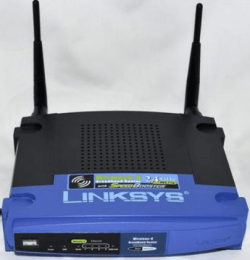
I had someone who was not supposed to be connected on my line as i run a cable connection ,Thus i found out my password is no more and the damn router went to default so i had no password on :mad: Mind you i use a old old Linksys 2.4 ghz speed booster router wireless

To make a long story short i corrected it changed passwords changed everything to wpa-2 and a solid password on here i also do homegroup for all my builds i have in the house which means only the PC i built names and one other family member will have access ---shutting down the person that was on my line for free

you will see someone on your line if you have your homegroup set up properly so it might just be the service or even your modem going to hell You should test the main line and see if it is abnormal or not and go from there modem main line to pc thats it and see what it does

My Router --way old school
 

Attachments

  • router.PNG
    router.PNG
    50.1 KB · Views: 7

My Computer

Computer type
PC/Desktop
Computer Manufacturer/Model Number
CoreI7-6700K MrFingerIII Special Builds
OS
Windows 10 Home Premium 64bit sp1
CPU
Intel I7-6700K @ 4.6 Ghz 1.344 volts everyday OC
Motherboard
Asrock Fatality K6 Z170 Socket 1151
Memory
32GB G-Skill TridentZ 3200mhz 16-18-18-38 DDR4
Graphics Card(s)
Sli Gigabyte Windforce GTX 980 G1
Sound Card
AC97 Creative Rage Tactic 3D Headphones Bluetooth
Monitor(s) Displays
27" Asus ROG Swift PG278Q G-Sync 48" Vizio Smart HD TV
Screen Resolution
2560x1440p 27"- 48" Currently Gaming at 2560x1440p Res 2K
Hard Drives
250GB Samsung Evo840SSD Seagate baracuda 500 GB WD Mybook 500Gb 1TB Seagate Barracuda
PSU
HX1050w Corsair Silver 80plus certified crosfire/sli
Case
Enthod Pro Full Tower
Cooling
Corsair H110i GT 280 mm High Performance WaterBlock
Keyboard
Logitech wireless keyboard
Mouse
Logitech wireless mouse
Internet Speed
Cox Cable 100+ mb
Antivirus
WebRoot Spysweeper with Antivirus
Browser
IE-10, Chrome, Opera
Other Info
My Other Rig is a AMD FX8320E @4.6Ghz 16GB Ballistic Sport Ram
Mobo Asrock Fatality 990FX 120GB OCZ SSD 1TB Seagate Barracuda Corsair H75 Cooling PSU Corsair CX750
GPU GTX Gigabyte 970G1

My Computer

Computer type
PC/Desktop
Computer Manufacturer/Model Number
Skylake Special #666
OS
Windows 10 Pro x64
CPU
Intel Core i7 6700K
Motherboard
Asus Sabertooth Z170 Mark 1
Memory
GSkill TridentZ RGB 16GB 3600 16-16-16-36
Graphics Card(s)
EVGA GTX 980 Ti SC x2
Sound Card
Realtek High Definition
Monitor(s) Displays
AOC G2460PG
Screen Resolution
1920 x 1080 144Hz
Hard Drives
Samsung 860 Pro 256GB, Seagate Barracuda 4TB x2
PSU
EVGA 1000 P2, EVGA White Custom Braided Cables
Case
Corsair Vengeance C70 Gunmetal Black
Cooling
Corsair H100i v2, Corsair ML120 x2, Thermal Grizzly Kryonaut
Keyboard
Logitech G910 Orion Spectrum
Mouse
Logitech G700s
Internet Speed
Verizon Fios Quantum Gateway 75/75
Antivirus
Windows Defender, Malwarebytes Free 3.8.3
Browser
Chrome
Other Info
Corsair SP120 x4, LG Blu-ray Drive, Durabrand HT-395 100 Watt Dolby Digital Amp, Corsair H2100 Wireless 7.1 Headset
Actually, I do have a wifi router connected to my normal router, treat it as a same type of connection as my computer, but I almost never turn it on as it takes up way too much of my bandwidth. I do sometimes leave it on for hours or a few days when i went to camp

Is it possible for hackers to maintain access to my internet after i turned off my wifi? or rather in what circumstances can people use my internet if they are all connected by cord?

If anyone is stealing your internet on win7 it would show up in the side panel of who is connected under network

I had someone who was not supposed to be connected on my line as i run a cable connection ,Thus i found out my password is no more and the damn router went to default so i had no password on :mad: Mind you i use a old old Linksys 2.4 ghz speed booster router wireless

To make a long story short i corrected it changed passwords changed everything to wpa-2 and a solid password on here i also do homegroup for all my builds i have in the house which means only the PC i built names and one other family member will have access ---shutting down the person that was on my line for free

you will see someone on your line if you have your homegroup set up properly so it might just be the service or even your modem going to hell You should test the main line and see if it is abnormal or not and go from there modem main line to pc thats it and see what it does

My Router --way old school


Along with a Linksys speedbooster card, this is an excellent router.
 

My Computer

Computer type
PC/Desktop
Computer Manufacturer/Model Number
Skylake Special #666
OS
Windows 10 Pro x64
CPU
Intel Core i7 6700K
Motherboard
Asus Sabertooth Z170 Mark 1
Memory
GSkill TridentZ RGB 16GB 3600 16-16-16-36
Graphics Card(s)
EVGA GTX 980 Ti SC x2
Sound Card
Realtek High Definition
Monitor(s) Displays
AOC G2460PG
Screen Resolution
1920 x 1080 144Hz
Hard Drives
Samsung 860 Pro 256GB, Seagate Barracuda 4TB x2
PSU
EVGA 1000 P2, EVGA White Custom Braided Cables
Case
Corsair Vengeance C70 Gunmetal Black
Cooling
Corsair H100i v2, Corsair ML120 x2, Thermal Grizzly Kryonaut
Keyboard
Logitech G910 Orion Spectrum
Mouse
Logitech G700s
Internet Speed
Verizon Fios Quantum Gateway 75/75
Antivirus
Windows Defender, Malwarebytes Free 3.8.3
Browser
Chrome
Other Info
Corsair SP120 x4, LG Blu-ray Drive, Durabrand HT-395 100 Watt Dolby Digital Amp, Corsair H2100 Wireless 7.1 Headset
Back
Top