
Solved Something Annoying In Startup

blksith0

New member
Local time
9:03 AM
Messages
4
Hey so I get this error every time I boot up.
OqBRV.jpg

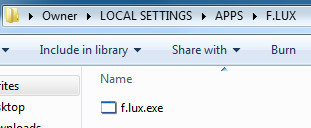
So I've used autoruns and looked for it, but nothing. So then I went into the folder and placed a "dummy" exe file in there, but for some reason I'm still getting this error.
IvF6r.jpg

So any help would be appreciated. :)
 

My Computer

OS
Windows 7 Ultimate x64
Tried reinstalling f.lux, and uninstalling/rebooting to see if it goes away?

F.lux: software to make your life better

Or might run something like CCleaner to see if there's any left over registry entries of f.lux and remove them.
 

My Computer

Computer type
PC/Desktop
Computer Manufacturer/Model Number
Airbot 2.0
OS
Windows 7 Ultimate x64 SP1
CPU
Core i7 920 (D0) @ 4Ghz, *26c idle *65c full load on air
Motherboard
Asus P6X58D Premium - Sata 6Gb/s - USB 3.0
Memory
12GB DDR3 Corsair Dominator -CMD12GX3M6A1600C8 at 1600MHz
Graphics Card(s)
Zotac Geforce GTX 770
Sound Card
ASUS Xonar D2X
Monitor(s) Displays
1 LG 24" Flatron W2453V-PF 1 Samsung 24" P2450H both 2ms RT
Screen Resolution
1920x1080@60hz
Hard Drives
1 Samsung 250GB 840 Evo SSD
1 OCZ Vertex2 180GB SSD
1 TB Samsung Spinpoint F1 7200RPM 32MB cache
2 500GB WD Caviar Blacks 7200RPM 32MB cache (WD5001AALS)

Pioneer DVD Burner DVR-S18M
PSU
Corsair HX1000W
Case
Cooler Master HAF 932
Cooling
Case Fans *3 230mm, *1 140mm/CPU - *Tuniq Tower 120 Extreme
Keyboard
Logitech Wireless MK700
Mouse
Logitech Wireless MK700
Internet Speed
DL 15 Mbps UL 0.98 Mbps
Antivirus
None
Browser
Firefox Nightly
Other Info
Processor-7.7 *RAM- 7.9 *Graphics-7.9 *Gaming Graphics- 7.9 *SSD- 7.8 W.E.I final score= 7.7
*Phone- LG Nexus 5
Hi blksith0,
Welcome to Seven Forums.

Check to see if you have a rouge program set to run at startup:
Click Start >> type MSCONFIG >> press enter and the go to the tab called 'Startup'

Un-tick any programs that shouldn't be running, if you are unsure about any then post a screen shot of the list and post back here for advise.

Regards,
JDobbsy1987
 

My Computer

Computer type
PC/Desktop
Computer Manufacturer/Model Number
Self Built
OS
Windows 8.1 Pro x64
CPU
Intel Core i5-2500K @ 3.30GHz - S1155
Motherboard
Asus P8P67 LE Rev3, Intel P67, S115
Memory
8GB Corsair DDR3 XMS3, PC3-12800
Graphics Card(s)
NVIDIA GeForce GTX 650
Sound Card
On-Board
Monitor(s) Displays
3 x 24" {Extended Display}
Screen Resolution
1920 x 1080
Hard Drives
300GB Seagate Barracuda 7200
PSU
550W Coolermaster GX550
Case
Silverstone Precision PS04B
Cooling
Stock
Keyboard
Logitech K120
Mouse
World of Warcraft Cataclysm MMO Gaming Mouse
Internet Speed
80 MB
Antivirus
MSE / Windows Defender
Browser
Chrome
Yeah I tried reinstalling and uninstalling with Revo Uninstaller, but that didnt work. CCleaner scan didnt fix anything as well, unfortunately.
I'm just really confused as to why its saying it cant find it, when there's clearly a file there with the same name.
 

My Computer

OS
Windows 7 Ultimate x64
Hi blksith0,
Welcome to Seven Forums.

Check to see if you have a rouge program set to run at startup:
Click Start >> type MSCONFIG >> press enter and the go to the tab called 'Startup'

Un-tick any programs that shouldn't be running, if you are unsure about any then post a screen shot of the list and post back here for advise.

Regards,
JDobbsy1987

Yeah I already tried this with Autoruns, everything is as it should be, thanks though.
 

My Computer

OS
Windows 7 Ultimate x64
Ha, I found it! It was in WinPatrol's Delayed Start programs thing. So thats why it wasn't showing up anywhere. Thanks again!
 

My Computer

OS
Windows 7 Ultimate x64
Glad you fixed it :thumbsup:
 

My Computer

Computer type
PC/Desktop
Computer Manufacturer/Model Number
Self Built
OS
Windows 8.1 Pro x64
CPU
Intel Core i5-2500K @ 3.30GHz - S1155
Motherboard
Asus P8P67 LE Rev3, Intel P67, S115
Memory
8GB Corsair DDR3 XMS3, PC3-12800
Graphics Card(s)
NVIDIA GeForce GTX 650
Sound Card
On-Board
Monitor(s) Displays
3 x 24" {Extended Display}
Screen Resolution
1920 x 1080
Hard Drives
300GB Seagate Barracuda 7200
PSU
550W Coolermaster GX550
Case
Silverstone Precision PS04B
Cooling
Stock
Keyboard
Logitech K120
Mouse
World of Warcraft Cataclysm MMO Gaming Mouse
Internet Speed
80 MB
Antivirus
MSE / Windows Defender
Browser
Chrome
Ha, I found it! It was in WinPatrol's Delayed Start programs thing. So thats why it wasn't showing up anywhere. Thanks again!

That's happened to me a few times. Put something over to delay, then forgot I did it. :)
 

My Computer

Computer Manufacturer/Model Number
HP Media Center
OS
Windows 7 32 bit
CPU
AMD 5200+ dual core
Memory
2 GB
Graphics Card(s)
NVidia GeForce 6150SE 128 MB
Monitor(s) Displays
CRT
Screen Resolution
1280x1024
Hard Drives
500 GB Sata internal :

SIIG USB 3.0 docking stations w/WD Caviar Black 6 Gb/s drives
Keyboard
PS/2
Mouse
PS/2 Wheel Mouse
Other Info
SIIG USB 3.0 PCIexpress card.
Back
Top